
20 KiB
Helm/DM Developer Experience Workflows
The purpose of this document is to outline the various workflows used in our target use cases. It is broken into three major sections:
- A section on the anticipated workflow patterns for the
helmcommand line tool - A section on development workflow models
- A section providing sample workflow implementations for the workflow models
The document is designed to address user experience, not the implementation of the tools.
tl;dr: The Workflows
Helm and DM expose tools for creating, managing, and deploying charts. This document outlines those tools, and then provides several possible high-level workflows.
We envision four high-level workflows, each satisfying different organizational needs.
- Helm Official: The workflow used for contributing to the official Helm charts repository.
- Public Unofficial: A public workflow used by another org
- Private: Non-public repository
- Private Development: Charts without repositories
Helm Workflows and User Experience
In this section we examine several workflows that we feel are central to the experience of deploying, managing, and building applications using Helm. Each workflow is followed by a basic model of where the processing of commands occurs.
User Workflow
The user workflow is the common case. This answers stories for the "tire kicker" and "standard user" personas.
Installation
Currently, the client can be used with no installation. However, installing the server side component is done like this:
$ helm dm install
- Client uses existing
kubectlconfiguration to install built-in manifests.
General pattern:
helm dm install
Searching
$ helm search bar
helm:example.com/foo/bar - A basic chart
helm:example.com/foo/barracuda - A fishy chart
helm:example.com/foo/barbecue - A smoky chart
- Client submits the query to the manager
- Server searches the available chart repos
General pattern:
helm search PATTERN
Simple deployment:
$ helm deploy helm:example.com/foo/bar
Created wonky-panda
- The client sends the server a request to deploy
helm:example.com/foo/bar. - The server assigns a random name
wonky-panda, fetches the chart from object storage, and goes about the deployment process.
General patterns:
helm deploy [-f CONFIG] [-n NAME] [CHART]
Find out about params:
In this operation, helm reads a chart and returns the list of parameters that can be supplied in a template:
$ helm list-params helm:example.com/foo/bar
Params:
- bgcolor: The background color for the home page (hex code or HTML colors)
- title: The title of the app
- The client sends the request to the API server
- The API server fetches the chart, analyzes it, and returns the list of parameters.
General pattern:
helm list-params CHART
Generate the params for me:
In this operation, helm generates a parameter values file for the user.
$ helm gen-params helm:example.com/foo/bar
Created: values.yaml
$ edit values.yaml
- The client sends the request to the server
- The server returns a stub file
- The client writes the file to disk
General pattern:
helm gen-params CHART [CHART...]
Deploy with params:
In this operation, the user deploys a chart with an associated values file.
$ helm deploy -f values.yaml helm:example.com/foo/bar
Created taco-tuesday
- The client sends a request with the name of the chart and the values file.
- The API server generates a name (
taco-tuesday) - The API server fetches the request chart, sends the chart and values through the template resolution phase, and deploys the results.
If we allow the user to pass in a name (overriding the generated name), then the server must first guarantee that this name is unique.
Alternately, just the values file may be specified, since it contains a reference to the base chart.
$ helm deploy -f values.yaml
Created taco-wednesday
Get the info about named deployment.
A deployment, as we have seen, is a named instance of a chart. Operations that operate on these instances use the name to refer to the instance.
$ helm status taco-tuesday
OK
Located at: 10.10.10.77:8080
- The client sends the API server a request for the status of
taco-tuesday. - The API server looks up pertinent data and returns it.
- The client displays the data.
General pattern:
helm status NAME
Edit and redeploy:
Redeployment is taking an existing instance and changing its template values, and then re-deploying it.
$ edit values.yaml
$ helm redeploy -f values.yaml taco-tuesday
Redeployed taco-tuesday
- The client sends the instance name and the new values to the server
- The server coalesces the values into the existing instance and then restarts.
General pattern:
helm redeploy [-f CONFIG] NAME
Uninstall:
$ helm uninstall taco-tuesday
Destroyed taco-tuesday
- The client sends the DELETE instance name command
- The API server destroys the resource
General pattern:
helm uninstall NAME [NAME...]
Power User Features
Users familiar with the system may desire additional tools.
Name a deploy
$ helm deploy -name skinny-pigeon example.com/foo/bar
This follows the deployment process above. The server must ensure that the name is unique.
Get values for an app:
$ helm get-values taco-tuesday
Stored in values.yaml
$ helm redeploy taco-tuesday values.yaml
- The client sends the instance name to the values endpoint
- The server returns the values file used to generate the instance.
- The client writes this to a file (or, perhaps, to STDOUT)
General pattern:
helm get-values NAME [NAME...]
When more than one name is specified, the resulting file will contain configs for all names.
Get fully generated manifest files
$ helm manifest get taco-tuesday
Created manifest.yaml
- The client sends the instance name to the manifests endpoint
- The server returns the manifests, as generated during the deploy/redeploy cycle done prior.
General pattern:
helm manifest get NAME [NAME...]
Auto-detecting helm problems
$ helm doctor
Listing all installed charts
$ helm chart list
helm:example.com/foo/bar#1.1.1
helm:example.com/foo/bar#1.1.2
helm:example.com/foo/barbecue#0.1.0
Get instances of a chart
$ helm chart get helm:example.com/foo/bar
taco-tuesday
taco-wednesday
Listing deployments
$ helm deployment list
skinny-pigeon
taco-tuesday
taco-wednesday
Getting details of a deployment
NB: Might not need this.
$ helm deployment get skinny-pigeon
DETAILS
Developer Workflow
This section covers the experience of the chart developer.
In this case, when the client detects that it is working with a local chart, it bundles the chart, and sends the entire chart, not just the values.
$ helm create mychart
Created mychart/Chart.yaml
$ helm lint mychart
OK
$ helm deploy .
Uploading ./mychart as localchart/mychart-0.0.1.tgz
Created skinny-pigeon
$ helm status skinny-pigeon
OK
$ edit something
$ helm redeploy skinny-pigeon
Redeployed skinny-pigeon
helm createandhelm lintare client side operationshelm deploy,helm status, andhelm redeployare explained above.
General pattern for create:
helm create [--from NAME] CHARTNAME
Where NAME will result in fetching the generated values from the cluster.
General pattern for lint:
helm lint PATH
Packaging and Releasing packages
Package a chart:
$ helm package .
Created foo-1.1.2.tgz
Releasing a chart:
$ helm release -u https://example.com/bucket ./foo-1.1.2.tgz
Uploaded to https://example.com/bucket/foo-1.1.2.tgz
Helm Cluster Management Commands
Install
$ helm dm install
- Client installs using the current kubectl configuration
Uninstall
$ helm dm uninstall
Check which cluster is the current target for helm
$ helm dm target
API Endpoint: https://10.21.21.21/
View status of DM service
$ helm dm status
OK
Repository Configuration
Listing repositories
$ helm repo list
Adding credentials
$ helm credential add TOKEN SECRET
Created token-foo
Adding a repository with credentials
$ helm repo add -c token-foo https://example.com/charts
The URL is of the form PROTO://HOST[:PORT]/BUCKET.
Removing repositories
$ helm repo rm https://example.com/charts
Listing Credentials
$ helm credential list
token-foo: TOKEN
Removing credentials
$ helm credential rm token-foo
An Overview of Four Team Workflows
The remainder of this document is broken into two major sections: The Overview covers the broad characteristics of the four workflows. The Development Cycle section covers how the developer cycle plays out for each of the four workflows.
This section provides an introduction to the four workflows outlined above, calling out characteristics of each workflow that define it against other workflows.
Helm Official
The Helm Official project focuses on maintaining a repository of high-quality production-ready charts. Charts may be contributed by anyone in the broad community, and they are vetted and maintained by the Helm Official core contributors.
| Stage | Devel | Review | Release | Store | Use |
|---|---|---|---|---|---|
| Operations | Create/modify chart | Code review | Sign, version, package | Store releases | Get, Use |
| Who? | Developer | Us | Us | Us | Anyone |
| How? | Dev PR | We review | We release and sign | We upload to managed storage | Chart is public |
Characteristics of the Helm Official workflow:
- Source code for charts is maintained in a GitHub repository
- Chart source is linted and tested by automated tools and human beings
- Charts are released by core contributors to the project
- All Charts are made available under the Apache 2 license
- When a chart is released, an official binary distribution is uploaded to the official chart repository in Google Cloud Storage. In addition, Helm Official charts have the following characteristics:
- They released by community members
- They are versioned independently (each chart has its own version)
- They are signed/provenanced by one of the official Helm GPG keys
- They are made available with no authentication or registration requirements
Public Unofficial
The Helm project need not be the only repository available to users. Other organizations may wish to host their own repositories, and load whatever charts they so choose.
We attempt to provide flexibility that allows such organizations to build repositories as they see fit, but keep the end user's experience roughly similar.
| Stage | Devel | Review | Release | Store | Use |
|---|---|---|---|---|---|
| Operations | Create/modify chart | Code review | Sign, version, package | Store releases | Get, Use |
| Who? | Developer | Org? | Org? | Org | Anyone |
| How? | Dev Contribution | Org defines this | Org defines this | Org hosts | Chart is public |
A public unofficial chart repository is free to structure the development cycle as they see fit.
- We have no opinions about the source control (if any) used for chart development
- We provide
helm releaseas a tool for releasing a chart- We strongly advise public repository maintainers to use provenance files
- We strongly advise public repository maintainers to make public keys available to the general public.
- Charts must be stored in one of the supported object storage repositories, including Google Cloud Storage and S3 compatible storage
- Helm/DM provides the following tools for working with such repositories:
helm releasetakes local source and builds a chart.helm repo add|list|rmallows users to add, list, and remove repositories from the recognized list.helm repo pushallows new charts to be pushed to a remote server
Private Chart Repositories
We anticipate that some Helm users will desire to have private repositories over which they have control over both the development cycle and the availability of the released charts.
Similar to our approach to unofficial chart repositories, we attempt to provide a tool general enough that it can be used for private chart repositories.
| Stage | Devel | Review | Release | Store | Use |
|---|---|---|---|---|---|
| Operations | Create/modify chart | Code review | Sign, version, package | Store releases | Get, Use |
| Who? | Org | Org | Org | Org | Org |
| How? | Org defines this | Org defines this | Org defines this | Org hosts | Org controls access |
We assume the following about this workflow:
- We have no opinions about the source control (if any) used for chart development
- We provide
helm releaseas a tool for releasing a chart- While we suggest signing charts, this is a discretionary exercise for private repositories
- Charts may be stored in private GCS, S3, or compatible object storage. Helm is tested on Minio (an S3 compatible server for private hosting) to ensure a viable private cloud mechanism.
- Private repositories may require authentication via token/secret, as well as access controls.
- Helm/DM provides the following tools for working with such repositories:
helm releasetakes local source and builds a chart.helm repo add|list|rmallows users to add, list, and remove repositories from the recognized list.helm repo pushallows new charts to be pushed to a remote server
Private Charts without Repositories
In some cases, an organization may wish to create charts, but not store them in a chart repository. While this is not the preferred Helm workflow, we support tooling for this method.
| Stage | Devel | Review | Release | Store | Use |
|---|---|---|---|---|---|
| Operations | Create/modify chart | Code review | Sign, version, package | Store releases | Get, Use |
| Who? | Org | Org | Org | N/A | Org |
| How? | Org defines this | Org defines this | Org defines this | N/A | Org defines this |
We operate on a different set of assumptions for this workflow.
- We have no opinions about the source code control (if any) used.
- We have no opinions about access control when repositories are not involved.
- Charts must be pushed into the cluster (the cluster will not pull from a non-repository location)
- Helm/DM provides the following tools for this workflow:
helm releasebuilds a packagehelm deploypushes a package into a cluster
Development Cycles for Each Workflow
In this section, we explain the developer cycle for each of the four workflows above.
0. Pre-Submission Workflow (aka Local Development)
Prior to submitting a chart for release, developers may use the following workflow. This workflow is assumed in all four sections below.
- Create a chart with
helm create MYCHART(or manually) - Edit the chart
- Test the chart's standards conformance with
helm lint MYCHART - Run a test deployment using
helm deploy MYCHART
1. The Helm Official Development Cycle
The Helm Official project maintains source code in a location that is readily available to all of the community. Source code is stored on GitHub in the official (github.com/helm/charts or github.com/kubernetes/charts) repository. GitHub facilitates a development workflow that this project uses for chart maintenance.
There are two general classes of user that are important to this workflow:
- Core Contributors: Core contributors are developers that have been given special stewardship responsibilities over the repository. They have the following responsibilities:
- Review submissions to the repository
- Approve charts for release
- Respond to issues with existing charts
- Community Members: Any user of the Helm Official project who is not a core contributor.
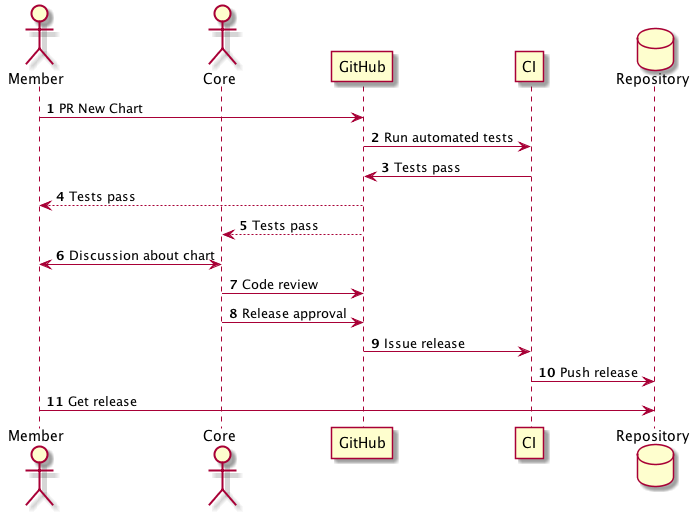
- PULL REQUEST: A new chart (or an update to an existing chart) is contributed by a core maintainer or community member. This is done using GitHub pull requests.
- AUTOMATED TESTING: Automated testing tools evaluate the contribution for the following:
- CLA approval of the submitter
- Style/format adherence
- Unit, functional, and/or integration tests pass
- DISCUSSION: Any discussion on the pull request may happen using GitHub's commentary features
- CODE REVIEW: Two or more core contributors must review the code and sign off on it.
- RELEASE APPROVAL: If a chart is approved for release, a core maintainer may mark it as such
- AUTOMATED RELEASE: Once a chart is approved for release, an automated tool will bundle the chart, sign it using an official signature, and upload it into the Helm Official repository
2. Unofficial Public Repositories
Unofficial repositories do not have a well-defined development workflow, but have a semi-rigid release workflow.
- The public repository must use a supported object storage system
- Charts must be in the same format
A Hypothetical Dev Workflow
An organization has a Bazaar (bzr) project maintained at launchpad.net, and has no automated tooling around the project.
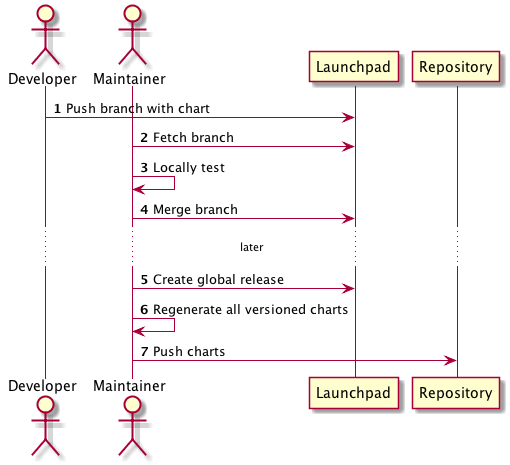
- Developers work off of copies of the Bazaar code base
- Developers push branches into the code review system when ready
- A central maintainer approves and merges reviewed code
- At a fixed point in time, the project administrator releases a new version of the entire repository
- During this process, all charts are version, packaged/signed, and uploaded to the project's S3 repository, where they are made available to users
The above workflow illustrates how a development team may conduct public shared development, and release to a public repository, but with a workflow that diverges substantially from the model of the Helm Official repository.
3. Private Chart Repository
In this model, the entire process is managed by an organization.
A Hypothetical Dev Workflow
The organization uses an internally hosted Git server, Gerrit for code review, and Jenkins for automation. They host an internal repository on Minio. This repository has a combination of pre-approved Helm Official packages (copied from upstream) and internal packages.
In this workflow, charts are not stored together. Instead, each chart is stored alongside the Docker image source code. For example, the repository named corpcalendar.git is laid out as follows:
corpcalendar/
    Dockerfile
    src/
       ... # corpcalendar source code
    chart/
       corpcalendar
           Chart.yaml
           ... # Helm Chart files
Each separate project is structured in this way.
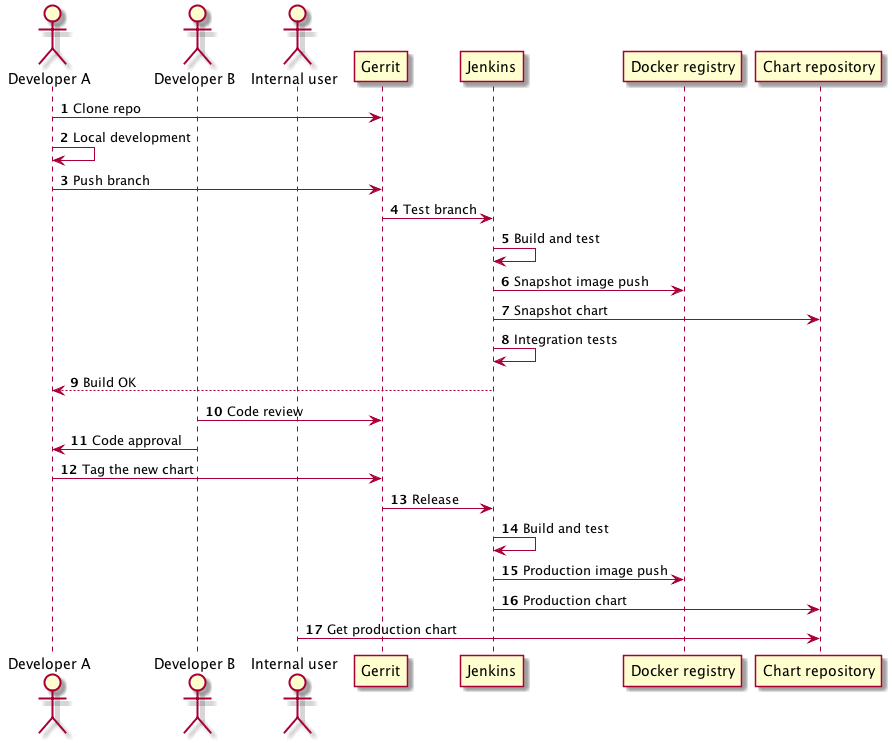
- Developers clone a desired repo (
git clone .../corpcalendar.git) - Developers work on the code and chart together
- Upon each commit, Jenkins does the following:
- Project tests are run
- A snapshot Docker image is built and stored in a snapshot Docker registry
- A snapshot chart is built and stored on a snapshot Helm repository
- Integration tests are run
- When the developer is ready for a release, she tags the repository (
git tag v1.2.3) and pushes the tag - Upon a tag commit, Jenkins does the following:
- Runs tests
- Creates a final Docker image and uploads to the internal release Docker registry
- Creates a final chart and uploads to the internal Helm repository
- Internal users may then access the chart at the internal Helm repository
This workflow represents a method common in enterprises, and also illustrates how chart development need not occur in one aggregated repository.
4. Private Charts without Repositories
This model is used in cases where an organization chooses not to host a Chart repository. While we don't advise using this method, a workflow exists.
While we don't offer an opinionated VCS workflow, we also suggest that one is used. In our example below, we draw on VCS usage.
A Hypothetical Dev Workflow
A small development team uses Subversion (SVN) to host their internal projects. They do not use a chart repository, nor do they employ any automated testing tools outside of Helm.
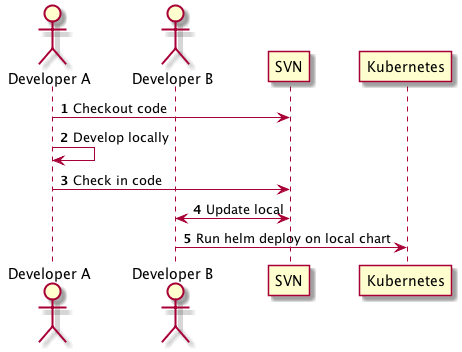
- Developer Andy checks out a copy of the SVN repository (
svn co ...) - Developer Andy edits charts locally, and test locally
- When a chart is ready for sharing, the developer checks in the revised chart (
svn ci ...) - Developer Barb updates her local copy (
svn up) - Developer Barb then uses
helm deploy ./localchartto deploy this chart into production