
16 KiB
JavaScript Basics: Methods and Functions
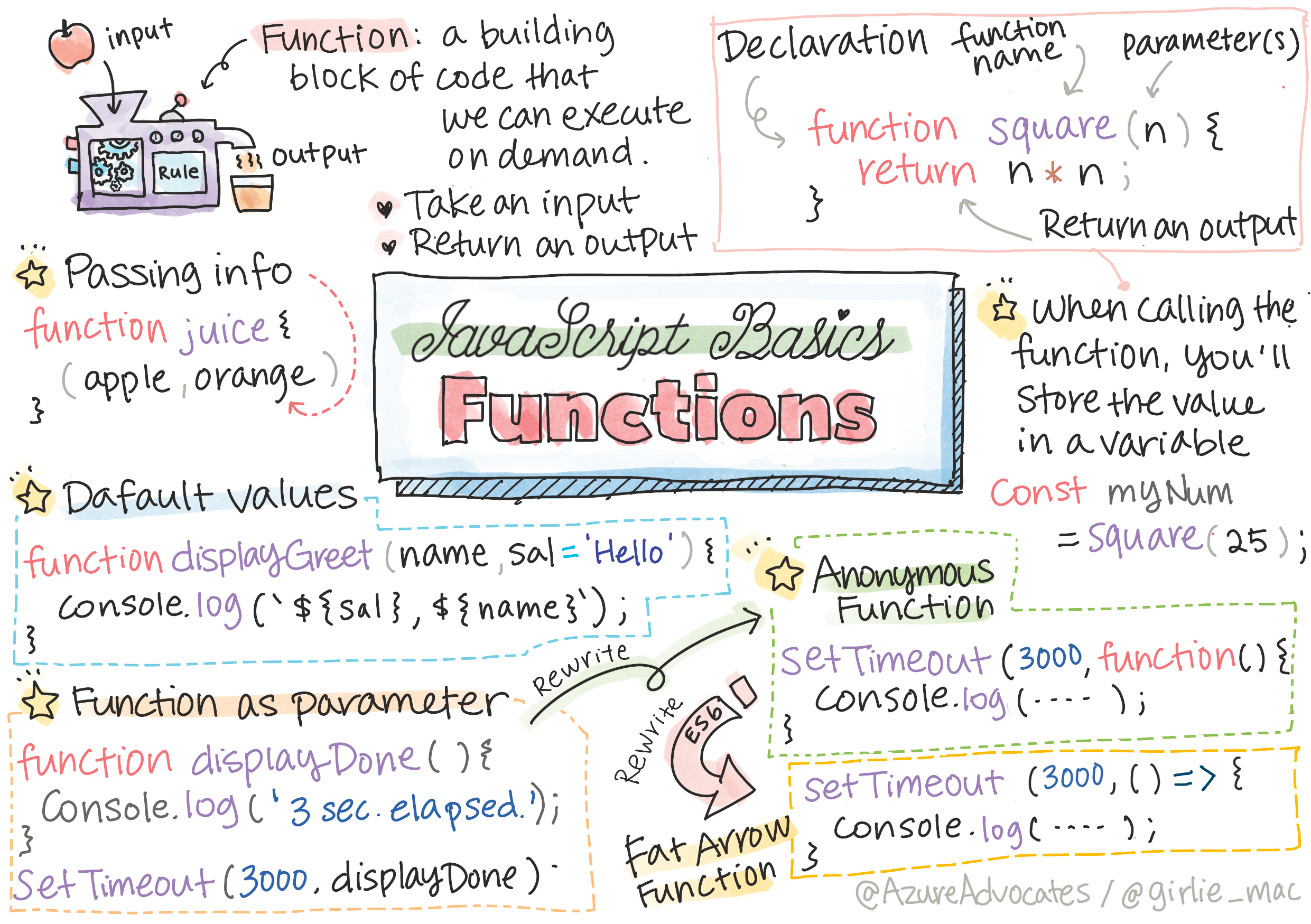
Sketchnote by Tomomi Imura
Pre-Lecture Quiz
Functions are the building blocks of modern JavaScript programming and one of the most powerful concepts you'll master as a web developer. They allow you to package code into reusable blocks, making your programs more organized, efficient, and easier to maintain. Think of functions as specialized tools in your programming toolkit – each one designed to accomplish a specific task whenever you need it.
In this lesson, you'll discover how to create your own functions, pass information to them, and get meaningful results back. You'll learn the difference between functions and methods, explore various ways to write functions (including modern arrow function syntax), and understand how functions can accept other functions as parameters. These concepts form the foundation for writing clean, professional JavaScript code.
By the end of this lesson, you'll be confidently creating functions that solve real-world problems and understanding how they fit into the bigger picture of web development. Let's dive in and unlock these fundamental programming concepts together!

🎥 Click the image above for a video about methods and functions.
You can take this lesson on Microsoft Learn!
Functions
Now that you understand why functions are essential, let's explore what they actually are and how they work. A function is like a mini-program within your larger program – a self-contained block of code that performs a specific task.
At its core, a function is a block of code we can execute on demand. This is perfect for scenarios where we need to perform the same task multiple times; rather than duplicating the logic in multiple locations (which would make it hard to update when the time comes), we can centralize it in one location, and call it whenever we need the operation performed - you can even call functions from other functions!.
Just as important is the ability to name a function. While this might seem trivial, the name provides a quick way of documenting a section of code. You could think of this as a label on a button. If I click on a button which reads "Cancel timer", I know it's going to stop running the clock.
Creating and calling a function
Let's create your first function together! We'll start with the basic syntax and build up to more complex examples as your confidence grows.
The syntax for a function looks like the following:
function nameOfFunction() { // function definition
 // function definition/body
}
Here's what this code structure includes:
- Uses the
functionkeyword to declare a new function - Provides a descriptive name for the function (
nameOfFunction) - Contains parentheses
()where parameters can be added later - Wraps the function body in curly braces
{} - Includes comments to help identify the different parts
If I wanted to create a function to display a greeting, it might look like this:
function displayGreeting() {
  console.log('Hello, world!');
}
Breaking down what happens here:
- Defines a function named
displayGreetingwith no parameters - Uses
console.log()to output a message to the browser's developer console - Contains the string
'Hello, world!'as the message to display - Creates a reusable block of code that can be called multiple times
Whenever we want to call (or invoke) our function, we use the name of the function followed by (). It's worth noting the fact our function can be defined before or after we decide to call it; the JavaScript compiler will find it for you.
// calling our function
displayGreeting();
What this function call accomplishes:
- Executes the code inside the
displayGreetingfunction - Displays "Hello, world!" in the browser console
- Demonstrates how to invoke a function using its name and parentheses
- Shows that functions can be called multiple times throughout your code
NOTE: There is a special type of function known as a method, which you've already been using! In fact, we saw this in our demo above when we used
console.log(). What makes a method different from a function is a method is attached to an object (consolein our example), while a function is free floating. You will hear many developers use these terms interchangeably.
Function best practices
There are a handful of best practices to keep in mind when creating functions
- As always, use descriptive names so you know what the function will do
- Use camelCasing to combine words
- Keep your functions focused on a specific task
Passing information to a function
Our current displayGreeting function works, but it's quite limited – it can only say "Hello, world!" to everyone. Let's make it more flexible and personal by learning how to pass information into functions.
To make a function more reusable you'll often want to pass information into it. If we consider our displayGreeting example above, it will only display Hello, world!. Not the most useful function one could create. If we want to make it a little more flexible, like allowing someone to specify the name of the person to greet, we can add a parameter. A parameter (also sometimes called an argument), is additional information sent to a function.
Parameters are listed in the definition part within parenthesis and are comma separated like so:
function name(param, param2, param3) {

}
Understanding these concepts:
- Lists parameters inside the parentheses, separated by commas
- Accepts multiple pieces of information (param, param2, param3)
- Creates placeholders that will hold the actual values when the function is called
- Allows the same function to work with different data each time
We can update our displayGreeting to accept a name and have that displayed.
function displayGreeting(name) {
  const message = `Hello, ${name}!`;
  console.log(message);
}
In the above, we've:
- Added a
nameparameter to receive the person's name - Created a template literal using backticks and
${}syntax for string interpolation - Stored the personalized message in a
constvariable calledmessage - Displayed the customized greeting using
console.log()
When we want to call our function and pass in the parameter, we specify it in the parenthesis.
displayGreeting('Christopher');
// displays "Hello, Christopher!" when run
Step by step, here's what's happening:
- Calls the
displayGreetingfunction with the string'Christopher' - Passes the name as an argument to the
nameparameter - Substitutes
'Christopher'into the template literal - Outputs "Hello, Christopher!" to the console
Default values
Sometimes you want to make parameters optional by providing sensible defaults. This makes your functions more flexible and easier to use.
We can make our function even more flexible by adding more parameters. But what if we don't want to require every value be specified? Keeping with our greeting example, we could leave name as required (we need to know who we're greeting), but we want to allow the greeting itself to be customized as desired. If someone doesn't want to customize it, we provide a default value instead. To provide a default value to a parameter, we set it much in the same way we set a value for a variable - parameterName = 'defaultValue'. To see a full example:
function displayGreeting(name, salutation='Hello') {
  console.log(`${salutation}, ${name}`);
}
Key points to remember:
- Defines
nameas a required parameter (no default value) - Sets
salutationwith a default value of'Hello' - Uses the assignment operator
=to specify the default - Allows the function to work with just one argument or both
When we call the function, we can then decide if we want to set a value for salutation.
displayGreeting('Christopher');
// displays "Hello, Christopher"

displayGreeting('Christopher', 'Hi');
// displays "Hi, Christopher"
What you need to know:
- Uses the default value
'Hello'when only the name is provided - Overrides the default with
'Hi'when both parameters are specified - Demonstrates how optional parameters make functions more flexible
- Shows that required parameters come before optional ones
Return values
So far, our functions have only displayed messages, but often you'll want functions to calculate something and give you back a result that you can use in other parts of your code.
Up until now the function we built will always output to the console. Sometimes this can be exactly what we're looking for, especially when we create functions which will be calling other services. But what if I want to create a helper function to perform a calculation and provide the value back so I can use it elsewhere?
We can do this by using a return value. A return value is returned by the function, and can be stored in a variable just the same as we could store a literal value such as a string or number.
If a function does return something then the keyword return is used. The return keyword expects a value or reference of what's being returned like so:
return myVariable;
Understanding these concepts:
- Uses the
returnkeyword to send a value back to the caller - Ends function execution immediately when the return statement runs
- Allows the returned value to be stored in a variable or used directly
- Provides a way for functions to produce results rather than just side effects
We could create a function to create a greeting message and return the value back to the caller
function createGreetingMessage(name) {
  const message = `Hello, ${name}`;
  return message;
}
Breaking down what happens here:
- Creates a personalized message using template literal syntax
- Stores the message in a
constvariable for clarity - Returns the message string to whoever called the function
- Allows the calling code to use the result however it needs
When calling this function we'll store the value in a variable. This is much the same way we'd set a variable to a static value (like const name = 'Christopher').
const greetingMessage = createGreetingMessage('Christopher');
What this accomplishes:
- Calls the
createGreetingMessagefunction with'Christopher'as the argument - Receives the returned string "Hello, Christopher"
- Stores the result in the
greetingMessagevariable - Makes the greeting message available for use elsewhere in the code
Functions as parameters for functions
One of the most powerful features in JavaScript is the ability to pass functions to other functions. This might sound complex, but it's actually a pattern you'll use frequently in modern web development.
As you progress in your programming career, you will come across functions which accept functions as parameters. This neat trick is commonly used when we don't know when something is going to occur or complete, but we know we need to perform an operation in response.
As an example, consider setTimeout, which begins a timer and will execute code when it completes. We need to tell it what code we want to execute. Sounds like a perfect job for a function!
If you run the code below, after 3 seconds you'll see the message 3 seconds has elapsed.
function displayDone() {
  console.log('3 seconds has elapsed');
}
// timer value is in milliseconds
setTimeout(displayDone, 3000);
Here's what this code does:
- Defines a function called
displayDonethat logs a message - Uses
setTimeout()to schedule the function to run later - Passes the function name (without parentheses) as the first parameter
- Sets the delay to 3000 milliseconds (3 seconds)
Anonymous functions
Sometimes you need a function for just one specific purpose and don't want to clutter your code with extra function names. JavaScript provides a perfect solution for this scenario.
Let's take another look at what we've built. We're creating a function with a name which will be used one time. As our application gets more complex, we can see ourselves creating a lot of functions which will only be called once. This isn't ideal. As it turns out, we don't always need to provide a name!
When we are passing a function as a parameter we can bypass creating one in advance and instead build one as part of the parameter. We use the same function keyword, but instead we build it as a parameter.
Let's rewrite the code above to use an anonymous function:
setTimeout(function() {
  console.log('3 seconds has elapsed');
}, 3000);
In the above, we've:
- Created a function directly inside the
setTimeoutcall - Eliminated the need for a separate function declaration
- Used the
functionkeyword without a name - Achieved the same result with less code
If you run our new code you'll notice we get the same results. We've created a function, but didn't have to give it a name!
Fat arrow functions
Modern JavaScript provides an even more concise way to write functions using arrow syntax. This is a popular and widely-used feature in contemporary web development.
One shortcut common in a lot of programming languages (including JavaScript) is the ability to use what's called an arrow or fat arrow function. It uses a special indicator of =>, which looks like an arrow - thus the name! By using =>, we are able to skip the function keyword.
Let's rewrite our code one more time to use a fat arrow function:
setTimeout(() => {
  console.log('3 seconds has elapsed');
}, 3000);
What you need to remember:
- Uses parentheses
()for the parameter list (empty in this case) - Includes the arrow
=>to indicate this is an arrow function - Maintains the same curly braces
{}for the function body - Provides a more concise syntax popular in modern JavaScript
When to use each strategy
You've now seen we have three ways to pass a function as a parameter and might be wondering when to use each. If you know you'll be using the function more than once, create it as normal. If you'll be using it for just the one location, it's generally best to use an anonymous function. Whether or not you use a fat arrow function or the more traditional function syntax is up to you, but you will notice most modern developers prefer =>.
🚀 Challenge
Can you articulate in one sentence the difference between functions and methods? Give it a try!
GitHub Copilot Agent Challenge 🚀
Use the Agent mode to complete the following challenge:
Description: Create a utility library of mathematical functions that demonstrates different function concepts covered in this lesson, including parameters, default values, return values, and arrow functions.
Prompt: Create a JavaScript file called mathUtils.js that contains the following functions:
- A function
addthat takes two parameters and returns their sum - A function
multiplywith default parameter values (second parameter defaults to 1) - An arrow function
squarethat takes a number and returns its square - A function
calculatethat accepts another function as a parameter and two numbers, then applies the function to those numbers - Demonstrate calling each function with appropriate test cases
Post-Lecture Quiz
Review & Self Study
It's worth reading up a little more on arrow functions, as they are increasingly used in code bases. Practice writing a function, and then rewriting it with this syntax.