
7.6 KiB
Implement "Add Transaction" Dialog
Overview
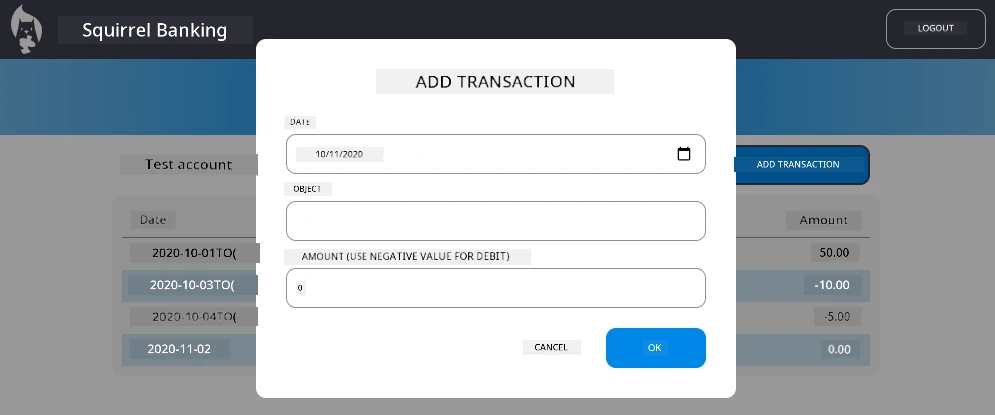
Your banking app now has solid state management and data persistence, but it's missing a crucial feature that real banking apps need: the ability for users to add their own transactions. In this assignment, you'll implement a complete "Add Transaction" dialog that integrates seamlessly with your existing state management system.
This assignment brings together everything you've learned in the four banking lessons: HTML templating, form handling, API integration, and state management.
Learning Objectives
By completing this assignment, you will:
- Create a user-friendly dialog interface for data entry
- Implement accessible form design with keyboard and screen reader support
- Integrate new features with your existing state management system
- Practice API communication and error handling
- Apply modern web development patterns to a real-world feature
Instructions
Step 1: Add Transaction Button
Create an "Add Transaction" button on your dashboard page that users can easily find and access.
Requirements:
- Place the button in a logical location on the dashboard
- Use clear, action-oriented button text
- Style the button to match your existing UI design
- Ensure the button is keyboard accessible
Step 2: Dialog Implementation
Choose one of these two approaches for implementing your dialog:
Option A: Separate Page
- Create a new HTML template for the transaction form
- Add a new route to your routing system
- Implement navigation to and from the form page
Option B: Modal Dialog (Recommended)
- Use JavaScript to show/hide the dialog without leaving the dashboard
- Implement using the
hiddenproperty or CSS classes - Create a smooth user experience with proper focus management
Step 3: Accessibility Implementation
Ensure your dialog meets accessibility standards for modal dialogs:
Keyboard Navigation:
- Support Escape key to close the dialog
- Trap focus within the dialog when open
- Return focus to the trigger button when closed
Screen Reader Support:
- Add appropriate ARIA labels and roles
- Announce dialog opening/closing to screen readers
- Provide clear form field labels and error messages
Step 4: Form Creation
Design an HTML form that collects transaction data:
Required Fields:
- Date: When the transaction occurred
- Description: What the transaction was for
- Amount: Transaction value (positive for income, negative for expenses)
Form Features:
- Validate user input before submission
- Provide clear error messages for invalid data
- Include helpful placeholder text and labels
- Style consistently with your existing design
Step 5: API Integration
Connect your form to the backend API:
Implementation Steps:
- Review the server API specifications for the correct endpoint and data format
- Create JSON data from your form inputs
- Send the data to the API using appropriate error handling
- Display success/failure messages to the user
- Handle network errors gracefully
Step 6: State Management Integration
Update your dashboard with the new transaction:
Integration Requirements:
- Refresh the account data after successful transaction addition
- Update the dashboard display without requiring a page reload
- Ensure the new transaction appears immediately
- Maintain proper state consistency throughout the process
Technical Specifications
API Endpoint Details: Refer to the server API documentation for:
- Required JSON format for transaction data
- HTTP method and endpoint URL
- Expected response format
- Error response handling
Expected Result: After completing this assignment, your banking app should have a fully functional "Add Transaction" feature that looks and behaves professionally:
Testing Your Implementation
Functional Testing:
- Verify the "Add Transaction" button is clearly visible and accessible
- Test that the dialog opens and closes properly
- Confirm form validation works for all required fields
- Check that successful transactions appear immediately on the dashboard
- Ensure error handling works for invalid data and network issues
Accessibility Testing:
- Navigate through the entire flow using only the keyboard
- Test with a screen reader to ensure proper announcements
- Verify focus management works correctly
- Check that all form elements have appropriate labels
Evaluation Rubric
| Criteria | Exemplary | Adequate | Needs Improvement |
|---|---|---|---|
| Functionality | Add transaction feature works flawlessly with excellent user experience and follows all best practices from the lessons | Add transaction feature works correctly but may not follow some best practices or has minor usability issues | Add transaction feature is partially working or has significant usability problems |
| Code Quality | Code is well-organized, follows established patterns, includes proper error handling, and integrates seamlessly with existing state management | Code works but may have some organization issues or inconsistent patterns with the existing codebase | Code has significant structural issues or doesn't integrate well with existing patterns |
| Accessibility | Full keyboard navigation support, screen reader compatibility, and follows WCAG guidelines with excellent focus management | Basic accessibility features implemented but may be missing some keyboard navigation or screen reader features | Limited or no accessibility considerations implemented |
| User Experience | Intuitive, polished interface with clear feedback, smooth interactions, and professional appearance | Good user experience with minor areas for improvement in feedback or visual design | Poor user experience with confusing interface or lack of user feedback |
Additional Challenges (Optional)
Once you've completed the basic requirements, consider these enhancements:
Enhanced Features:
- Add transaction categories (food, transportation, entertainment, etc.)
- Implement input validation with real-time feedback
- Create keyboard shortcuts for power users
- Add transaction editing and deletion capabilities
Advanced Integration:
- Implement undo functionality for recently added transactions
- Add bulk transaction import from CSV files
- Create transaction search and filtering capabilities
- Implement data export functionality
These optional features will help you practice more advanced web development concepts and create a more complete banking application!
Disclaimer: This document has been translated using the AI translation service Co-op Translator. While we strive for accuracy, please be aware that automated translations may contain errors or inaccuracies. The original document in its native language should be considered the authoritative source. For critical information, professional human translation is recommended. We are not liable for any misunderstandings or misinterpretations arising from the use of this translation.