
 localizeflow[bot]
9e661e295d
localizeflow[bot]
9e661e295d
|
8 months ago | |
|---|---|---|
| .. | ||
| README.md | 8 months ago | |
| assignment.md | 8 months ago | |
README.md
JavaScript Basics: Methods and Functions
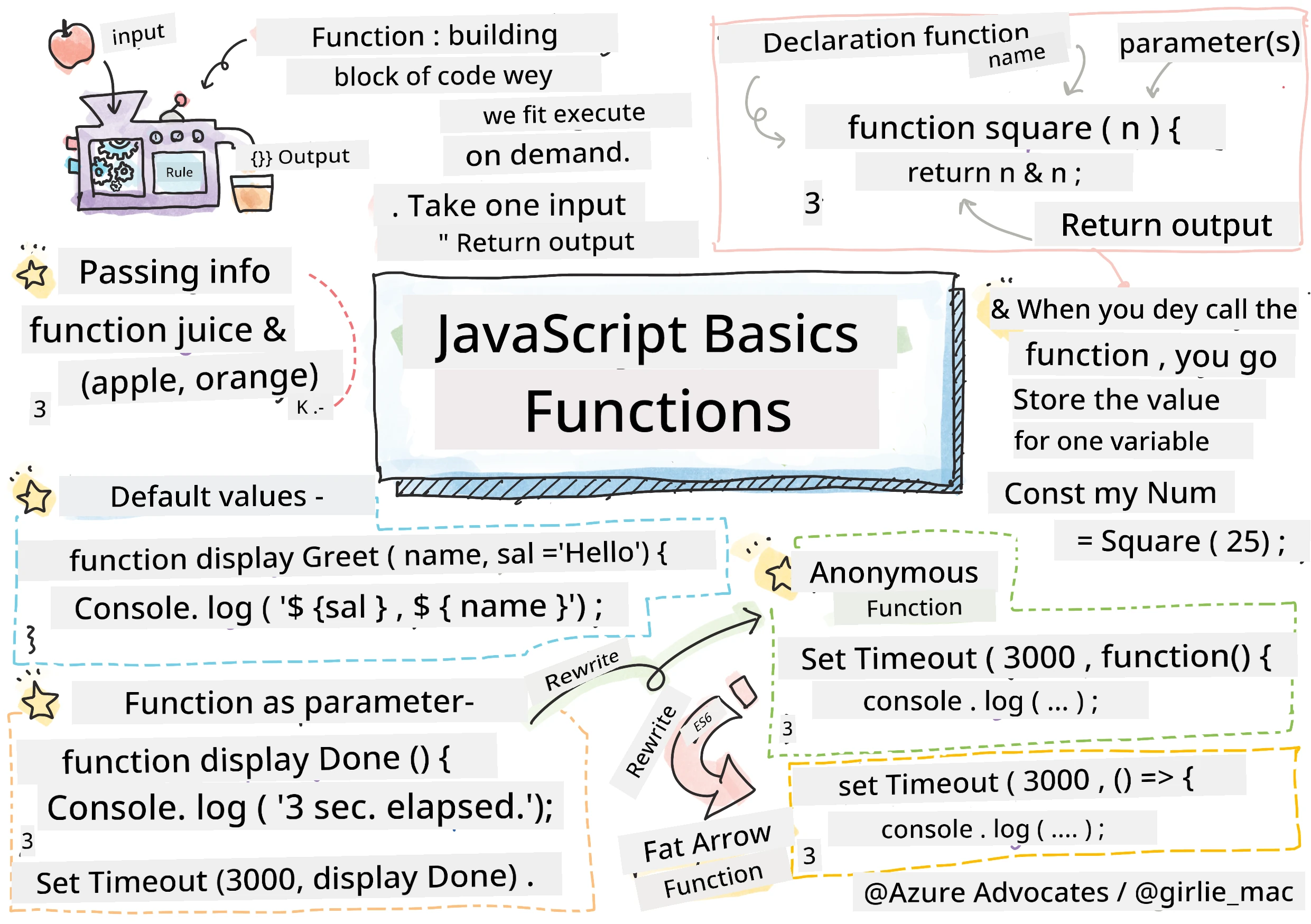
Sketchnote by Tomomi Imura
journey
    title Your JavaScript Functions Adventure
    section Foundation
      Function Syntax: 5: You
      Calling Functions: 4: You
      Parameters & Arguments: 5: You
    section Advanced Concepts
      Return Values: 4: You
      Default Parameters: 5: You
      Function Composition: 4: You
    section Modern JavaScript
      Arrow Functions: 5: You
      Anonymous Functions: 4: You
      Higher-Order Functions: 5: You
Pre-Lecture Quiz
Writa di same code plenti taem na one of di wahala we programmer dem dey face. Functions na im dey solve dis problem by make you fit bundle code inside plenti places wey you fit reuse am. Think of functions like di standardized parts wey Henry Ford first use for hin assembly line – once you create one reliable part, you fit use am anywhere without to build am from di beginning.
Functions dey help you bundle pieces of code so that you fit reuse dem everywhere for your program. Instead to dey copy and paste di same logic anyhow, you fit create one function once and call am anytime you want. Dis style sabi keep your code clean and e go make am easy to update.
For dis lesson, you go learn how to create your own functions, how to pass information enter dem, and how to get useful result back. You go sabi di difference between functions and methods, learn how to use modern syntax, and see how functions fit work with other functions dem. We go build all dis small small.

🎥 Click di image for video wey talk about methods and functions.
You fit take dis lesson for Microsoft Learn!
mindmap
  root((JavaScript Functions))
    Basic Concepts
      Declaration
        Traditional syntax
        Arrow function syntax
      Calling
        Using parentheses
        Parentheses required
    Parameters
      Input Values
        Multiple parameters
        Default values
      Arguments
        Values passed in
        Fit be any kain
    Return Values
      Output Data
        return statement
        Exit function
      Use Results
        Store for variables
        Chain functions
    Advanced Patterns
      Higher-Order
        Functions as parameters
        Callbacks
      Anonymous
        No name needed
        Inline definition
Functions
Function na one self-contained block of code wey dey do specific task. E dey hold logic wey you fit run anytime you want.
Instead make you dey write di same code many many times for your program, you fit pack am inside function and call di function anytime you need am. Dis style dey keep your code neat and e go make any update easier. Imagine say you get one logic wey spread all over your codebase for 20 places and you wan change am.
Make you dey give your functions correct names and names weh mean something. Good name for function go make am clear wetin e do – when you see cancelTimer(), you sabi immediately wetin e mean, like button wey get clear label wey you sabi wetin e go do when you press am.
How to create and call function
Make we check how to create function. Di syntax dey:
function nameOfFunction() { // function definition
 // function definition/body
}
Make we break dis down:
- Di
functionkeyword dey tell JavaScript say "Hey, I dey create function!" nameOfFunctionna where you go put correct function name- Di parentheses
()na where you fit put parameters (we go yarn about dat later) - Di curly braces
{}hold di code wey go run once you call di function
Make we create simple greeting function make you see am:
function displayGreeting() {
  console.log('Hello, world!');
}
Dis function dey print "Hello, world!" for console. Once you define am, you fit use am many times.
To run (or "call") your function, write di name and follow am with parentheses. JavaScript fit allow you define your function before or after you call am – di JavaScript engine go handle am correct.
// we dey call our function
displayGreeting();
When you run dis line, e go run all di code wey dey inside displayGreeting function, and go show "Hello, world!" for your browser console. You fit call dis function over and over.
🧠 Function Fundamentals Check: Building Your First Functions
Make we test how you dey understand basic functions:
- Why you dey use curly braces
{}for function definition? - Wetin go happen if you write
displayGreetingwithout parentheses? - Why you fit want call di same function many times?
flowchart TD
    A["✏️ Define Function"] --> B["📦 Package Code"]
    B --> C["🏷️ Giv am Naim"]
    C --> D["📞 Call Wen E Dey Needed"]
    D --> E["🔄 Reuse Anywɛa"]

    F["💡 Benefits"] --> F1["No code repetition"]
    F --> F2["Ezi to maintain"]
    F --> F3["Clear organization"]
    F --> F4["Ezi to test"]

    style A fill:#e3f2fd
    style E fill:#e8f5e8
    style F fill:#fff3e0
Note: You don dey use methods dem all dis time for di lessons.
console.log()na method – e be function wey belong toconsoleobject. Di main difference be say method dey attached to object, but functions dey stand-alone. Plenti developers dey use di two words one way one time when dem dey talk.
Function best practices
Here na small tips to help you write better functions:
- Give your functions clear and correct names – your future sef go thank you!
- Use camelCasing for multi-word names (like
calculateTotalnotcalculate_total) - Make sure each function dey focused on doing one thing well
Passing information to function
Our displayGreeting function no flexible – e just dey display "Hello, world!" for everybody. Parameters dey help make functions flexible and useful.
Parameters na placeholders wey you fit put different values anytime you call di function. Dis one mean say di same function fit use different information anytime you call am.
You dey put parameters inside di parentheses when you dey define function, and separate multiple parameters with commas:
function name(param, param2, param3) {

}
Each parameter na like placeholder – when person call your function, dem go give real values wey go enter these spots.
Make we update our greeting function to carry person name inside:
function displayGreeting(name) {
  const message = `Hello, ${name}!`;
  console.log(message);
}
You fit see say we dey use backticks (`) and ${} to put name directly inside di message - dis na template literal, e sweet well well to build string with variables inside.
Now when we call the function, we fit pass any name:
displayGreeting('Christopher');
// dey show "Hello, Christopher!" wen e run
JavaScript go carry di string 'Christopher', put am for name parameter, and create personalized message "Hello, Christopher!"
flowchart LR
    A["🎯 Function Call"] --> B["📥 Parameters"]
    B --> C["⚙️ Function Body"]
    C --> D["📤 Result"]

    A1["displayGreeting('Alice')"] --> A
    B1["name = 'Alice'"] --> B
    C1["Template literal\n\`Hello, \${name}!\`"] --> C
    D1["'Hello, Alice!'"] --> D

    E["🔄 Parameter Types"] --> E1["String dem"]
    E --> E2["Numbers"]
    E --> E3["Booleans"]
    E --> E4["Objects"]
    E --> E5["Functions"]

    style A fill:#e3f2fd
    style C fill:#e8f5e8
    style D fill:#fff3e0
    style E fill:#f3e5f5
Default values
Wetin you go do if you want make some parameters optional? Na dis time default values help!
Make we say you want make people fit choose greeting word, but if dem no put anything, you go use "Hello" as fallback. You fit set default values with equals sign like how you dey set variable:
function displayGreeting(name, salutation='Hello') {
  console.log(`${salutation}, ${name}`);
}
Here, name still be required, but salutation get backup value 'Hello' if person no provide other greeting.
Now we fit call dis function two ways:
displayGreeting('Christopher');
// dey show "Hello, Christopher"

displayGreeting('Christopher', 'Hi');
// dey show "Hi, Christopher"
For first call, JavaScript use default "Hello" because we no send salutation. For second call, e use our custom "Hi". Dis flexi make function fit different situation.
🎛️ Parameters Mastery Check: Making Functions Flexible
Test your parameter sabi:
- Wetin be difference between parameter and argument?
- Why default values dey important for real-world programming?
- Wetin you tink go happen if you pass more arguments than parameters?
stateDiagram-v2
    [*] --> NoParams: function greet() {}
    [*] --> WithParams: function greet(name) {}
    [*] --> WithDefaults: function greet(name, greeting='Hi') {}

    NoParams --> Static: Di same output every time
    WithParams --> Dynamic: E dey change wit input
    WithDefaults --> Flexible: Optional customization

    Static --> [*]
    Dynamic --> [*]
    Flexible --> [*]

    note right of WithDefaults
        Di most flexible way
        E still fit work wit old one dem
    end note
Pro tip: Default parameters dey make functions more user-friendly. User fit start quickly with normal default values, but still fit customize as dem want!
Return values
So far, our functions just dey print messages to console, but wetin you go do if you want say function go calculate something and give you result back?
Na here return values come. Instead to just display something, function fit give you value wey you fit save inside variable or use for other parts of your code.
To send value back, use return keyword follow am with wetin you want return:
return myVariable;
One important thing be say: once function hit return, e go stop immediately and send dat value to di person wey call am.
Make we change our greeting function to return message instead of printing am:
function createGreetingMessage(name) {
  const message = `Hello, ${name}`;
  return message;
}
Now, this function no longer print greeting, e just create message and give am back to us.
To use di returned value, we fit hold am inside variable like any value:
const greetingMessage = createGreetingMessage('Christopher');
Now greetingMessage get "Hello, Christopher" and we fit use am anywhere for code – to show for web page, put for email, or pass am to another function.
flowchart TD
    A["🔧 Function Processing"] --> B{"return statement?"}
    B -->|Yes| C["📤 Return Value"]
    B -->|No| D["📭 Return undefined"]

    C --> E["💾 Store am for Variable"]
    C --> F["🔗 Use am for Expression"]
    C --> G["📞 Pass am go Function"]

    D --> H["⚠️ Most times no dey useful"]

    I["📋 How dem dey use Return Value"] --> I1["Calculate results"]
    I --> I2["Validate input"]
    I --> I3["Transform data"]
    I --> I4["Create objects"]

    style C fill:#e8f5e8
    style D fill:#ffebee
    style I fill:#e3f2fd
🔄 Return Values Check: Getting Results Back
Test how you understand return values:
- Wetin happen to code wey dey after
returninside function? - Why e better to return values than just to print to console?
- Fit function return different type of values (string, number, boolean)?
pie title "Common Return Value Types"
    "Strinz" : 30
    "Nambas" : 25
    "Objeks" : 20
    "Boolis" : 15
    "Erays" : 10
Main gist: Functions wey return values dey flexible because di caller fit decide wetin to do with di result. Dis one make your code modular and reusable!
Functions as parameters for functions
Functions fit pass as parameters to other functions. Even though e fit look hard at first, na powerful way to enable flexible programming.
Dis pattern common when you want say "when sometin happen, do another tin." Like "when timer finish, run dis code" or "when user click button, call dis function."
Make we see setTimeout wey be built-in function wey go wait small time then run code. We need tell am wetin to run – perfect case to pass function as parameter!
Try dis code – after 3 seconds, you go see message:
function displayDone() {
  console.log('3 seconds has elapsed');
}
// timer value dey for milliseconds
setTimeout(displayDone, 3000);
See as we pass displayDone (without parentheses) to setTimeout. We no dey call function ourselves – we just dey give am to setTimeout, tell am "call dis function after 3 seconds."
Anonymous functions
Sometimes you need function for one thing only and you no want give am name. Think am – if you dey use function only once, why you go put extra name for code?
JavaScript allow you create anonymous functions – functions wey no get name, wey you fit define exactly where you need am.
Here how we fit rewrite our timer example using anonymous function:
setTimeout(function() {
  console.log('3 seconds has elapsed');
}, 3000);
Dis one do the same thing, but function dey defined inside setTimeout call, no need separate function declaration.
Fat arrow functions
Modern JavaScript get one shorter way to write function wey dem call arrow functions. Dem use => (wey look like arrow) and developers love am.
Arrow functions let you skip function keyword and write shorter code.
Here be our timer example with arrow function:
setTimeout(() => {
  console.log('3 seconds has elapsed');
}, 3000);
Di () na where parameters fit go (empty here), then di arrow =>, then function body inside curly braces. Dis one dey do same thing but in shorter way.
flowchart LR
    A["📝 Function Styles"] --> B["Traditional"]
    A --> C["Arrow"]
    A --> D["Anonymous"]

    B --> B1["function name() {}"]
    B --> B2["Hoisted"]
    B --> B3["Named"]

    C --> C1["const name = () => {}"]
    C --> C2["Concise syntax"]
    C --> C3["Modern style"]

    D --> D1["function() {}"]
    D --> D2["No name"]
    D --> D3["One-time use"]

    E["⏰ Wen to Use"] --> E1["Traditional: Functions we fit use again"]
    E --> E2["Arrow: Short callbacks"]
    E --> E3["Anonymous: Event handlers"]

    style A fill:#e3f2fd
    style B fill:#e8f5e8
    style C fill:#fff3e0
    style D fill:#f3e5f5
    style E fill:#e0f2f1
When to use each style
When you suppose use each style? Rule of thumb: if you go use function many times, give am name and define am separately. If na for one special thing, use anonymous function. Both arrow functions and normal functions good, but arrow functions dey popular for modern code.
🎨 Function Styles Mastery Check: Choosing the Right Syntax
Test your syntax sabi:
- When you go prefer arrow functions pass traditional syntax?
- Wetin be main advantage of anonymous functions?
- Fit you give example where named function better than anonymous?
quadrantChart
    title Function Choice Decision Matrix
    x-axis Simple --> Complex
    y-axis One-time use --> Reusable
    quadrant-1 Arrow Functions
    quadrant-2 Named Functions
    quadrant-3 Anonymous Functions
    quadrant-4 Traditional Functions

    Event Handlers: [0.3, 0.2]
    Utility Functions: [0.7, 0.8]
    Callbacks: [0.2, 0.3]
    Class Methods: [0.8, 0.7]
    Mathematical Operations: [0.4, 0.6]
Modern trend: Arrow functions dey become default choice for many developers because syntax tight, but traditional functions still get place!
🚀 Challenge
Fit talk wetin be difference between functions and methods inside one sentence? Try am!
GitHub Copilot Agent Challenge 🚀
Use Agent mode do this challenge:
Description: Create utility library of maths functions wey show different function concepts wey dem teach for dis lesson, including parameters, default values, return values, and arrow functions.
Prompt: Create JavaScript file wey name mathUtils.js wey get these functions:
- Function
addwey get two parameters and return their sum - Function
multiplywey get default parameter values (second default to 1) - Arrow function
squarewey take number and return square - Function
calculatewey accept another function as parameter plus two numbers, then apply function to those numbers - Show how to call each function with correct test cases
Learn more about agent mode here.
Post-Lecture Quiz
Review & Self Study
E good to read small more about arrow functions as people dey use dem more for code. Practice write function, then rewrite am with dis syntax.
Assignment
🧰 Your JavaScript Functions Toolkit Summary
graph TD
    A["🎯 JavaScript Functions"] --> B["📋 Function Declaration"]
    A --> C["📥 Parameters"]
    A --> D["📤 Return Values"]
    A --> E["🎨 Modern Syntax"]

    B --> B1["function name() {}"]
    B --> B2["Descriptive naming"]
    B --> B3["Reusable code blocks"]

    C --> C1["Input data"]
    C --> C2["Default values"]
    C --> C3["Multiple parameters"]

    D --> D1["return statement"]
    D --> D2["Exit function"]
    D --> D3["Pass data back"]

    E --> E1["Arrow functions: () =>"]
    E --> E2["Anonymous functions"]
    E --> E3["Higher-order functions"]

    F["⚡ Key Benefits"] --> F1["Code reusability"]
    F --> F2["Better organization"]
    F --> F3["Easier testing"]
    F --> F4["Modular design"]

    style A fill:#e3f2fd
    style B fill:#e8f5e8
    style C fill:#fff3e0
    style D fill:#f3e5f5
    style E fill:#e0f2f1
    style F fill:#fce4ec
🚀 Your JavaScript Functions Mastery Timeline
⚡ Wetin You Fit Do for Next 5 Minutes
-
Write simple function wey go return your favorite number
-
Create function wey get two parameters wey go add dem together
-
Try convert traditional function to arrow function syntax
-
Practice di challenge: explain di difference between functions and methods
🎯 Wetin You Fit Achieve Dis Hour
- Complete di post-lesson quiz and review any confusing tins
- Build di math utilities library from di GitHub Copilot challenge
- Create one function wey dey use another function as parameter
- Practice to write functions with default parameters
- Experiment with template literals for function return values
📅 Your Week-Long Function Mastery
- Complete di "Fun with Functions" assignment wit creativity
- Refactor some repetitive code wey you don write into reusable functions
- Build small calculator wey only use functions (no global variables)
- Practice arrow functions wit array methods like
map()andfilter() - Create collection of utility functions for common tasks
- Study higher-order functions and functional programming concepts
🌟 Your Month-Long Transformation
- Master advanced function concepts like closures and scope
- Build project wey heavy use function composition
- Contribute to open source by improving function documentation
- Teach person else about functions and different syntax styles
- Explore functional programming paradigms for JavaScript
- Create personal library of reusable functions for future projects
🏆 Final Functions Champion Check-in
Celebrate your function mastery:
- Wetin be di most useful function wey you don create so far?
- How learning about functions don change how you dey think about code organization?
- Which function syntax you prefer and why?
- Which real-world problem you go solve by writing function?
journey
    title Your Function Confidence Evolution
    section Tode
      Confused by Syntax: 3: You
      Understanding Basics: 4: You
      Writing Simple Functions: 5: You
    section Dis Week
      Using Parameters: 4: You
      Returning Values: 5: You
      Modern Syntax: 5: You
    section Next Month
      Function Composition: 5: You
      Advanced Patterns: 5: You
      Teaching Others: 5: You
🎉 You don master one of programming's most powerful concepts! Functions na di building blocks of bigger programs. Every application wey you go build go use functions to organize, reuse, and structure code. Now you sabi how to package logic into reusable components, wey go make you more efficient and effective programmer. Welcome to di world of modular programming! 🚀
Disclaimer: Dis dokument don translate wit AI translation service wey dem call Co-op Translator. Even tho we dey try make am correct, abeg make you sabi say machine translation fit get some mistake or no be correct sotey. Di original dokument wey dem write for di language wey e come from na di main one wey get authority. If na serious matter, better make professional human translator help you do am. We no go responsible for any yawa or wrong understanding wey fit happen because of dis translation.