
7.8 KiB
Count stock from your IoT device - Wio Terminal
Combination of di predictions and dia bounding boxes fit help count stock wey dey inside one image.
Count stock
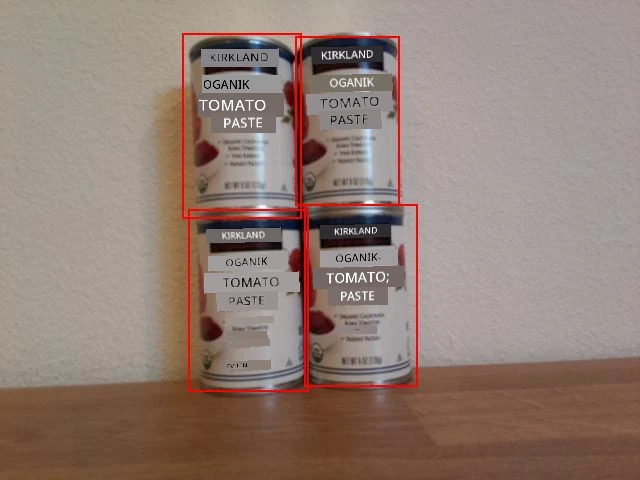
For di image wey dey up, di bounding boxes get small overlap. If di overlap big well well, di bounding boxes fit mean say na di same object. To count di objects correct, you go need ignore boxes wey get big overlap.
Task - count stock ignoring overlap
-
Open your
stock-counterproject if e never open. -
For di top of di
processPredictionsfunction, add dis code:const float overlap_threshold = 0.20f;Dis one dey define di percentage overlap wey go dey allowed before di bounding boxes go mean say na di same object. 0.20 mean say na 20% overlap.
-
After dis one, and for di top of di
processPredictionsfunction, add dis code to calculate di overlap between two rectangles:struct Point { float x, y; }; struct Rect { Point topLeft, bottomRight; }; float area(Rect rect) { return abs(rect.bottomRight.x - rect.topLeft.x) * abs(rect.bottomRight.y - rect.topLeft.y); } float overlappingArea(Rect rect1, Rect rect2) { float left = max(rect1.topLeft.x, rect2.topLeft.x); float right = min(rect1.bottomRight.x, rect2.bottomRight.x); float top = max(rect1.topLeft.y, rect2.topLeft.y); float bottom = min(rect1.bottomRight.y, rect2.bottomRight.y); if ( right > left && bottom > top ) { return (right-left)*(bottom-top); } return 0.0f; }Dis code dey define one
Pointstruct to store points for di image, and oneRectstruct to define rectangle using top left and bottom right coordinate. E then define oneareafunction wey dey calculate di area of rectangle from top left and bottom right coordinate.Next, e define one
overlappingAreafunction wey dey calculate di overlapping area of 2 rectangles. If dem no overlap, e go return 0. -
For di bottom of di
overlappingAreafunction, declare one function to convert bounding box toRect:Rect rectFromBoundingBox(JsonVariant prediction) { JsonObject bounding_box = prediction["boundingBox"].as<JsonObject>(); float left = bounding_box["left"].as<float>(); float top = bounding_box["top"].as<float>(); float width = bounding_box["width"].as<float>(); float height = bounding_box["height"].as<float>(); Point topLeft = {left, top}; Point bottomRight = {left + width, top + height}; return {topLeft, bottomRight}; }Dis one dey take prediction from di object detector, e dey extract di bounding box and use di values for di bounding box to define rectangle. Di right side dey calculated from di left plus di width. Di bottom dey calculated as di top plus di height.
-
Di predictions go need compare each other, and if 2 predictions get overlap wey pass di threshold, one of dem go need delete. Di overlap threshold na percentage, so e go need multiply by di size of di smallest bounding box to check say di overlap pass di given percentage of di bounding box, no be di given percentage of di whole image. Start by deleting di content of di
processPredictionsfunction. -
Add dis one to di empty
processPredictionsfunction:std::vector<JsonVariant> passed_predictions; for (int i = 0; i < predictions.size(); ++i) { Rect prediction_1_rect = rectFromBoundingBox(predictions[i]); float prediction_1_area = area(prediction_1_rect); bool passed = true; for (int j = i + 1; j < predictions.size(); ++j) { Rect prediction_2_rect = rectFromBoundingBox(predictions[j]); float prediction_2_area = area(prediction_2_rect); float overlap = overlappingArea(prediction_1_rect, prediction_2_rect); float smallest_area = min(prediction_1_area, prediction_2_area); if (overlap > (overlap_threshold * smallest_area)) { passed = false; break; } } if (passed) { passed_predictions.push_back(predictions[i]); } }Dis code dey declare one vector to store di predictions wey no overlap. E then dey loop through all di predictions, dey create one
Rectfrom di bounding box.Next, dis code dey loop through di remaining predictions, dey start from di one wey dey after di current prediction. Dis one dey stop predictions from dey compare more than once - once 1 and 2 don compare, e no need to compare 2 with 1 again, only with 3, 4, etc.
For each pair of predictions, di overlapping area go dey calculated. Dis one go then dey compare to di area of di smallest bounding box - if di overlap pass di threshold percentage of di smallest bounding box, di prediction go mark as no pass. If after comparing all di overlap, di prediction pass di checks, e go add am to di
passed_predictionscollection.💁 Dis na very simple way to remove overlaps, e just dey remove di first one for di overlapping pair. For production code, you go wan put more logic for here, like to consider di overlaps between plenty objects, or if one bounding box dey inside another.
-
After dis one, add dis code to send details of di passed predictions to di serial monitor:
for(JsonVariant prediction : passed_predictions)
{
    String boundingBox = prediction["boundingBox"].as<String>();
    String tag = prediction["tagName"].as<String>();
    float probability = prediction["probability"].as<float>();

    char buff[32];
    sprintf(buff, "%s:\t%.2f%%\t%s", tag.c_str(), probability * 100.0, boundingBox.c_str());
    Serial.println(buff);
}
Dis code dey loop through di passed predictions and dey print dia details to di serial monitor.
-
For di bottom of dis one, add code to print di number of counted items to di serial monitor:
Serial.print("Counted ");
Serial.print(passed_predictions.size());
Serial.println(" stock items.");
Dis one fit then dey send am to one IoT service to alert if di stock levels dey low.
-
Upload and run your code. Point di camera to objects wey dey for shelf and press di C button. Try adjust di
overlap_thresholdvalue to see predictions wey dem dey ignore.Connecting to WiFi.. Connected! Image captured Image read to buffer with length 17416 tomato paste: 35.84% {"left":0.395631,"top":0.215897,"width":0.180768,"height":0.359364} tomato paste: 35.87% {"left":0.378554,"top":0.583012,"width":0.14824,"height":0.359382} tomato paste: 34.11% {"left":0.699024,"top":0.592617,"width":0.124411,"height":0.350456} tomato paste: 35.16% {"left":0.513006,"top":0.647853,"width":0.187472,"height":0.325817} Counted 4 stock items.
💁 You fit find dis code for di code-count/wio-terminal folder.
😀 Your stock counter program don work well!
Disclaimer:
Dis dokyument don use AI transleto service Co-op Translator do di translation. Even as we dey try make am correct, abeg sabi say machine translation fit get mistake or no dey accurate well. Di original dokyument wey dey for im native language na di main source wey you go fit trust. For important mata, e good make professional human transleto check am. We no go fit take blame for any misunderstanding or wrong interpretation wey fit happen because you use dis translation.