
5.0 KiB
Call your object detector from your IoT device - Virtual IoT Hardware and Raspberry Pi
Wen you don publish your object detector, you fit use am from your IoT device.
Copy di image classifier project
Most of di stock detector na di same as di image classifier wey you don create for one previous lesson.
Task - copy di image classifier project
-
Create one folder wey you go call
stock-counterfor your computer if you dey use virtual IoT device, or for your Raspberry Pi. If you dey use virtual IoT device, make sure say you set up virtual environment. -
Set up di camera hardware.
- If you dey use Raspberry Pi, you go need to fix di PiCamera. You fit also wan fix di camera for one position, like hang di cable for one box or can, or fix di camera for one box with double-sided tape.
- If you dey use virtual IoT device, you go need to install CounterFit and di CounterFit PyCamera shim. If you wan use still images, capture some images wey your object detector never see before. If you wan use your web cam, make sure say e dey positioned well to see di stock wey you dey detect.
-
Follow di steps from lesson 2 of di manufacturing project to capture images from di camera.
-
Follow di steps from lesson 2 of di manufacturing project to call di image classifier. Most of di code go dey reused to detect objects.
Change di code from classifier to image detector
Di code wey you use to classify images dey almost di same as di code to detect objects. Di main difference na di method wey you go call for di Custom Vision SDK, and di results wey e go return.
Task - change di code from classifier to image detector
-
Delete di three lines of code wey dey classify di image and process di predictions:
results = predictor.classify_image(project_id, iteration_name, image)

for prediction in results.predictions:
    print(f'{prediction.tag_name}:\t{prediction.probability * 100:.2f}%')
Remove dis three lines.
-
Add di code wey dey below to detect objects for di image:
results = predictor.detect_image(project_id, iteration_name, image)

threshold = 0.3

predictions = list(prediction for prediction in results.predictions if prediction.probability > threshold)

for prediction in predictions:
    print(f'{prediction.tag_name}:\t{prediction.probability * 100:.2f}%')
Dis code dey call di
detect_imagemethod for di predictor to run di object detector. E go gather all di predictions wey get probability wey pass one threshold, then e go print dem for di console.Unlike image classifier wey dey return only one result per tag, di object detector go return plenty results, so any one wey get low probability go need to dey filtered out.
-
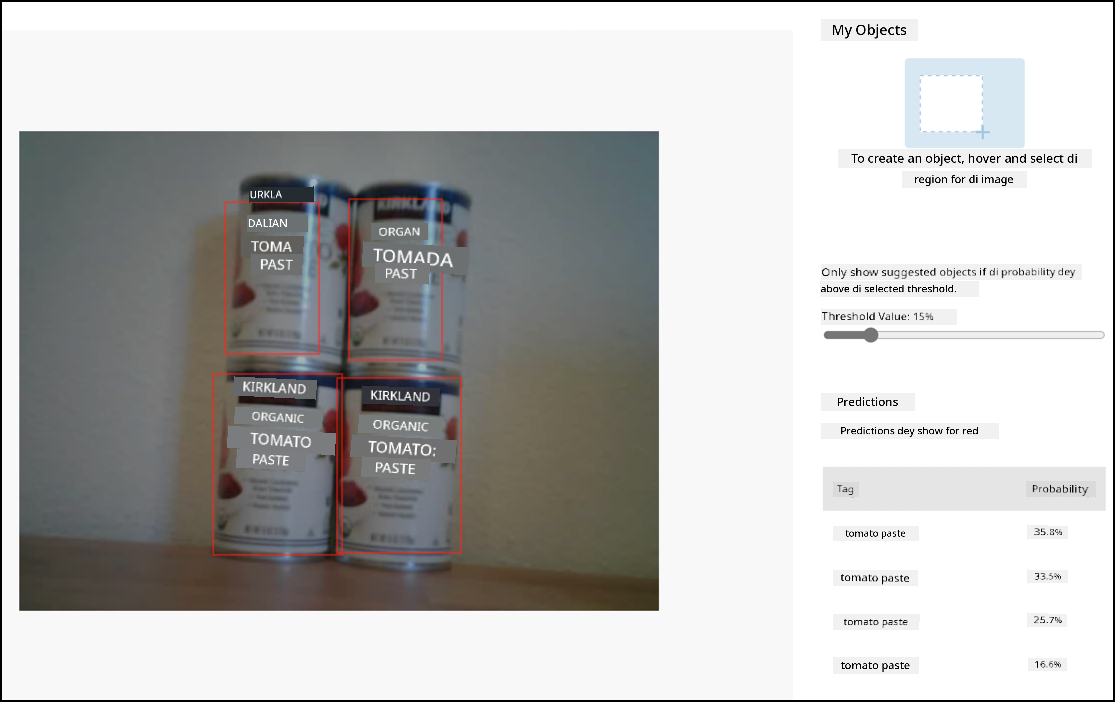
Run dis code and e go capture one image, send am to di object detector, and print out di detected objects. If you dey use virtual IoT device, make sure say you get correct image set for CounterFit, or your web cam dey selected. If you dey use Raspberry Pi, make sure say your camera dey point to objects for one shelf.
pi@raspberrypi:~/stock-counter $ python3 app.py
tomato paste:   34.13%
tomato paste:   33.95%
tomato paste:   35.05%
tomato paste:   32.80%
💁 You fit need to adjust di
thresholdto correct value for your images.You go fit see di image wey dem take, and di values for di Predictions tab for Custom Vision.
💁 You fit find dis code for di code-detect/pi or code-detect/virtual-iot-device folder.
😀 Your stock counter program don work well!
Disclaimer:
Dis dokyument don use AI transleto service Co-op Translator do di translation. Even as we dey try make am correct, abeg sabi say machine translation fit get mistake or no dey accurate well. Di original dokyument wey dey for im native language na di main source wey you go fit trust. For important mata, e better make professional human transleto do di work. We no go fit take blame for any misunderstanding or wrong interpretation wey fit happen because you use dis translation.