
5.0 KiB
Detect proximity - Raspberry Pi
For dis part of di lesson, you go add proximity sensor to your Raspberry Pi, and read di distance wey e dey measure.
Hardware
Di Raspberry Pi go need one proximity sensor.
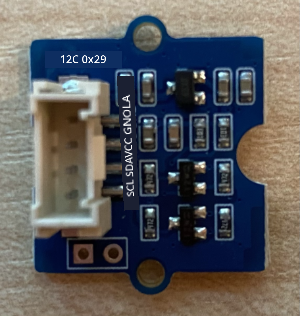
Di sensor wey you go use na Grove Time of Flight distance sensor. Dis sensor dey use laser ranging module to detect distance. E fit measure distance from 10mm to 2000mm (1cm - 2m), and e go report di values for dat range well well, but if di distance pass 1000mm, e go report am as 8109mm.
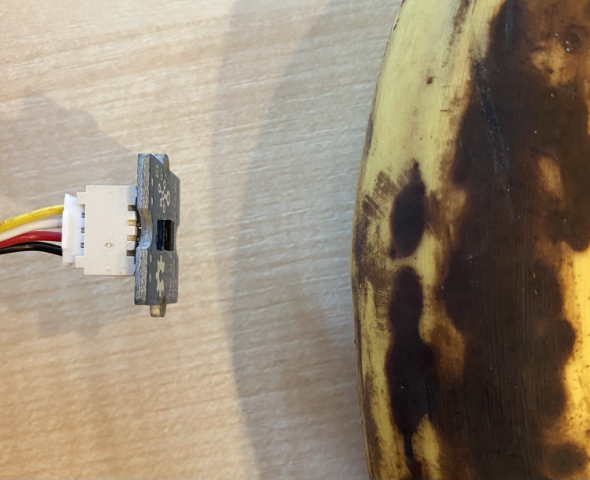
Di laser rangefinder dey for di back of di sensor, di opposite side to di Grove socket.
Dis na I2C sensor.
Connect di time of flight sensor
Di Grove time of flight sensor fit connect to di Raspberry Pi.
Task - connect di time of flight sensor
Connect di time of flight sensor.
-
Put one end of di Grove cable inside di socket for di time of flight sensor. E go only fit enter one way.
-
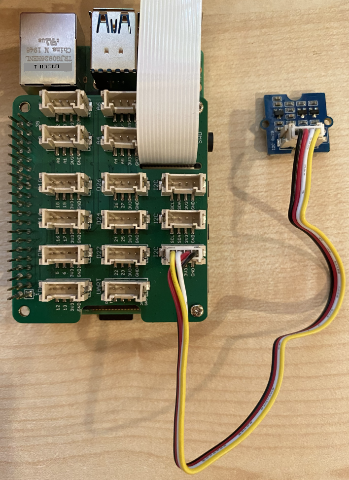
When di Raspberry Pi dey off, connect di other end of di Grove cable to one of di I2C sockets wey dem mark I2C for di Grove Base hat wey dey attach to di Pi. Dis sockets dey for di bottom row, di opposite side to di GPI pins and near di camera cable slot.
Program di time of flight sensor
Di Raspberry Pi fit now dey program to use di time of flight sensor wey dem attach.
Task - program di time of flight sensor
Program di device.
-
Power di Pi and wait make e boot.
-
Open di
fruit-quality-detectorcode for VS Code, either directly for di Pi, or connect am through di Remote SSH extension. -
Install di rpi-vl53l0x Pip package, one Python package wey dey work with VL53L0X time-of-flight distance sensor. Install am with dis pip command
pip install rpi-vl53l0x -
Create new file for dis project wey you go call
distance-sensor.py.💁 One easy way to simulate plenty IoT devices na to do each one for different Python file, then run dem at di same time.
-
Add dis code to di file:
import time

from grove.i2c import Bus
from rpi_vl53l0x.vl53l0x import VL53L0X
Dis one dey import di Grove I2C bus library, and one sensor library for di core sensor hardware wey dey inside di Grove time of flight sensor.
-
Under dis one, add dis code to access di sensor:
distance_sensor = VL53L0X(bus = Bus().bus)
distance_sensor.begin()
Dis code dey declare one distance sensor wey dey use di Grove I2C bus, then e go start di sensor.
-
Finally, add one infinite loop to dey read distances:
while True:
    distance_sensor.wait_ready()
    print(f'Distance = {distance_sensor.get_distance()} mm')
    time.sleep(1)
Dis code dey wait make value ready to read from di sensor, then e go print am for di console.
-
Run dis code.
💁 No forget say dis file name na
distance-sensor.py! Make sure say you dey run am with Python, no beapp.py. -
You go see distance measurements for di console. Put objects near di sensor and you go see di distance measurement:
pi@raspberrypi:~/fruit-quality-detector $ python3 distance_sensor.py
Distance = 29 mm
Distance = 28 mm
Distance = 30 mm
Distance = 151 mm
Di rangefinder dey for di back of di sensor, so make sure say you dey use di correct side when you dey measure distance.
💁 You fit find dis code for di code-proximity/pi folder.
😀 Your proximity sensor program don work well!
Disclaimer:
Dis docu don dey translate wit AI translation service Co-op Translator. Even though we dey try make am accurate, abeg sabi say automated translation fit get mistake or no correct well. Di original docu for im native language na di main correct source. For important information, e go beta make professional human translator check am. We no go fit take blame for any misunderstanding or wrong interpretation wey fit happen because you use dis translation.