
27 KiB






Join the Azure AI Foundry Community
If you encounter challenges or have questions about building AI applications, join other learners and experienced developers in discussions about MCP. It's a welcoming community where questions are encouraged and knowledge is shared openly.
If you have product feedback or experience issues while building, visit:

Follow these steps to start using these resources:
- Fork the Repository: Click
- Clone the Repository:
git clone https://github.com/microsoft/IoT-For-Beginners.git - Join The Microsoft Foundry Discord and connect with experts and fellow developers
🌐 Multi-Language Support
Supported via GitHub Action (Automated & Always Up-to-Date)
Arabic | Bengali | Bulgarian | Burmese (Myanmar) | Chinese (Simplified) | Chinese (Traditional, Hong Kong) | Chinese (Traditional, Macau) | Chinese (Traditional, Taiwan) | Croatian | Czech | Danish | Dutch | Estonian | Finnish | French | German | Greek | Hebrew | Hindi | Hungarian | Indonesian | Italian | Japanese | Korean | Lithuanian | Malay | Marathi | Nepali | Nigerian Pidgin | Norwegian | Persian (Farsi) | Polish | Portuguese (Brazil) | Portuguese (Portugal) | Punjabi (Gurmukhi) | Romanian | Russian | Serbian (Cyrillic) | Slovak | Slovenian | Spanish | Swahili | Swedish | Tagalog (Filipino) | Tamil | Thai | Turkish | Ukrainian | Urdu | Vietnamese
IoT for Beginners - A Curriculum
Azure Cloud Advocates at Microsoft are excited to present a 12-week, 24-lesson curriculum focused on IoT fundamentals. Each lesson includes pre- and post-lesson quizzes, detailed instructions, solutions, assignments, and more. Our project-based approach ensures you learn by building, a proven method for retaining new skills.
The projects explore the journey of food from farm to table, covering farming, logistics, manufacturing, retail, and consumer stages—key industries for IoT applications.
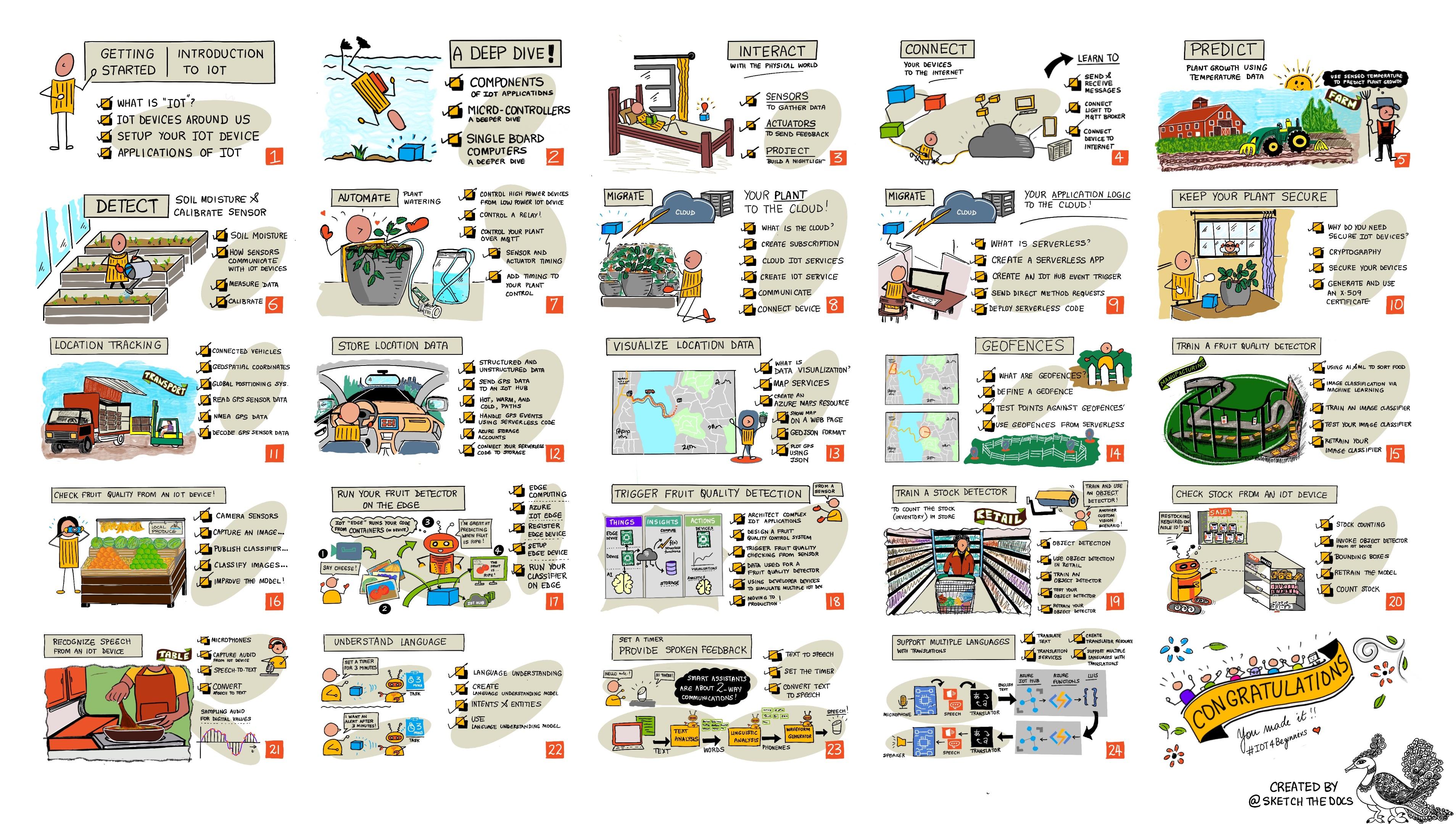
Sketchnote by Nitya Narasimhan. Click the image for a larger version.
Special thanks to our authors Jen Fox, Jen Looper, Jim Bennett, and our sketchnote artist Nitya Narasimhan.
We also appreciate the contributions of our Microsoft Learn Student Ambassadors who have reviewed and translated this curriculum - Aditya Garg, Anurag Sharma, Arpita Das, Aryan Jain, Bhavesh Suneja, Faith Hunja, Lateefah Bello, Manvi Jha, Mireille Tan, Mohammad Iftekher (Iftu) Ebne Jalal, Mohammad Zulfikar, Priyanshu Srivastav, Thanmai Gowducheruvu, and Zina Kamel.
Meet the team!
Gif by Mohit Jaisal
🎥 Click the image above for a video about the project!
Teachers, we have included some suggestions on how to use this curriculum. If you want to create your own lessons, we’ve also provided a lesson template.
Students, to use this curriculum independently, fork the repository and complete the exercises starting with the pre-lesson quiz, then read the lecture and complete the activities. Try to build the projects by understanding the lessons rather than copying the solution code, although the code is available in the /solutions folders for each project-based lesson. Another idea is to form a study group with friends and go through the content together. For further study, we recommend Microsoft Learn.
For a video overview of this course, check out this video:
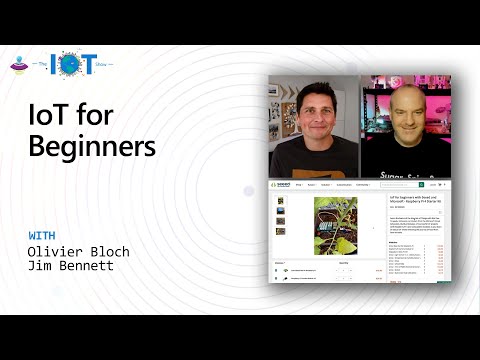
🎥 Click the image above for a video about the project!
Pedagogy
We’ve adopted two key teaching principles for this curriculum: making it project-based and including frequent quizzes. By the end of this series, students will have built a plant monitoring and watering system, a vehicle tracker, a smart factory setup to track and check food, and a voice-controlled cooking timer, while learning IoT basics such as device coding, cloud connectivity, telemetry analysis, and edge AI.
By aligning the content with projects, the learning process becomes more engaging, and concept retention is enhanced.
Additionally, a low-pressure quiz before class helps students focus on the topic, while a post-class quiz reinforces retention. This curriculum is designed to be flexible and enjoyable, allowing students to take it in full or in part. The projects start simple and grow more complex over the 12-week cycle.
Each project uses real-world hardware accessible to students and hobbyists. The curriculum also provides relevant background knowledge for each project domain. Understanding the domain helps developers solve problems effectively, and this context allows students to think about IoT solutions in real-world scenarios. Students learn the 'why' behind the solutions they build and gain an appreciation for the end user.
Hardware
We offer two IoT hardware options for the projects, depending on personal preferences, programming language knowledge, learning goals, and availability. A 'virtual hardware' version is also available for those without access to physical hardware or who want to learn more before purchasing. You can find a 'shopping list' and more details on the hardware page, including links to buy complete kits from Seeed Studio.
💁 Check out our Code of Conduct, Contributing, and Translation guidelines. We welcome your constructive feedback!
Each lesson includes:
- sketchnote
- optional supplemental video
- pre-lesson warmup quiz
- written lesson
- for project-based lessons, step-by-step guides on how to build the project
- knowledge checks
- a challenge
- supplemental reading
- assignment
- post-lesson quiz
A note about quizzes: All quizzes are located in the quiz-app folder, with a total of 48 quizzes, each containing three questions. They are linked within the lessons, but the quiz app can be run locally or deployed to Azure; follow the instructions in the
quiz-appfolder. Localization is being done gradually.
Lessons
| Project Name | Concepts Taught | Learning Objectives | Linked Lesson | |
|---|---|---|---|---|
| 01 | Getting started | Introduction to IoT | Learn the basic principles of IoT and the fundamental components of IoT solutions, such as sensors and cloud services, while setting up your first IoT device | Introduction to IoT |
| 02 | Getting started | A deeper dive into IoT | Learn more about the components of an IoT system, as well as microcontrollers and single-board computers | A deeper dive into IoT |
| 03 | Getting started | Interact with the physical world with sensors and actuators | Learn about sensors to collect data from the physical world and actuators to provide feedback, while building a nightlight | Interact with the physical world with sensors and actuators |
| 04 | Getting started | Connect your device to the Internet | Learn how to connect an IoT device to the Internet to send and receive messages by connecting your nightlight to an MQTT broker | Connect your device to the Internet |
| 05 | Farm | Predict plant growth | Learn how to predict plant growth using temperature data collected by an IoT device | Predict plant growth |
| 06 | Farm | Detect soil moisture | Learn how to detect soil moisture and calibrate a soil moisture sensor | Detect soil moisture |
| 07 | Farm | Automated plant watering | Learn how to automate and schedule watering using a relay and MQTT | Automated plant watering |
| 08 | Farm | Migrate your plant to the cloud | Learn about the cloud and cloud-hosted IoT services, and how to connect your plant to one of these instead of a public MQTT broker | Migrate your plant to the cloud |
| 09 | Farm | Migrate your application logic to the cloud | Learn how to write application logic in the cloud that responds to IoT messages | Migrate your application logic to the cloud |
| 10 | Farm | Keep your plant secure | Learn about IoT security and how to keep your plant secure using keys and certificates | Keep your plant secure |
| 11 | Transport | Location tracking | Learn about GPS location tracking for IoT devices | Location tracking |
| 12 | Transport | Store location data | Learn how to store IoT data for visualization or analysis later | Store location data |
| 13 | Transport | Visualize location data | Learn about visualizing location data on a map and how maps represent the real 3D world in 2D | Visualize location data |
| 14 | Transport | Geofences | Learn about geofences and how they can be used to alert when vehicles in the supply chain are near their destination | Geofences |
| 15 | Manufacturing | Train a fruit quality detector | Learn how to train an image classifier in the cloud to detect fruit quality | Train a fruit quality detector |
| 16 | Manufacturing | Check fruit quality from an IoT device | Learn how to use your fruit quality detector from an IoT device | Check fruit quality from an IoT device |
| 17 | Manufacturing | Run your fruit detector on the edge | Learn how to run your fruit detector on an IoT device at the edge | Run your fruit detector on the edge |
| 18 | Manufacturing | Trigger fruit quality detection from a sensor | Learn how to trigger fruit quality detection using a sensor | Trigger fruit quality detection from a sensor |
| 19 | Retail | Train a stock detector | Learn how to use object detection to train a stock detector to count inventory in a store | Train a stock detector |
| 20 | Retail | Check stock from an IoT device | Learn how to check inventory from an IoT device using an object detection model | Check stock from an IoT device |
| 21 | Consumer | Recognize speech with an IoT device | Learn how to recognize speech from an IoT device to build a smart timer | Recognize speech with an IoT device |
| 22 | Consumer | Understand language | Learn how to understand sentences spoken to an IoT device | Understand language |
| 23 | Consumer | Set a timer and provide spoken feedback | Learn how to set a timer on an IoT device and provide spoken feedback on when the timer is set and when it finishes | Set a timer and provide spoken feedback |
| 24 | Consumer | Support multiple languages | Learn how to support multiple languages, both for input and responses from your smart timer | Support multiple languages |
Offline access
You can run this documentation offline using Docsify. Fork this repository, install Docsify on your local machine, and then in the root folder of this repository, type docsify serve. The website will be served on port 3000 on your localhost: localhost:3000.
Quiz
Thanks to the community for hosting the interactive quiz that tests your knowledge of each chapter. You can test your knowledge here.
You can generate a PDF of this content for offline access if needed. To do this, ensure you have npm installed and run the following commands in the root folder of this repository:
npm i
npm run convert
Slides
Slide decks for some lessons are available in the slides folder.
Other Curricula
Our team creates other curricula! Check out:
Azure / Edge / MCP / Agents




Generative AI Series

-9333EA?style=for-the-badge&labelColor=E5E7EB&color=9333EA)
-C084FC?style=for-the-badge&labelColor=E5E7EB&color=C084FC)
-E879F9?style=for-the-badge&labelColor=E5E7EB&color=E879F9)
Core Learning







Copilot Series



Image attributions
You can find all the attributions for the images used in this curriculum where required in the Attributions.
Disclaimer:
This document has been translated using the AI translation service Co-op Translator. While we strive for accuracy, please note that automated translations may contain errors or inaccuracies. The original document in its native language should be considered the authoritative source. For critical information, professional human translation is recommended. We are not responsible for any misunderstandings or misinterpretations resulting from the use of this translation.