
9.2 KiB
Day 01
Tasks Done
-
nodeis installed -
chromeis installed -
Understood how to open console
Command+Option+J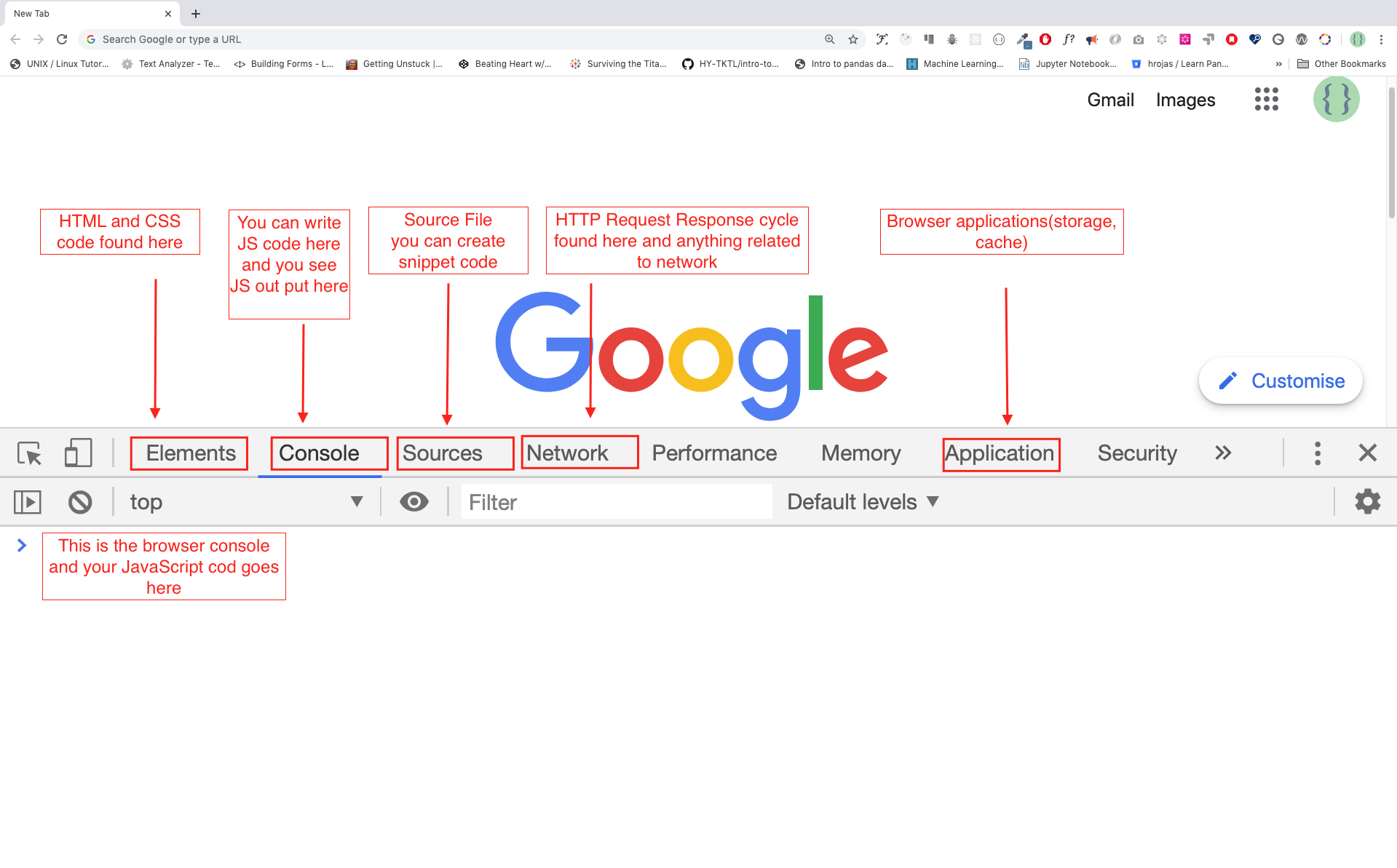
-
Console.log
console.log('Hello, World!') -
Console.log with Multiple Arguments
Theconsole.log()function can take multiple parameters separated by commas.
The syntax looks like as follows:console.log(param1, param2, param3)console.log('Hello', 'World', '!') console.log('HAPPY', 'NEW', 'YEAR', 2020) console.log('Welcome', 'to', 30, 'Days', 'Of', 'JavaScript') -
Comments
JavaScript does not execute the comment part of our code. In JavaScript, any text line starting with//is a comment, and anything enclosed like this/*..*/is also a comment.- Single Line Comment
// This is the first comment // This is the second comment // I am a single line comment - Multiline Comment
/*
This is a multiline comment
Multiline comments can take multiple lines
JavaScript is the language of the web
*/
- Single Line Comment
-
Arithmetics
console.log(2 + 3) // Addition console.log(3 - 2) // Subtraction console.log(2 * 3) // Multiplication console.log(3 / 2) // Division console.log(3 % 2) // Modulus - finding remainder console.log(3 ** 2) // Exponentiation 3 ** 2 == 3 * 3 -
Visual Studio Codeis installed -
Adding JavaScript to a Web Page
JavaScript can be added to a web page in three different ways:- Inline JavaScript
<!DOCTYPE html> <html lang="en"> <head> <title>30DaysOfScript:Inline Script</title> </head> <body> <button onclick="alert('Welcome to 30DaysOfJavaScript!')">Click Me</button> </body> </html> - Internal Script
The internal script can be written in theheador thebody, but it is preferred to put it on the body of the HTML document.<!DOCTYPE html> <html lang="en"> <head> <title>30DaysOfScript:Internal Script</title> </head> <body> <button onclick="alert('Welcome to 30DaysOfJavaScript!');">Click Me</button> <script> console.log('Welcome to 30DaysOfJavaScript') </script> </body> </html> - External Script
Similar to the internal script, the external script link can be on the header or body, but it is preferred to put it in the body.
First, we should create an external JavaScript file with .js extension. All files ending with .js extension are JavaScript files. Create a file named introduction.js inside your project directory and write the following code and link this .js file at the bottom of the body.// introduction.js console.log('Welcome to 30DaysOfJavaScript')<!-- index.html --> <!DOCTYPE html> <html lang="en"> <head> <title>30DaysOfJavaScript:External script</title> </head> <body> <!-- Before the closing tag of the body is the recommended place to put the external JavaScript script --> <script src="introduction.js"></script> </body> </html> - Multiple External Scripts
We can also link multiple external JavaScript files to a web page.// helloworld.js console.log('Hello, World!')<!-- index.html --> <!DOCTYPE html> <html lang="en"> <head> <title>Multiple External Scripts</title> </head> <body> <script src="./helloworld.js"></script> <script src="./introduction.js"></script> </body> </html>
- Inline JavaScript
-
Introduction to Data types
In JavaScript and also other programming languages, there are different types of data types. The following are JavaScript primitive data types:- Numbers
- Integers: Integer (negative, zero and positive) numbers
Example:
... -3, -2, -1, 0, 1, 2, 3 ... - Float-point numbers: Decimal number
Example
... -3.5, -2.25, -1.0, 0.0, 1.1, 2.2, 3.5 ...
- Integers: Integer (negative, zero and positive) numbers
Example:
- Strings
A collection of one or more characters between two single quotes, double quotes, or backticks.
Example:'a' 'Asabeneh' "Asabeneh" 'Finland' 'JavaScript is a beautiful programming language' 'I love teaching' 'I hope you are enjoying the first day' `We can also create a string using a backtick` 'A string could be just as small as one character or as big as many pages' 'Any data type under a single quote, double quote or backtick is a string' - Booleans
A boolean value is either True or False. Any comparisons returns a boolean value, which is either true or false.
A boolean data type is either a true or false value.
Example:true // if the light is on, the value is true false // if the light is off, the value is false - Undefined
In JavaScript, if we don't assign a value to a variable, the value is undefined. In addition to that, if a function is not returning anything, it returns undefined.let firstName console.log(firstName) // undefined, because it is not assigned to a value yet - Null
Null in JavaScript means an empty value.let emptyValue = null
- Numbers
-
Checking Data Types
To check the data type of a certain variable, we use thetypeofoperator. See the following example.console.log(typeof 'Asabeneh') // string console.log(typeof 5) // number console.log(typeof true) // boolean console.log(typeof null) // object type console.log(typeof undefined) // undefined -
Variables
Variables arecontainersof data.
Variables are used to store data in a memory location.
When a variable is declared, a memory location is reserved.
When a variable is assigned to a value (data), the memory space will be filled with that data.
To declare a variable, we usevar,let, orconstkeywords.letis used for a variable that changes at a different timeconstis used if the data does not change at all For example, PI, country name, gravity
A valid JavaScript variable name must follow the following rules:
- A JavaScript variable name should not begin with a number
- A JavaScript variable name does not allow special characters except dollar sign and underscore.
- A JavaScript variable name follows a camelCase convention.
- A JavaScript variable name should not have space between words.
The following are examples of valid JavaScript variables.
Example of invalid variables:firstName lastName country city capitalCity age isMarried first_name last_name is_married capital_city num1 num_1 _num_1 $num1 year2020 year_2020first-name 1_num num_#_1
💻 Day 1: Exercises
- Write a single line comment which says, comments can make code readable
// comments can make code readable - Write another single comment which says, Welcome to 30DaysOfJavaScript
// Welcome to 30DaysOfJavaScript - Write a multiline comment which says, comments can make code readable, easy to reuse
and informative
/* comments can make code readable, easy to resuse and informative */ - Create a variable.js file and declare variables and assign string, boolean, undefined and null data types
// variable.js let stringVar = "I am a String Literal"; let booleanVar = true; let undefinedVar; let nullVar = null; - Create datatypes.js file and use the JavaScript typeof operator to check different data types. Check the data type of each variable
// datatypes.js console.log(typeof(stringVar)); console.log(typeof(booleanVar)); console.log(typeof(undefinedVar)); console.log(typeof(nullVar)); - Declare four variables without assigning values
let stringVar; let booleanVar; let undefinedVar; let nullVar; - Declare four variables with assigned values
let stringVar = "I am a String Literal"; let booleanVar = true; let undefinedVar = "Finally Defined..!!"; let nullVar = null; - Declare variables to store your first name, last name, marital status, country and age in multiple lines
let firstName = "Nishant"; let lastName = "Goyal"; let isMarried = true; let country = "India"; let age = 31; - Declare variables to store your first name, last name, marital status, country and age in a single line
let firstName = "Nishant", lastName = "Goyal", isMarried = true, country = "India", age = 31; - Declare two variables myAge and yourAge and assign them initial values and log to the browser console.
let myAge = 31;
let yourAge = 30;
console.log("I am " + myAge + " years old.");
console.log("You are " + yourAge + " years old.");