
mirror of https://github.com/flutter/samples.git
main
master_archived
${ noResults }
4 Commits (a1ed3be4b76d2a3aaacc2463d2ca91d146f61dfc)
| Author | SHA1 | Message | Date |
|---|---|---|---|
 Miguel Beltran
|
0c88289339
|
[Compass App] Booking screen (#2380)
This PR adds the Booking screen at the end of the main app flow. After the user selects `Activity`s, these get stored in the `ItineraryConfig` and then the user navigates to the `BookingScreen`. In the `BookingScreen`, a `Booking` is generated with the `BookingCreateComponent`. This component communicates with multiple repositories, and it is a bit more complex than the average view model, something that we want to show as discussed in the previous PRs. <details> <summary>Screenshots</summary>   </details> In the `BookingScreen`, the user can tap on "share trip" which displays the OS share sheet functionality. This uses the plugin `share_plus`, but the functionality is also wrapped in the `BookingShareComponent`, which takes a `Booking` object and creates a shareable string, then calls to the `Share.share()` method from `share_plus`. But the `share_plus` dependency is also injected into the `BookingShareComponent`, allowing us to unit test without plugin dependencies. This is an example of a shared booking to instant messaging: 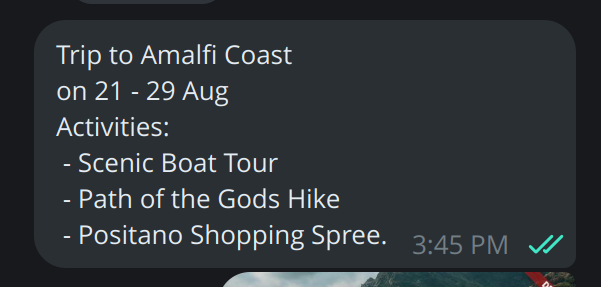 **TODO** - I want to take a look at the whole experience on mobile, as I noticed some inconsistent UI and navigation issues that I couldn't see on Desktop. I will submit those in a new PR. - We also talked about user authentication in the design document. I will work on that once we are happy with the main app flow. ## Pre-launch Checklist - [x] I read the [Flutter Style Guide] _recently_, and have followed its advice. - [x] I signed the [CLA]. - [x] I read the [Contributors Guide]. - [x] I updated/added relevant documentation (doc comments with `///`). - [x] All existing and new tests are passing. If you need help, consider asking for advice on the #hackers-devrel channel on [Discord]. <!-- Links --> [Flutter Style Guide]: https://github.com/flutter/flutter/blob/master/docs/contributing/Style-guide-for-Flutter-repo.md [CLA]: https://cla.developers.google.com/ [Discord]: https://github.com/flutter/flutter/blob/master/docs/contributing/Chat.md [Contributors Guide]: https://github.com/flutter/samples/blob/main/CONTRIBUTING.md |
2 years ago |
|
Miguel Beltran
|
0305894b0e
|
Compass App: Activities screen, error handling and logs (#2371)
This PR introduces the Activities screen, handling of errors in view models and commands, and logs using the dart `logging` package. **Activities** - The screen loads a list of activities, split in daytime and evening activities, and the user can select them. - Server adds the endpoint `/destination/<id>/activitity` which was missing before. Screencast provided: [Screencast from 2024-07-29 16-29-02.webm](https://github.com/user-attachments/assets/a56024d8-0a9c-49e7-8fd0-c895da15badc) **Error handling** _UI Error handling:_ In the screencast you can see a `SnackBar` appearing, since the "Confirm" button is not yet implemented. The `saveActivities` Command returns an error `Result.error()`, then the error state is exposed by the Command and consumed by the listener in the `ActivityScreen`, which displays a `SnackBar` and consumes the state. Functionality is similar to the one found in [UI events - Consuming events can trigger state updates](https://developer.android.com/topic/architecture/ui-layer/events#consuming-trigger-updates) from the Android architecture guide, as the command state is "consumed" and cleared. The Snackbar also includes an action to "try again". Tapping on it calls to the failed Command `execute()` so users can run the action again. For example, here the `saveActivities` command failed, so `error` is `true`. Then we call to `clearResult()` to remove the failed status, and show a `SnackBar`, with the `SnackBarAction` that runs `saveActivities` again when tapped. ```dart if (widget.viewModel.saveActivities.error) { widget.viewModel.saveActivities.clearResult(); ScaffoldMessenger.of(context).showSnackBar( SnackBar( content: const Text('Error while saving activities'), action: SnackBarAction( label: "Try again", onPressed: widget.viewModel.saveActivities.execute, ), ), ); } ``` Since commands expose `running`, `error` and `completed`, it is easy to implement loading and error indicator widgets: [Screencast from 2024-07-29 16-55-42.webm](https://github.com/user-attachments/assets/fb5772d0-7b9d-4ded-8fa2-9ce347f4d555) As side node, we can easily simulate that state by adding these lines in any of the repository implementations: ```dart await Future.delayed(Durations.extralong1); return Result.error(Exception('ERROR!')); ``` _In-code error handling:_ The project introduces the `logging` package. In the entry point `main_development.dart` the log level is configured. Then in code, a `Logger` is creaded in each View Model with the name of the class. Then the log calls are used depending on the `Result` response, some finer traces are also added. By default, they are printed to the IDE debug console, for example: ``` [SearchFormViewModel] Continents (7) loaded [SearchFormViewModel] ItineraryConfig loaded [SearchFormViewModel] Selected continent: Asia [SearchFormViewModel] Selected date range: 2024-07-30 00:00:00.000 - 2024-08-08 00:00:00.000 [SearchFormViewModel] Set guests number: 1 [SearchFormViewModel] ItineraryConfig saved ``` **Other changes** - The json files containing destinations and activities are moved into the `app/assets/` folders, and the server is querying those files instead of their own copy. This is done to avoid file duplication but we can make a copy of those assets files for the server if we decide to. **TODO Next** - I will implement the "book a trip" screen which would complete the main application flow, which should introduce a more complex "component/use case" outside a view model. ## Pre-launch Checklist - [x] I read the [Flutter Style Guide] _recently_, and have followed its advice. - [x] I signed the [CLA]. - [x] I read the [Contributors Guide]. - [x] I updated/added relevant documentation (doc comments with `///`). - [x] All existing and new tests are passing. If you need help, consider asking for advice on the #hackers-devrel channel on [Discord]. <!-- Links --> [Flutter Style Guide]: https://github.com/flutter/flutter/blob/master/docs/contributing/Style-guide-for-Flutter-repo.md [CLA]: https://cla.developers.google.com/ [Discord]: https://github.com/flutter/flutter/blob/master/docs/contributing/Chat.md [Contributors Guide]: https://github.com/flutter/samples/blob/main/CONTRIBUTING.md |
2 years ago |
|
Miguel Beltran
|
175195eae6
|
Compass App: Add "Activities", "Itinerary Config" and MVVM Commands (#2366)
Part of the WIP for the Compass App example. Merge to `compass-app`. This PR introduces: - A new feature for Activities (UI unfinished). - A repository for the current Itinerary Configuration. - A `Command` utils class to be used in View Models. **Activities** - PR adds the `compass_app/app/assets/activities.json` (large file!) - Created `ActivityRepository` with local and remote implementation. - Added `getActivitiesByDestination` to `ApiClient` - Added `Activity` data model - Created `ActivitiesScreen` and `ActivitiesViewModel`. - WIP: Decided to finish the UI later due to the size the PR was taking. - WIP: Server implementation for Activities will be completed in another PR. **Itinerary Configuration** - Created the `ItineraryConfigRepository` with an "in-memory" implementation. (local database or shared preferences could potentially be implemented too) - Refactored the way screens share data, instead of passing data using the navigator query parameters, the screens store the state (the itinerary configuration) in this repository, and load it when the screen is opened. - This allows to navigate between screens, back and forth, and keep the selection of data the user made. **Commands** - To handle button taps and other running actions. - Encapsulates an action, exposes the running state (to show progress indicators), and ensures that the action cannot execute if it is already running (to avoid multiple taps on buttons). - Two implementations included, one without arguments `Command0`, and one that supports a single argument `Command1`. - Commands also provide an `onComplete` callback, in case the UI needs to do something when the action finished running (e.g. navigate). - Tests are included. **TODO in further PRs** - Finish the Activities UI and continue implementing the app flow. - Introduce an error handling solution. - Move the data jsons into a common folder (maybe a package?) so they can be shared between app and server and don't duplicate files. **Screencast** As it can be observed, the state of the screen is recovered from the stored "itinerary config". Note: Activites screen appears empty, the list is just printed on terminal at the moment. [Screencast from 2024-07-23 10-58-40.webm](https://github.com/user-attachments/assets/54805c66-2938-48dd-8f63-a26b1e88eab6) ## Pre-launch Checklist - [x] I read the [Flutter Style Guide] _recently_, and have followed its advice. - [x] I signed the [CLA]. - [x] I read the [Contributors Guide]. - [x] I updated/added relevant documentation (doc comments with `///`). - [x] All existing and new tests are passing. If you need help, consider asking for advice on the #hackers-devrel channel on [Discord]. <!-- Links --> [Flutter Style Guide]: https://github.com/flutter/flutter/blob/master/docs/contributing/Style-guide-for-Flutter-repo.md [CLA]: https://cla.developers.google.com/ [Discord]: https://github.com/flutter/flutter/blob/master/docs/contributing/Chat.md [Contributors Guide]: https://github.com/flutter/samples/blob/main/CONTRIBUTING.md |
2 years ago |
|
Miguel Beltran
|
be0b3dc0d1
|
Compass App: Add "server" dart shelf-app and "shared" dart package (#2359)
This PR introduces two new subprojects: - `compass_server` under `compass_app/server`. - `compass_model` under `compass_app/model`. **`compass_server`** - Dart server implemented using `shelf`. - Created with the `dart create -t server-shelf` template. - Implements two REST endpoints: - `GET /continent`: Returns the list of `Continent` as JSON. - `GET /destination`: Returns the list of `Destination` as JSON. - Generated Docker files have been removed. - Implemented tests. - TODO: Implement some basic auth. **`compass_model`** - Dart package to share data model classes between the `server` and `app`. - Contains the data model classes (`Continent`, `Destination`). - Generated JSON from/To methods and data classes using `freezed`. - The sole purpose of this package is to host the data model. Other shared code should go in a different package. **Other changes** - Created an API Client to connect to the local dart server. - Created "remote" repositories, which also implement a basic in-memory caching strategy. - Created two dependency configurations, one with local repositories and one with remote repos. - Created two application main targets to select configuration: - `lib/main_development.dart` which starts the app with the "local" data configuration. - `lib/main_staging.dart` which starts the app with the "remove" (local dart server) configuration. - `lib/main.dart` still works as default entry point. - Implemented tests for remote repositories. ## Pre-launch Checklist - [x] I read the [Flutter Style Guide] _recently_, and have followed its advice. - [x] I signed the [CLA]. - [x] I read the [Contributors Guide]. - [x] I updated/added relevant documentation (doc comments with `///`). - [x] All existing and new tests are passing. If you need help, consider asking for advice on the #hackers-devrel channel on [Discord]. <!-- Links --> [Flutter Style Guide]: https://github.com/flutter/flutter/blob/master/docs/contributing/Style-guide-for-Flutter-repo.md [CLA]: https://cla.developers.google.com/ [Discord]: https://github.com/flutter/flutter/blob/master/docs/contributing/Chat.md [Contributors Guide]: https://github.com/flutter/samples/blob/main/CONTRIBUTING.md |
2 years ago |