
 Sounmay
3a561404f0
Sounmay
3a561404f0
|
7 years ago | |
|---|---|---|
| .github/ISSUE_TEMPLATE | 8 years ago | |
| Projects | 7 years ago | |
| .DS_Store | 8 years ago | |
| .gitignore | 7 years ago | |
| CODE_OF_CONDUCT.md | ||
| CONTRIBUTING.md | 8 years ago | |
| Example Guide.md | 8 years ago | |
| LICENSE | ||
| README.md | 7 years ago | |
| app-ideas.png | 8 years ago | |
| build.gradle | 7 years ago | |
| gradle.properties | 7 years ago | |
| gradlew | 7 years ago | |
| gradlew.bat | 7 years ago | |
| settings.gradle | 7 years ago | |

README.md
Book Search Demo
Android app that leverages the OpenLibrary API to search books and display cover images. It also allows you to recommend books to friends. See the Book Search Tutorial on our cliffnotes for a step-by-step tutorial.
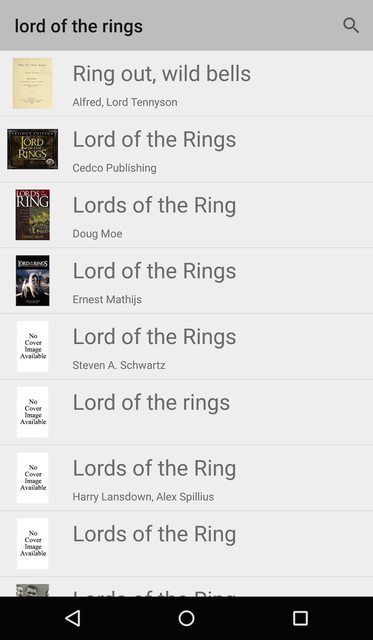
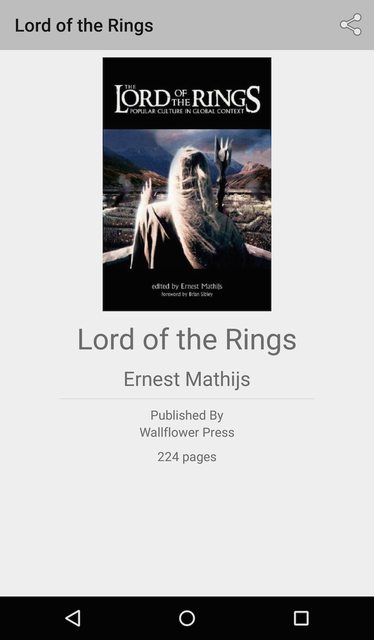
The app is composed of two screens. The first screen displays a list of books, in which, each book is described by its title, author and cover photo. After a user selects a book from the list, a second screen appears displaying additional details about the book, including the publisher and no. of pages.
Book List
Book Details
Overview
The app does the following:
- Search a list of books using the OpenLibrary Search API
- Display the list of books with their cover images and details
- Replace ActionBar with Toolbar
- Use SearchView to search for books with a title
- Show ProgressBar before each network request
- Add a detail view to display more information about the selected book from the list
- Use a share intent to recommend a book to friends
To achieve this, there are five different components in this app:
BookClient- Responsible for executing the API requests and retrieving the JSONBook- Model object responsible for encapsulating the attributes for each individual bookBookAdapter- Responsible for mapping eachBookto a particular view layoutBookListActivity- Responsible for fetching and deserializing the data, configuring the adapter and providing a search interfaceBookDetailActivity- Responsible for providing book detail view and share intent.
See the Book Search Tutorial on our cliffnotes for a step-by-step tutorial.
Libraries
This app leverages two third-party libraries:
- Android AsyncHTTPClient - For asynchronous network requests
- Picasso - For remote image loading