
 chris
7e58c1e582
chris
7e58c1e582
|
12 months ago | |
|---|---|---|
| .. | ||
| assets | 12 months ago | |
| backend | 12 months ago | |
| frontend | 12 months ago | |
| README.md | 12 months ago | |
README.md
Chat project
This chat project shows how to build a Chat Assistant using GitHub Models.
Here's what the finished project looks like:
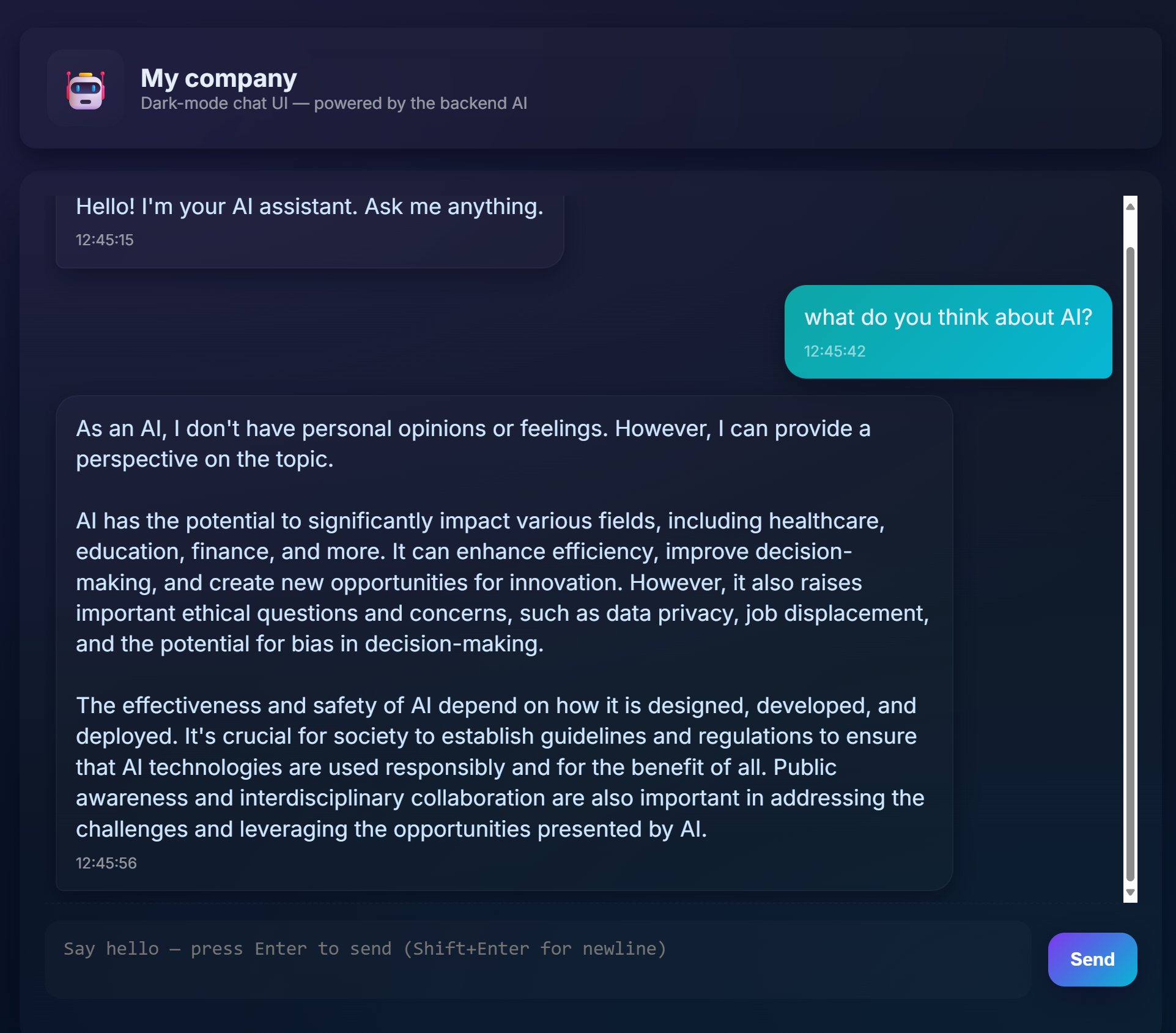
Some context, building Chat assistants using generative AI is a great way to start learning about AI. What you'll learn is to integrate generative AI into a web app throughout this lesson, let's begin.
Connecting to generative AI
For the backend, we're using GitHub Models. It's a great service that enables you to use AI for free. Go to its playground and grab code that corresponds to your chosen backend language. Here's what it looks like at GitHub Models Playground

As we said, select the "Code" tab and your chosen runtime.

In this case we select Python, which will mean we pick this code:
"""Run this model in Python

> pip install openai
"""
import os
from openai import OpenAI

# To authenticate with the model you will need to generate a personal access token (PAT) in your GitHub settings.
# Create your PAT token by following instructions here: https://docs.github.com/en/authentication/keeping-your-account-and-data-secure/managing-your-personal-access-tokens
client = OpenAI(
    base_url="https://models.github.ai/inference",
    api_key=os.environ["GITHUB_TOKEN"],
)

response = client.chat.completions.create(
    messages=[
        {
            "role": "system",
            "content": "",
        },
        {
            "role": "user",
            "content": "What is the capital of France?",
        }
    ],
    model="openai/gpt-4o-mini",
    temperature=1,
    max_tokens=4096,
    top_p=1
)

print(response.choices[0].message.content)
Let's clean up this code a bit so it's reusable:
def call_llm(prompt: str, system_message: str):
    response = client.chat.completions.create(
        messages=[
            {
                "role": "system",
                "content": system_message,
            },
            {
                "role": "user",
                "content": prompt,
            }
        ],
        model="openai/gpt-4o-mini",
        temperature=1,
        max_tokens=4096,
        top_p=1
    )

    return response.choices[0].message.content
With this function call_llm we can now take a prompt and a system prompt and the function ends up returning the result.
customize
If you want to customize the AI assistant you can specify how you want it to behave by populating the system prompt like so:
call_llm("Tell me about you", "You're Albert Einstein, you only know of things in the time you were alive")
Expose it via a Web API
Great, we have an AI part done, let's see how we can integrate that into a Web API. For the Web API, we're choosing to use Flask, but any web framework should be good. Let's see the code for it:
# api.py
from flask import Flask, request, jsonify
from llm import call_llm
from flask_cors import CORS

app = Flask(__name__)
CORS(app)   # *   example.com

@app.route("/", methods=["GET"])
def index():
    return "Welcome to this API. Call POST /hello with 'message': 'my message' as JSON payload"


@app.route("/hello", methods=["POST"])
def hello():
    # get message from request body  { "message": "do this taks for me" }
    data = request.get_json()
    message = data.get("message", "")

    response = call_llm(message, "You are a helpful assistant.")
    return jsonify({
        "response": response
    })

if __name__ == "__main__":
    app.run(host="0.0.0.0", port=5000)
Here, we create a flask API and define a default route "/" and "/chat". The latter is meant to be used by our frontend to pass questions to it.
To integrate llm.py here's what we need to do:
-
Import the
call_llmfunction:from llm import call_llm from flask import Flask, request -
Call it from the "/chat" route:
@app.route("/hello", methods=["POST"])
def hello():
   # get message from request body  { "message": "do this taks for me" }
   data = request.get_json()
   message = data.get("message", "")

   response = call_llm(message, "You are a helpful assistant.")
   return jsonify({
      "response": response
   })
Here we parse the incoming request to retrieve the
messageproperty from the JSON body. Thereafter we call the LLM with this call:response = call_llm(message, "You are a helpful assistant") # return the response as JSON return jsonify({ "response": response })
Great, now we have done what we need.
cors
We should call out that we set up something like CORS, cross-origin resource sharing. This means that because our backend and frontend will ron on different ports, we need to allow the frontend to call into the backend. There's a piece of code in api.py that sets this up:
from flask_cors import CORS

app = Flask(__name__)
CORS(app)   # *   example.com
Right now it's been set up to allow "*" which is all origins and that's a bit unsafe, we should restrict it once we go to production.
all together
Ok, so we have llm.py and api.py, how can we make this work with a backend? Well, there's two things we need to do:
-
Install dependencies:
cd backend python -m venv venv source ./venv/bin/activate pip install openai flask flask-cors openai -
Start the API
python api.pyIf you're in Codespaces you need to go to Ports in the bottom part of the editor, right-click over it and click Port Visibility" and select "Public".
Work on a frontend
Now that we have an API up and running, let's create a frontend for this. A bare minimum frontend that we will improve stepwise. In a frontend folder, create the following:
backend/
frontend/
index.html
app.js
styles.css
Let's start with index.html:
<html>
    <head></head>
    <body>
      <form>
        <input type="text">
      </form>

    </body>
</html>