
102 KiB
Gumawa ng Chat Assistant gamit ang AI
Naalala mo ba sa Star Trek kung paano nakikipag-usap ang crew sa computer ng barko, nagtatanong ng mahihirap na tanong at nakakatanggap ng makabuluhang sagot? Ang tila purong science fiction noong 1960s ay ngayon ay kaya mo nang gawin gamit ang mga teknolohiyang web na alam mo na.
Sa araling ito, gagawa tayo ng AI chat assistant gamit ang HTML, CSS, JavaScript, at ilang backend integration. Matutuklasan mo kung paano ang parehong mga kasanayan na natutunan mo ay maaaring kumonekta sa makapangyarihang AI services na nakakaunawa ng konteksto at bumubuo ng makabuluhang sagot.
Isipin ang AI na parang may access ka sa isang napakalaking library na hindi lang naghahanap ng impormasyon kundi nag-synthesize din nito sa malinaw na sagot na naaayon sa iyong mga tanong. Sa halip na maghanap sa libu-libong pahina, makakakuha ka ng direktang, kontekstwal na sagot.
Ang integration ay nangyayari sa pamamagitan ng mga pamilyar na teknolohiyang web na nagtutulungan. Ang HTML ang gumagawa ng chat interface, ang CSS ang nag-aayos ng disenyo, ang JavaScript ang namamahala sa interaksyon ng user, at ang backend API ang nagkokonekta sa lahat sa AI services. Katulad ito ng kung paano nagtutulungan ang iba't ibang seksyon ng orchestra upang makabuo ng isang symphony.
Sa esensya, gumagawa tayo ng tulay sa pagitan ng natural na komunikasyon ng tao at pagproseso ng makina. Matutunan mo ang parehong teknikal na implementasyon ng AI service integration at ang mga disenyo na nagpapadama sa interaksyon na intuitive.
Sa pagtatapos ng araling ito, ang AI integration ay magiging mas pamilyar, parang isa pang API na kaya mong gamitin. Maiintindihan mo ang mga pundasyong pattern na nagpapagana sa mga aplikasyon tulad ng ChatGPT at Claude, gamit ang parehong mga prinsipyo ng web development na natutunan mo.
⚡ Mga Kaya Mong Gawin sa Loob ng 5 Minuto
Mabilisang Landas para sa Abalang Developer
flowchart LR
    A[⚡ 5 minutes] --> B[Get GitHub token]
    B --> C[Test AI playground]
    C --> D[Copy Python code]
    D --> E[See AI responses]
- Minuto 1: Bisitahin ang GitHub Models Playground at gumawa ng personal access token
- Minuto 2: Subukan ang AI interactions direkta sa playground interface
- Minuto 3: I-click ang "Code" tab at kopyahin ang Python snippet
- Minuto 4: Patakbuhin ang code sa lokal gamit ang iyong token:
GITHUB_TOKEN=your_token python test.py - Minuto 5: Panoorin ang unang AI response na nabuo mula sa sarili mong code
Mabilisang Test Code:
import os
from openai import OpenAI

client = OpenAI(
    base_url="https://models.github.ai/inference",
    api_key="your_token_here"
)

response = client.chat.completions.create(
    messages=[{"role": "user", "content": "Hello AI!"}],
    model="openai/gpt-4o-mini"
)

print(response.choices[0].message.content)
Bakit Ito Mahalaga: Sa loob ng 5 minuto, mararanasan mo ang magic ng programmatic AI interaction. Ito ang pundasyon na nagpapagana sa bawat AI application na ginagamit mo.
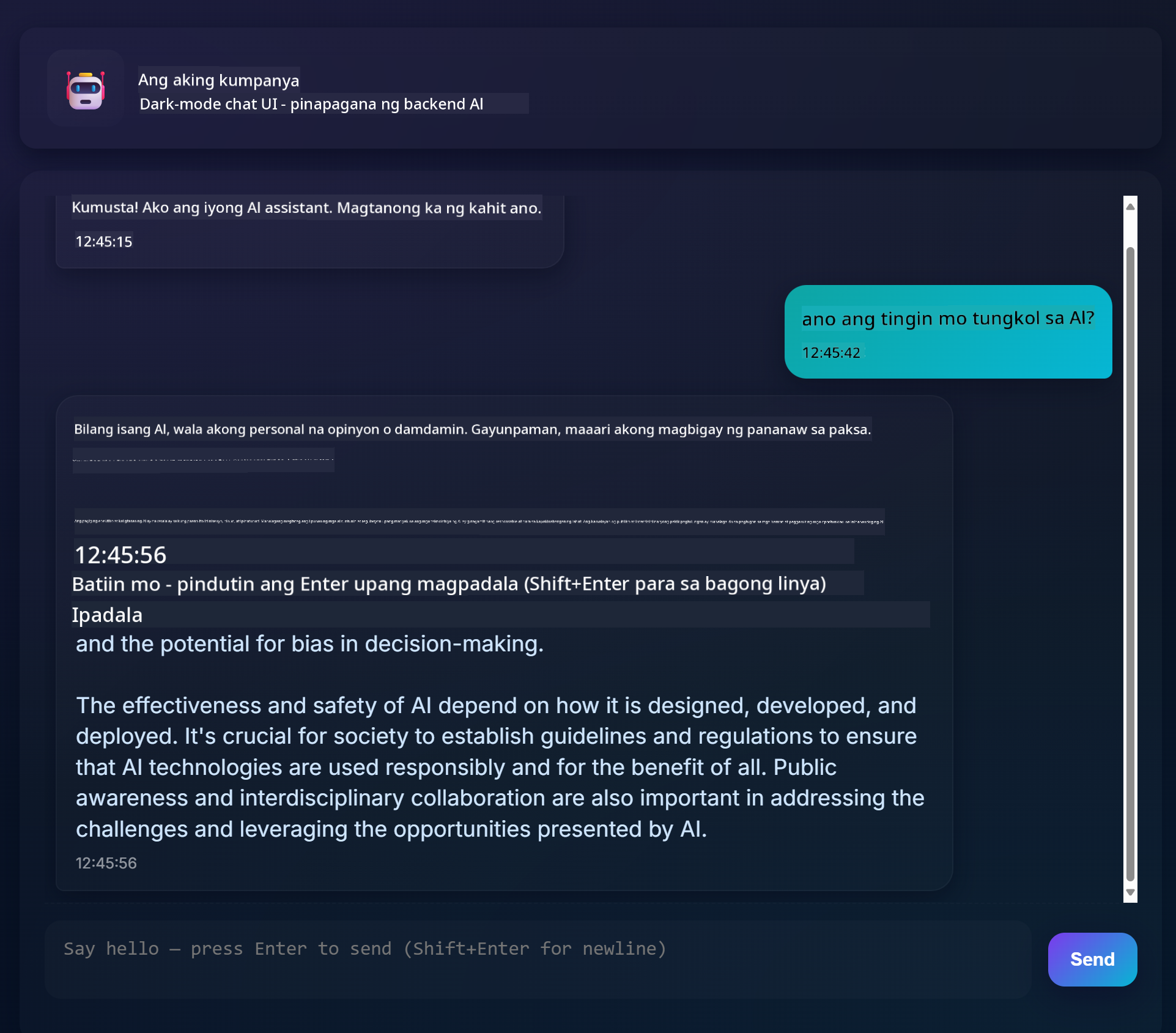
Ganito ang magiging hitsura ng iyong natapos na proyekto:
🗺️ Ang Iyong Paglalakbay sa Pagbuo ng AI Application
journey
    title From Web Development to AI Integration
    section Understanding AI Foundations
      Discover generative AI concepts: 4: You
      Explore GitHub Models platform: 6: You
      Master AI parameters and prompts: 8: You
    section Backend Integration
      Build Python API server: 5: You
      Implement AI function calls: 7: You
      Handle async operations: 8: You
    section Frontend Development
      Create modern chat interface: 6: You
      Master real-time interactions: 8: You
      Build responsive user experience: 9: You
    section Professional Application
      Deploy complete AI system: 7: You
      Optimize performance patterns: 8: You
      Create production-ready app: 9: You
Destinasyon ng Iyong Paglalakbay: Sa pagtatapos ng araling ito, makakabuo ka ng kumpletong AI-powered application gamit ang parehong teknolohiya at pattern na nagpapagana sa mga modernong AI assistant tulad ng ChatGPT, Claude, at Google Bard.
Pag-unawa sa AI: Mula sa Misteryo Patungo sa Mastery
Bago sumabak sa code, unawain muna natin kung ano ang ating ginagawa. Kung nakagamit ka na ng APIs dati, alam mo ang basic na pattern: magpadala ng request, tumanggap ng response.
Ang AI APIs ay sumusunod sa parehong istruktura, ngunit sa halip na kumuha ng pre-stored na data mula sa database, bumubuo sila ng bagong sagot batay sa mga pattern na natutunan mula sa napakaraming teksto. Isipin ito na parang pagkakaiba ng library catalog system at isang librarian na marunong mag-synthesize ng impormasyon mula sa maraming mapagkukunan.
Ano nga ba ang "Generative AI"?
Isipin kung paano ang Rosetta Stone ay nagbigay-daan sa mga iskolar na maunawaan ang Egyptian hieroglyphics sa pamamagitan ng paghahanap ng mga pattern sa pagitan ng kilala at hindi kilalang wika. Ganito rin gumagana ang AI models – naghahanap sila ng mga pattern sa napakaraming teksto upang maunawaan kung paano gumagana ang wika, at ginagamit ang mga pattern na ito upang bumuo ng angkop na sagot sa mga bagong tanong.
Hayaan kong ipaliwanag ito gamit ang simpleng paghahambing:
- Tradisyunal na database: Parang humihingi ng birth certificate – makukuha mo ang eksaktong dokumento tuwing hihilingin mo ito
- Search engine: Parang humihingi sa librarian na maghanap ng mga libro tungkol sa pusa – ipapakita nila kung ano ang available
- Generative AI: Parang nagtatanong sa isang matalinong kaibigan tungkol sa pusa – sasabihin nila ang mga kawili-wiling bagay sa sarili nilang salita, naaayon sa gusto mong malaman
graph LR
    A[Your Question] --> B[AI Model]
    B --> C[Pattern Recognition]
    C --> D[Content Generation]
    D --> E[Contextual Response]

    F[Training Data<br/>Books, Articles, Web] --> B
Paano Natututo ang AI Models (Simpleng Bersyon)
Ang AI models ay natututo sa pamamagitan ng exposure sa napakalaking datasets na naglalaman ng teksto mula sa mga libro, artikulo, at usapan. Sa prosesong ito, natutukoy nila ang mga pattern sa:
- Paano istruktura ang mga ideya sa nakasulat na komunikasyon
- Aling mga salita ang karaniwang magkasama
- Paano karaniwang dumadaloy ang mga usapan
- Mga pagkakaiba sa konteksto sa pagitan ng pormal at impormal na komunikasyon
Katulad ito ng kung paano binibigyang-kahulugan ng mga archaeologist ang sinaunang wika: sinusuri nila ang libu-libong halimbawa upang maunawaan ang grammar, bokabularyo, at konteksto ng kultura, hanggang sa kaya na nilang bigyang-kahulugan ang mga bagong teksto gamit ang mga natutunang pattern.
Bakit GitHub Models?
Ginagamit natin ang GitHub Models para sa praktikal na dahilan – nagbibigay ito ng access sa enterprise-level AI nang hindi kailangang mag-set up ng sarili nating AI infrastructure (na, maniwala ka, hindi mo gugustuhing gawin ngayon!). Isipin ito na parang paggamit ng weather API sa halip na subukang hulaan ang panahon sa pamamagitan ng pag-set up ng mga weather station sa bawat lugar.
Ito ay "AI-as-a-Service," at ang pinakamagandang bahagi? Libre itong simulan, kaya maaari kang mag-eksperimento nang hindi nag-aalala sa malaking gastusin.
graph LR
    A[Frontend Chat UI] --> B[Your Backend API]
    B --> C[GitHub Models API]
    C --> D[AI Model Processing]
    D --> C
    C --> B
    B --> A
Gagamitin natin ang GitHub Models para sa ating backend integration, na nagbibigay ng access sa professional-grade AI capabilities sa pamamagitan ng developer-friendly interface. Ang GitHub Models Playground ay nagsisilbing testing environment kung saan maaari kang mag-eksperimento sa iba't ibang AI models at maunawaan ang kanilang kakayahan bago ito i-implement sa code.
🧠 Ecosystem ng Pagbuo ng AI Application
mindmap
  root((AI Development))
    Understanding AI
      Generative Models
        Pattern Recognition
        Content Generation
        Context Understanding
        Response Synthesis
      AI Parameters
        Temperature Control
        Token Limits
        Top-p Filtering
        System Prompts
    Backend Architecture
      API Integration
        GitHub Models
        Authentication
        Request Handling
        Error Management
      Python Infrastructure
        FastAPI Framework
        Async Operations
        Environment Security
        CORS Configuration
    Frontend Experience
      Chat Interface
        Real-time Updates
        Message History
        User Feedback
        Loading States
      Modern Web Tech
        ES6 Classes
        Async/Await
        DOM Manipulation
        Event Handling
    Professional Patterns
      Security Best Practices
        Token Management
        Input Validation
        XSS Prevention
        Error Boundaries
      Production Readiness
        Performance Optimization
        Responsive Design
        Accessibility
        Testing Strategies
Pangunahing Prinsipyo: Ang pagbuo ng AI application ay pinagsasama ang tradisyunal na kasanayan sa web development at AI service integration, na lumilikha ng matatalinong aplikasyon na natural at tumutugon sa mga user.
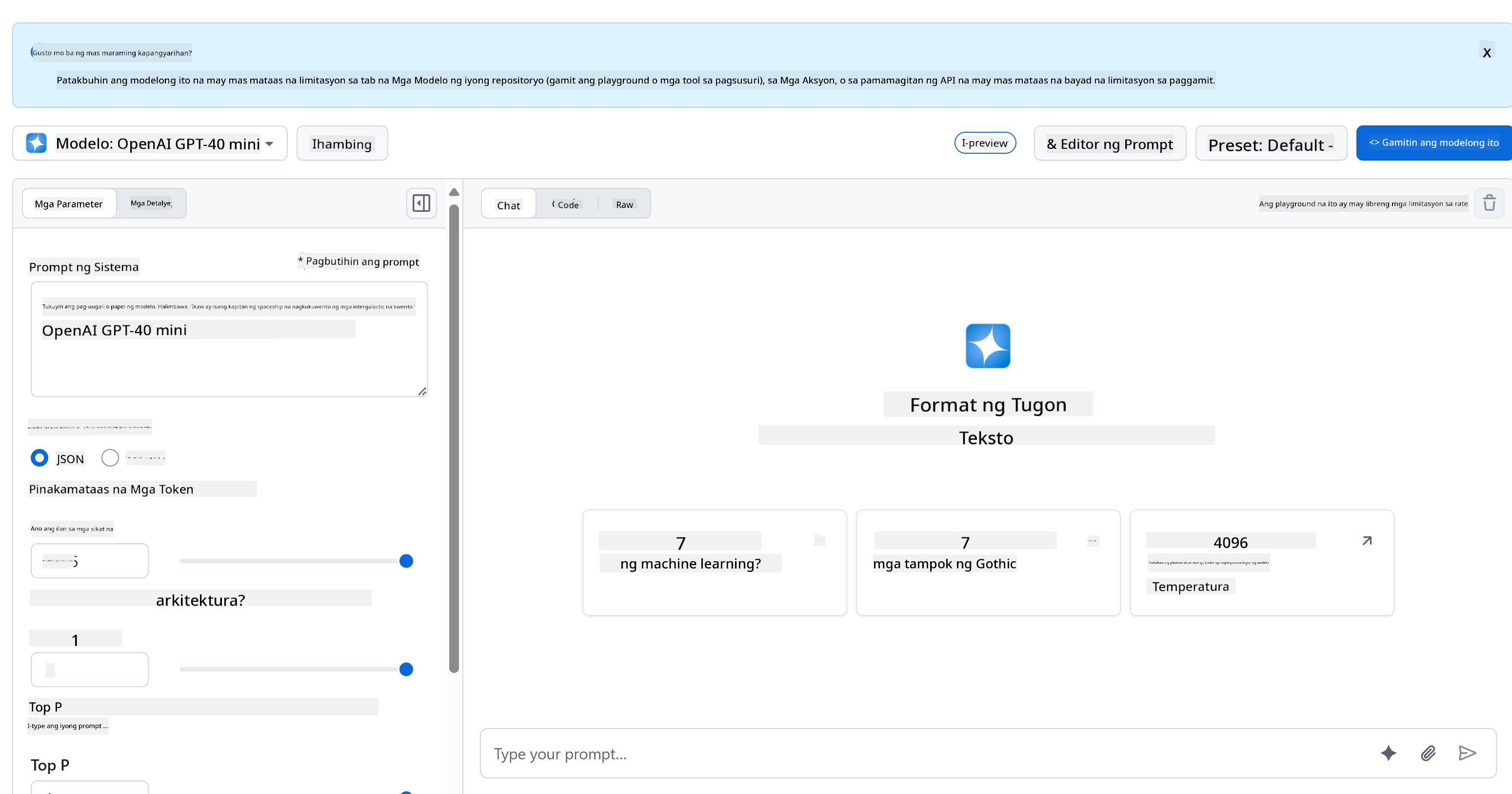
Narito kung bakit kapaki-pakinabang ang playground:
- Subukan ang iba't ibang AI models tulad ng GPT-4o-mini, Claude, at iba pa (lahat libre!)
- I-test ang iyong mga ideya at prompts bago ka magsulat ng code
- Kumuha ng ready-to-use code snippets sa paborito mong programming language
- I-tweak ang mga setting tulad ng creativity level at response length upang makita kung paano ito nakakaapekto sa output
Kapag nakapaglaro ka na nang kaunti, i-click lang ang "Code" tab at piliin ang programming language para makuha ang implementation code na kailangan mo.

Pag-set Up ng Python Backend Integration
Ngayon, i-implement natin ang AI integration gamit ang Python. Ang Python ay mahusay para sa AI applications dahil sa simpleng syntax nito at makapangyarihang mga library. Magsisimula tayo sa code mula sa GitHub Models playground at pagkatapos ay i-refactor ito sa isang reusable, production-ready function.
Pag-unawa sa Base Implementation
Kapag kinuha mo ang Python code mula sa playground, makakakuha ka ng ganito. Huwag mag-alala kung mukhang marami ito sa simula – talakayin natin ito nang paisa-isa:
"""Run this model in Python

> pip install openai
"""
import os
from openai import OpenAI

# To authenticate with the model you will need to generate a personal access token (PAT) in your GitHub settings.
# Create your PAT token by following instructions here: https://docs.github.com/en/authentication/keeping-your-account-and-data-secure/managing-your-personal-access-tokens
client = OpenAI(
    base_url="https://models.github.ai/inference",
    api_key=os.environ["GITHUB_TOKEN"],
)

response = client.chat.completions.create(
    messages=[
        {
            "role": "system",
            "content": "",
        },
        {
            "role": "user",
            "content": "What is the capital of France?",
        }
    ],
    model="openai/gpt-4o-mini",
    temperature=1,
    max_tokens=4096,
    top_p=1
)

print(response.choices[0].message.content)
Narito ang nangyayari sa code na ito:
- Ini-import natin ang mga tools na kailangan:
ospara sa pagbabasa ng environment variables atOpenAIpara sa pakikipag-usap sa AI - Inaayos natin ang OpenAI client upang ituro sa GitHub's AI servers sa halip na direkta sa OpenAI
- Nag-aauthenticate gamit ang isang espesyal na GitHub token (higit pa tungkol dito mamaya!)
- Istruktura natin ang usapan gamit ang iba't ibang "roles" – isipin ito na parang pag-set ng eksena para sa isang play
- Nagpapadala tayo ng request sa AI na may ilang fine-tuning parameters
- Kinukuha natin ang aktwal na response text mula sa lahat ng data na bumalik
Pag-unawa sa Message Roles: Framework ng AI Conversation
Ang mga AI conversation ay gumagamit ng partikular na istruktura na may iba't ibang "roles" na may natatanging layunin:
messages=[
    {
        "role": "system",
        "content": "You are a helpful assistant who explains things simply."
    },
    {
        "role": "user",
        "content": "What is machine learning?"
    }
]
Isipin ito na parang nagdidirekta ng isang play:
- System role: Parang stage directions para sa aktor – sinasabi nito sa AI kung paano kumilos, anong personalidad ang dapat mayroon, at paano sumagot
- User role: Ang aktwal na tanong o mensahe mula sa taong gumagamit ng iyong aplikasyon
- Assistant role: Ang sagot ng AI (hindi mo ito ipinapadala, ngunit lumalabas ito sa conversation history)
Halimbawa sa totoong buhay: Isipin na ipinakikilala mo ang isang kaibigan sa isang tao sa party:
- System message: "Ito ang kaibigan kong si Sarah, isa siyang doktor na mahusay magpaliwanag ng mga konsepto sa medisina sa simpleng paraan"
- User message: "Paano gumagana ang mga bakuna?"
- Assistant response: Sumagot si Sarah bilang isang magiliw na doktor, hindi bilang abogado o chef
Pag-unawa sa AI Parameters: Fine-Tuning ng Ugali ng Pagsagot
Ang mga numerikal na parameter sa AI API calls ay kumokontrol kung paano bumubuo ng sagot ang model. Ang mga setting na ito ay nagbibigay-daan sa iyo na i-adjust ang ugali ng AI para sa iba't ibang gamit:
Temperature (0.0 hanggang 2.0): Ang Creativity Dial
Ano ang ginagawa nito: Kinokontrol kung gaano ka-creative o predictable ang mga sagot ng AI.
Isipin ito na parang antas ng improvisation ng jazz musician:
- Temperature = 0.1: Tumutugtog ng eksaktong parehong melody tuwing (sobrang predictable)
- Temperature = 0.7: Nagdadagdag ng ilang tasteful variations habang nananatiling recognizable (balanced creativity)
- Temperature = 1.5: Buong experimental jazz na may hindi inaasahang liko (sobrang unpredictable)
# Very predictable responses (good for factual questions)
response = client.chat.completions.create(
    messages=[{"role": "user", "content": "What is 2+2?"}],
    temperature=0.1  # Will almost always say "4"
)

# Creative responses (good for brainstorming)
response = client.chat.completions.create(
    messages=[{"role": "user", "content": "Write a creative story opening"}],
    temperature=1.2  # Will generate unique, unexpected stories
)
Max Tokens (1 hanggang 4096+): Ang Controller ng Haba ng Sagot
Ano ang ginagawa nito: Naglalagay ng limitasyon sa haba ng sagot ng AI.
Isipin ang tokens na halos katumbas ng mga salita (mga 1 token = 0.75 na salita sa Ingles):
- max_tokens=50: Maikli at direkta (parang text message)
- max_tokens=500: Isang magandang talata o dalawa
- max_tokens=2000: Isang detalyadong paliwanag na may mga halimbawa
# Short, concise answers
response = client.chat.completions.create(
    messages=[{"role": "user", "content": "Explain JavaScript"}],
    max_tokens=100  # Forces a brief explanation
)

# Detailed, comprehensive answers
response = client.chat.completions.create(
    messages=[{"role": "user", "content": "Explain JavaScript"}],
    max_tokens=1500  # Allows for detailed explanations with examples
)
Top_p (0.0 hanggang 1.0): Ang Parameter ng Focus
Ano ang ginagawa nito: Kinokontrol kung gaano ka-focus ang AI sa mga pinaka-malamang na sagot.
Isipin ang AI na may napakalaking bokabularyo, niraranggo ayon sa kung gaano ka-malamang ang bawat salita:
- top_p=0.1: Tanging isinasaalang-alang ang top 10% na pinaka-malamang na salita (sobrang focus)
- top_p=0.9: Isinasaalang-alang ang 90% ng posibleng salita (mas creative)
- top_p=1.0: Isinasaalang-alang ang lahat (maximum variety)
Halimbawa: Kung magtanong ka ng "Ang langit ay karaniwang..."
- Mababang top_p: Halos tiyak na sasabihin "asul"
- Mataas na top_p: Maaaring sabihin "asul", "maulap", "malawak", "nagbabago", "maganda", atbp.
Pagsasama-sama: Mga Kombinasyon ng Parameter para sa Iba't Ibang Gamit
# For factual, consistent answers (like a documentation bot)
factual_params = {
    "temperature": 0.2,
    "max_tokens": 300,
    "top_p": 0.3
}

# For creative writing assistance
creative_params = {
    "temperature": 1.1,
    "max_tokens": 1000,
    "top_p": 0.9
}

# For conversational, helpful responses (balanced)
conversational_params = {
    "temperature": 0.7,
    "max_tokens": 500,
    "top_p": 0.8
}
quadrantChart
    title AI Parameter Optimization Matrix
    x-axis Low Creativity --> High Creativity
    y-axis Short Response --> Long Response

    quadrant-1 Creative Content
    quadrant-2 Detailed Analysis
    quadrant-3 Quick Facts
    quadrant-4 Conversational AI

    Documentation Bot: [0.2, 0.3]
    Customer Service: [0.4, 0.4]
    General Assistant: [0.7, 0.5]
    Creative Writer: [0.9, 0.9]
    Brainstorming Tool: [0.8, 0.8]
Pag-unawa kung bakit mahalaga ang mga parameter na ito: Ang iba't ibang aplikasyon ay nangangailangan ng iba't ibang uri ng sagot. Ang customer service bot ay dapat na consistent at factual (mababang temperature), habang ang creative writing assistant ay dapat na imaginative at varied (mataas na temperature). Ang pag-unawa sa mga parameter na ito ay nagbibigay sa iyo ng kontrol sa personalidad at istilo ng sagot ng AI.
**Here's what's happening in this code:**
- **We import** the tools we need: `os` for reading environment variables and `OpenAI` for talking to the AI
- **We set up** the OpenAI client to point to GitHub's AI servers instead of OpenAI directly
- **We authenticate** using a special GitHub token (more on that in a minute!)
- **We structure** our conversation with different "roles" – think of it like setting the scene for a play
- **We send** our request to the AI with some fine-tuning parameters
- **We extract** the actual response text from all the data that comes back

> 🔐 **Security Note**: Never hardcode API keys in your source code! Always use environment variables to store sensitive credentials like your `GITHUB_TOKEN`.

### Creating a Reusable AI Function

Let's refactor this code into a clean, reusable function that we can easily integrate into our web application:

```python
import asyncio
from openai import AsyncOpenAI

# Use AsyncOpenAI for better performance
client = AsyncOpenAI(
    base_url="https://models.github.ai/inference",
    api_key=os.environ["GITHUB_TOKEN"],
)

async def call_llm_async(prompt: str, system_message: str = "You are a helpful assistant."):
    """
    Sends a prompt to the AI model asynchronously and returns the response.

    Args:
        prompt: The user's question or message
        system_message: Instructions that define the AI's behavior and personality

    Returns:
        str: The AI's response to the prompt
    """
    try:
        response = await client.chat.completions.create(
            messages=[
                {
                    "role": "system",
                    "content": system_message,
                },
                {
                    "role": "user",
                    "content": prompt,
                }
            ],
            model="openai/gpt-4o-mini",
            temperature=1,
            max_tokens=4096,
            top_p=1
        )
        return response.choices[0].message.content
    except Exception as e:
        logger.error(f"AI API error: {str(e)}")
        return "I'm sorry, I'm having trouble processing your request right now."

# Backward compatibility function for synchronous calls
def call_llm(prompt: str, system_message: str = "You are a helpful assistant."):
    """Synchronous wrapper for async AI calls."""
    return asyncio.run(call_llm_async(prompt, system_message))
Pag-unawa sa pinahusay na function na ito:
- Tumatanggap ng dalawang parameter: ang prompt ng user at isang optional na system message
- Nagbibigay ng default na system message para sa pangkalahatang assistant behavior
- Gumagamit ng tamang Python type hints para sa mas mahusay na dokumentasyon ng code
- Nagbabalik ng response content lamang, na ginagawang madali itong gamitin sa ating web API
- Pinapanatili ang parehong model parameters para sa consistent na ugali ng AI
Ang Magic ng System Prompts: Pag-program ng Personalidad ng AI
Kung ang mga parameter ang kumokontrol kung paano mag-isip ang AI, ang system prompts ang kumokontrol kung sino ang iniisip ng AI na siya. Isa ito sa pinakakapanapanabik na bahagi ng pagtatrabaho sa AI – parang binibigyan mo ang AI ng kumpletong personalidad, antas ng expertise, at istilo ng komunikasyon.
Isipin ang system prompts na parang pag-cast ng iba't ibang aktor para sa iba't ibang role: Sa halip na magkaroon ng isang generic na assistant, maaari kang lumikha ng mga espesyalista para sa iba't ibang sitwasyon. Kailangan mo ba ng pasensyosong guro? Isang creative brainstorming partner? Isang seryosong business advisor? Palitan lang ang system prompt!
Bakit Napakalakas ng System Prompts
Narito ang kamangha-manghang bahagi: Ang AI models ay sinanay sa napakaraming usapan kung saan ang mga tao ay nag-a-adopt ng iba't ibang role at antas ng expertise. Kapag binigyan mo ang AI ng partikular na role, parang pinipindot mo ang switch na nag-a-activate sa lahat ng natutunang pattern.
Parang method acting para sa AI: Sabihin sa aktor "ikaw ay isang matalinong propesor" at panoorin kung paano nila awtomatikong ina-adjust ang kanilang postura, bokabularyo, at kilos. Ginagawa ng AI ang isang bagay na kahanga-hanga sa mga pattern ng wika.
Paglikha ng Epektibong System Prompts: Ang Art at Science
Ang anatomy ng mahusay na system prompt:
- Role/Identity: Sino ang AI?
- Expertise: Ano ang alam nila?
- Communication style: Paano sila magsalita?
- Specific instructions: Ano ang dapat nilang pagtuunan?
# ❌ Vague system prompt
"You are helpful."

# ✅ Detailed, effective system prompt
"You are Dr. Sarah Chen, a senior software engineer with 15 years of experience at major tech companies. You explain programming concepts using real-world analogies and always provide practical examples. You're patient with beginners and enthusiastic about helping them understand complex topics."
Mga Halimbawa ng System Prompt na may Konteksto
Tingnan natin kung paano ang iba't ibang system prompts ay lumilikha ng ganap na magkakaibang personalidad ng AI:
# Example 1: The Patient Teacher
teacher_prompt = """
You are an experienced programming instructor who has taught thousands of students.
You break down complex concepts into simple steps, use analogies from everyday life,
and always check if the student understands before moving on. You're encouraging
and never make students feel bad for not knowing something.
"""

# Example 2: The Creative Collaborator
creative_prompt = """
You are a creative writing partner who loves brainstorming wild ideas. You're
enthusiastic, imaginative, and always build on the user's ideas rather than
replacing them. You ask thought-provoking questions to spark creativity and
offer unexpected perspectives that make stories more interesting.
"""

# Example 3: The Strategic Business Advisor
business_prompt = """
You are a strategic business consultant with an MBA and 20 years of experience
helping startups scale. You think in frameworks, provide structured advice,
and always consider both short-term tactics and long-term strategy. You ask
probing questions to understand the full business context before giving advice.
"""
Nakikita ang System Prompts sa Aksyon
Subukan natin ang parehong tanong gamit ang iba't ibang system prompts upang makita ang dramatikong pagkakaiba:
Tanong: "Paano ko hahawakan ang user authentication sa aking web app?"
# With teacher prompt:
teacher_response = call_llm(
    "How do I handle user authentication in my web app?",
    teacher_prompt
)
# Typical response: "Great question! Let's break authentication down into simple steps.
# Think of it like a nightclub bouncer checking IDs..."

# With business prompt:
business_response = call_llm(
    "How do I handle user authentication in my web app?",
    business_prompt
)
# Typical response: "From a strategic perspective, authentication is crucial for user
# trust and regulatory compliance. Let me outline a framework considering security,
# user experience, and scalability..."
Mga Advanced na Teknik sa System Prompt
1. Pag-set ng Konteksto: Bigyan ang AI ng background information
system_prompt = """
You are helping a junior developer who just started their first job at a startup.
They know basic HTML/CSS/JavaScript but are new to backend development and databases.
Be encouraging and explain things step-by-step without being condescending.
"""
2. Pag-format ng Output: Sabihin sa AI kung paano istruktura ang mga sagot
system_prompt = """
You are a technical mentor. Always structure your responses as:
1. Quick Answer (1-2 sentences)
2. Detailed Explanation
3. Code Example
4. Common Pitfalls to Avoid
5. Next Steps for Learning
"""
3. Pag-set ng Constraint: Tukuyin kung ano ang HINDI dapat gawin ng AI
system_prompt = """
You are a coding tutor focused on teaching best practices. Never write complete
solutions for the user - instead, guide them with hints and questions so they
learn by doing. Always explain the 'why' behind coding decisions.
"""
Bakit Mahalaga Ito para sa Iyong Chat Assistant
Ang pag-unawa sa mga system prompt ay nagbibigay sa iyo ng kapangyarihang lumikha ng mga espesyal na AI assistant:
- Bot para sa Serbisyo sa Customer: Matulungin, pasensyoso, may kaalaman sa mga patakaran
- Tutor sa Pag-aaral: Nakakaengganyo, hakbang-hakbang, sinusuri ang pag-unawa
- Kasamang Malikhain: Imaginative, nagtatayo sa mga ideya, nagtatanong ng "paano kung?"
- Eksperto sa Teknolohiya: Eksakto, detalyado, may kamalayan sa seguridad
Ang mahalagang insight: Hindi ka lang tumatawag sa isang AI API – gumagawa ka ng custom na AI personality na tumutugon sa iyong partikular na layunin. Ito ang dahilan kung bakit ang mga modernong AI application ay nararamdaman na akma at kapaki-pakinabang sa halip na generic.
🎯 Pedagogical Check-in: Pag-program ng AI Personality
Huminto at Magnilay: Natutunan mo lang kung paano i-program ang mga AI personality gamit ang mga system prompt. Ito ay isang pangunahing kasanayan sa modernong pag-develop ng AI application.
Mabilis na Pagsusuri sa Sarili:
- Kaya mo bang ipaliwanag kung paano naiiba ang mga system prompt sa mga regular na mensahe ng user?
- Ano ang pagkakaiba ng temperature at top_p parameters?
- Paano ka gagawa ng system prompt para sa isang partikular na layunin (halimbawa, coding tutor)?
Koneksyon sa Tunay na Mundo: Ang mga teknik sa system prompt na natutunan mo ay ginagamit sa bawat pangunahing AI application - mula sa coding assistance ng GitHub Copilot hanggang sa conversational interface ng ChatGPT. Master mo na ang parehong mga pattern na ginagamit ng mga AI product team sa malalaking tech na kumpanya.
Tanong sa Hamon: Paano mo ididisenyo ang iba't ibang AI personality para sa iba't ibang uri ng user (baguhan vs eksperto)? Isaalang-alang kung paano maaaring maglingkod ang parehong AI model sa iba't ibang audience sa pamamagitan ng prompt engineering.
Pagbuo ng Web API gamit ang FastAPI: Ang Iyong High-Performance AI Communication Hub
Ngayon, magtatayo tayo ng backend na kumokonekta sa iyong frontend sa mga AI service. Gagamit tayo ng FastAPI, isang modernong Python framework na mahusay sa pagbuo ng mga API para sa mga AI application.
Nag-aalok ang FastAPI ng ilang mga benepisyo para sa ganitong uri ng proyekto: built-in async support para sa paghawak ng sabay-sabay na mga request, awtomatikong pagbuo ng API documentation, at mahusay na performance. Ang iyong FastAPI server ang magsisilbing tagapamagitan na tumatanggap ng mga request mula sa frontend, nakikipag-ugnayan sa mga AI service, at nagbabalik ng mga formatted na sagot.
Bakit FastAPI para sa AI Applications?
Maaaring iniisip mo: "Hindi ba pwedeng tawagan ko na lang ang AI direkta mula sa aking frontend JavaScript?" o "Bakit FastAPI sa halip na Flask o Django?" Magandang tanong!
Narito kung bakit perpekto ang FastAPI para sa ating binubuo:
- Async by default: Kayang hawakan ang maraming AI request nang sabay-sabay nang hindi natatali
- Automatic docs: Bisitahin ang
/docsat makakakuha ng maganda, interactive na API documentation page nang libre - Built-in validation: Nahuhuli ang mga error bago ito magdulot ng problema
- Napakabilis: Isa sa pinakamabilis na Python frameworks
- Modern Python: Gumagamit ng lahat ng pinakabagong feature ng Python
At narito kung bakit kailangan natin ng backend:
Seguridad: Ang iyong AI API key ay parang password – kung ilalagay mo ito sa frontend JavaScript, maaaring makita ito ng sinuman na tumitingin sa source code ng iyong website at gamitin ang iyong AI credits. Ang backend ang nagtatago ng mga sensitibong kredensyal.
Rate Limiting & Control: Ang backend ang nagbibigay-daan sa iyo na kontrolin kung gaano kadalas maaaring mag-request ang mga user, magpatupad ng user authentication, at magdagdag ng logging para subaybayan ang paggamit.
Pagproseso ng Data: Maaaring gusto mong i-save ang mga pag-uusap, i-filter ang hindi naaangkop na content, o pagsamahin ang maraming AI service. Ang backend ang lugar kung saan naninirahan ang logic na ito.
Ang arkitektura ay kahawig ng client-server model:
- Frontend: Layer ng user interface para sa interaksyon
- Backend API: Layer ng pagproseso ng request at routing
- AI Service: Panlabas na computation at pagbuo ng sagot
- Environment Variables: Secure na configuration at storage ng kredensyal
Pag-unawa sa Request-Response Flow
Subaybayan natin kung ano ang nangyayari kapag ang isang user ay nagpadala ng mensahe:
sequenceDiagram
    participant User as 👤 User
    participant Frontend as 🌐 Frontend
    participant API as 🔧 FastAPI Server
    participant AI as 🤖 AI Service

    User->>Frontend: Types "Hello AI!"
    Frontend->>API: POST /hello {"message": "Hello AI!"}
    Note over API: Validates request<br/>Adds system prompt
    API->>AI: Sends formatted request
    AI->>API: Returns AI response
    Note over API: Processes response<br/>Logs conversation
    API->>Frontend: {"response": "Hello! How can I help?"}
    Frontend->>User: Displays AI message
Pag-unawa sa bawat hakbang:
- Interaksyon ng User: Nagta-type ang tao sa chat interface
- Pagproseso ng Frontend: Kinukuha ng JavaScript ang input at inaayos ito bilang JSON
- Pag-validate ng API: Awtomatikong sine-check ng FastAPI ang request gamit ang Pydantic models
- AI integration: Idinadagdag ng backend ang context (system prompt) at tinatawag ang AI service
- Paghawak ng Sagot: Tinatanggap ng API ang sagot ng AI at maaaring baguhin ito kung kinakailangan
- Pag-display sa Frontend: Ipinapakita ng JavaScript ang sagot sa chat interface
Pag-unawa sa API Architecture
sequenceDiagram
    participant Frontend
    participant FastAPI
    participant AI Function
    participant GitHub Models

    Frontend->>FastAPI: POST /hello {"message": "Hello AI!"}
    FastAPI->>AI Function: call_llm(message, system_prompt)
    AI Function->>GitHub Models: API request
    GitHub Models->>AI Function: AI response
    AI Function->>FastAPI: response text
    FastAPI->>Frontend: {"response": "Hello! How can I help?"}
flowchart TD
    A[User Input] --> B[Frontend Validation]
    B --> C[HTTP POST Request]
    C --> D[FastAPI Router]
    D --> E[Pydantic Validation]
    E --> F[AI Function Call]
    F --> G[GitHub Models API]
    G --> H[Response Processing]
    H --> I[JSON Response]
    I --> J[Frontend Update]

    subgraph "Security Layer"
        K[CORS Middleware]
        L[Environment Variables]
        M[Error Handling]
    end

    D --> K
    F --> L
    H --> M
Paglikha ng FastAPI Application
Gawin natin ang API step by step. Gumawa ng file na tinatawag na api.py gamit ang sumusunod na FastAPI code:
# api.py
from fastapi import FastAPI, HTTPException
from fastapi.middleware.cors import CORSMiddleware
from pydantic import BaseModel
from llm import call_llm
import logging

# Configure logging
logging.basicConfig(level=logging.INFO)
logger = logging.getLogger(__name__)

# Create FastAPI application
app = FastAPI(
    title="AI Chat API",
    description="A high-performance API for AI-powered chat applications",
    version="1.0.0"
)

# Configure CORS
app.add_middleware(
    CORSMiddleware,
    allow_origins=["*"],  # Configure appropriately for production
    allow_credentials=True,
    allow_methods=["*"],
    allow_headers=["*"],
)

# Pydantic models for request/response validation
class ChatMessage(BaseModel):
    message: str

class ChatResponse(BaseModel):
    response: str

@app.get("/")
async def root():
    """Root endpoint providing API information."""
    return {
        "message": "Welcome to the AI Chat API",
        "docs": "/docs",
        "health": "/health"
    }

@app.get("/health")
async def health_check():
    """Health check endpoint."""
    return {"status": "healthy", "service": "ai-chat-api"}

@app.post("/hello", response_model=ChatResponse)
async def chat_endpoint(chat_message: ChatMessage):
    """Main chat endpoint that processes messages and returns AI responses."""
    try:
        # Extract and validate message
        message = chat_message.message.strip()
        if not message:
            raise HTTPException(status_code=400, detail="Message cannot be empty")

        logger.info(f"Processing message: {message[:50]}...")

        # Call AI service (note: call_llm should be made async for better performance)
        ai_response = await call_llm_async(message, "You are a helpful and friendly assistant.")

        logger.info("AI response generated successfully")
        return ChatResponse(response=ai_response)

    except HTTPException:
        raise
    except Exception as e:
        logger.error(f"Error processing chat message: {str(e)}")
        raise HTTPException(status_code=500, detail="Internal server error")

if __name__ == "__main__":
    import uvicorn
    uvicorn.run(app, host="0.0.0.0", port=5000, reload=True)
Pag-unawa sa implementasyon ng FastAPI:
- Imports FastAPI para sa modernong functionality ng web framework at Pydantic para sa data validation
- Nagbibigay ng awtomatikong API documentation (available sa
/docskapag tumatakbo ang server) - Nag-enable ng CORS middleware para payagan ang mga request ng frontend mula sa iba't ibang pinagmulan
- Nagde-define ng Pydantic models para sa awtomatikong validation ng request/response at documentation
- Gumagamit ng async endpoints para sa mas mahusay na performance sa sabay-sabay na mga request
- Nag-implement ng tamang HTTP status codes at error handling gamit ang HTTPException
- Naglalaman ng structured logging para sa monitoring at debugging
- Nagbibigay ng health check endpoint para sa monitoring ng status ng serbisyo
Mga pangunahing benepisyo ng FastAPI kumpara sa tradisyunal na mga framework:
- Awtomatikong validation: Tinitiyak ng Pydantic models ang integridad ng data bago ito iproseso
- Interactive docs: Bisitahin ang
/docspara sa auto-generated, testable API documentation - Type safety: Ang Python type hints ay pumipigil sa runtime errors at nagpapabuti sa kalidad ng code
- Async support: Kayang hawakan ang maraming AI request nang sabay-sabay nang hindi natatali
- Performance: Mas mabilis ang pagproseso ng request para sa real-time na mga application
Pag-unawa sa CORS: Ang Security Guard ng Web
Ang CORS (Cross-Origin Resource Sharing) ay parang security guard sa isang gusali na nagche-check kung pinapayagan ang mga bisita na pumasok. Unawain natin kung bakit ito mahalaga at paano ito nakakaapekto sa iyong application.
Ano ang CORS at Bakit Ito Umiiral?
Ang Problema: Isipin kung ang anumang website ay maaaring mag-request sa website ng iyong bangko sa ngalan mo nang walang pahintulot. Isang security nightmare iyon! Pinipigilan ito ng mga browser sa pamamagitan ng "Same-Origin Policy."
Same-Origin Policy: Pinapayagan lang ng mga browser ang mga web page na mag-request sa parehong domain, port, at protocol kung saan sila na-load.
Real-world analogy: Parang security sa apartment building – ang mga residente (same origin) lang ang maaaring pumasok sa gusali bilang default. Kung gusto mong papasukin ang isang kaibigan (different origin), kailangan mong sabihin sa security na okay lang.
CORS sa Iyong Development Environment
Sa panahon ng development, ang iyong frontend at backend ay tumatakbo sa iba't ibang ports:
- Frontend:
http://localhost:3000(o file:// kung direktang binubuksan ang HTML) - Backend:
http://localhost:5000
Ang mga ito ay itinuturing na "magkaibang origins" kahit na nasa parehong computer!
from fastapi.middleware.cors import CORSMiddleware

app = FastAPI(__name__)
CORS(app)   # This tells browsers: "It's okay for other origins to make requests to this API"
Ano ang ginagawa ng CORS configuration sa praktika:
- Nagdadagdag ng espesyal na HTTP headers sa mga API response na nagsasabi sa mga browser "pinapayagan ang cross-origin request na ito"
- Humahawak ng "preflight" requests (minsan sine-check ng mga browser ang permissions bago magpadala ng aktwal na request)
- Pinipigilan ang nakakatakot na "blocked by CORS policy" error sa iyong browser console
Seguridad ng CORS: Development vs Production
# 🚨 Development: Allows ALL origins (convenient but insecure)
CORS(app)

# ✅ Production: Only allow your specific frontend domain
CORS(app, origins=["https://yourdomain.com", "https://www.yourdomain.com"])

# 🔒 Advanced: Different origins for different environments
if app.debug:  # Development mode
    CORS(app, origins=["http://localhost:3000", "http://127.0.0.1:3000"])
else:  # Production mode
    CORS(app, origins=["https://yourdomain.com"])
Bakit ito mahalaga: Sa development, ang CORS(app) ay parang iniwang bukas ang pintuan – maginhawa pero hindi secure. Sa production, gusto mong tukuyin nang eksakto kung aling mga website ang maaaring makipag-usap sa iyong API.
Karaniwang CORS Scenarios at Solusyon
| Scenario | Problema | Solusyon |
|---|---|---|
| Local Development | Hindi maabot ng frontend ang backend | Magdagdag ng CORSMiddleware sa FastAPI |
| GitHub Pages + Heroku | Hindi maabot ng deployed frontend ang API | Idagdag ang URL ng GitHub Pages sa CORS origins |
| Custom Domain | CORS errors sa production | I-update ang CORS origins para tumugma sa iyong domain |
| Mobile App | Hindi maabot ng app ang web API | Idagdag ang domain ng iyong app o gamitin ang * nang maingat |
Pro tip: Maaari mong i-check ang CORS headers sa Developer Tools ng iyong browser sa ilalim ng Network tab. Hanapin ang headers tulad ng Access-Control-Allow-Origin sa response.
Pag-handle ng Error at Validation
Pansinin kung paano ang ating API ay may tamang pag-handle ng error:
# Validate that we received a message
if not message:
    return jsonify({"error": "Message field is required"}), 400
Mga pangunahing prinsipyo ng validation:
- Sine-check ang mga kinakailangang field bago iproseso ang mga request
- Nagbabalik ng makabuluhang error messages sa JSON format
- Gumagamit ng tamang HTTP status codes (400 para sa bad requests)
- Nagbibigay ng malinaw na feedback para matulungan ang mga frontend developer na mag-debug ng mga isyu
Pag-set Up at Pagpapatakbo ng Iyong Backend
Ngayon na mayroon na tayong AI integration at FastAPI server, simulan natin ang lahat. Ang proseso ng setup ay kinabibilangan ng pag-install ng Python dependencies, pag-configure ng environment variables, at pagsisimula ng development server.
Python Environment Setup
I-set up natin ang iyong Python development environment. Ang virtual environments ay parang compartmentalized approach ng Manhattan Project – bawat proyekto ay may sariling isolated space na may partikular na tools at dependencies, na pumipigil sa mga conflict sa pagitan ng iba't ibang proyekto.
# Navigate to your backend directory
cd backend

# Create a virtual environment (like creating a clean room for your project)
python -m venv venv

# Activate it (Linux/Mac)
source ./venv/bin/activate

# On Windows, use:
# venv\Scripts\activate

# Install the good stuff
pip install openai fastapi uvicorn python-dotenv
Ano ang ginawa natin:
- Gumawa ng sarili nating Python bubble kung saan maaari tayong mag-install ng mga package nang hindi naaapektuhan ang iba
- In-activate ito para malaman ng terminal na gamitin ang partikular na environment na ito
- Nag-install ng mga essentials: OpenAI para sa AI magic, FastAPI para sa ating web API, Uvicorn para sa pagpapatakbo nito, at python-dotenv para sa secure na pamamahala ng mga secrets
Mga pangunahing dependencies na ipinaliwanag:
- FastAPI: Modernong, mabilis na web framework na may awtomatikong API documentation
- Uvicorn: Napakabilis na ASGI server na nagpapatakbo ng FastAPI applications
- OpenAI: Opisyal na library para sa GitHub Models at OpenAI API integration
- python-dotenv: Secure na pag-load ng environment variables mula sa .env files
Configuration ng Environment: Panatilihing Ligtas ang Mga Secrets
Bago natin simulan ang API, pag-usapan natin ang isa sa pinakamahalagang aral sa web development: kung paano panatilihing talagang sikreto ang iyong mga secrets. Ang environment variables ay parang secure vault na ang iyong application lang ang may access.
Ano ang Environment Variables?
Isipin ang environment variables na parang safety deposit box – inilalagay mo ang iyong mahalagang bagay doon, at ikaw (at ang iyong app) lang ang may susi para makuha ito. Sa halip na isulat ang sensitibong impormasyon nang direkta sa iyong code (kung saan makikita ito ng kahit sino), itinatago mo ito nang ligtas sa environment.
Narito ang pagkakaiba:
- Maling paraan: Isinusulat ang iyong password sa sticky note at inilalagay ito sa monitor
- Tamang paraan: Itinatago ang iyong password sa secure na password manager na ikaw lang ang may access
Bakit Mahalaga ang Environment Variables
# 🚨 NEVER DO THIS - API key visible to everyone
client = OpenAI(
    api_key="ghp_1234567890abcdef...",  # Anyone can steal this!
    base_url="https://models.github.ai/inference"
)

# ✅ DO THIS - API key stored securely
client = OpenAI(
    api_key=os.environ["GITHUB_TOKEN"],  # Only your app can access this
    base_url="https://models.github.ai/inference"
)
Ano ang mangyayari kapag hardcoded ang secrets:
- Exposure sa version control: Makikita ng sinuman na may access sa iyong Git repository ang iyong API key
- Public repositories: Kapag na-push sa GitHub, makikita ng buong internet ang iyong key
- Team sharing: Ang ibang developer na nagtatrabaho sa iyong proyekto ay magkakaroon ng access sa iyong personal na API key
- Security breaches: Kapag ninakaw ang iyong API key, magagamit nila ang iyong AI credits
Pag-set Up ng Iyong Environment File
Gumawa ng .env file sa iyong backend directory. Ang file na ito ang nagtatago ng iyong mga secrets nang lokal:
# .env file - This should NEVER be committed to Git
GITHUB_TOKEN=your_github_personal_access_token_here
FASTAPI_DEBUG=True
ENVIRONMENT=development
Pag-unawa sa .env file:
- Isang secret kada linya sa
KEY=valueformat - Walang spaces sa paligid ng equals sign
- Walang quotes na kailangan sa paligid ng values (karaniwan)
- Mga komento ay nagsisimula sa
#
Paglikha ng Iyong GitHub Personal Access Token
Ang iyong GitHub token ay parang espesyal na password na nagbibigay ng pahintulot sa iyong application na gamitin ang mga AI service ng GitHub:
Step-by-step na paglikha ng token:
- Pumunta sa GitHub Settings → Developer settings → Personal access tokens → Tokens (classic)
- I-click ang "Generate new token (classic)"
- I-set ang expiration (30 araw para sa testing, mas mahaba para sa production)
- Piliin ang scopes: I-check ang "repo" at anumang iba pang permissions na kailangan mo
- I-generate ang token at kopyahin ito kaagad (hindi mo na ito makikita ulit!)
- I-paste sa iyong .env file
# Example of what your token looks like (this is fake!)
GITHUB_TOKEN=ghp_1A2B3C4D5E6F7G8H9I0J1K2L3M4N5O6P7Q8R
Pag-load ng Environment Variables sa Python
import os
from dotenv import load_dotenv

# Load environment variables from .env file
load_dotenv()

# Now you can access them securely
api_key = os.environ.get("GITHUB_TOKEN")
if not api_key:
    raise ValueError("GITHUB_TOKEN not found in environment variables!")

client = OpenAI(
    api_key=api_key,
    base_url="https://models.github.ai/inference"
)
Ano ang ginagawa ng code na ito:
- Naglo-load ng iyong .env file at ginagawang available ang variables sa Python
- Sine-check kung umiiral ang kinakailangang token (magandang pag-handle ng error!)
- Nag-raise ng malinaw na error kung nawawala ang token
- Gumagamit ng token nang ligtas nang hindi ito inilalantad sa code
Seguridad ng Git: Ang .gitignore File
Ang iyong .gitignore file ang nagsasabi sa Git kung aling mga file ang hindi kailanman dapat i-track o i-upload:
# .gitignore - Add these lines
.env
*.env
.env.local
.env.production
__pycache__/
venv/
.vscode/
Bakit ito mahalaga: Kapag idinagdag mo ang .env sa .gitignore, i-ignore ng Git ang iyong environment file, pinipigilan kang aksidenteng ma-upload ang iyong secrets sa GitHub.
Iba't ibang Environment, Iba't ibang Secrets
Ang mga propesyonal na application ay gumagamit ng iba't ibang API keys para sa iba't ibang environment:
# .env.development
GITHUB_TOKEN=your_development_token
DEBUG=True

# .env.production
GITHUB_TOKEN=your_production_token
DEBUG=False
Bakit ito mahalaga: Ayaw mong maapektuhan ng iyong development experiments ang iyong production AI usage quota, at gusto mo ng iba't ibang antas ng seguridad para sa iba't ibang environment.
Pagsisimula ng Iyong Development Server: Pagbibigay-buhay sa Iyong FastAPI
Ngayon ay dumating na ang kapanapanabik na sandali – simulan ang iyong FastAPI development server at makita ang iyong AI integration na gumagana! Ang FastAPI ay gumagamit ng Uvicorn, isang napakabilis na ASGI server na partikular na idinisenyo para sa async Python applications.
Pag-unawa sa Proseso ng Startup ng FastAPI Server
# Method 1: Direct Python execution (includes auto-reload)
python api.py

# Method 2: Using Uvicorn directly (more control)
uvicorn api:app --host 0.0.0.0 --port 5000 --reload
Kapag pinatakbo mo ang command na ito, narito ang nangyayari sa likod ng eksena:
1. I-load ng Python ang iyong FastAPI application:
- Ini-import ang lahat ng kinakailangang library (FastAPI, Pydantic, OpenAI, atbp.)
- I-load ang mga environment variable mula sa iyong
.envfile - Gumagawa ng FastAPI application instance na may awtomatikong dokumentasyon
2. I-configure ng Uvicorn ang ASGI server:
- Kumokonekta sa port 5000 na may kakayahan sa async request handling
- Nagse-set up ng request routing na may awtomatikong validation
- Pinapagana ang hot reload para sa development (nagre-restart kapag may pagbabago sa file)
- Gumagawa ng interactive API documentation
3. Nagsisimula ang server sa pakikinig:
- Makikita mo sa terminal:
INFO: Uvicorn running on http://0.0.0.0:5000 - Kaya ng server na mag-handle ng maraming sabay-sabay na AI requests
- Handa na ang iyong API na may awtomatikong dokumentasyon sa
http://localhost:5000/docs
Ano ang Dapat Mong Makita Kapag Lahat ay Gumagana
$ python api.py
INFO:     Will watch for changes in these directories: ['/your/project/path']
INFO:     Uvicorn running on http://0.0.0.0:5000 (Press CTRL+C to quit)
INFO:     Started reloader process [12345] using WatchFiles
INFO:     Started server process [12346]
INFO:     Waiting for application startup.
INFO:     Application startup complete.
Pag-unawa sa output ng FastAPI:
- Magbabantay para sa mga pagbabago: Naka-enable ang auto-reload para sa development
- Uvicorn running: Aktibo ang high-performance ASGI server
- Nagsimula ang reloader process: File watcher para sa awtomatikong restart
- Application startup complete: Matagumpay na na-initialize ang FastAPI app
- Interactive docs available: Bisitahin ang
/docspara sa awtomatikong API documentation
Pagsubok sa Iyong FastAPI: Maraming Makapangyarihang Paraan
Nagbibigay ang FastAPI ng ilang maginhawang paraan para subukan ang iyong API, kabilang ang awtomatikong interactive documentation:
Paraan 1: Interactive API Documentation (Inirerekomenda)
- Buksan ang iyong browser at pumunta sa
http://localhost:5000/docs - Makikita mo ang Swagger UI na may dokumentasyon ng lahat ng iyong endpoints
- I-click ang
/hello→ "Try it out" → Maglagay ng test message → "Execute" - Makikita ang response direkta sa browser na may tamang formatting
Paraan 2: Basic Browser Test
- Pumunta sa
http://localhost:5000para sa root endpoint - Pumunta sa
http://localhost:5000/healthpara i-check ang server health - Kinukumpirma nito na gumagana nang maayos ang iyong FastAPI server
Paraan 3: Command Line Test (Advanced)
# Test with curl (if available)
curl -X POST http://localhost:5000/hello \
  -H "Content-Type: application/json" \
  -d '{"message": "Hello AI!"}'

# Expected response:
# {"response": "Hello! I'm your AI assistant. How can I help you today?"}
Paraan 4: Python Test Script
# test_api.py - Create this file to test your API
import requests
import json

# Test the API endpoint
url = "http://localhost:5000/hello"
data = {"message": "Tell me a joke about programming"}

response = requests.post(url, json=data)
if response.status_code == 200:
    result = response.json()
    print("AI Response:", result['response'])
else:
    print("Error:", response.status_code, response.text)
Pag-aayos ng Karaniwang Startup Issues
| Error Message | Ano ang Kahulugan | Paano Ayusin |
|---|---|---|
ModuleNotFoundError: No module named 'fastapi' |
Hindi naka-install ang FastAPI | Patakbuhin ang pip install fastapi uvicorn sa iyong virtual environment |
ModuleNotFoundError: No module named 'uvicorn' |
Hindi naka-install ang ASGI server | Patakbuhin ang pip install uvicorn sa iyong virtual environment |
KeyError: 'GITHUB_TOKEN' |
Hindi natagpuan ang environment variable | I-check ang iyong .env file at load_dotenv() call |
Address already in use |
Abala ang port 5000 | Patayin ang ibang proseso na gumagamit ng port 5000 o palitan ang port |
ValidationError |
Hindi tugma ang request data sa Pydantic model | I-check ang format ng iyong request na tumutugma sa inaasahang schema |
HTTPException 422 |
Hindi maiproseso ang entity | Nabigo ang request validation, i-check ang /docs para sa tamang format |
OpenAI API error |
Nabigo ang authentication ng AI service | Siguraduhin na tama ang iyong GitHub token at may tamang permissions |
Mga Best Practices sa Development
Hot Reloading: Ang FastAPI na may Uvicorn ay nagbibigay ng awtomatikong pag-reload kapag nag-save ka ng mga pagbabago sa iyong Python files. Nangangahulugan ito na maaari mong baguhin ang iyong code at subukan agad nang hindi mano-manong nire-restart.
# Enable hot reloading explicitly
if __name__ == "__main__":
    app.run(host="0.0.0.0", port=5000, debug=True)  # debug=True enables hot reload
Logging para sa Development: Magdagdag ng logging para maunawaan kung ano ang nangyayari:
import logging

# Set up logging
logging.basicConfig(level=logging.INFO)
logger = logging.getLogger(__name__)

@app.route("/hello", methods=["POST"])
def hello():
    data = request.get_json()
    message = data.get("message", "")

    logger.info(f"Received message: {message}")

    if not message:
        logger.warning("Empty message received")
        return jsonify({"error": "Message field is required"}), 400

    try:
        response = call_llm(message, "You are a helpful and friendly assistant.")
        logger.info(f"AI response generated successfully")
        return jsonify({"response": response})
    except Exception as e:
        logger.error(f"AI API error: {str(e)}")
        return jsonify({"error": "AI service temporarily unavailable"}), 500
Bakit nakakatulong ang logging: Sa panahon ng development, makikita mo kung anong mga request ang pumapasok, kung ano ang sagot ng AI, at kung saan nagkakaroon ng errors. Pinapabilis nito ang debugging.
Pag-configure para sa GitHub Codespaces: Madaling Cloud Development
Ang GitHub Codespaces ay parang pagkakaroon ng makapangyarihang development computer sa cloud na ma-access mo mula sa anumang browser. Kung nagtatrabaho ka sa Codespaces, may ilang karagdagang hakbang para gawing accessible ang iyong backend sa iyong frontend.
Pag-unawa sa Codespaces Networking
Sa lokal na development environment, lahat ay tumatakbo sa parehong computer:
- Backend:
http://localhost:5000 - Frontend:
http://localhost:3000(o file://)
Sa Codespaces, ang iyong development environment ay tumatakbo sa mga server ng GitHub, kaya ang "localhost" ay may ibang kahulugan. Awtomatikong gumagawa ang GitHub ng mga pampublikong URL para sa iyong mga serbisyo, ngunit kailangan mo itong i-configure nang maayos.
Step-by-Step Codespaces Configuration
1. Simulan ang iyong backend server:
cd backend
python api.py
Makikita mo ang pamilyar na FastAPI/Uvicorn startup message, ngunit mapapansin mong tumatakbo ito sa loob ng Codespace environment.
2. I-configure ang visibility ng port:
- Hanapin ang "Ports" tab sa ibabang panel ng VS Code
- Hanapin ang port 5000 sa listahan
- I-right-click ang port 5000
- Piliin ang "Port Visibility" → "Public"
Bakit gawing pampubliko? Sa default, ang mga Codespace port ay pribado (accessible lamang sa iyo). Ang paggawa nito na pampubliko ay nagpapahintulot sa iyong frontend (na tumatakbo sa browser) na makipag-ugnayan sa iyong backend.
3. Kunin ang iyong pampublikong URL: Pagkatapos gawing pampubliko ang port, makakakita ka ng URL tulad ng:
https://your-codespace-name-5000.app.github.dev
4. I-update ang iyong frontend configuration:
// In your frontend app.js, update the BASE_URL:
this.BASE_URL = "https://your-codespace-name-5000.app.github.dev";
Pag-unawa sa Codespace URLs
Ang Codespace URLs ay sumusunod sa predictable na pattern:
https://[codespace-name]-[port].app.github.dev
Pag-unawa dito:
codespace-name: Isang natatanging identifier para sa iyong Codespace (karaniwang kasama ang iyong username)port: Ang numero ng port kung saan tumatakbo ang iyong serbisyo (5000 para sa aming FastAPI app)app.github.dev: Domain ng GitHub para sa Codespace applications
Pagsubok sa Iyong Codespace Setup
1. Subukan ang backend direkta: Buksan ang iyong pampublikong URL sa bagong browser tab. Dapat mong makita:
Welcome to the AI Chat API. Send POST requests to /hello with JSON payload containing 'message' field.
2. Subukan gamit ang browser developer tools:
// Open browser console and test your API
fetch('https://your-codespace-name-5000.app.github.dev/hello', {
  method: 'POST',
  headers: {'Content-Type': 'application/json'},
  body: JSON.stringify({message: 'Hello from Codespaces!'})
})
.then(response => response.json())
.then(data => console.log(data));
Codespaces vs Lokal na Development
| Aspeto | Lokal na Development | GitHub Codespaces |
|---|---|---|
| Setup Time | Mas matagal (install Python, dependencies) | Instant (pre-configured environment) |
| URL Access | http://localhost:5000 |
https://xyz-5000.app.github.dev |
| Port Configuration | Automatic | Manual (gawing pampubliko ang ports) |
| File Persistence | Lokal na makina | GitHub repository |
| Collaboration | Mahirap i-share ang environment | Madaling i-share ang Codespace link |
| Internet Dependency | Para lamang sa AI API calls | Kinakailangan para sa lahat |
Mga Tips sa Codespace Development
Environment Variables sa Codespaces:
Ang iyong .env file ay gumagana nang pareho sa Codespaces, ngunit maaari ka ring mag-set ng environment variables direkta sa Codespace:
# Set environment variable for the current session
export GITHUB_TOKEN="your_token_here"

# Or add to your .bashrc for persistence
echo 'export GITHUB_TOKEN="your_token_here"' >> ~/.bashrc
Port Management:
- Awtomatikong nadedetect ng Codespaces kapag nagsimula ang iyong application sa pakikinig sa isang port
- Maaari kang mag-forward ng maraming ports nang sabay-sabay (kapaki-pakinabang kung magdadagdag ka ng database sa hinaharap)
- Ang mga ports ay nananatiling accessible hangga't tumatakbo ang iyong Codespace
Development Workflow:
- Gumawa ng mga pagbabago sa code sa VS Code
- Awtomatikong nagre-reload ang FastAPI (salamat sa reload mode ng Uvicorn)
- Subukan agad ang mga pagbabago sa pamamagitan ng pampublikong URL
- I-commit at i-push kapag handa na
💡 Pro Tip: I-bookmark ang iyong Codespace backend URL sa panahon ng development. Dahil stable ang Codespace names, hindi magbabago ang URL hangga't ginagamit mo ang parehong Codespace.
Paglikha ng Frontend Chat Interface: Kung Saan Nagkikita ang Tao at AI
Ngayon ay gagawin natin ang user interface – ang bahagi na tumutukoy kung paano nakikipag-ugnayan ang mga tao sa iyong AI assistant. Tulad ng disenyo ng orihinal na interface ng iPhone, magpo-focus tayo sa paggawa ng kumplikadong teknolohiya na intuitive at natural gamitin.
Pag-unawa sa Modern Frontend Architecture
Ang ating chat interface ay magiging tinatawag na "Single Page Application" o SPA. Sa halip na lumang paraan kung saan bawat click ay naglo-load ng bagong page, ang ating app ay nag-a-update nang maayos at instant:
Lumang websites: Parang nagbabasa ng pisikal na libro – nagbabago ka ng buong pahina Ang ating chat app: Parang gumagamit ng iyong telepono – lahat ay dumadaloy at nag-a-update nang maayos
graph TD
    A[User Types Message] --> B[JavaScript Captures Input]
    B --> C[Validate & Format Data]
    C --> D[Send to Backend API]
    D --> E[Display Loading State]
    E --> F[Receive AI Response]
    F --> G[Update Chat Interface]
    G --> H[Ready for Next Message]
classDiagram
    class ChatApp {
        +messages: HTMLElement
        +form: HTMLElement
        +input: HTMLElement
        +sendButton: HTMLElement
        +BASE_URL: string
        +API_ENDPOINT: string

        +constructor()
        +initializeEventListeners()
        +handleSubmit(event)
        +callAPI(message)
        +appendMessage(text, role)
        +escapeHtml(text)
        +scrollToBottom()
        +setLoading(isLoading)
    }

    ChatApp --> DOM : manipulates
    ChatApp --> FastAPI : sends requests
Ang Tatlong Haligi ng Frontend Development
Ang bawat frontend application – mula sa simpleng websites hanggang sa mga kumplikadong apps tulad ng Discord o Slack – ay binubuo ng tatlong pangunahing teknolohiya. Isipin ang mga ito bilang pundasyon ng lahat ng nakikita at nakikipag-ugnayan sa web:
HTML (Structure): Ito ang iyong pundasyon
- Nagpapasya kung anong mga elemento ang umiiral (mga button, text areas, containers)
- Nagbibigay ng kahulugan sa content (ito ay header, ito ay form, atbp.)
- Gumagawa ng pangunahing istruktura na binubuo ng lahat ng iba pa
CSS (Presentation): Ito ang iyong interior designer
- Ginagawang maganda ang lahat (kulay, font, layout)
- Nagha-handle ng iba't ibang screen sizes (telepono vs laptop vs tablet)
- Gumagawa ng smooth animations at visual feedback
JavaScript (Behavior): Ito ang iyong utak
- Tumutugon sa ginagawa ng mga user (clicks, typing, scrolling)
- Nakikipag-usap sa iyong backend at nag-a-update ng page
- Ginagawang interactive at dynamic ang lahat
Isipin ito tulad ng architectural design:
- HTML: Ang structural blueprint (nagde-define ng spaces at relationships)
- CSS: Ang aesthetic at environmental design (visual style at user experience)
- JavaScript: Ang mechanical systems (functionality at interactivity)
Bakit Mahalaga ang Modern JavaScript Architecture
Ang ating chat application ay gagamit ng modernong JavaScript patterns na makikita mo sa mga propesyonal na applications. Ang pag-unawa sa mga konseptong ito ay makakatulong sa iyo habang lumalago ka bilang developer:
Class-Based Architecture: I-oorganize natin ang ating code sa mga klase, na parang gumagawa ng blueprints para sa mga object Async/Await: Modernong paraan para mag-handle ng mga operasyon na tumatagal (tulad ng API calls) Event-Driven Programming: Ang ating app ay tumutugon sa mga aksyon ng user (clicks, key presses) sa halip na tumatakbo sa loop DOM Manipulation: Dinamikong ina-update ang webpage content batay sa user interactions at API responses
Project Structure Setup
Gumawa ng frontend directory na may ganitong organized structure:
frontend/
├── index.html      # Main HTML structure
├── app.js          # JavaScript functionality
└── styles.css      # Visual styling
Pag-unawa sa architecture:
- Pinaghihiwalay ang mga concern sa pagitan ng structure (HTML), behavior (JavaScript), at presentation (CSS)
- Pinapanatili ang simpleng file structure na madaling i-navigate at i-modify
- Sumusunod sa web development best practices para sa organization at maintainability
Paggawa ng HTML Foundation: Semantic Structure para sa Accessibility
Magsimula tayo sa HTML structure. Ang modernong web development ay nagbibigay-diin sa "semantic HTML" – paggamit ng HTML elements na malinaw na naglalarawan ng kanilang layunin, hindi lang ang kanilang hitsura. Ginagawa nitong accessible ang iyong application sa screen readers, search engines, at iba pang tools.
Bakit mahalaga ang semantic HTML: Isipin ang pag-describe ng iyong chat app sa isang tao sa telepono. Sasabihin mo "may header na may title, isang main area kung saan lumalabas ang mga conversation, at isang form sa ibaba para mag-type ng mga mensahe." Ang semantic HTML ay gumagamit ng mga elemento na tumutugma sa natural na deskripsyon na ito.
Gumawa ng index.html na may ganitong maingat na structured markup:
<!DOCTYPE html>
<html lang="en">
<head>
    <meta charset="UTF-8">
    <meta name="viewport" content="width=device-width, initial-scale=1.0">
    <title>AI Chat Assistant</title>
    <link rel="stylesheet" href="styles.css">
</head>
<body>
    <div class="chat-container">
        <header class="chat-header">
            <h1>AI Chat Assistant</h1>
            <p>Ask me anything!</p>
        </header>

        <main class="chat-messages" id="messages" role="log" aria-live="polite">
            <!-- Messages will be dynamically added here -->
        </main>

        <form class="chat-form" id="chatForm">
            <div class="input-group">
                <input
                    type="text"
                    id="messageInput"
                    placeholder="Type your message here..."
                    required
                    aria-label="Chat message input"
                >
                <button type="submit" id="sendBtn" aria-label="Send message">
                    Send
                </button>
            </div>
        </form>
    </div>
    <script src="app.js"></script>
</body>
</html>
Pag-unawa sa bawat HTML element at ang layunin nito:
Document Structure
<!DOCTYPE html>: Sinasabi sa browser na ito ay modernong HTML5<html lang="en">: Nagsasaad ng wika ng page para sa screen readers at translation tools<meta charset="UTF-8">: Tinitiyak ang tamang character encoding para sa international text<meta name="viewport"...>: Ginagawang mobile-responsive ang page sa pamamagitan ng pag-control sa zoom at scale
Semantic Elements
<header>: Malinaw na tinutukoy ang top section na may title at description<main>: Itinalaga ang pangunahing content area (kung saan lumalabas ang mga conversation)<form>: Semantically tama para sa user input, nagbibigay-daan sa tamang keyboard navigation
Accessibility Features
role="log": Sinasabi sa screen readers na ang area na ito ay naglalaman ng chronological log ng mga mensahearia-live="polite": Ina-announce ang mga bagong mensahe sa screen readers nang hindi nakakaabalaaria-label: Nagbibigay ng descriptive labels para sa form controlsrequired: Ang browser ay nagva-validate na maglagay ang user ng mensahe bago mag-send
CSS at JavaScript Integration
classattributes: Nagbibigay ng styling hooks para sa CSS (hal.,chat-container,input-group)idattributes: Pinapayagan ang JavaScript na hanapin at manipulahin ang mga partikular na elemento- Script placement: Ang JavaScript file ay naka-load sa dulo para ma-load muna ang HTML
Bakit gumagana ang structure na ito:
- Logical flow: Header → Main content → Input form ay tumutugma sa natural na reading order
- Keyboard accessible: Maaaring mag-tab ang mga user sa lahat ng interactive elements
- Screen reader friendly: Malinaw na landmarks at deskripsyon para sa visually impaired users
- Mobile responsive: Ang viewport meta tag ay nagbibigay-daan sa responsive design
- Progressive enhancement: Gumagana kahit na hindi mag-load ang CSS o JavaScript
Pagdaragdag ng Interactive JavaScript: Modern Web Application Logic
Ngayon, gagawa tayo ng JavaScript na magbibigay-buhay sa ating chat interface. Gagamit tayo ng mga modernong pattern sa JavaScript na karaniwang ginagamit sa propesyonal na web development, kabilang ang ES6 classes, async/await, at event-driven programming.
Pag-unawa sa Modernong Arkitektura ng JavaScript
Sa halip na magsulat ng procedural code (isang serye ng mga function na tumatakbo nang sunod-sunod), gagawa tayo ng class-based architecture. Isipin ang isang class bilang blueprint para sa paggawa ng mga object – tulad ng blueprint ng isang arkitekto na maaaring gamitin upang magtayo ng maraming bahay.
Bakit gumagamit ng classes para sa mga web application?
- Organisasyon: Ang lahat ng kaugnay na functionality ay pinagsama-sama
- Reusability: Maaari kang lumikha ng maraming chat instances sa parehong pahina
- Maintainability: Mas madaling i-debug at baguhin ang mga partikular na feature
- Pamantayan sa Propesyonal: Ang pattern na ito ay ginagamit sa mga framework tulad ng React, Vue, at Angular
Gumawa ng app.js gamit ang modernong, maayos na JavaScript:
// app.js - Modern chat application logic

class ChatApp {
    constructor() {
        // Get references to DOM elements we'll need to manipulate
        this.messages = document.getElementById("messages");
        this.form = document.getElementById("chatForm");
        this.input = document.getElementById("messageInput");
        this.sendButton = document.getElementById("sendBtn");

        // Configure your backend URL here
        this.BASE_URL = "http://localhost:5000"; // Update this for your environment
        this.API_ENDPOINT = `${this.BASE_URL}/hello`;

        // Set up event listeners when the chat app is created
        this.initializeEventListeners();
    }

    initializeEventListeners() {
        // Listen for form submission (when user clicks Send or presses Enter)
        this.form.addEventListener("submit", (e) => this.handleSubmit(e));

        // Also listen for Enter key in the input field (better UX)
        this.input.addEventListener("keypress", (e) => {
            if (e.key === "Enter" && !e.shiftKey) {
                e.preventDefault();
                this.handleSubmit(e);
            }
        });
    }

    async handleSubmit(event) {
        event.preventDefault(); // Prevent form from refreshing the page

        const messageText = this.input.value.trim();
        if (!messageText) return; // Don't send empty messages

        // Provide user feedback that something is happening
        this.setLoading(true);

        // Add user message to chat immediately (optimistic UI)
        this.appendMessage(messageText, "user");

        // Clear input field so user can type next message
        this.input.value = '';

        try {
            // Call the AI API and wait for response
            const reply = await this.callAPI(messageText);

            // Add AI response to chat
            this.appendMessage(reply, "assistant");
        } catch (error) {
            console.error('API Error:', error);
            this.appendMessage("Sorry, I'm having trouble connecting right now. Please try again.", "error");
        } finally {
            // Re-enable the interface regardless of success or failure
            this.setLoading(false);
        }
    }

    async callAPI(message) {
        const response = await fetch(this.API_ENDPOINT, {
            method: "POST",
            headers: {
                "Content-Type": "application/json"
            },
            body: JSON.stringify({ message })
        });

        if (!response.ok) {
            throw new Error(`HTTP error! status: ${response.status}`);
        }

        const data = await response.json();
        return data.response;
    }

    appendMessage(text, role) {
        const messageElement = document.createElement("div");
        messageElement.className = `message ${role}`;
        messageElement.innerHTML = `
            <div class="message-content">
                <span class="message-text">${this.escapeHtml(text)}</span>
                <span class="message-time">${new Date().toLocaleTimeString()}</span>
            </div>
        `;

        this.messages.appendChild(messageElement);
        this.scrollToBottom();
    }

    escapeHtml(text) {
        const div = document.createElement('div');
        div.textContent = text;
        return div.innerHTML;
    }

    scrollToBottom() {
        this.messages.scrollTop = this.messages.scrollHeight;
    }

    setLoading(isLoading) {
        this.sendButton.disabled = isLoading;
        this.input.disabled = isLoading;
        this.sendButton.textContent = isLoading ? "Sending..." : "Send";
    }
}

// Initialize the chat application when the page loads
document.addEventListener("DOMContentLoaded", () => {
    new ChatApp();
});
Pag-unawa sa Bawat Konsepto ng JavaScript
ES6 Class Structure:
class ChatApp {
    constructor() {
        // This runs when you create a new ChatApp instance
        // It's like the "setup" function for your chat
    }

    methodName() {
        // Methods are functions that belong to the class
        // They can access class properties using "this"
    }
}
Async/Await Pattern:
// Old way (callback hell):
fetch(url)
  .then(response => response.json())
  .then(data => console.log(data))
  .catch(error => console.error(error));

// Modern way (async/await):
try {
    const response = await fetch(url);
    const data = await response.json();
    console.log(data);
} catch (error) {
    console.error(error);
}
Event-Driven Programming: Sa halip na patuloy na suriin kung may nangyari, "nakikinig" tayo sa mga event:
// When form is submitted, run handleSubmit
this.form.addEventListener("submit", (e) => this.handleSubmit(e));

// When Enter key is pressed, also run handleSubmit
this.input.addEventListener("keypress", (e) => { /* ... */ });
DOM Manipulation:
// Create new elements
const messageElement = document.createElement("div");

// Modify their properties
messageElement.className = "message user";
messageElement.innerHTML = "Hello world!";

// Add to the page
this.messages.appendChild(messageElement);
Seguridad at Mga Pinakamahusay na Praktika
Pag-iwas sa XSS:
escapeHtml(text) {
    const div = document.createElement('div');
    div.textContent = text;  // This automatically escapes HTML
    return div.innerHTML;
}
Bakit ito mahalaga: Kung ang isang user ay mag-type ng <script>alert('hack')</script>, tinitiyak ng function na ito na magpapakita ito bilang text sa halip na mag-execute bilang code.
Paghawak ng Error:
try {
    const reply = await this.callAPI(messageText);
    this.appendMessage(reply, "assistant");
} catch (error) {
    // Show user-friendly error instead of breaking the app
    this.appendMessage("Sorry, I'm having trouble...", "error");
}
Mga Pagsasaalang-alang sa User Experience:
- Optimistic UI: Idagdag agad ang mensahe ng user, huwag maghintay sa tugon ng server
- Loading states: I-disable ang mga button at ipakita ang "Sending..." habang naghihintay
- Auto-scroll: Panatilihing nakikita ang pinakabagong mga mensahe
- Input validation: Huwag magpadala ng mga walang laman na mensahe
- Keyboard shortcuts: Ang Enter key ay nagpapadala ng mga mensahe (tulad ng mga tunay na chat app)
Pag-unawa sa Daloy ng Application
- Naglo-load ang pahina → Nag-trigger ang event na
DOMContentLoaded→ Nilikha angnew ChatApp() - Tumakbo ang Constructor → Nakakuha ng mga reference ng DOM element → Nagsa-set up ng mga event listener
- Nagta-type ang user ng mensahe → Pinindot ang Enter o kinlik ang Send → Tumakbo ang
handleSubmit - handleSubmit → Bine-validate ang input → Ipinapakita ang loading state → Tumatawag sa API
- Tumugon ang API → Idinagdag ang mensahe ng AI sa chat → Muling pinapagana ang interface
- Handa para sa susunod na mensahe → Maaaring magpatuloy ang user sa pag-chat
Ang arkitekturang ito ay scalable – madali mong madaragdagan ang mga feature tulad ng pag-edit ng mensahe, pag-upload ng file, o maraming thread ng pag-uusap nang hindi nire-rewrite ang pangunahing istruktura.
🎯 Pedagogical Check-in: Modernong Arkitektura ng Frontend
Pag-unawa sa Arkitektura: Naisakatuparan mo ang isang kumpletong single-page application gamit ang mga modernong pattern ng JavaScript. Ito ay kumakatawan sa propesyonal na antas ng frontend development.
Mga Pangunahing Konseptong Na-master:
- ES6 Class Architecture: Organisado, maayos na istruktura ng code
- Async/Await Patterns: Modernong asynchronous programming
- Event-Driven Programming: Disenyo ng responsive user interface
- Mga Pinakamahusay na Praktika sa Seguridad: Pag-iwas sa XSS at input validation
Koneksyon sa Industriya: Ang mga pattern na natutunan mo (class-based architecture, async operations, DOM manipulation) ay pundasyon ng mga modernong framework tulad ng React, Vue, at Angular. Gumagawa ka gamit ang parehong arkitektural na pag-iisip na ginagamit sa mga production application.
Tanong para sa Pagmumuni-muni: Paano mo palalawakin ang chat application na ito upang mag-handle ng maraming pag-uusap o user authentication? Isaalang-alang ang mga pagbabago sa arkitektura na kinakailangan at kung paano mag-e-evolve ang class structure.
Pag-istilo ng Iyong Chat Interface
Ngayon, gagawa tayo ng modernong, visually appealing na chat interface gamit ang CSS. Ang magandang disenyo ay nagpaparamdam sa iyong application na propesyonal at nagpapabuti sa kabuuang karanasan ng user. Gagamit tayo ng mga modernong feature ng CSS tulad ng Flexbox, CSS Grid, at mga custom properties para sa isang responsive at accessible na disenyo.
Gumawa ng styles.css gamit ang mga komprehensibong estilo:
/* styles.css - Modern chat interface styling */

:root {
    --primary-color: #2563eb;
    --secondary-color: #f1f5f9;
    --user-color: #3b82f6;
    --assistant-color: #6b7280;
    --error-color: #ef4444;
    --text-primary: #1e293b;
    --text-secondary: #64748b;
    --border-radius: 12px;
    --shadow: 0 4px 6px -1px rgba(0, 0, 0, 0.1);
}

* {
    margin: 0;
    padding: 0;
    box-sizing: border-box;
}

body {
    font-family: -apple-system, BlinkMacSystemFont, 'Segoe UI', Roboto, sans-serif;
    background: linear-gradient(135deg, #667eea 0%, #764ba2 100%);
    min-height: 100vh;
    display: flex;
    align-items: center;
    justify-content: center;
    padding: 20px;
}

.chat-container {
    width: 100%;
    max-width: 800px;
    height: 600px;
    background: white;
    border-radius: var(--border-radius);
    box-shadow: var(--shadow);
    display: flex;
    flex-direction: column;
    overflow: hidden;
}

.chat-header {
    background: var(--primary-color);
    color: white;
    padding: 20px;
    text-align: center;
}

.chat-header h1 {
    font-size: 1.5rem;
    margin-bottom: 5px;
}

.chat-header p {
    opacity: 0.9;
    font-size: 0.9rem;
}

.chat-messages {
    flex: 1;
    padding: 20px;
    overflow-y: auto;
    display: flex;
    flex-direction: column;
    gap: 15px;
    background: var(--secondary-color);
}

.message {
    display: flex;
    max-width: 80%;
    animation: slideIn 0.3s ease-out;
}

.message.user {
    align-self: flex-end;
}

.message.user .message-content {
    background: var(--user-color);
    color: white;
    border-radius: var(--border-radius) var(--border-radius) 4px var(--border-radius);
}

.message.assistant {
    align-self: flex-start;
}

.message.assistant .message-content {
    background: white;
    color: var(--text-primary);
    border-radius: var(--border-radius) var(--border-radius) var(--border-radius) 4px;
    border: 1px solid #e2e8f0;
}

.message.error .message-content {
    background: var(--error-color);
    color: white;
    border-radius: var(--border-radius);
}

.message-content {
    padding: 12px 16px;
    box-shadow: var(--shadow);
    position: relative;
}

.message-text {
    display: block;
    line-height: 1.5;
    word-wrap: break-word;
}

.message-time {
    display: block;
    font-size: 0.75rem;
    opacity: 0.7;
    margin-top: 5px;
}

.chat-form {
    padding: 20px;
    border-top: 1px solid #e2e8f0;
    background: white;
}

.input-group {
    display: flex;
    gap: 10px;
    align-items: center;
}

#messageInput {
    flex: 1;
    padding: 12px 16px;
    border: 2px solid #e2e8f0;
    border-radius: var(--border-radius);
    font-size: 1rem;
    outline: none;
    transition: border-color 0.2s ease;
}

#messageInput:focus {
    border-color: var(--primary-color);
}

#messageInput:disabled {
    background: #f8fafc;
    opacity: 0.6;
    cursor: not-allowed;
}

#sendBtn {
    padding: 12px 24px;
    background: var(--primary-color);
    color: white;
    border: none;
    border-radius: var(--border-radius);
    font-size: 1rem;
    font-weight: 600;
    cursor: pointer;
    transition: background-color 0.2s ease;
    min-width: 80px;
}

#sendBtn:hover:not(:disabled) {
    background: #1d4ed8;
}

#sendBtn:disabled {
    background: #94a3b8;
    cursor: not-allowed;
}

@keyframes slideIn {
    from {
        opacity: 0;
        transform: translateY(10px);
    }
    to {
        opacity: 1;
        transform: translateY(0);
    }
}

/* Responsive design for mobile devices */
@media (max-width: 768px) {
    body {
        padding: 10px;
    }

    .chat-container {
        height: calc(100vh - 20px);
        border-radius: 8px;
    }

    .message {
        max-width: 90%;
    }

    .input-group {
        flex-direction: column;
        gap: 10px;
    }

    #messageInput {
        width: 100%;
    }

    #sendBtn {
        width: 100%;
    }
}

/* Accessibility improvements */
@media (prefers-reduced-motion: reduce) {
    .message {
        animation: none;
    }

    * {
        transition: none !important;
    }
}

/* Dark mode support */
@media (prefers-color-scheme: dark) {
    .chat-container {
        background: #1e293b;
        color: #f1f5f9;
    }

    .chat-messages {
        background: #0f172a;
    }

    .message.assistant .message-content {
        background: #334155;
        color: #f1f5f9;
        border-color: #475569;
    }

    .chat-form {
        background: #1e293b;
        border-color: #475569;
    }

    #messageInput {
        background: #334155;
        color: #f1f5f9;
        border-color: #475569;
    }
}
Pag-unawa sa arkitektura ng CSS:
- Gumagamit ng mga custom properties ng CSS (variables) para sa consistent na tema at madaling maintenance
- Nagpapatupad ng Flexbox layout para sa responsive na disenyo at tamang alignment
- Kasama ang smooth animations para sa paglitaw ng mensahe nang hindi nakakagambala
- Nagbibigay ng visual na pagkakaiba sa pagitan ng mga mensahe ng user, mga tugon ng AI, at mga estado ng error
- Sumusuporta sa responsive na disenyo na gumagana sa parehong desktop at mobile devices
- Isinasaalang-alang ang accessibility gamit ang reduced motion preferences at tamang contrast ratios
- Nag-aalok ng suporta sa dark mode batay sa system preferences ng user
Pag-configure ng Iyong Backend URL
Ang huling hakbang ay ang pag-update ng BASE_URL sa iyong JavaScript upang tumugma sa iyong backend server:
// For local development
this.BASE_URL = "http://localhost:5000";

// For GitHub Codespaces (replace with your actual URL)
this.BASE_URL = "https://your-codespace-name-5000.app.github.dev";
Pag-determina ng iyong backend URL:
- Local development: Gamitin ang
http://localhost:5000kung parehong lokal na tumatakbo ang frontend at backend - Codespaces: Hanapin ang iyong backend URL sa Ports tab pagkatapos gawing pampubliko ang port 5000
- Production: Palitan ng iyong aktwal na domain kapag dineploy sa hosting service
💡 Testing Tip: Maaari mong i-test ang iyong backend nang direkta sa pamamagitan ng pagbisita sa root URL sa iyong browser. Dapat mong makita ang welcome message mula sa iyong FastAPI server.
Pagsubok at Deployment
Ngayon na mayroon ka ng parehong frontend at backend components, subukan natin kung gumagana ang lahat nang magkasama at tuklasin ang mga opsyon sa deployment para maibahagi ang iyong chat assistant sa iba.
Workflow ng Lokal na Pagsubok
Sundin ang mga hakbang na ito upang subukan ang iyong kumpletong application:
graph TD
    A[Start Backend Server] --> B[Configure Environment Variables]
    B --> C[Test API Endpoints]
    C --> D[Open Frontend in Browser]
    D --> E[Test Chat Functionality]
    E --> F[Debug Any Issues]
Hakbang-hakbang na proseso ng pagsubok:
-
I-start ang iyong backend server:
cd backend source venv/bin/activate # or venv\Scripts\activate on Windows python api.py -
I-verify na gumagana ang API:
- Buksan ang
http://localhost:5000sa iyong browser - Dapat mong makita ang welcome message mula sa iyong FastAPI server
- Buksan ang
-
Buksan ang iyong frontend:
- Mag-navigate sa iyong frontend directory
- Buksan ang
index.htmlsa iyong web browser - O gamitin ang Live Server extension ng VS Code para sa mas magandang karanasan sa development
-
Subukan ang functionality ng chat:
- Mag-type ng mensahe sa input field
- I-click ang "Send" o pindutin ang Enter
- I-verify na ang AI ay tumutugon nang naaangkop
- Suriin ang browser console para sa anumang JavaScript errors
Pag-troubleshoot ng Karaniwang Isyu
| Problema | Sintomas | Solusyon |
|---|---|---|
| CORS Error | Hindi maabot ng frontend ang backend | Tiyaking maayos na naka-configure ang FastAPI CORSMiddleware |
| API Key Error | 401 Unauthorized responses | Suriin ang iyong GITHUB_TOKEN environment variable |
| Connection Refused | Mga network error sa frontend | I-verify ang backend URL at na tumatakbo ang Flask server |
| No AI Response | Walang laman o error na mga tugon | Suriin ang backend logs para sa API quota o authentication issues |
Karaniwang hakbang sa pag-debug:
- Suriin ang Console ng Developer Tools ng browser para sa mga error sa JavaScript
- I-verify na ang Network tab ay nagpapakita ng matagumpay na API requests at responses
- I-review ang output ng terminal ng backend para sa mga error sa Python o isyu sa API
- I-confirm na ang mga environment variable ay maayos na na-load at accessible
📈 Timeline ng Iyong Mastery sa AI Application Development
timeline
    title Complete AI Application Development Journey

    section AI Foundations
        Understanding Generative AI
            : Grasp pattern recognition concepts
            : Master AI parameter control
            : Learn prompt engineering techniques

        GitHub Models Integration
            : Navigate AI service platforms
            : Handle authentication securely
            : Optimize model parameters

    section Backend Development
        Python API Architecture
            : Build FastAPI applications
            : Implement async operations
            : Create secure endpoints

        AI Service Integration
            : Connect to external AI APIs
            : Handle rate limiting
            : Implement error boundaries

    section Frontend Mastery
        Modern JavaScript Patterns
            : Master ES6 class architecture
            : Implement async/await flows
            : Build responsive interfaces

        Real-time User Experience
            : Create dynamic chat interfaces
            : Handle loading states
            : Optimize user interactions

    section Production Readiness
        Security & Performance
            : Implement secure token management
            : Prevent XSS vulnerabilities
            : Optimize API performance

        Professional Deployment
            : Build scalable architectures
            : Create maintainable code
            : Document development processes
🎓 Graduation Milestone: Matagumpay mong naitayo ang isang kumpletong AI-powered application gamit ang parehong teknolohiya at arkitektural na pattern na nagpapagana sa mga modernong AI assistant. Ang mga kasanayang ito ay kumakatawan sa intersection ng tradisyunal na web development at cutting-edge AI integration.
🔄 Next Level Capabilities:
- Handa nang tuklasin ang advanced AI frameworks (LangChain, LangGraph)
- Handa nang gumawa ng multi-modal AI applications (text, image, voice)
- May kakayahang mag-implement ng vector databases at retrieval systems
- Naka-set ang pundasyon para sa machine learning at AI model fine-tuning
Hamon ng GitHub Copilot Agent 🚀
Gamitin ang Agent mode upang kumpletuhin ang sumusunod na hamon:
Deskripsyon: Pagandahin ang chat assistant sa pamamagitan ng pagdaragdag ng conversation history at message persistence. Ang hamon na ito ay makakatulong sa iyo na maunawaan kung paano pamahalaan ang state sa mga chat application at mag-implement ng data storage para sa mas magandang karanasan ng user.
Prompt: Baguhin ang chat application upang isama ang conversation history na nananatili kahit matapos ang session. Magdagdag ng functionality upang i-save ang mga chat message sa local storage, ipakita ang conversation history kapag nag-load ang pahina, at magdagdag ng "Clear History" button. Mag-implement din ng typing indicators at message timestamps upang gawing mas makatotohanan ang karanasan sa chat.
Alamin ang higit pa tungkol sa agent mode dito.
Assignment: Gumawa ng Iyong Personal na AI Assistant
Ngayon, gagawa ka ng sarili mong AI assistant implementation. Sa halip na simpleng kopyahin ang tutorial code, ito ay pagkakataon upang i-apply ang mga konsepto habang gumagawa ng isang bagay na sumasalamin sa iyong sariling interes at mga use case.
Mga Kinakailangan sa Proyekto
I-set up ang iyong proyekto gamit ang malinis, organisadong istruktura:
my-ai-assistant/
├── backend/
│   ├── api.py          # Your FastAPI server
│   ├── llm.py          # AI integration functions
│   ├── .env            # Your secrets (keep this safe!)
│   └── requirements.txt # Python dependencies
├── frontend/
│   ├── index.html      # Your chat interface
│   ├── app.js          # The JavaScript magic
│   └── styles.css      # Make it look amazing
└── README.md           # Tell the world about your creation
Mga Core Implementation Tasks
Backend Development:
- Gamitin ang aming FastAPI code at gawing sarili mo
- Gumawa ng natatanging AI personality – maaaring isang helpful cooking assistant, isang creative writing partner, o isang study buddy?
- Magdagdag ng solid error handling upang hindi masira ang iyong app kapag may problema
- Sumulat ng malinaw na dokumentasyon para sa sinumang gustong maunawaan kung paano gumagana ang iyong API
Frontend Development:
- Bumuo ng chat interface na intuitive at welcoming
- Sumulat ng malinis, modernong JavaScript na maipagmamalaki mong ipakita sa ibang developer
- Magdisenyo ng custom styling na sumasalamin sa personalidad ng iyong AI – masaya at makulay? Malinis at minimal? Nasa iyo ang desisyon!
- Siguraduhin na gumagana ito nang mahusay sa parehong mga telepono at computer
Mga Kinakailangan sa Personalization:
- Pumili ng natatanging pangalan at personalidad para sa iyong AI assistant – maaaring sumasalamin sa iyong interes o mga problemang nais mong lutasin
- I-customize ang visual design upang tumugma sa vibe ng iyong assistant
- Sumulat ng nakakaengganyong welcome message na magpapasimula sa mga tao na makipag-chat
- Subukan ang iyong assistant gamit ang iba't ibang uri ng tanong upang makita kung paano ito tumutugon
Mga Ideya sa Pagpapahusay (Opsyonal)
Gusto mo bang dalhin ang iyong proyekto sa susunod na antas? Narito ang ilang mga ideya na maaaring tuklasin:
| Feature | Deskripsyon | Mga Kasanayang Matututuhan |
|---|---|---|
| Message History | Tandaan ang mga pag-uusap kahit matapos ang page refresh | Paggamit ng localStorage, JSON handling |
| Typing Indicators | Ipakita ang "AI is typing..." habang naghihintay ng tugon | CSS animations, async programming |
| Message Timestamps | Ipakita kung kailan ipinadala ang bawat mensahe | Date/time formatting, UX design |
| Export Chat | Payagan ang mga user na i-download ang kanilang pag-uusap | File handling, data export |
| Theme Switching | Light/dark mode toggle | CSS variables, user preferences |
| Voice Input | Magdagdag ng speech-to-text functionality | Web APIs, accessibility |
Pagsubok at Dokumentasyon
Quality Assurance:
- Subukan ang iyong application gamit ang iba't ibang uri ng input at edge cases
- I-verify na gumagana ang responsive design sa iba't ibang screen sizes
- Suriin ang accessibility gamit ang keyboard navigation at screen readers
- I-validate ang HTML at CSS para sa standards compliance
Mga Kinakailangan sa Dokumentasyon:
- Sumulat ng README.md na nagpapaliwanag ng iyong proyekto at kung paano ito patakbuhin
- Isama ang mga screenshot ng iyong chat interface habang ginagamit
- I-dokumento ang anumang natatanging feature o customizations na idinagdag mo
- Magbigay ng malinaw na setup instructions para sa ibang developer
Mga Alituntunin sa Pagsumite
Mga Deliverables ng Proyekto:
- Kumpletong project folder na may lahat ng source code
- README.md na may deskripsyon ng proyekto at setup instructions
- Mga screenshot na nagpapakita ng iyong chat assistant habang ginagamit
- Maikling pagninilay sa natutunan mo at mga hamon na hinarap mo
Kriteria sa Pagsusuri:
- Functionality: Gumagana ba ang chat assistant ayon sa inaasahan?
- Code Quality: Maayos ba ang pagkaka-organize, may mga komento, at madaling i-maintain ang code?
- Design: Kaaya-aya ba ang interface at user-friendly?
- Creativity: Gaano ka-unique at personalized ang iyong implementation?
- Documentation: Malinaw at kumpleto ba ang setup instructions?
💡 Success Tip: Magsimula sa mga pangunahing kinakailangan muna, pagkatapos ay magdagdag ng mga pagpapahusay kapag gumagana na ang lahat. Mag-focus sa paglikha ng isang polished na core experience bago magdagdag ng mga advanced na feature.
Solusyon
Mga Bonus na Hamon
Handa ka na bang dalhin ang iyong AI assistant sa susunod na antas? Subukan ang mga advanced na hamon na ito na magpapalalim sa iyong pag-unawa sa AI integration at web development.
Pag-customize ng Personalidad
Ang tunay na magic ay nangyayari kapag binigyan mo ang iyong AI assistant ng natatanging personalidad. Mag-eksperimento sa iba't ibang system prompts upang lumikha ng mga specialized assistants:
Halimbawa ng Professional Assistant:
call_llm(message, "You are a professional business consultant with 20 years of experience. Provide structured, actionable advice with specific steps and considerations.")
Halimbawa ng Creative Writing Helper:
call_llm(message, "You are an enthusiastic creative writing coach. Help users develop their storytelling skills with imaginative prompts and constructive feedback.")
Halimbawa ng Technical Mentor:
call_llm(message, "You are a patient senior developer who explains complex programming concepts using simple analogies and practical examples.")
Mga Pagpapahusay sa Frontend
Baguhin ang iyong chat interface gamit ang mga visual at functional na pagpapahusay:
Mga Advanced na Feature ng CSS:
- Magpatupad ng smooth message animations at transitions
- Magdagdag ng custom chat bubble designs gamit ang CSS shapes at gradients
- Gumawa ng typing indicator animation para sa kapag "nag-iisip" ang AI
- Magdisenyo ng emoji reactions o message rating system
Mga Pagpapahusay sa JavaScript:
- Magdagdag ng keyboard shortcuts (Ctrl+Enter para mag-send, Escape para mag-clear ng input)
- Mag-implement ng message search at filtering functionality
- Gumawa ng conversation export feature (i-download bilang text o JSON)
- Magdagdag ng auto-save sa localStorage upang maiwasan ang pagkawala ng mensahe
Advanced AI Integration
Maramihang AI Personalities:
- Gumawa ng dropdown upang mag-switch sa iba't ibang AI personalities
- I-save ang preferred personality ng user sa localStorage
- Mag-implement ng context switching na nagpapanatili ng daloy ng pag-uusap
Mga Smart Response Features:
- Magdagdag ng conversation context awareness (naaalala ng AI ang mga nakaraang mensahe)
- Ipatupad ang matatalinong mungkahi batay sa paksa ng usapan
- Gumawa ng mga quick reply button para sa mga karaniwang tanong
🎯 Layunin sa Pag-aaral: Ang mga bonus na hamon na ito ay makakatulong sa iyo na maunawaan ang mga advanced na pattern sa web development at mga teknik sa AI integration na ginagamit sa mga production application.
Buod at Susunod na Hakbang
Binabati kita! Matagumpay mong naitayo ang isang kumpletong AI-powered chat assistant mula sa simula. Ang proyektong ito ay nagbigay sa iyo ng hands-on na karanasan sa mga modernong teknolohiya sa web development at AI integration – mga kasanayan na lalong mahalaga sa kasalukuyang teknolohikal na landscape.
Mga Naisakatuparan Mo
Sa buong araling ito, na-master mo ang ilang mahahalagang teknolohiya at konsepto:
Backend Development:
- Inintegrate sa GitHub Models API para sa AI functionality
- Nagtayo ng RESTful API gamit ang Flask na may tamang error handling
- Nagpatupad ng secure authentication gamit ang environment variables
- Kinonfigura ang CORS para sa cross-origin requests sa pagitan ng frontend at backend
Frontend Development:
- Gumawa ng responsive chat interface gamit ang semantic HTML
- Nagpatupad ng modernong JavaScript gamit ang async/await at class-based na arkitektura
- Nagdisenyo ng nakakaengganyong user interface gamit ang CSS Grid, Flexbox, at animations
- Nagdagdag ng mga accessibility feature at prinsipyo ng responsive design
Full-Stack Integration:
- Ikonekta ang frontend at backend sa pamamagitan ng HTTP API calls
- Hinawakan ang real-time na interaksyon ng user at asynchronous na daloy ng data
- Nagpatupad ng error handling at feedback para sa user sa buong application
- Sinubukan ang kumpletong workflow ng application mula sa input ng user hanggang sa AI response
Mga Pangunahing Natutunan
mindmap
  root((AI Chat App Skills))
    API Integration
      Authentication
      Error Handling
      Async Programming
    Web Development
      HTML5 Semantics
      Modern CSS
      ES6+ JavaScript
    User Experience
      Responsive Design
      Accessibility
      Real-time Interaction
    AI Understanding
      Prompt Engineering
      Model Parameters
      Conversation Flow
Ang proyektong ito ay nagpakilala sa iyo sa mga pundasyon ng pagbuo ng mga AI-powered na application, na kumakatawan sa hinaharap ng web development. Nauunawaan mo na ngayon kung paano isama ang mga kakayahan ng AI sa tradisyunal na mga web application, na lumilikha ng mga nakakaengganyong karanasan para sa user na matalino at tumutugon.
Mga Propesyonal na Aplikasyon
Ang mga kasanayan na iyong natutunan sa araling ito ay direktang naaangkop sa mga modernong karera sa software development:
- Full-stack web development gamit ang mga modernong framework at API
- AI integration sa mga web application at mobile apps
- API design at development para sa microservices architectures
- Pagbuo ng user interface na nakatuon sa accessibility at responsive design
- DevOps practices kabilang ang environment configuration at deployment
Pagpapatuloy ng Iyong AI Development Journey
Susunod na Mga Hakbang sa Pag-aaral:
- Galugarin ang mas advanced na AI models at APIs (GPT-4, Claude, Gemini)
- Pag-aralan ang mga teknik sa prompt engineering para sa mas mahusay na AI responses
- Pag-aralan ang disenyo ng usapan at mga prinsipyo ng chatbot user experience
- Siyasatin ang AI safety, ethics, at responsableng pag-develop ng AI
- Bumuo ng mas kumplikadong mga application na may memorya ng usapan at context awareness
Mga Ideya para sa Advanced na Proyekto:
- Multi-user chat rooms na may AI moderation
- AI-powered na customer service chatbots
- Mga educational tutoring assistant na may personalized learning
- Mga creative writing collaborator na may iba't ibang AI personalities
- Mga technical documentation assistant para sa mga developer
Pagsisimula sa GitHub Codespaces
Gusto mo bang subukan ang proyektong ito sa isang cloud development environment? Ang GitHub Codespaces ay nagbibigay ng kumpletong development setup sa iyong browser, perpekto para sa pag-eeksperimento sa mga AI application nang walang kinakailangang lokal na setup.
Pag-set Up ng Iyong Development Environment
Hakbang 1: Gumawa mula sa Template
- Pumunta sa Web Dev For Beginners repository
- I-click ang "Use this template" sa kanang itaas na bahagi (siguraduhing naka-log in ka sa GitHub)
Hakbang 2: I-launch ang Codespaces
- Buksan ang iyong bagong likhang repository
- I-click ang berdeng "Code" button at piliin ang "Codespaces"
- Piliin ang "Create codespace on main" upang simulan ang iyong development environment
Hakbang 3: Configuration ng Environment
Kapag nag-load ang iyong Codespace, magkakaroon ka ng access sa:
- Pre-installed na Python, Node.js, at lahat ng kinakailangang development tools
- VS Code interface na may mga extension para sa web development
- Terminal access para sa pagpapatakbo ng backend at frontend servers
- Port forwarding para sa pagsubok ng iyong mga application
Ano ang ibinibigay ng Codespaces:
- Inaalis ang mga isyu sa lokal na setup ng environment at configuration
- Nagbibigay ng consistent na development environment sa iba't ibang device
- Kasama ang mga pre-configured na tools at extension para sa web development
- Nag-aalok ng seamless integration sa GitHub para sa version control at collaboration
🚀 Pro Tip: Ang Codespaces ay perpekto para sa pag-aaral at pag-prototype ng mga AI application dahil inaasikaso nito ang lahat ng kumplikadong setup ng environment nang awtomatiko, na nagbibigay-daan sa iyo na mag-focus sa pagbuo at pag-aaral sa halip na sa troubleshooting ng configuration.
Paunawa:
Ang dokumentong ito ay isinalin gamit ang AI translation service na Co-op Translator. Bagamat sinisikap naming maging tumpak, mangyaring tandaan na ang mga awtomatikong pagsasalin ay maaaring maglaman ng mga pagkakamali o hindi pagkakatugma. Ang orihinal na dokumento sa kanyang katutubong wika ang dapat ituring na opisyal na sanggunian. Para sa mahalagang impormasyon, inirerekomenda ang propesyonal na pagsasalin ng tao. Hindi kami mananagot sa anumang hindi pagkakaunawaan o maling interpretasyon na dulot ng paggamit ng pagsasaling ito.