chris
3067636ae6
chris
3067636ae6
|
1 month ago | |
|---|---|---|
| .. | ||
| images | ||
| README.md | 1 month ago | |
| assignment.md | 1 month ago | |
README.md
Build a Banking App Part 4: Concepts of State Management
⚡ What You Can Do in the Next 5 Minutes
Quick Start Pathway for Busy Developers
flowchart LR
    A[⚡ 5 minutes] --> B[Diagnose state issues]
    B --> C[Create central state object]
    C --> D[Add updateState function]
    D --> E[See immediate improvements]
- Minute 1: Test the current state issue - log in, refresh page, observe logout
- Minute 2: Replace
let account = nullwithlet state = { account: null } - Minute 3: Create a simple
updateState()function for controlled updates - Minute 4: Update one function to use the new pattern
- Minute 5: Test the improved predictability and debugging capability
Quick Diagnostic Test:
// Before: Scattered state
let account = null; // Lost on refresh!

// After: Centralized state
let state = Object.freeze({ account: null }); // Controlled and trackable!
Why This Matters: In 5 minutes, you'll experience the transformation from chaotic state management to predictable, debuggable patterns. This is the foundation that makes complex applications maintainable.
🗺️ Your Learning Journey Through State Management Mastery
journey
    title From Scattered State to Professional Architecture
    section Diagnosing Problems
      Identify state loss issues: 3: You
      Understand scattered updates: 4: You
      Recognize architecture needs: 6: You
    section Centralizing Control
      Create unified state object: 5: You
      Implement controlled updates: 7: You
      Add immutable patterns: 8: You
    section Adding Persistence
      Implement localStorage: 6: You
      Handle serialization: 7: You
      Create session continuity: 9: You
    section Balancing Freshness
      Address data staleness: 5: You
      Build refresh systems: 8: You
      Achieve optimal balance: 9: You
Your Journey Destination: By the end of this lesson, you'll have built a professional-grade state management system that handles persistence, data freshness, and predictable updates - the same patterns used in production applications.
Pre-Lecture Quiz
Introduction
State management is like the navigation system on the Voyager spacecraft – when everything's working smoothly, you barely notice it's there. But when things go wrong, it becomes the difference between reaching interstellar space and drifting lost in the cosmic void. In web development, state represents everything your application needs to remember: user login status, form data, navigation history, and temporary interface states.
As your banking app has evolved from a simple login form into a more sophisticated application, you've likely encountered some common challenges. Refresh the page and users get logged out unexpectedly. Close the browser and all progress disappears. Debug a problem and you're hunting through multiple functions that all modify the same data in different ways.
These aren't signs of poor coding – they're the natural growing pains that occur when applications reach a certain complexity threshold. Every developer faces these challenges as their apps transition from "proof of concept" to "production ready."
In this lesson, we'll implement a centralized state management system that transforms your banking app into a reliable, professional application. You'll learn to manage data flows predictably, persist user sessions appropriately, and create the smooth user experience that modern web applications require.
Prerequisites
Before diving into state management concepts, you'll need to have your development environment properly set up and your banking app foundation in place. This lesson builds directly on the concepts and code from previous parts of this series.
Make sure you have the following components ready before proceeding:
Required Setup:
- Complete the data fetching lesson - your app should successfully load and display account data
- Install Node.js on your system for running the backend API
- Start the server API locally to handle account data operations
Testing Your Environment:
Verify that your API server is running correctly by executing this command in a terminal:
curl http://localhost:5000/api
# -> should return "Bank API v1.0.0" as a result
What this command does:
- Sends a GET request to your local API server
- Tests the connection and verifies the server is responding
- Returns the API version information if everything is working correctly
🧠 State Management Architecture Overview
mindmap
  root((State Management))
    Current Problems
      Session Loss
        Page Refresh Issues
        Browser Close Impact
        Variable Reset Problems
      Scattered Updates
        Multiple Modification Points
        Debugging Challenges
        Unpredictable Behavior
      Incomplete Cleanup
        Logout State Issues
        Memory Leaks
        Security Concerns
    Centralized Solutions
      Unified State Object
        Single Source of Truth
        Predictable Structure
        Scalable Foundation
      Controlled Updates
        Immutable Patterns
        Object.freeze Usage
        Function-Based Changes
      State Tracking
        History Management
        Debug Visibility
        Change Auditing
    Persistence Strategies
      localStorage Integration
        Session Continuity
        JSON Serialization
        Automatic Sync
      Data Freshness
        Server Refresh
        Stale Data Handling
        Balance Optimization
      Storage Optimization
        Minimal Data
        Performance Focus
        Security Considerations
Core Principle: Professional state management balances predictability, persistence, and performance to create reliable user experiences that scale from simple interactions to complex application workflows.
Diagnosing the Current State Issues
Like Sherlock Holmes examining a crime scene, we need to understand exactly what's happening in our current implementation before we can solve the mystery of disappearing user sessions.
Let's conduct a simple experiment that reveals the underlying state management challenges:
🧪 Try This Diagnostic Test:
- Log into your banking app and navigate to the dashboard
- Refresh the browser page
- Observe what happens to your login status
If you're redirected back to the login screen, you've discovered the classic state persistence problem. This behavior occurs because our current implementation stores user data in JavaScript variables that reset with each page load.
Current Implementation Problems:
The simple account variable from our previous lesson creates three significant issues that affect both user experience and code maintainability:
| Problem | Technical Cause | User Impact |
|---|---|---|
| Session Loss | Page refresh clears JavaScript variables | Users must re-authenticate frequently |
| Scattered Updates | Multiple functions modify state directly | Debugging becomes increasingly difficult |
| Incomplete Cleanup | Logout doesn't clear all state references | Potential security and privacy concerns |
The Architectural Challenge:
Like the Titanic's compartmentalized design that seemed robust until multiple compartments flooded simultaneously, fixing these issues individually won't address the underlying architectural problem. We need a comprehensive state management solution.
💡 What are we actually trying to accomplish here?
State management is really about solving two fundamental puzzles:
- Where's My Data?: Keeping track of what information we have and where it's coming from
- Is Everyone on the Same Page?: Making sure what users see matches what's actually happening
Our Game Plan:
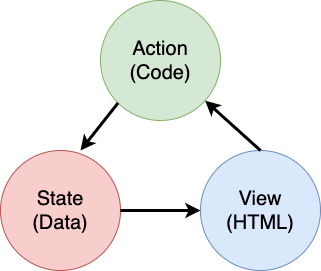
Instead of chasing our tails, we're going to create a centralized state management system. Think of it like having one really organized person in charge of all the important stuff:
flowchart TD
    A[User Action] --> B[Event Handler]
    B --> C[updateState Function]
    C --> D{State Validation}
    D -->|Valid| E[Create New State]
    D -->|Invalid| F[Error Handling]
    E --> G[Object.freeze]
    G --> H[Update localStorage]
    H --> I[Trigger UI Update]
    I --> J[User Sees Changes]
    F --> K[User Sees Error]

    subgraph "State Management Layer"
        C
        E
        G
    end

    subgraph "Persistence Layer"
        H
        L[localStorage]
        H -.-> L
    end
Understanding this data flow:
- Centralizes all application state in one location
- Routes all state changes through controlled functions
- Ensures the UI stays synchronized with the current state
- Provides a clear, predictable pattern for data management
💡 Professional Insight: This lesson focuses on fundamental concepts. For complex applications, libraries like Redux provide more advanced state management features. Understanding these core principles will help you master any state management library.
⚠️ Advanced Topic: We won't cover automatic UI updates triggered by state changes, as this involves Reactive Programming concepts. Consider this an excellent next step for your learning journey!
Task: Centralize State Structure
Let's begin transforming our scattered state management into a centralized system. This first step establishes the foundation for all the improvements that follow.
Step 1: Create a Central State Object
Replace the simple account declaration:
let account = null;
With a structured state object:
let state = {
  account: null
};
Here's why this change matters:
- Centralizes all application data in one location
- Prepares the structure for adding more state properties later
- Creates a clear boundary between state and other variables
- Establishes a pattern that scales as your app grows
Step 2: Update State Access Patterns
Update your functions to use the new state structure:
In register() and login() functions, replace:
account = ...
With:
state.account = ...
In updateDashboard() function, add this line at the top:
const account = state.account;
What these updates accomplish:
- Maintains existing functionality while improving structure
- Prepares your code for more sophisticated state management
- Creates consistent patterns for accessing state data
- Establishes the foundation for centralized state updates
💡 Note: This refactoring doesn't immediately solve our problems, but it creates the essential foundation for the powerful improvements coming next!
🎯 Pedagogical Check-in: Centralization Principles
Pause and Reflect: You've just implemented the foundation of centralized state management. This is a crucial architectural decision.
Quick Self-Assessment:
- Can you explain why centralizing state in one object is better than scattered variables?
- What would happen if you forgot to update a function to use
state.account? - How does this pattern prepare your code for more advanced features?
Real-World Connection: The centralization pattern you've learned is the foundation of modern frameworks like Redux, Vuex, and React Context. You're building the same architectural thinking used in major applications.
Challenge Question: If you needed to add user preferences (theme, language) to your app, where would you add them in the state structure? How would this scale?
Implementing Controlled State Updates
With our state centralized, the next step involves establishing controlled mechanisms for data modifications. This approach ensures predictable state changes and easier debugging.
The core principle resembles air traffic control: instead of allowing multiple functions to modify state independently, we'll channel all changes through a single, controlled function. This pattern provides clear oversight of when and how data changes occur.
Immutable State Management:
We'll treat our state object as immutable, meaning we never modify it directly. Instead, each change creates a new state object with the updated data.
While this approach might initially seem inefficient compared to direct modifications, it provides significant advantages for debugging, testing, and maintaining application predictability.
Benefits of immutable state management:
| Benefit | Description | Impact |
|---|---|---|
| Predictability | Changes only happen through controlled functions | Easier to debug and test |
| History Tracking | Each state change creates a new object | Enables undo/redo functionality |
| Side Effect Prevention | No accidental modifications | Prevents mysterious bugs |
| Performance Optimization | Easy to detect when state actually changed | Enables efficient UI updates |
JavaScript Immutability with Object.freeze():
JavaScript provides Object.freeze() to prevent object modifications:
const immutableState = Object.freeze({ account: userData });
// Any attempt to modify immutableState will throw an error
Breaking down what happens here:
- Prevents direct property assignments or deletions
- Throws exceptions if modification attempts are made
- Ensures state changes must go through controlled functions
- Creates a clear contract for how state can be updated
💡 Deep Dive: Learn about the difference between shallow and deep immutable objects in the MDN documentation. Understanding this distinction is crucial for complex state structures.
stateDiagram-v2
    [*] --> StateV1: Initial State
    StateV1 --> StateV2: updateState('account', newData)
    StateV2 --> StateV3: updateState('account', anotherUpdate)
    StateV3 --> StateV4: updateState('preferences', userSettings)

    note right of StateV1
        Object.freeze()
        Immutable
        Debuggable
    end note

    note right of StateV2
        New object created
        Previous state preserved
        Predictable changes
    end note
Task
Let's create a new updateState() function:
function updateState(property, newData) {
  state = Object.freeze({
    ...state,
    [property]: newData
  });
}
In this function, we're creating a new state object and copy data from the previous state using the spread (...) operator. Then we override a particular property of the state object with the new data using the bracket notation [property] for assignment. Finally, we lock the object to prevent modifications using Object.freeze(). We only have the account property stored in the state for now, but with this approach you can add as many properties as you need in the state.
We'll also update the state initialization to make sure the initial state is frozen too:
let state = Object.freeze({
  account: null
});
After that, update the register function by replacing the state.account = result; assignment with:
updateState('account', result);
Do the same with the login function, replacing state.account = data; with:
updateState('account', data);
We'll now take the chance to fix the issue of account data not being cleared when the user clicks on Logout.
Create a new function logout():
function logout() {
  updateState('account', null);
  navigate('/login');
}
In updateDashboard(), replace the redirection return navigate('/login'); with return logout();
Try registering a new account, logging out and in again to check that everything still works correctly.
Tip: you can take a look at all state changes by adding
console.log(state)at the bottom ofupdateState()and opening up the console in your browser's development tools.
Implementing Data Persistence
The session loss issue we identified earlier requires a persistence solution that maintains user state across browser sessions. This transforms our application from a temporary experience into a reliable, professional tool.
Consider how atomic clocks maintain precise time even through power outages by storing critical state in non-volatile memory. Similarly, web applications need persistent storage mechanisms to preserve essential user data across browser sessions and page refreshes.
Strategic Questions for Data Persistence:
Before implementing persistence, consider these critical factors:
| Question | Banking App Context | Decision Impact |
|---|---|---|
| Is the data sensitive? | Account balance, transaction history | Choose secure storage methods |
| How long should it persist? | Login state vs. temporary UI preferences | Select appropriate storage duration |
| Does the server need it? | Authentication tokens vs. UI settings | Determine sharing requirements |
Browser Storage Options:
Modern browsers provide several storage mechanisms, each designed for different use cases:
Primary Storage APIs:
-
localStorage: Persistent Key/Value storage- Persists data across browser sessions indefinitely
- Survives browser restarts and computer reboots
- Scoped to the specific website domain
- Perfect for user preferences and login states
-
sessionStorage: Temporary session storage- Functions identically to localStorage during active sessions
- Clears automatically when the browser tab closes
- Ideal for temporary data that shouldn't persist
-
HTTP Cookies: Server-shared storage
- Automatically sent with every server request
- Perfect for authentication tokens
- Limited in size and can impact performance
Data Serialization Requirement:
Both localStorage and sessionStorage only store strings:
// Convert objects to JSON strings for storage
const accountData = { user: 'john', balance: 150 };
localStorage.setItem('account', JSON.stringify(accountData));

// Parse JSON strings back to objects when retrieving
const savedAccount = JSON.parse(localStorage.getItem('account'));
Understanding serialization:
- Converts JavaScript objects to JSON strings using
JSON.stringify() - Reconstructs objects from JSON using
JSON.parse() - Handles complex nested objects and arrays automatically
- Fails on functions, undefined values, and circular references
💡 Advanced Option: For complex offline applications with large datasets, consider the
IndexedDBAPI. It provides a full client-side database but requires more complex implementation.
quadrantChart
    title Browser Storage Options
    x-axis Low Complexity --> High Complexity
    y-axis Short Duration --> Long Duration

    quadrant-1 Professional Tools
    quadrant-2 Simple Persistence
    quadrant-3 Temporary Storage
    quadrant-4 Advanced Systems

    localStorage: [0.3, 0.8]
    sessionStorage: [0.2, 0.2]
    HTTP Cookies: [0.6, 0.7]
    IndexedDB: [0.9, 0.9]
    Memory Variables: [0.1, 0.1]
Task: Implement localStorage Persistence
Let's implement persistent storage so users stay logged in until they explicitly log out. We'll use localStorage to store account data across browser sessions.
Step 1: Define Storage Configuration
const storageKey = 'savedAccount';
What this constant provides:
- Creates a consistent identifier for our stored data
- Prevents typos in storage key references
- Makes it easy to change the storage key if needed
- Follows best practices for maintainable code
Step 2: Add Automatic Persistence
Add this line at the end of the updateState() function:
localStorage.setItem(storageKey, JSON.stringify(state.account));
Breaking down what happens here:
- Converts the account object to a JSON string for storage
- Saves the data using our consistent storage key
- Executes automatically whenever state changes occur
- Ensures stored data is always synchronized with current state
💡 Architecture Benefit: Because we centralized all state updates through
updateState(), adding persistence required only one line of code. This demonstrates the power of good architectural decisions!
Step 3: Restore State on App Load
Create an initialization function to restore saved data:
function init() {
  const savedAccount = localStorage.getItem(storageKey);
  if (savedAccount) {
    updateState('account', JSON.parse(savedAccount));
  }

  // Our previous initialization code
  window.onpopstate = () => updateRoute();
  updateRoute();
}

init();
Understanding the initialization process:
- Retrieves any previously saved account data from localStorage
- Parses the JSON string back into a JavaScript object
- Updates the state using our controlled update function
- Restores the user's session automatically on page load
- Executes before route updates to ensure state is available
Step 4: Optimize Default Route
Update the default route to take advantage of persistence:
In updateRoute(), replace:
// Replace: return navigate('/login');
return navigate('/dashboard');
Why this change makes sense:
- Leverages our new persistence system effectively
- Allows the dashboard to handle authentication checks
- Redirects to login automatically if no saved session exists
- Creates a more seamless user experience
Testing Your Implementation:
- Log into your banking app
- Refresh the browser page
- Verify you remain logged in and on the dashboard
- Close and reopen your browser
- Navigate back to your app and confirm you're still logged in
🎉 Achievement Unlocked: You've successfully implemented persistent state management! Your app now behaves like a professional web application.
🎯 Pedagogical Check-in: Persistence Architecture
Architecture Understanding: You've implemented a sophisticated persistence layer that balances user experience with data management complexity.
Key Concepts Mastered:
- JSON Serialization: Converting complex objects to storable strings
- Automatic Synchronization: State changes trigger persistent storage
- Session Recovery: Apps can restore user context after interruptions
- Centralized Persistence: One update function handles all storage
Industry Connection: This persistence pattern is fundamental to Progressive Web Apps (PWAs), offline-first applications, and modern mobile web experiences. You're building production-level capabilities.
Reflection Question: How would you modify this system to handle multiple user accounts on the same device? Consider privacy and security implications.
Balancing Persistence with Data Freshness
Our persistence system successfully maintains user sessions, but introduces a new challenge: data staleness. When multiple users or applications modify the same server data, local cached information becomes outdated.
This situation resembles Viking navigators who relied on both stored star charts and current celestial observations. The charts provided consistency, but navigators needed fresh observations to account for changing conditions. Similarly, our application needs both persistent user state and current server data.
🧪 Discovering the Data Freshness Problem:
- Log into the dashboard using the
testaccount - Run this command in a terminal to simulate a transaction from another source:
curl --request POST \
     --header "Content-Type: application/json" \
     --data "{ \"date\": \"2020-07-24\", \"object\": \"Bought book\", \"amount\": -20 }" \
     http://localhost:5000/api/accounts/test/transactions
- Refresh your dashboard page in the browser
- Observe whether you see the new transaction
What this test demonstrates:
- Shows how local storage can become "stale" (outdated)
- Simulates real-world scenarios where data changes occur outside your app
- Reveals the tension between persistence and data freshness
The Data Staleness Challenge:
| Problem | Cause | User Impact |
|---|---|---|
| Stale Data | localStorage never expires automatically | Users see outdated information |
| Server Changes | Other apps/users modify the same data | Inconsistent views across platforms |
| Cache vs. Reality | Local cache doesn't match server state | Poor user experience and confusion |
Solution Strategy:
We'll implement a "refresh on load" pattern that balances the benefits of persistence with the need for fresh data. This approach maintains the smooth user experience while ensuring data accuracy.
sequenceDiagram
    participant U as User
    participant A as App
    participant L as localStorage
    participant S as Server

    U->>A: Opens app
    A->>L: Load saved state
    L-->>A: Return cached data
    A->>U: Show UI immediately
    A->>S: Fetch fresh data
    S-->>A: Return current data
    A->>L: Update cache
    A->>U: Update UI with fresh data
Task: Implement Data Refresh System
We'll create a system that automatically fetches fresh data from the server while maintaining the benefits of our persistent state management.
Step 1: Create Account Data Updater
async function updateAccountData() {
  const account = state.account;
  if (!account) {
    return logout();
  }

  const data = await getAccount(account.user);
  if (data.error) {
    return logout();
  }

  updateState('account', data);
}
Understanding this function's logic:
- Checks if a user is currently logged in (state.account exists)
- Redirects to logout if no valid session is found
- Fetches fresh account data from the server using the existing
getAccount()function - Handles server errors gracefully by logging out invalid sessions
- Updates the state with fresh data using our controlled update system
- Triggers automatic localStorage persistence through the
updateState()function
Step 2: Create Dashboard Refresh Handler
async function refresh() {
  await updateAccountData();
  updateDashboard();
}
What this refresh function accomplishes:
- Coordinates the data refresh and UI update process
- Waits for fresh data to be loaded before updating the display
- Ensures the dashboard shows the most current information
- Maintains a clean separation between data management and UI updates
Step 3: Integrate with Route System
Update your route configuration to trigger refresh automatically:
const routes = {
  '/login': { templateId: 'login' },
  '/dashboard': { templateId: 'dashboard', init: refresh }
};
How this integration works:
- Executes the refresh function every time the dashboard route loads
- Ensures fresh data is always displayed when users navigate to the dashboard
- Maintains the existing route structure while adding data freshness
- Provides a consistent pattern for route-specific initialization
Testing Your Data Refresh System:
- Log into your banking app
- Run the curl command from earlier to create a new transaction
- Refresh your dashboard page or navigate away and back
- Verify that the new transaction appears immediately
🎉 Perfect Balance Achieved: Your app now combines the smooth experience of persistent state with the accuracy of fresh server data!
📈 Your State Management Mastery Timeline
timeline
    title Professional State Management Journey

    section Problem Recognition
        State Issues Diagnosis
            : Identify session loss problems
            : Understand scattered update issues
            : Recognize architectural needs

    section Architecture Foundation
        Centralized State Design
            : Create unified state objects
            : Implement controlled update patterns
            : Establish immutable principles

        Predictable Updates
            : Master Object.freeze() usage
            : Build debug-friendly systems
            : Create scalable patterns

    section Persistence Mastery
        localStorage Integration
            : Handle JSON serialization
            : Implement automatic synchronization
            : Create session continuity

        Data Freshness Balance
            : Address staleness challenges
            : Build refresh mechanisms
            : Optimize performance vs accuracy

    section Professional Patterns
        Production-Ready Systems
            : Implement error handling
            : Create maintainable architectures
            : Follow industry best practices

        Advanced Capabilities
            : Ready for framework integration
            : Prepared for complex state needs
            : Foundation for real-time features
🎓 Graduation Milestone: You've successfully built a complete state management system using the same principles that power Redux, Vuex, and other professional state libraries. These patterns scale from simple apps to enterprise applications.
🔄 Next Level Capabilities:
- Ready to master state management frameworks (Redux, Zustand, Pinia)
- Prepared to implement real-time features with WebSockets
- Equipped to build offline-first Progressive Web Apps
- Foundation set for advanced patterns like state machines and observers
GitHub Copilot Agent Challenge 🚀
Use the Agent mode to complete the following challenge:
Description: Implement a comprehensive state management system with undo/redo functionality for the banking app. This challenge will help you practice advanced state management concepts including state history tracking, immutable updates, and user interface synchronization.
Prompt: Create an enhanced state management system that includes: 1) A state history array that tracks all previous states, 2) Undo and redo functions that can revert to previous states, 3) UI buttons for undo/redo operations on the dashboard, 4) A maximum history limit of 10 states to prevent memory issues, and 5) Proper cleanup of history when the user logs out. Ensure the undo/redo functionality works with account balance changes and persists across browser refreshes.
Learn more about agent mode here.
🚀 Challenge: Storage Optimization
Your implementation now handles user sessions, data refresh, and state management effectively. However, consider whether our current approach optimally balances storage efficiency with functionality.
Like chess masters who distinguish between essential pieces and expendable pawns, effective state management requires identifying which data must persist versus which should always be fresh from the server.
Optimization Analysis:
Evaluate your current localStorage implementation and consider these strategic questions:
- What's the minimum information required to maintain user authentication?
- Which data changes frequently enough that local caching provides little benefit?
- How can storage optimization improve performance without degrading user experience?
This type of architectural analysis distinguishes experienced developers who consider both functionality and efficiency in their solutions.
Implementation Strategy:
- Identify the essential data that must persist (likely just user identification)
- Modify your localStorage implementation to store only critical session data
- Ensure fresh data is always loaded from the server on dashboard visits
- Test that your optimized approach maintains the same user experience
Advanced Consideration:
- Compare the trade-offs between storing full account data vs. just authentication tokens
- Document your decisions and reasoning for future team members
This challenge will help you think like a professional developer who considers both user experience and application efficiency. Take your time to experiment with different approaches!
Post-Lecture Quiz
Assignment
Implement "Add transaction" dialog
Here's an example result after completing the assignment: