
25 KiB
JavaScript Basics: Making Decisions
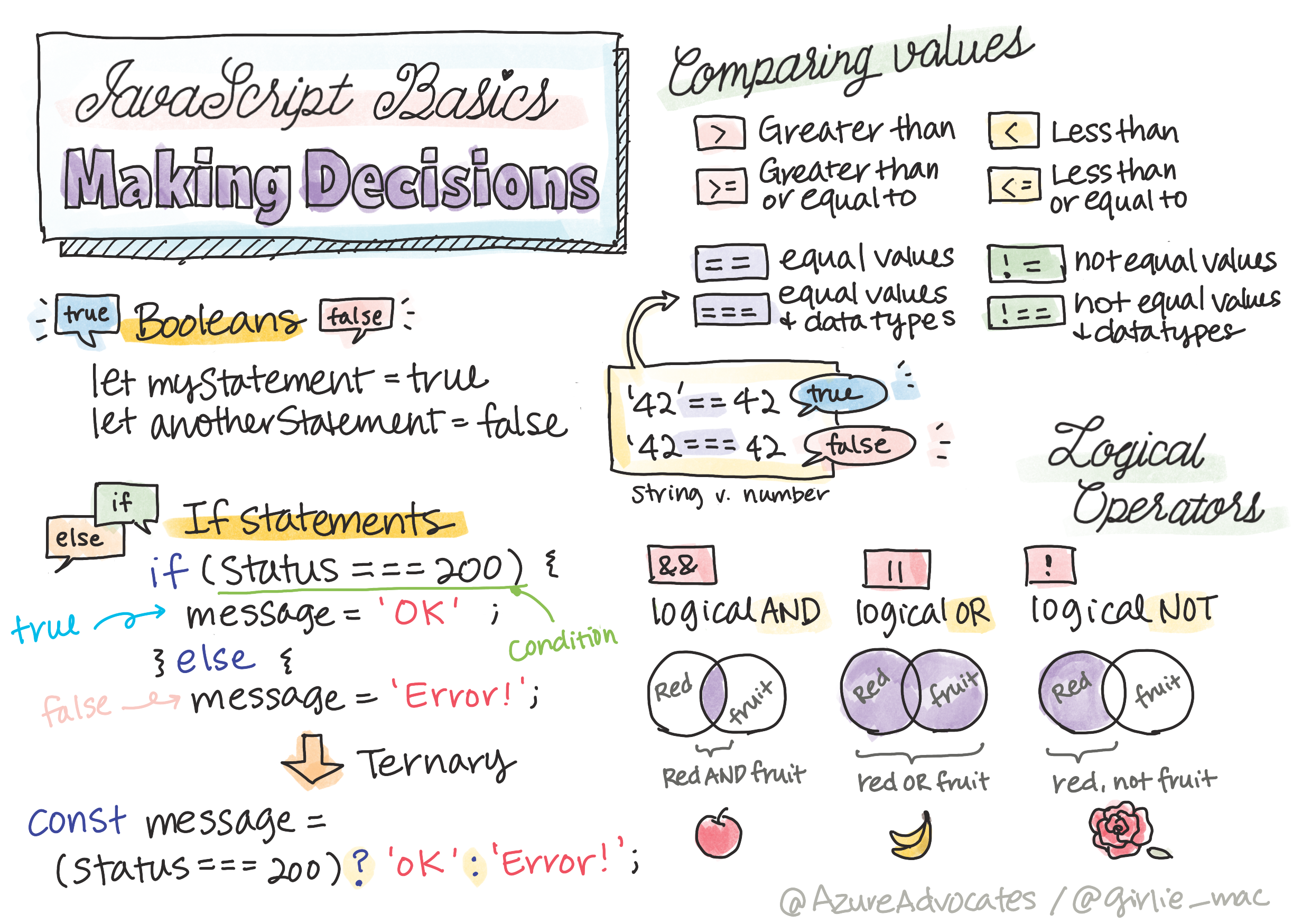
Sketchnote by Tomomi Imura
journey
    title Your JavaScript Decision-Making Adventure
    section Foundation
      Boolean Values: 5: You
      Comparison Operators: 4: You
      Logical Thinking: 5: You
    section Basic Decisions
      If Statements: 4: You
      If-Else Logic: 5: You
      Switch Statements: 4: You
    section Advanced Logic
      Logical Operators: 5: You
      Complex Conditions: 4: You
      Ternary Expressions: 5: You
Have you ever wondered how applications make smart decisions? Like how a navigation system chooses the fastest route, or how a thermostat decides when to turn on the heat? This is the fundamental concept of decision-making in programming.
Just as Charles Babbage's Analytical Engine was designed to follow different sequences of operations based on conditions, modern JavaScript programs need to make choices based on varying circumstances. This ability to branch and make decisions is what transforms static code into responsive, intelligent applications.
In this lesson, you'll learn how to implement conditional logic in your programs. We'll explore conditional statements, comparison operators, and logical expressions that allow your code to evaluate situations and respond appropriately.
Pre-Lecture Quiz
The ability to make decisions and control program flow is a fundamental aspect of programming. This section covers how to control the execution path of your JavaScript programs using Boolean values and conditional logic.
🎥 Click the image above for a video about making decisions.
You can take this lesson on Microsoft Learn!
mindmap
  root((Decision Making))
    Boolean Logic
      true/false
      Comparison results
      Logical expressions
    Conditional Statements
      if statements
        Single condition
        Code execution
      if-else
        Two paths
        Alternative actions
      switch
        Multiple options
        Clean structure
    Operators
      Comparison
        === !== < > <= >=
        Value relationships
      Logical
        && || !
        Combine conditions
    Advanced Patterns
      Ternary
        ? : syntax
        Inline decisions
      Complex Logic
        Nested conditions
        Multiple criteria
A Brief Recap on Booleans
Before exploring decision-making, let's revisit Boolean values from our previous lesson. Named after mathematician George Boole, these values represent binary states – either true or false. There's no ambiguity, no middle ground.
These binary values form the foundation of all computational logic. Every decision your program makes ultimately reduces to a Boolean evaluation.
Creating Boolean variables is straightforward:
let myTrueBool = true;
let myFalseBool = false;
This creates two variables with explicit Boolean values.
✅ Booleans are named after the English mathematician, philosopher and logician George Boole (1815–1864).
Comparison Operators and Booleans
In practice, you'll rarely set Boolean values manually. Instead, you'll generate them by evaluating conditions: "Is this number greater than that one?" or "Are these values equal?"
Comparison operators enable these evaluations. They compare values and return Boolean results based on the relationship between the operands.
| Symbol | Description | Example |
|---|---|---|
< |
Less than: Compares two values and returns the true Boolean data type if the value on the left side is less than the right |
5 < 6 // true |
<= |
Less than or equal to: Compares two values and returns the true Boolean data type if the value on the left side is less than or equal to the right |
5 <= 6 // true |
> |
Greater than: Compares two values and returns the true Boolean data type if the value on the left side is larger than the right |
5 > 6 // false |
>= |
Greater than or equal to: Compares two values and returns the true Boolean data type if the value on the left side is larger than or equal to the right |
5 >= 6 // false |
=== |
Strict equality: Compares two values and returns the true Boolean data type if values on the right and left are equal AND are the same data type. |
5 === 6 // false |
!== |
Inequality: Compares two values and returns the opposite Boolean value of what a strict equality operator would return | 5 !== 6 // true |
✅ Check your knowledge by writing some comparisons in your browser's console. Does any returned data surprise you?
flowchart LR
    A["🔢 Values"] --> B["⚖️ Comparison"]
    B --> C["✅ Boolean Result"]

    D["5"] --> E["< 6"]
    E --> F["true"]

    G["10"] --> H["=== '10'"]
    H --> I["false"]

    J["'hello'"] --> K["!== 'world'"]
    K --> L["true"]

    M["📋 Operator Types"] --> M1["Equality: === !=="]
    M --> M2["Relational: < > <= >="]
    M --> M3["Strict vs Loose"]

    style A fill:#e3f2fd
    style C fill:#e8f5e8
    style M fill:#fff3e0
🧠 Comparison Mastery Check: Understanding Boolean Logic
Test your comparison understanding:
- Why do you think
===(strict equality) is generally preferred over==(loose equality)? - Can you predict what
5 === '5'returns? How about5 == '5'? - What's the difference between
!==and!=?
stateDiagram-v2
    [*] --> Comparison: Two values
    Comparison --> StrictEqual: === or !==
    Comparison --> Relational: < > <= >=

    StrictEqual --> TypeCheck: Check type AND value
    Relational --> NumberCompare: Convert to numbers

    TypeCheck --> BooleanResult: true or false
    NumberCompare --> BooleanResult

    note right of StrictEqual
        Preferred approach
        No type conversion
    end note

    note right of Relational
        Useful for ranges
        Numerical comparisons
    end note
Pro tip: Always use
===and!==for equality checks unless you specifically need type conversion. This prevents unexpected behavior!
If Statement
The if statement is like asking a question in your code. "If this condition is true, then do this thing." It's probably the most important tool you'll use for making decisions in JavaScript.
Here's how it works:
if (condition) {
  // Condition is true. Code in this block will run.
}
The condition goes inside the parentheses, and if it's true, JavaScript runs the code inside the curly braces. If it's false, JavaScript just skips that whole block.
You'll often use comparison operators to create these conditions. Let's see a practical example:
let currentMoney = 1000;
let laptopPrice = 800;

if (currentMoney >= laptopPrice) {
  // Condition is true. Code in this block will run.
  console.log("Getting a new laptop!");
}
Since 1000 >= 800 evaluates to true, the code inside the block executes, displaying "Getting a new laptop!" in the console.
flowchart TD
    A["🚀 Program Start"] --> B{"💰 currentMoney >= laptopPrice?"}
    B -->|true| C["🎉 'Getting a new laptop!'"]
    B -->|false| D["⏭️ Skip code block"]
    C --> E["📋 Continue program"]
    D --> E

    F["📊 If Statement Structure"] --> F1["if (condition) {"]
    F1 --> F2["  // code to run if true"]
    F2 --> F3["}"]

    style B fill:#fff3e0
    style C fill:#e8f5e8
    style D fill:#ffebee
    style F fill:#e3f2fd
If..Else Statement
But what if you want your program to do something different when the condition is false? That's where else comes in – it's like having a backup plan.
The else statement gives you a way to say "if this condition isn't true, do this other thing instead."
let currentMoney = 500;
let laptopPrice = 800;

if (currentMoney >= laptopPrice) {
  // Condition is true. Code in this block will run.
  console.log("Getting a new laptop!");
} else {
  // Condition is false. Code in this block will run.
  console.log("Can't afford a new laptop, yet!");
}
Now since 500 >= 800 is false, JavaScript skips the first block and runs the else block instead. You'll see "Can't afford a new laptop, yet!" in the console.
✅ Test your understanding of this code and the following code by running it in a browser console. Change the values of the currentMoney and laptopPrice variables to change the returned console.log().
🎯 If-Else Logic Check: Branching Paths
Evaluate your conditional logic understanding:
- What happens if
currentMoneyexactly equalslaptopPrice? - Can you think of a real-world scenario where if-else logic would be useful?
- How might you extend this to handle multiple price ranges?
flowchart TD
    A["🔍 Evaluate Condition"] --> B{"Condition True?"}
    B -->|Yes| C["📤 Execute IF block"]
    B -->|No| D["📥 Execute ELSE block"]

    C --> E["✅ One path taken"]
    D --> E

    F["🌐 Real-world Examples"] --> F1["User login status"]
    F --> F2["Age verification"]
    F --> F3["Form validation"]
    F --> F4["Game state changes"]

    style B fill:#fff3e0
    style C fill:#e8f5e8
    style D fill:#e3f2fd
    style F fill:#f3e5f5
Key insight: If-else ensures exactly one path is taken. This guarantees your program always has a response to any condition!
Switch Statement
Sometimes you need to compare one value against multiple options. While you could chain several if..else statements, this approach becomes unwieldy. The switch statement provides a cleaner structure for handling multiple discrete values.
The concept resembles the mechanical switching systems used in early telephone exchanges – one input value determines which specific path the execution follows.
switch (expression) {
  case x:
    // code block
    break;
  case y:
    // code block
    break;
  default:
    // code block
}
Here's how it's structured:
- JavaScript evaluates the expression once
- It looks through each
caseto find a match - When it finds a match, it runs that code block
- The
breaktells JavaScript to stop and exit the switch - If no cases match, it runs the
defaultblock (if you have one)
// Program using switch statement for day of week
let dayNumber = 2;
let dayName;

switch (dayNumber) {
  case 1:
    dayName = "Monday";
    break;
  case 2:
    dayName = "Tuesday";
    break;
  case 3:
    dayName = "Wednesday";
    break;
  default:
    dayName = "Unknown day";
    break;
}
console.log(`Today is ${dayName}`);
In this example, JavaScript sees that dayNumber is 2, finds the matching case 2, sets dayName to "Tuesday", and then breaks out of the switch. The result? "Today is Tuesday" gets logged to the console.
flowchart TD
    A["📥 switch(expression)"] --> B["🔍 Evaluate once"]
    B --> C{"Match case 1?"}
    C -->|Yes| D["📋 Execute case 1"]
    C -->|No| E{"Match case 2?"}
    E -->|Yes| F["📋 Execute case 2"]
    E -->|No| G{"Match case 3?"}
    G -->|Yes| H["📋 Execute case 3"]
    G -->|No| I["📋 Execute default"]

    D --> J["🛑 break"]
    F --> K["🛑 break"]
    H --> L["🛑 break"]

    J --> M["✅ Exit switch"]
    K --> M
    L --> M
    I --> M

    style A fill:#e3f2fd
    style B fill:#fff3e0
    style M fill:#e8f5e8
✅ Test your understanding of this code and the following code by running it in a browser console. Change the values of the variable a to change the returned console.log().
🔄 Switch Statement Mastery: Multiple Options
Test your switch understanding:
- What happens if you forget a
breakstatement? - When would you use
switchinstead of multipleif-elsestatements? - Why is the
defaultcase useful even if you think you've covered all possibilities?
pie title "When to Use Each Decision Structure"
    "Simple if-else" : 40
    "Complex if-else chains" : 25
    "Switch statements" : 20
    "Ternary operators" : 15
Best practice: Use
switchwhen comparing one variable against multiple specific values. Useif-elsefor range checks or complex conditions!
Logical Operators and Booleans
Complex decisions often require evaluating multiple conditions simultaneously. Just as Boolean algebra allows mathematicians to combine logical expressions, programming provides logical operators to connect multiple Boolean conditions.
These operators enable sophisticated conditional logic by combining simple true/false evaluations.
| Symbol | Description | Example |
|---|---|---|
&& |
Logical AND: Compares two Boolean expressions. Returns true only if both sides are true | (5 > 3) && (5 < 10) // Both sides are true. Returns true |
|| |
Logical OR: Compares two Boolean expressions. Returns true if at least one side is true | (5 > 10) || (5 < 10) // One side is false, other is true. Returns true |
! |
Logical NOT: Returns the opposite value of a Boolean expression | !(5 > 10) // 5 is not greater than 10, so "!" makes it true |
These operators let you combine conditions in useful ways:
- AND (
&&) means both conditions must be true - OR (
||) means at least one condition must be true - NOT (
!) flips true to false (and vice versa)
flowchart LR
    A["🔗 Logical Operators"] --> B["&& AND"]
    A --> C["|| OR"]
    A --> D["! NOT"]

    B --> B1["Both must be true"]
    B --> B2["true && true = true"]
    B --> B3["true && false = false"]

    C --> C1["At least one true"]
    C --> C2["true || false = true"]
    C --> C3["false || false = false"]

    D --> D1["Flips the value"]
    D --> D2["!true = false"]
    D --> D3["!false = true"]

    E["🌍 Real Examples"] --> E1["Age >= 18 && hasLicense"]
    E --> E2["isWeekend || isHoliday"]
    E --> E3["!isLoggedIn"]

    style A fill:#e3f2fd
    style B fill:#e8f5e8
    style C fill:#fff3e0
    style D fill:#f3e5f5
    style E fill:#e0f2f1
Conditions and Decisions with Logical Operators
Let's see these logical operators in action with a more realistic example:
let currentMoney = 600;
let laptopPrice = 800;
let laptopDiscountPrice = laptopPrice - (laptopPrice * 0.2); // Laptop price at 20 percent off

if (currentMoney >= laptopPrice || currentMoney >= laptopDiscountPrice) {
  // Condition is true. Code in this block will run.
  console.log("Getting a new laptop!");
} else {
  // Condition is false. Code in this block will run.
  console.log("Can't afford a new laptop, yet!");
}
In this example: we calculate a 20% discount price (640), then evaluate whether our available funds cover either the full price OR the discounted price. Since 600 meets the discounted price threshold of 640, the condition evaluates to true.
🧮 Logical Operators Check: Combining Conditions
Test your logical operator understanding:
- In the expression
A && B, what happens if A is false? Does B even get evaluated? - Can you think of a situation where you'd need all three operators (&&, ||, !) together?
- What's the difference between
!user.isActiveanduser.isActive !== true?
stateDiagram-v2
    [*] --> EvaluateA: A && B
    EvaluateA --> CheckB: A is true
    EvaluateA --> ReturnFalse: A is false
    CheckB --> ReturnTrue: B is true
    CheckB --> ReturnFalse: B is false

    [*] --> EvaluateC: A || B
    EvaluateC --> ReturnTrue: A is true
    EvaluateC --> CheckD: A is false
    CheckD --> ReturnTrue: B is true
    CheckD --> ReturnFalse: B is false

    note right of EvaluateA
        Short-circuit evaluation:
        If A is false, B is never checked
    end note
Performance tip: JavaScript uses "short-circuit evaluation" - in
A && B, if A is false, B isn't even evaluated. Use this to your advantage!
Negation Operator
Sometimes it's easier to think about when something is NOT true. Like instead of asking "Is the user logged in?", you might want to ask "Is the user NOT logged in?" The exclamation mark (!) operator flips the logic for you.
if (!condition) {
  // runs if condition is false
} else {
  // runs if condition is true
}
The ! operator is like saying "the opposite of..." – if something is true, ! makes it false, and vice versa.
Ternary Expressions
For simple conditional assignments, JavaScript provides the ternary operator. This concise syntax allows you to write a conditional expression in a single line, useful when you need to assign one of two values based on a condition.
let variable = condition ? returnThisIfTrue : returnThisIfFalse;
It reads like a question: "Is this condition true? If yes, use this value. If no, use that value."
Below is a more tangible example:
let firstNumber = 20;
let secondNumber = 10;
let biggestNumber = firstNumber > secondNumber ? firstNumber : secondNumber;
✅ Take a minute to read this code a few times. Do you understand how these operators are working?
Here's what this line is saying: "Is firstNumber greater than secondNumber? If yes, put firstNumber in biggestNumber. If no, put secondNumber in biggestNumber."
The ternary operator is just a shorter way to write this traditional if..else statement:
let biggestNumber;
if (firstNumber > secondNumber) {
  biggestNumber = firstNumber;
} else {
  biggestNumber = secondNumber;
}
Both approaches produce identical results. The ternary operator offers conciseness, while the traditional if-else structure may be more readable for complex conditions.
flowchart LR
    A["🤔 Ternary Operator"] --> B["condition ?"]
    B --> C["valueIfTrue :"]
    C --> D["valueIfFalse"]

    E["📝 Traditional If-Else"] --> F["if (condition) {"]
    F --> G["  return valueIfTrue"]
    G --> H["} else {"]
    H --> I["  return valueIfFalse"]
    I --> J["}"]

    K["⚡ When to Use"] --> K1["Simple assignments"]
    K --> K2["Short conditions"]
    K --> K3["Inline decisions"]
    K --> K4["Return statements"]

    style A fill:#e3f2fd
    style E fill:#fff3e0
    style K fill:#e8f5e8
🚀 Challenge
Create a program that is written first with logical operators, and then rewrite it using a ternary expression. What's your preferred syntax?
GitHub Copilot Agent Challenge 🚀
Use the Agent mode to complete the following challenge:
Description: Create a comprehensive grade calculator that demonstrates multiple decision-making concepts from this lesson, including if-else statements, switch statements, logical operators, and ternary expressions.
Prompt: Write a JavaScript program that takes a student's numerical score (0-100) and determines their letter grade using the following criteria:
- A: 90-100
- B: 80-89
- C: 70-79
- D: 60-69
- F: Below 60
Requirements:
- Use an if-else statement to determine the letter grade
- Use logical operators to check if the student passes (grade >= 60) AND has honors (grade >= 90)
- Use a switch statement to provide specific feedback for each letter grade
- Use a ternary operator to determine if the student is eligible for the next course (grade >= 70)
- Include input validation to ensure the score is between 0 and 100
Test your program with various scores including edge cases like 59, 60, 89, 90, and invalid inputs.
Learn more about agent mode here.
Post-Lecture Quiz
Review & Self Study
Read more about the many operators available to the user on MDN.
Go through Josh Comeau's wonderful operator lookup!
Assignment
🧠 Your Decision-Making Toolkit Summary
graph TD
    A["🎯 JavaScript Decisions"] --> B["🔍 Boolean Logic"]
    A --> C["📊 Conditional Statements"]
    A --> D["🔗 Logical Operators"]
    A --> E["⚡ Advanced Patterns"]

    B --> B1["true/false values"]
    B --> B2["Comparison operators"]
    B --> B3["Truthiness concepts"]

    C --> C1["if statements"]
    C --> C2["if-else chains"]
    C --> C3["switch statements"]

    D --> D1["&& (AND)"]
    D --> D2["|| (OR)"]
    D --> D3["! (NOT)"]

    E --> E1["Ternary operator"]
    E --> E2["Short-circuit evaluation"]
    E --> E3["Complex conditions"]

    F["💡 Key Principles"] --> F1["Clear readable conditions"]
    F --> F2["Consistent comparison style"]
    F --> F3["Proper operator precedence"]
    F --> F4["Efficient evaluation order"]

    style A fill:#e3f2fd
    style B fill:#e8f5e8
    style C fill:#fff3e0
    style D fill:#f3e5f5
    style E fill:#e0f2f1
    style F fill:#fce4ec
🚀 Your JavaScript Decision-Making Mastery Timeline
⚡ What You Can Do in the Next 5 Minutes
- Practice comparison operators in your browser console
- Write a simple if-else statement that checks your age
- Try the challenge: rewrite an if-else using a ternary operator
- Test what happens with different "truthy" and "falsy" values
🎯 What You Can Accomplish This Hour
- Complete the post-lesson quiz and review any confusing concepts
- Build the comprehensive grade calculator from the GitHub Copilot challenge
- Create a simple decision tree for a real-world scenario (like choosing what to wear)
- Practice combining multiple conditions with logical operators
- Experiment with switch statements for different use cases
📅 Your Week-Long Logic Mastery
- Complete the operators assignment with creative examples
- Build a mini quiz application using various conditional structures
- Create a form validator that checks multiple input conditions
- Practice Josh Comeau's operator lookup exercises
- Refactor existing code to use more appropriate conditional structures
- Study short-circuit evaluation and performance implications
🌟 Your Month-Long Transformation
- Master complex nested conditions and maintain code readability
- Build an application with sophisticated decision-making logic
- Contribute to open source by improving conditional logic in existing projects
- Teach someone else about different conditional structures and when to use each
- Explore functional programming approaches to conditional logic
- Create a personal reference guide for conditional best practices
🏆 Final Decision-Making Champion Check-in
Celebrate your logical thinking mastery:
- What's the most complex decision logic you've successfully implemented?
- Which conditional structure feels most natural to you and why?
- How has learning about logical operators changed your problem-solving approach?
- What real-world application would benefit from sophisticated decision-making logic?
journey
    title Your Logical Thinking Evolution
    section Today
      Boolean Confusion: 3: You
      If-Else Understanding: 4: You
      Operator Recognition: 5: You
    section This Week
      Complex Conditions: 4: You
      Switch Mastery: 5: You
      Logical Combinations: 5: You
    section Next Month
      Advanced Patterns: 5: You
      Performance Awareness: 5: You
      Teaching Others: 5: You
🧠 You've mastered the art of digital decision-making! Every interactive application relies on conditional logic to respond intelligently to user actions and changing conditions. You now understand how to make your programs think, evaluate, and choose appropriate responses. This logical foundation will power every dynamic application you build! 🎉