
 chris
62a6a5377e
chris
62a6a5377e
|
10 months ago | |
|---|---|---|
| .. | ||
| README.md | 10 months ago | |
| assignment.md | 10 months ago | |
README.md
JavaScript Basics: Data Types
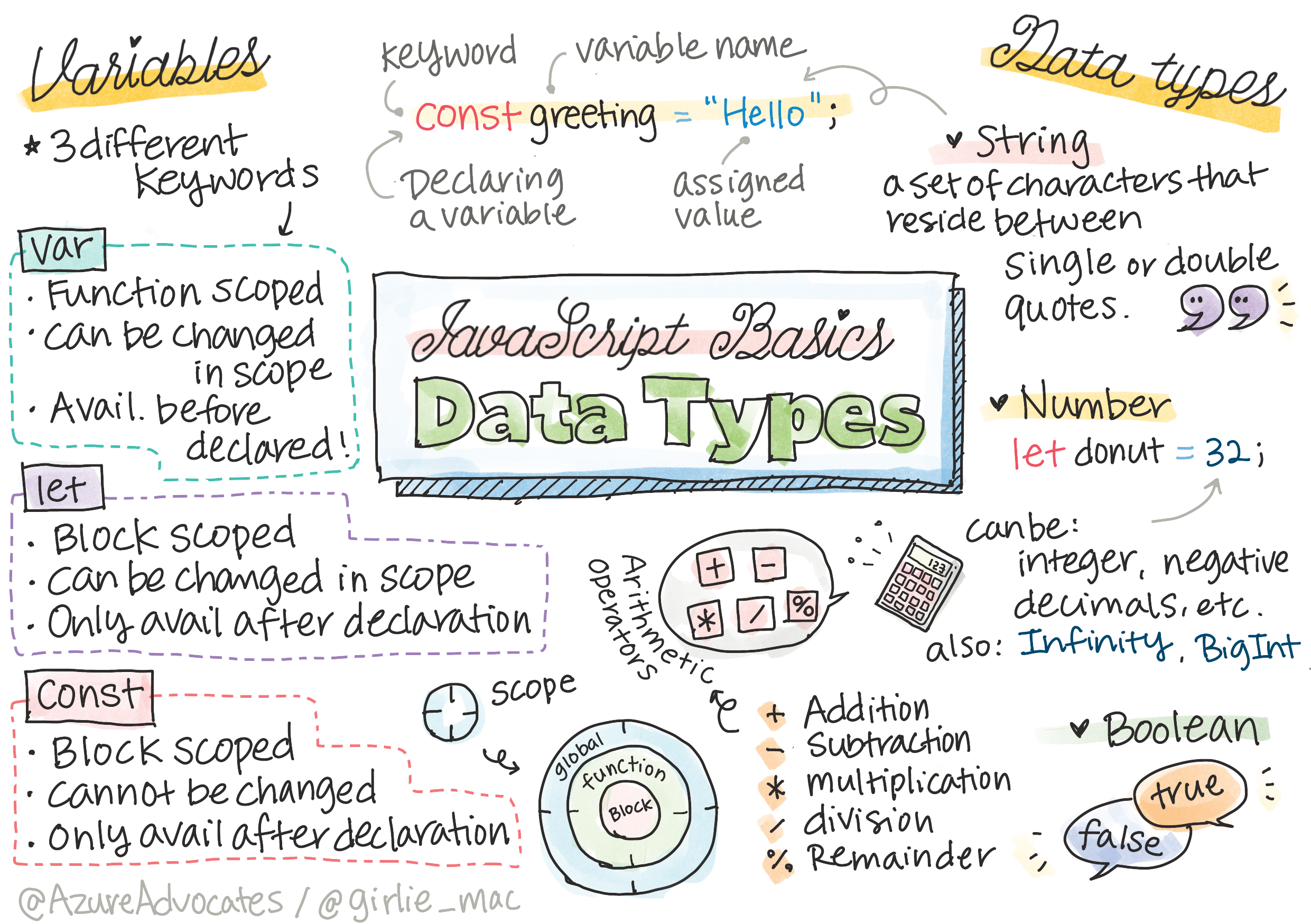
Sketchnote by Tomomi Imura
Data types are the foundation of all programming languages, and JavaScript is no exception. Think of data types as the different kinds of information your programs can work with – just like how you might organize different types of items in your home, JavaScript organizes different types of data in specific ways. Understanding data types will help you write more reliable code and avoid common beginner mistakes.
In this lesson, you'll discover the core data types that JavaScript provides and learn how to work with each one effectively. You'll explore variables as containers for your data, understand how to perform operations with different types, and see how JavaScript handles the relationships between them. This knowledge forms the building blocks for everything else you'll learn in web development.
By the end of this lesson, you'll confidently work with numbers, text, true/false values, and understand when and why to use each type. You'll also learn about JavaScript's unique behaviors with data types that make it both powerful and occasionally surprising. Let's dive into the fundamental data structures that power modern web applications!
Pre-Lecture Quiz
This lesson covers the basics of JavaScript, the language that provides interactivity on the web.
You can take this lesson on Microsoft Learn!


🎥 Click the images above for videos about variables and data types
Let's start with variables and the data types that populate them!
Variables
Variables are like labeled containers that hold different types of information in your programs. Just as you might use labeled boxes to organize items in your home, variables help you organize and manage data in your code. They're essential because they allow you to store information, change it when needed, and use it throughout your program.
Let's explore how to create variables and see them in action. You'll learn the modern way to declare variables and understand why certain keywords are preferred over others.
Variables store values that can be used and changed throughout your code.
Creating and declaring a variable has the following syntax [keyword] [name]. It's made up of the two parts:
- Keyword. Use
letfor variables that can change, orconstfor values that stay the same. - The variable name, this is a descriptive name you choose yourself.
✅ The keyword let was introduced in ES6 and gives your variable a so called block scope. It's recommended that you use let or const instead of the older var keyword. We will cover block scopes more in depth in future parts.
Task - working with variables
-
Declare a variable. Let's declare a variable using the
letkeyword:let myVariable;Here's what this code does:
- Creates a variable named
myVariableusing theletkeyword - Reserves space in memory for storing a value
- Leaves the variable undefined until we assign it a value
- Creates a variable named
-
Assign a value. Store a value in a variable with the
=operator, followed by the expected value.myVariable = 123;Breaking down what happens here:
- Uses the assignment operator
=to store a value - Assigns the number 123 to our previously declared variable
- Initializes the variable with its first actual value
Note: the use of
=in this lesson means we make use of an "assignment operator", used to set a value to a variable. It doesn't denote equality. - Uses the assignment operator
-
Refactor. Replace your code with the following statement.
let myVariable = 123;In the above, we've:
- Combined declaration and initialization into one line
- Created what's called an explicit initialization
- Streamlined our code by doing both steps at once
-
Change the variable value. Change the variable value in the following way:
myVariable = 321;What you need to know:
- Updates the variable's value from 123 to 321
- Overwrites the previous value completely
- Demonstrates that
letvariables can be reassigned
✅ Try it! You can write JavaScript right in your browser. Open a browser window and navigate to Developer Tools. In the console, you will find a prompt; type
let myVariable = 123, press return, then typemyVariable. What happens? Note, you'll learn more about these concepts in subsequent lessons.
Constants
Constants are special variables that can't be changed once you set their value. Think of them like permanent labels – once you write on them, they stay that way. Constants are incredibly useful for storing values that you know will never change throughout your program, like mathematical constants or configuration settings.
Using constants helps prevent accidental changes to important values and makes your code more reliable and easier to understand.
Declaration and initialization of a constant follows the same concepts as a variable, with the exception of the const keyword. Constants are typically declared with all uppercase letters.
const MY_VARIABLE = 123;
Here's what this code does:
- Creates a constant named
MY_VARIABLEwith the value 123 - Uses uppercase naming convention for constants
- Prevents any future changes to this value
Constants are similar to variables, with two exceptions:
-
Must have a value. Constants must be initialized, or an error will occur when running code.
-
Reference cannot be changed. The reference of a constant cannot be changed once initialized, or an error will occur when running code. Let's look at examples:
Simple value - The following is NOT allowed:
```javascript
const PI = 3;
PI = 4; // not allowed
```
What you need to remember:
- Attempts to reassign a constant will cause an error
- Protects important values from accidental changes
- Ensures the value remains consistent throughout your program
Object reference is protected - The following is NOT allowed:
```javascript
const obj = { a: 3 };
obj = { b: 5 } // not allowed
```
Understanding these concepts:
- Prevents replacing the entire object with a new one
- Protects the reference to the original object
- Maintains the object's identity in memory
Object value is not protected - The following IS allowed:
```javascript
const obj = { a: 3 };
obj.a = 5;  // allowed
```

**Breaking down what happens here:**
- **Modifies** the property value inside the object
- **Keeps** the same object reference
- **Demonstrates** that object contents can change while the reference stays constant
Note, a
constmeans the reference is protected from reassignment. The value is not immutable though and can change, especially if it's a complex construct like an object.
Data Types
Data types are JavaScript's way of categorizing different kinds of information. Just like how you might sort items in your home into categories like books, tools, or clothing, JavaScript sorts data into specific types like numbers, text, or true/false values. Each type has its own special properties and behaviors that make it perfect for certain tasks.
Understanding data types is crucial because it helps you choose the right tool for each job and avoid common programming mistakes. When you know what type of data you're working with, you can predict how it will behave and what operations you can perform on it.
Variables can store many different types of values, like numbers and text. These various types of values are known as the data type. Data types are an important part of software development because it helps developers make decisions on how the code should be written and how the software should run. Furthermore, some data types have unique features that help transform or extract additional information in a value.
✅ Data Types are also referred to as JavaScript data primitives, as they are the lowest-level data types that are provided by the language. There are 7 primitive data types: string, number, bigint, boolean, undefined, null and symbol. Take a minute to visualize what each of these primitives might represent. What is a zebra? How about 0? true?
Numbers
Numbers in JavaScript are incredibly versatile and handle both whole numbers (integers) and decimal numbers (floats) seamlessly. Unlike some programming languages that treat these as separate types, JavaScript simplifies things by using one number type for everything mathematical.
In the previous section, the value of myVariable was a number data type:
let myVariable = 123;
Here's what this code does:
- Stores the integer value 123 in the variable
- Uses JavaScript's number data type automatically
- Prepares the variable for mathematical operations
Variables can store all types of numbers, including decimals or negative numbers. Numbers also can be used with arithmetic operators, covered in the next section.
Arithmetic Operators
Arithmetic operators are the mathematical symbols that let you perform calculations with your numbers. Think of them as the basic math operations you learned in school, but now you can use them to make your programs dynamic and interactive.
These operators work exactly like you'd expect from mathematics, and they're essential for creating calculations, animations, game scores, and countless other programming tasks.
There are several types of operators to use when performing arithmetic functions, and some are listed here:
| Symbol | Description | Example |
|---|---|---|
+ |
Addition: Calculates the sum of two numbers | 1 + 2 //expected answer is 3 |
- |
Subtraction: Calculates the difference of two numbers | 1 - 2 //expected answer is -1 |
* |
Multiplication: Calculates the product of two numbers | 1 * 2 //expected answer is 2 |
/ |
Division: Calculates the quotient of two numbers | 1 / 2 //expected answer is 0.5 |
% |
Remainder: Calculates the remainder from the division of two numbers | 1 % 2 //expected answer is 1 |
✅ Try it! Try an arithmetic operation in your browser's console. Do the results surprise you?
Strings
Strings are how JavaScript handles text data – everything from single letters to entire paragraphs. Think of strings as any piece of text that you want to display, store, or manipulate in your programs. They're called "strings" because they're essentially strings of characters linked together.
Strings are everywhere in web development: user names, messages, button labels, error notifications, and much more. Learning to work with strings effectively is essential for creating interactive web applications.
Strings are sets of characters that reside between single or double quotes.
'This is a string'
"This is also a string"
let myString = 'This is a string value stored in a variable';
Understanding these concepts:
- Uses either single quotes
'or double quotes"to define strings - Stores text data that can include letters, numbers, and symbols
- Assigns string values to variables for later use
- Requires quotes to distinguish text from variable names
Remember to use quotes when writing a string, or else JavaScript will assume it's a variable name.
Formatting Strings
Working with strings often means combining them, inserting variables, or arranging them in specific ways. Just like how you might combine words to form sentences, JavaScript provides several methods to format and manipulate strings to create the exact text you need.
String formatting is essential for creating dynamic content like personalized messages, formatted displays, and interactive user interfaces.
Strings are textual, and will require formatting from time to time.
To concatenate two or more strings, or join them together, use the + operator.
let myString1 = "Hello";
let myString2 = "World";

myString1 + myString2 + "!"; //HelloWorld!
myString1 + " " + myString2 + "!"; //Hello World!
myString1 + ", " + myString2 + "!"; //Hello, World!
Step by step, here's what's happening:
- Combines multiple strings using the
+operator - Joins strings directly together without spaces in the first example
- Adds space characters
" "between strings for readability - Inserts punctuation like commas to create proper formatting
✅ Why does 1 + 1 = 2 in JavaScript, but '1' + '1' = 11? Think about it. What about '1' + 1?
Template literals are another way to format strings, except instead of quotes, the backtick is used. Anything that is not plain text must be placed inside placeholders ${ }. This includes any variables that may be strings.
let myString1 = "Hello";
let myString2 = "World";

`${myString1} ${myString2}!` //Hello World!
`${myString1}, ${myString2}!` //Hello, World!
Let's understand each part:
- Uses backticks
`instead of regular quotes to create template literals - Embeds variables directly using
${}placeholder syntax - Preserves spaces and formatting exactly as written
- Provides a cleaner way to create complex strings with variables
You can achieve your formatting goals with either method, but template literals will respect any spaces and line breaks.
✅ When would you use a template literal vs. a plain string?
Booleans
Booleans represent the simplest form of data: something is either true or false, yes or no, on or off. Named after mathematician George Boole, these values are fundamental to how computers make decisions and control program flow.
Booleans are incredibly powerful despite their simplicity. They're the foundation of all conditional logic in programming – every "if this, then that" decision your program makes relies on Boolean values.
Booleans can be only two values: true or false. Booleans can help make decisions on which lines of code should run when certain conditions are met. In many cases, operators assist with setting the value of a Boolean and you will often notice and write variables being initialized or their values being updated with an operator.
let myTrueBool = true;
let myFalseBool = false;
In the above, we've:
- Created a variable that stores the Boolean value
true - Demonstrated how to store the Boolean value
false - Used the exact keywords
trueandfalse(no quotes needed) - Prepared these variables for use in conditional statements
✅ A variable can be considered 'truthy' if it evaluates to a boolean true. Interestingly, in JavaScript, all values are truthy unless defined as falsy.
GitHub Copilot Agent Challenge 🚀
Use the Agent mode to complete the following challenge:
Description: Create a personal information manager that demonstrates all the JavaScript data types you've learned in this lesson while handling real-world data scenarios.
Prompt: Build a JavaScript program that creates a user profile object containing: a person's name (string), age (number), is a student status (boolean), favorite colors as an array, and an address object with street, city, and zip code properties. Include functions to display the profile information and update individual fields. Make sure to demonstrate string concatenation, template literals, arithmetic operations with the age, and boolean logic for the student status.
🚀 Challenge
JavaScript is notorious for its surprising ways of handling datatypes on occasion. Do a bit of research on these 'gotchas'. For example: case sensitivity can bite! Try this in your console: let age = 1; let Age = 2; age == Age (resolves false -- why?). What other gotchas can you find?
Post-Lecture Quiz
Review & Self Study
Take a look at this list of JavaScript exercises and try one. What did you learn?