
 localizeflow[bot]
9e661e295d
localizeflow[bot]
9e661e295d
|
8 months ago | |
|---|---|---|
| .. | ||
| README.md | 8 months ago | |
| assignment.md | 8 months ago | |
README.md
Browser Extension Project Part 1: All about Browsers
journey
    title Your Browser Extension Development Journey
    section Foundation
      Understand browsers: 3: Student
      Learn extension types: 4: Student
      Setup development: 4: Student
    section Development
      Build interface: 4: Student
      Add functionality: 5: Student
      Handle data: 5: Student
    section Integration
      Test in browser: 5: Student
      Debug issues: 4: Student
      Polish experience: 5: Student
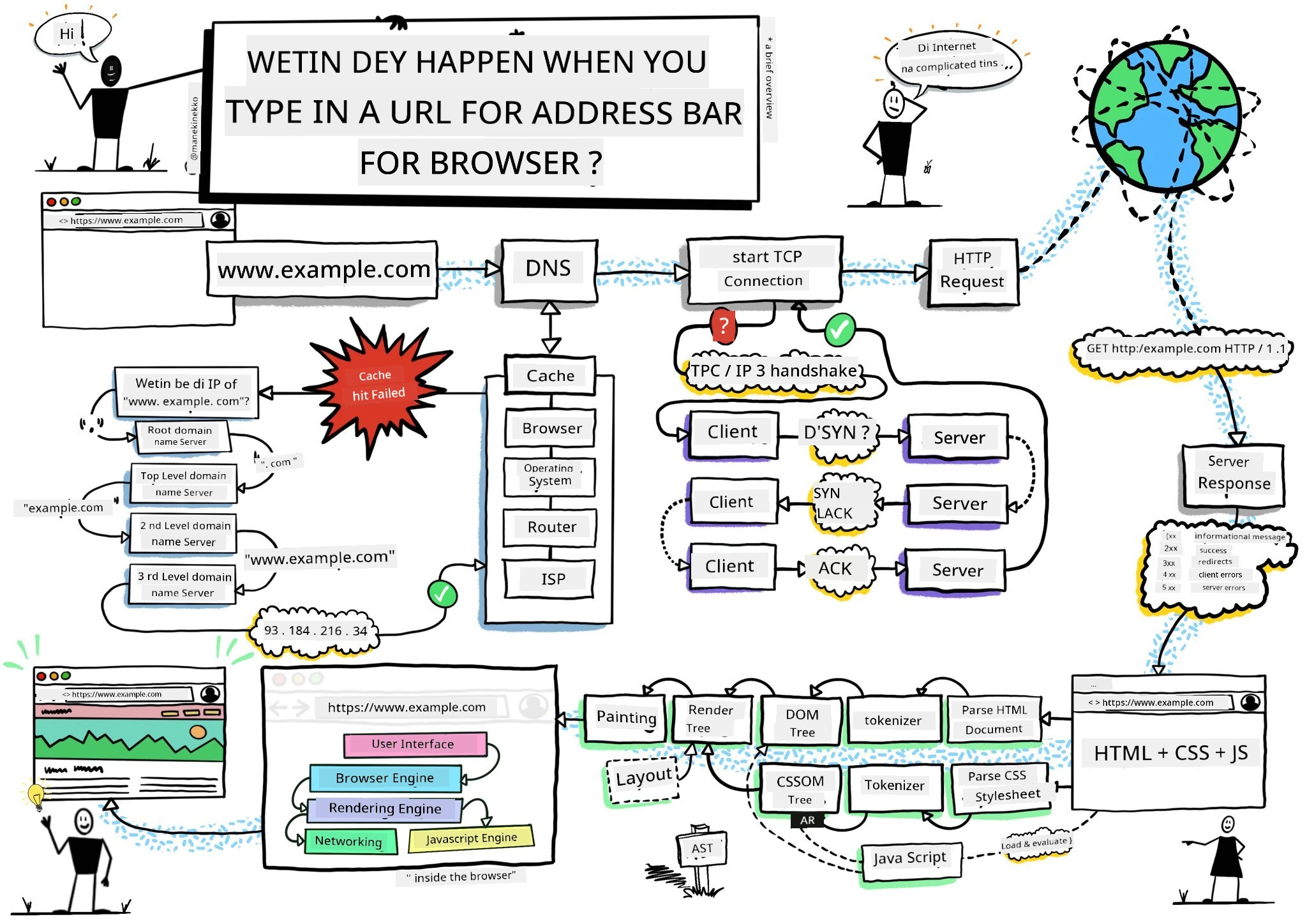
Sketchnote by Wassim Chegham
Pre-Lecture Quiz
Introduction
Browser extensions na small apps wey dey make your web browsing beta. Like Tim Berners-Lee original plan for interactive web, extensions dey increase the browser power pass just to dey look documents. From password managers wey dey keep your account safe to color pickers wey help designers find correct shades, extensions dey solve wahala wey dey everyday browsing.
Before we build your first extension, make we understand how browsers dey work. Just like Alexander Graham Bell suppose understand how sound dey carry before e invent telephone, to sabi browser basics go help you make extensions wey go join well-well with browser systems.
By the end of this lesson, you go sabi browser architecture and start to build your first extension.
mindmap
  root((Browser Architecture))
    Core Components
      Rendering Engine
      JavaScript Engine
      Network Stack
      Storage APIs
    User Interface
      Address Bar
      Tab Management
      Bookmarks
      Extension Icons
    Extension System
      Manifest Files
      Content Scripts
      Background Pages
      Popup Windows
    Security Model
      Same-Origin Policy
      Permissions API
      Content Security
      Isolated Worlds
    Development Tools
      DevTools Integration
      Debug Console
      Performance Monitor
      Extension Inspector
Understanding Web Browsers
Web browser na correct document interpreter. When you type "google.com" inside address bar, browser go do gbege series of work - e go request content from servers for everywhere, then e go parse am and render dat code into interactive web pages wey you dey see.
This process dey like how first web browser, WorldWideWeb, Tim Berners-Lee design am for 1990 so that everybody fit access hyperlinked documents.
✅ Small history: Di first browser na 'WorldWideWeb' an e be Tim Berners-Lee create am for 1990.
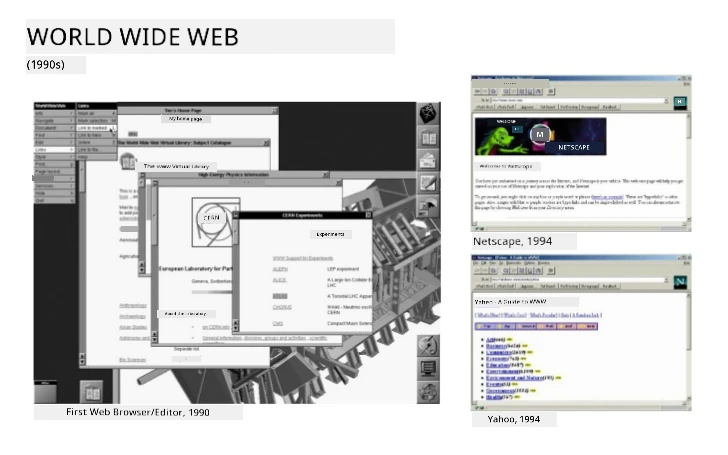
Some early browsers, via Karen McGrane
How Browsers Process Web Content
The process between to put URL and see webpage get many steps wey dem arranged nicely, and everything happen in seconds:
sequenceDiagram
    participant User
    participant Browser
    participant Extension
    participant DNS
    participant Server

    User->>Browser: Types URL and presses Enter
    Browser->>Extension: Trigger beforeRequest event
    Extension->>Extension: Check if URL needs modification
    Browser->>DNS: Looks up server IP address
    DNS->>Browser: Returns IP address
    Browser->>Server: Requests web page content
    Server->>Browser: Sends HTML, CSS, and JavaScript
    Browser->>Extension: Trigger beforeResponse event
    Extension->>Extension: Modify content if needed
    Browser->>User: Render di complete web page
    Extension->>User: Show extension UI updates
Dis na wetin dis process dey do:
- Translate human readable URL go server IP address through DNS lookup
- Set up secure connection with the web server using HTTP or HTTPS protocols
- Request the exact web page content from the server
- Receive HTML markup, CSS styling, and JavaScript code from server
- Render all di content to interactive web page wey you dey see
Browser Core Features
Modern browsers get plenty features wey extension developers fit use:
| Feature | Purpose | Extension Opportunities |
|---|---|---|
| Rendering Engine | Display HTML, CSS, JavaScript | Change content, styling injection |
| JavaScript Engine | Run JavaScript code | Custom scripts, API interactions |
| Local Storage | Save data local | User preferences, cached data |
| Network Stack | Handle web requests | Monitor requests, data analysis |
| Security Model | Protect users from bad content | Content filtering, security upgrades |
To sabi these features go help you:
- Know where your extension fit add the most value
- Pick correct browser APIs for your extension work
- Design extensions wey dey work well with browser system
- Make sure your extension follow browser security best practices
Cross-Browser Development Considerations
Different browsers dey do standards small-small different, like how different programming languages dey handle algorithm differently too. Chrome, Firefox, and Safari get their own way wey developers must understand as dem develop extensions.
💡 Pro Tip: Use caniuse.com to check which web technologies browsers support. Dis thing go help you plan your extension well!
Important things to remember when developing extensions:
- Test your extension for Chrome, Firefox, and Edge
- Adjust to different browser extension APIs and manifest formats
- Handle different performance and limits
- Provide fallbacks for browser-specific features wey no too dey available
✅ Analytics Insight: You fit sabi the browsers wey your users like by installing analytics tools for your web projects. Dis data go help you know which browser to support first.
Understanding Browser Extensions
Browser extensions dey solve common web browsing problems by adding extra work directly to the browser interface. No need for separate apps or complicated workflow, extensions go give quick access to tools.
Dis idea na like how early computer pioneers like Douglas Engelbart think say technology fit boost wetin humans fit do - extensions go add power to your browser.
quadrantChart
    title Browser Extension Categories
    x-axis Simple --> Complex
    y-axis Personal Use --> Professional Tools
    quadrant-1 Developer Tools
    quadrant-2 Enterprise Solutions
    quadrant-3 Personal Utilities
    quadrant-4 Productivity Apps

    Ad Blockers: [0.3, 0.2]
    Password Managers: [0.7, 0.3]
    Color Pickers: [0.4, 0.8]
    Code Formatters: [0.8, 0.9]
    Note Taking: [0.6, 0.5]
    Video Downloaders: [0.5, 0.2]
    Time Trackers: [0.7, 0.6]
    Screenshot Tools: [0.4, 0.4]
Popular extension categories and benefits:
- Productivity Tools: Task managers, note-taking apps, time trackers wey dey help you organize
- Security Enhancements: Password managers, ad blockers, privacy tools wey protect your data
- Developer Tools: Code formatters, color pickers, debugging tools wey make development easier
- Content Enhancement: Reading modes, video downloaders, screenshot tools wey improve your web experience
✅ Reflection Question: Wetin be your favorite browser extensions? Wetin dem dey do, and how e dey make your browsing better?
🔄 Pedagogical Check-in
Browser Architecture Understanding: Before you start to develop extensions, make sure you:
- ✅ Fit explain how browsers dey process web requests and display content
- ✅ Fit identify main parts for browser architecture
- ✅ Understand how extensions join with browser functions
- ✅ Know security model wey protect users
Quick Self-Test: You fit trace the way from when you type URL to when webpage show?
- DNS lookup convert URL go IP address
- HTTP request fetch content from server
- Parsing processes HTML, CSS, JavaScript
- Rendering display final webpage
- Extension fit change content for different steps
Installing and Managing Extensions
To sabi extension installation process go help you sabi how user experience go be when people dey install your extension. Installation process dey similar for all modern browsers, only small design differences.
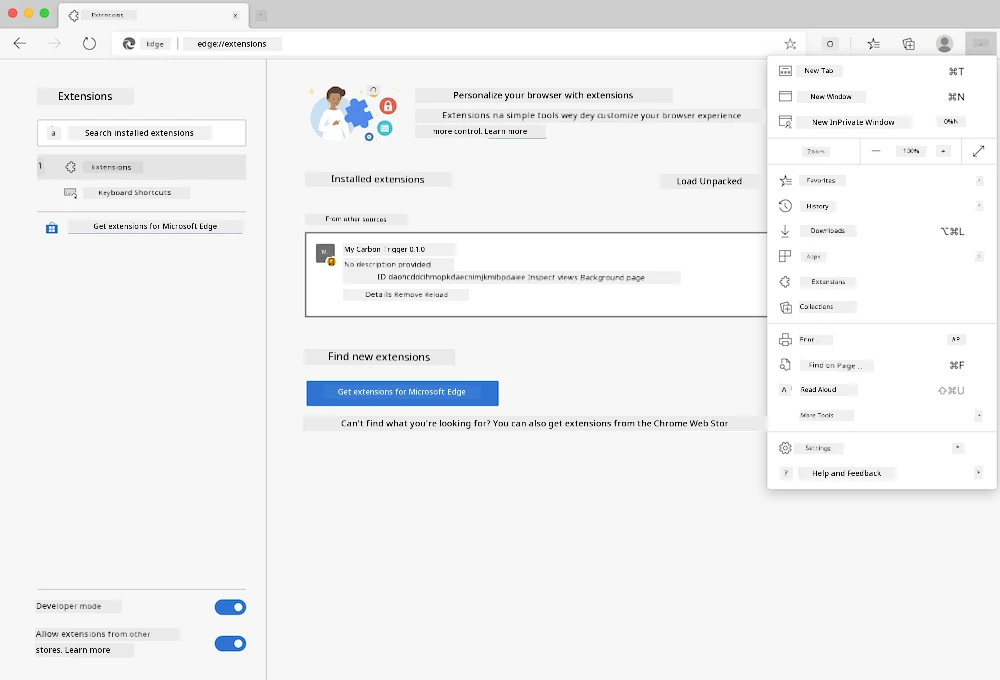
Important: Make sure say developer mode dey on and you allow extensions wey come from other stores when you dey test your own extensions.
Development Extension Installation Process
When you dey develop and test your own extensions, follow this steps:
flowchart TD
    A[Write Code] --> B[Build Extension]
    B --> C{First Install?}
    C -->|Yes| D[Load Unpacked]
    C -->|No| E[Reload Extension]
    D --> F[Test Functionality]
    E --> F
    F --> G{Working Correctly?}
    G -->|No| H[Debug Issues]
    G -->|Yes| I[Ready for Users]
    H --> A
    I --> J[Publish to Store]

    style A fill:#e1f5fe
    style F fill:#e8f5e8
    style I fill:#f3e5f5
    style J fill:#fff3e0
# Step 1: Make your extension
npm run build
Wetìn dis command dey do:
- Compile your source code into browser ready files
- Bundle JavaScript modules into better optimized packages
- Create final extension files for
/distfolder - Prepare your extension for installation and testing
Step 2: Go Browser Extensions
- Open your browser extension management page
- Click "Settings and more" button (
...icon) for top right - Select "Extensions" from menu
Step 3: Load Your Extension
- For new installs: Choose
load unpackedand select your/distfolder - For updates: Click
reloadbeside your installed extension - For testing: Turn on "Developer mode" to get extra debugging features
Production Extension Installation
✅ Note: These development instructions na for extensions wey you dey build yourself. If you want install published extensions, go official browser extension stores like Microsoft Edge Add-ons store.
Understand the difference:
- Development install let you test unpublished extensions as you develop
- Store install na vetted, published extensions wey get automatic updates
- Sideloading na to install extensions from outside official stores (developer mode must dey on)
Building Your Carbon Footprint Extension
We go create browser extension wey go show carbon footprint for your region energy use. Dis project show key extension development concepts plus create real tool for environment.
Dis approach follow "learning by doing" principle wey John Dewey education theory dey support - mix technical skills with real-world purpose.
Project Requirements
Before you start development, make we gather wetin we need:
Required API Access:
- CO2 Signal API key: Put your email to get free API key
- Region code: Find your region code on Electricity Map (for example, Boston get 'US-NEISO')
Development Tools:
- Node.js and NPM: Package manager tool to install project dependencies
- Starter code: Download
startfolder to start development
✅ Learn More: Improve your package management skills with this comprehensive Learn module
Understanding the Project Structure
Sabi project structure help organize development work better. Like Library of Alexandria organize knowledge for easy retrieval, well-structured codebase make development faster:
project-root/
├── dist/                    # Built extension files
│   ├── manifest.json        # Extension configuration
│   ├── index.html           # User interface markup
│   ├── background.js        # Background script functionality
│   └── main.js              # Compiled JavaScript bundle
├── src/                     # Source development files
│   └── index.js             # Your main JavaScript code
├── package.json             # Project dependencies and scripts
└── webpack.config.js        # Build configuration
Break down wetin each file do:
manifest.json: Define extension metadata, permissions, and entry pointsindex.html: Create user interface wey show when people click your extensionbackground.js: Handle background work and browser event listenersmain.js: Contain final bundled JavaScript after buildsrc/index.js: House your main development code wey go compile intomain.js
💡 Organization Tip: Keep your API key and region code for secure note so you fit easily check am during development. You go need am to test extension work.
✅ Security Note: No ever commit API keys or sensitive info to code repository. We go show you how to keep am safe later.
Creating the Extension Interface
Now, we go build user interface parts. The extension get two screens: one for setup and one for result show.
This follow progressive disclosure principle inside interface design since early computers - dey show info and options step by step so no overwhelm user.
Extension Views Overview
Setup View - Configuration for first time user:

Results View - Carbon footprint data display:
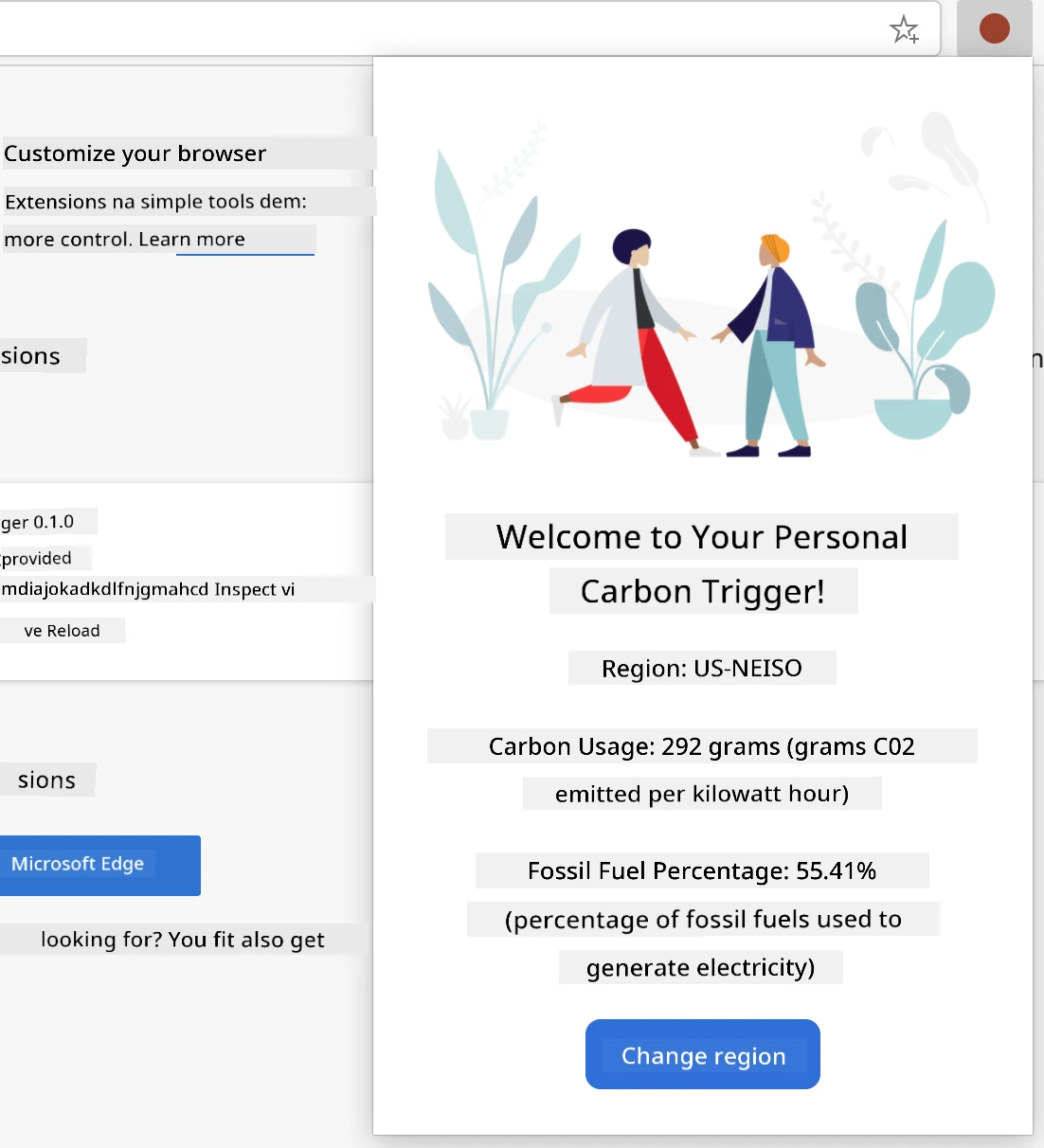
Building the Configuration Form
Setup form go collect user config data on first use. After you set am, info go remain for browser storage for next times.
For /dist/index.html file, add dis form structure:
<form class="form-data" autocomplete="on">
    <div>
        <h2>New? Add your Information</h2>
    </div>
    <div>
        <label for="region">Region Name</label>
        <input type="text" id="region" required class="region-name" />
    </div>
    <div>
        <label for="api">Your API Key from tmrow</label>
        <input type="text" id="api" required class="api-key" />
    </div>
    <button class="search-btn">Submit</button>
</form>
Wetìn dis form dey do:
- Create semantic form with correct labels and input connection
- Enable browser autocomplete to make user experience better
- Require both fields to fill before submit using
requiredattribute - Organize inputs with class names to ease styling and JavaScript access
- Give clear instructions to users wey dey set extension first time
Building the Results Display
Next, create where results go show the carbon footprint data. Add dis HTML below the form:
<div class="result">
    <div class="loading">loading...</div>
    <div class="errors"></div>
    <div class="data"></div>
    <div class="result-container">
        <p><strong>Region: </strong><span class="my-region"></span></p>
        <p><strong>Carbon Usage: </strong><span class="carbon-usage"></span></p>
        <p><strong>Fossil Fuel Percentage: </strong><span class="fossil-fuel"></span></p>
    </div>
    <button class="clear-btn">Change region</button>
</div>
Break down wetin dis place dey provide:
loading: Show loading message while API data dey fetcherrors: Show error messages if API call fail or data no correctdata: Hold raw data for debugging during developmentresult-container: Display formatted carbon footprint info to usersclear-btn: Allow users change region and reset extension
Setting Up the Build Process
Now make we install project dependencies and test build process:
npm install
Wetín dis installation go do:
- Download Webpack and other development dependencies from
package.json - Configure build tools for compiling modern JavaScript
- Prepare development environment to build and test extension
- Enable code bundling, optimization, and cross-browser support
💡 Build Process Insight: Webpack bundle your source code from
/src/index.jsinto/dist/main.js. Dis process go optimize your code for production and make am compatible with browsers.
Testing Your Progress
For now, you fit start to test your extension:
- Run di build command to compile ya kode
- Load di extension inside ya browser wit di developer mode
- Verify sey di form dey show well and e fine well well
- Check sey all di form elements line well and dey work
Wetin you don achieve:
- Built di basic HTML structure for ya extension
- Created both configuration and results interfaces with correct semantic markup
- Set up modern development workflow using industry-standard tools
- Prepared di foundation to add interactive JavaScript functionality
🔄 Pedagogical Check-in
Extension Development Progress: Make sure sey you sabi before you continue:
- ✅ You fit explain di purpose of each file inside di project structure?
- ✅ You understand how di build process dey turn your source code?
- ✅ Why we separate configuration and results into different UI sections?
- ✅ How di form structure dey support both usability and accessibility?
Development Workflow Understanding: You suppose fit now to:
- Modify HTML and CSS for ya extension interface
- Run di build command to compile your changes
- Reload di extension inside your browser to test updates
- Debug wahala using browser developer tools
You don finish di first phase of browser extension development. Just like how Wright brothers first gats understand aerodynamics before dem fit fly, understanding dis basic kind concept dey prepare you to build more complex interactive features for the next lesson.
GitHub Copilot Agent Challenge 🚀
Use di Agent mode to finish di following challenge:
Description: Make di browser extension beta by adding form validation and user feedback features to better di user experience when dem dey put API keys and region codes.
Prompt: Create JavaScript validation functions wey go check if di API key field get at least 20 characters and if di region code follow the correct format (like 'US-NEISO'). Add visual feedback by changing input border colors to green if valid and red if no correct. Make you also add toggle feature to show/hide di API key for security reasons.
Find out more about agent mode here.
🚀 Challenge
Make you check one browser extension store and install one for your browser. You fit check im files in interesting way. Wetin you discover?
Post-Lecture Quiz
Review & Self Study
For dis lesson you learn small about di history of web browser; take dis chance to learn how di inventors of di World Wide Web see how people go use am by reading more about di history. Some sites wey fit help include:
An interview with Tim Berners-Lee
⚡ Wetin You Fit Do for Next 5 Minutes
- Open Chrome/Edge extensions page (chrome://extensions) and explore wetin you get for your browser
- Look your browser DevTools Network tab as you dey load webpage
- Try see page source (Ctrl+U) to check HTML structure
- Inspect any webpage element and change im CSS inside DevTools
🎯 Wetin You Fit Achieve Dis Hour
- Finish di post-lesson quiz and sabi browser fundamentals
- Create basic manifest.json file for browser extension
- Build simple "Hello World" extension wey go show popup
- Test loading your extension for developer mode
- Explore di browser extension documentation for your target browser
📅 Your Week-Long Extension Journey
- Finish functional browser extension wey get real use
- Learn about content scripts, background scripts, and popup interactions
- Master browser APIs like storage, tabs, and messaging
- Design user-friendly interfaces for your extension
- Test your extension on different websites and scenarios
- Publish your extension to the browser extension store
🌟 Your Month-Long Browser Development
- Build many extensions wey solve different user problems
- Learn advanced browser APIs and correct security ways
- Contribute to open source browser extension projects
- Master cross-browser compatibility and progressive enhancement
- Create extension development tools and templates for other people to use
- Become browser extension expert wey fit help other developers
🎯 Your Browser Extension Mastery Timeline
timeline
    title Browser Extension Development Progression

    section Foundation (15 minutes)
        Browser Understanding: Core architecture
                              : Rendering process
                              : Extension integration points

    section Setup (20 minutes)
        Development Environment: Project structure
                               : Build tools configuration
                               : Browser developer mode
                               : Extension loading process

    section Interface Design (25 minutes)
        User Experience: HTML structure
                       : CSS styling
                       : Form validation
                       : Responsive design

    section Core Functionality (35 minutes)
        JavaScript Integration: Event handling
                              : API interactions
                              : Data storage
                              : Error handling

    section Browser APIs (45 minutes)
        Platform Integration: Permissions system
                            : Storage APIs
                            : Tab management
                            : Context menus

    section Advanced Features (1 week)
        Professional Extensions: Background scripts
                               : Content scripts
                               : Cross-browser compatibility
                               : Performance optimization

    section Publishing (2 weeks)
        Distribution: Store submission
                   : Review process
                   : User feedback
                   : Update management

    section Expert Level (1 month)
        Extension Ecosystem: Advanced APIs
                           : Security best practices
                           : Enterprise features
                           : Framework integration
🛠️ Your Extension Development Toolkit Summary
After you finish dis lesson, you now get:
- Browser Architecture Knowledge: You sabi rendering engines, security models, and extension integration
- Development Environment: Modern tools like Webpack, NPM, and debugging
- UI/UX Foundation: Semantic HTML structure with progressive disclosure patterns
- Security Awareness: You know browser permissions and how to develop safely
- Cross-Browser Concepts: You sabi compatibility and testing approach
- API Integration: Foundation to work with external data
- Professional Workflow: Industry-standard development and testing methods
Real-World Applications: These skills good for:
- Web Development: Single-page applications and progressive web apps
- Desktop Applications: Electron and web-based desktop software
- Mobile Development: Hybrid apps and web-based mobile solutions
- Enterprise Tools: Internal productivity apps and workflow automation
- Open Source: Contributing to browser extension projects and web standards
Next Level: You ready to add interactive features, work with browser APIs, and create extensions wey go solve real user wahala!
Assignment
Disclaimer: Dis document don translate wit AI translation service wey dem call Co-op Translator. Even though we dey try make everything correct, abeg make you sabi say automatic translation fit get wahala or mistake. Di original document for im own language na im get di real correct tin. If na important information, better make professional human translation do am. We no go responsible for any yawa or wrong understanding wey fit happen because of dis translation.