
12 KiB
Introduction to Programming Languages and Tools of the Trade
This lesson introduces the fundamentals of programming languages. The topics discussed here are relevant to most modern programming languages today. In the 'Tools of the Trade' section, you'll explore software that can assist you as a developer.
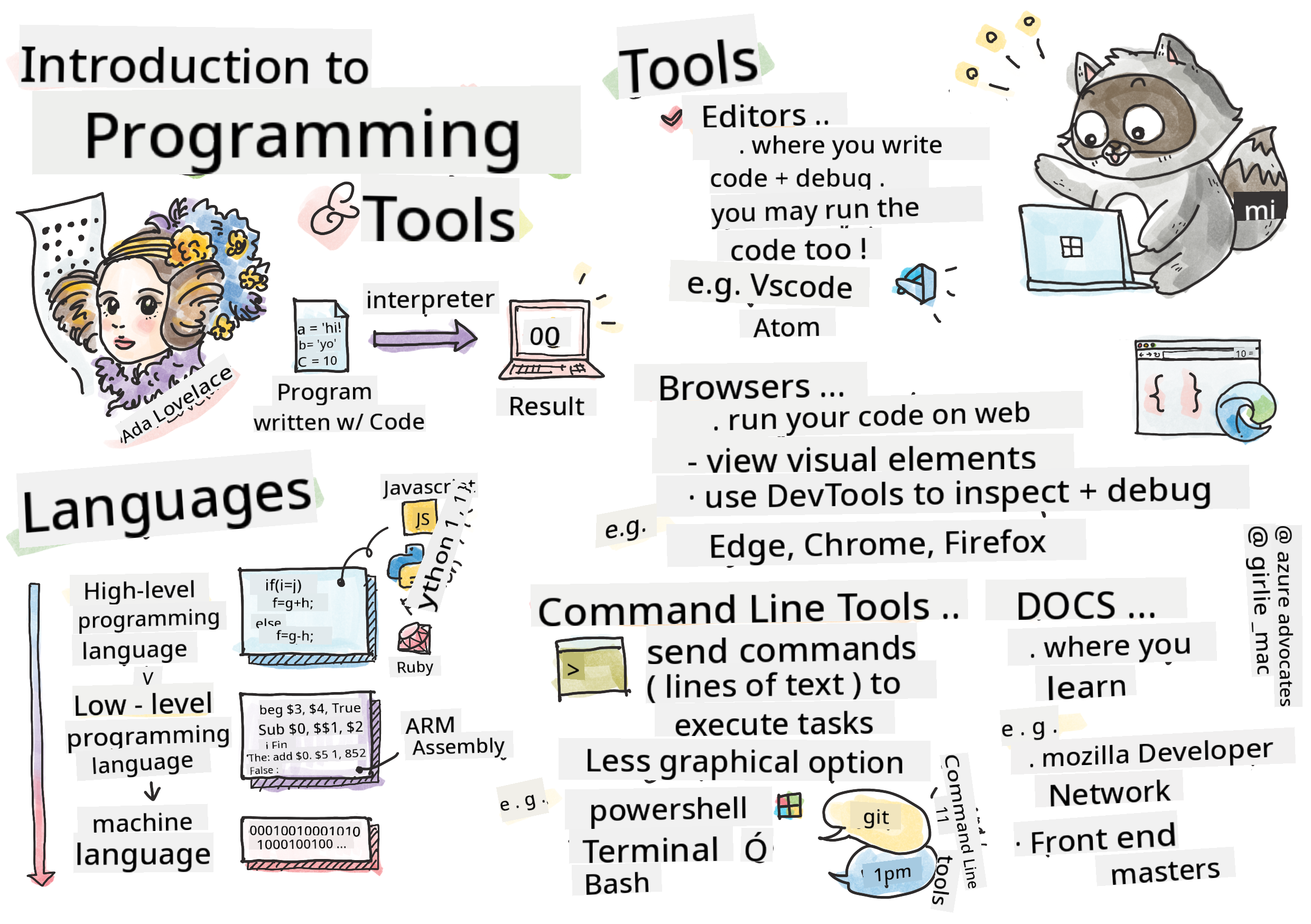
Sketchnote by Tomomi Imura
Pre-Lecture Quiz
Introduction
In this lesson, we will cover:
- What programming is
- Types of programming languages
- Basic components of a program
- Useful software and tools for professional developers
You can take this lesson on Microsoft Learn!
What is Programming?
Programming (also called coding) is the process of writing instructions for a device, such as a computer or mobile device. These instructions are written using a programming language, which the device interprets. These sets of instructions may be referred to by various names, such as program, computer program, application (app), or executable.
A program can be anything created with code—websites, games, and phone apps are all programs. While it's possible to create a program without writing code, the underlying logic is interpreted by the device, and that logic is most likely written in code. A program that is running or executing code is carrying out instructions. The device you're using to read this lesson is running a program to display it on your screen.
✅ Research task: Who is considered the world's first computer programmer?
Programming Languages
Programming languages allow developers to write instructions for a device. Devices only understand binary (1s and 0s), which is not an efficient way for most developers to communicate. Programming languages act as a bridge between humans and computers.
Programming languages come in various formats and serve different purposes. For instance, JavaScript is primarily used for web applications, while Bash is mainly used for operating systems.
Low-level languages typically require fewer steps for a device to interpret instructions compared to high-level languages. However, high-level languages are popular due to their readability and support. JavaScript is considered a high-level language.
The following code demonstrates the difference between a high-level language (JavaScript) and a low-level language (ARM assembly code).
let number = 10
let n1 = 0, n2 = 1, nextTerm;

for (let i = 1; i <= number; i++) {
    console.log(n1);
    nextTerm = n1 + n2;
    n1 = n2;
    n2 = nextTerm;
}
 area ascen,code,readonly
 entry
 code32
 adr r0,thumb+1
 bx r0
 code16
thumb
 mov r0,#00
 sub r0,r0,#01
 mov r1,#01
 mov r4,#10
 ldr r2,=0x40000000
back add r0,r1
 str r0,[r2]
 add r2,#04
 mov r3,r0
 mov r0,r1
 mov r1,r3
 sub r4,#01
 cmp r4,#00
 bne back
 end
Believe it or not, both are doing the same thing: printing a Fibonacci sequence up to 10.
✅ A Fibonacci sequence is defined as a series of numbers where each number is the sum of the two preceding ones, starting from 0 and 1. The first 10 numbers in the Fibonacci sequence are 0, 1, 1, 2, 3, 5, 8, 13, 21, and 34.
Elements of a Program
A single instruction in a program is called a statement. Statements usually have a character or line spacing that marks where the instruction ends, or terminates. The way a program terminates varies by language.
Statements in a program may depend on data provided by a user or other sources to execute instructions. Data can influence how a program behaves, so programming languages include ways to temporarily store data for later use. These are called variables. Variables are statements that instruct a device to save data in its memory. Variables in programs are similar to variables in algebra, where they have a unique name and their value can change over time.
Some statements may not be executed by a device. This can happen intentionally, as designed by the developer, or accidentally due to unexpected errors. This type of control over an application makes it more robust and maintainable. Typically, these changes in control occur when certain conditions are met. A common statement used in modern programming to control program flow is the if..else statement.
✅ You'll learn more about this type of statement in future lessons.
Tools of the Trade

🎥 Click the image above to watch a video about tooling
In this section, you'll explore software that can be very useful as you begin your journey as a professional developer.
A development environment is a unique set of tools and features that developers frequently use when writing software. These tools may be customized to meet a developer's specific needs and can evolve over time as priorities shift, personal projects change, or different programming languages are used. Development environments are as unique as the developers who use them.
Editors
One of the most essential tools for software development is the editor. Editors are where you write your code and sometimes where you run it.
Developers rely on editors for several reasons:
- Debugging helps identify bugs and errors by stepping through the code line by line. Some editors have built-in debugging capabilities, which can be customized for specific programming languages.
- Syntax highlighting adds colors and text formatting to code, making it easier to read. Most editors allow syntax highlighting customization.
- Extensions and Integrations are specialized tools created by developers for developers. These tools are not part of the base editor. For example, many developers document their code to explain how it works. They might install a spell-check extension to catch typos in the documentation. Most extensions are designed for specific editors, and most editors include a way to search for available extensions.
- Customization allows developers to tailor their development environment to their needs. Most editors are highly customizable and may even allow developers to create custom extensions.
Popular Editors and Web Development Extensions
Browsers
Another essential tool is the browser. Web developers use browsers to test how their code runs on the web. Browsers also display the visual elements of a web page written in the editor, such as HTML.
Many browsers include developer tools (DevTools), which offer features and information to help developers gather and analyze important details about their applications. For example, if a web page has errors, DevTools can be configured to capture information about when the errors occurred.
Popular Browsers and DevTools
Command Line Tools
Some developers prefer a less graphical interface for their daily tasks and rely on the command line. Writing code involves a lot of typing, and some developers prefer not to disrupt their workflow by switching between the keyboard and mouse. They use keyboard shortcuts to navigate between desktop windows, work on different files, and use tools. While most tasks can be completed with a mouse, the command line allows developers to perform many tasks without switching between the mouse and keyboard. Another advantage of the command line is its configurability—you can save custom configurations, modify them later, and import them to other development machines. Since development environments are highly personalized, some developers avoid the command line, others rely on it entirely, and some prefer a mix of both.
Popular Command Line Options
Command line options vary depending on the operating system.
💻 = preinstalled on the operating system.
Windows
- Powershell 💻
- Command Line (also known as CMD) 💻
- Windows Terminal
- mintty
MacOS
Linux
Popular Command Line Tools
Documentation
When developers want to learn something new, they often turn to documentation for guidance. Documentation helps developers understand how to use tools and languages effectively and provides deeper insights into their functionality.
Popular Documentation on Web Development
- Mozilla Developer Network (MDN), from Mozilla, the publishers of the Firefox browser
- Frontend Masters
- Web.dev, from Google, publishers of Chrome
- Microsoft's own developer docs, for Microsoft Edge
- W3 Schools
✅ Research task: Now that you understand the basics of a web developer's environment, compare it with a web designer's environment.
🚀 Challenge
Compare some programming languages. What are some unique characteristics of JavaScript vs. Java? How about COBOL vs. Go?
Post-Lecture Quiz
Review & Self Study
Explore the different programming languages available. Try writing a line of code in one language, then rewrite it in two others. What did you learn?
Assignment
Note: When selecting tools for your assignment, do not choose editors, browsers, or command line tools already listed above.
Disclaimer:
This document has been translated using the AI translation service Co-op Translator. While we aim for accuracy, please note that automated translations may contain errors or inaccuracies. The original document in its native language should be regarded as the authoritative source. For critical information, professional human translation is recommended. We are not responsible for any misunderstandings or misinterpretations resulting from the use of this translation.