# Build a Banking App Part 2: Build a Login and Registration Form
```mermaid
journey
title Your Form Development Journey
section HTML Foundation
Understand form elements: 3: Student
Learn input types: 4: Student
Master accessibility: 4: Student
section JavaScript Integration
Handle form submission: 4: Student
Implement AJAX communication: 5: Student
Process server responses: 5: Student
section Validation Systems
Create multi-layer validation: 5: Student
Enhance user experience: 5: Student
Ensure data integrity: 5: Student
```
## Pre-Lecture Quiz
[Pre-lecture quiz](https://ff-quizzes.netlify.app/web/quiz/43)
Ever filled out a form online and had it reject your email format? Or lost all your information when you clicked submit? We've all encountered these frustrating experiences.
Forms are the bridge between your users and your application's functionality. Like the careful protocols that air traffic controllers use to guide planes safely to their destinations, well-designed forms provide clear feedback and prevent costly errors. Poor forms, on the other hand, can drive users away faster than a miscommunication in a busy airport.
In this lesson, we'll transform your static banking app into an interactive application. You'll learn to build forms that validate user input, communicate with servers, and provide helpful feedback. Think of it as building the control interface that lets users navigate your application's features.
By the end, you'll have a complete login and registration system with validation that guides users toward success rather than frustration.
```mermaid
mindmap
root((Form Development))
HTML Foundation
Semantic Elements
Input Types
Accessibility
Label Association
User Experience
Validation Feedback
Error Prevention
Loading States
Success Messaging
JavaScript Integration
Event Handling
AJAX Communication
Data Processing
Error Management
Validation Layers
HTML5 Validation
Client-side Logic
Server-side Security
Progressive Enhancement
Modern Patterns
Fetch API
Async/Await
Form Data API
Promise Handling
```
## Prerequisites
Before we start building forms, let's make sure you've got everything set up correctly. This lesson picks up right where we left off in the previous one, so if you skipped ahead, you might want to go back and get the basics working first.
### Required Setup
| Component | Status | Description |
|-----------|--------|-------------|
| [HTML Templates](../1-template-route/README.md) | ✅ Required | Your basic banking app structure |
| [Node.js](https://nodejs.org) | ✅ Required | JavaScript runtime for the server |
| [Bank API Server](../api/README.md) | ✅ Required | Backend service for data storage |
> 💡 **Development Tip**: You'll be running two separate servers simultaneously – one for your front-end banking app and another for the backend API. This setup mirrors real-world development where frontend and backend services operate independently.
### Server Configuration
**Your development environment will include:**
- **Frontend server**: Serves your banking app (typically port `3000`)
- **Backend API server**: Handles data storage and retrieval (port `5000`)
- **Both servers** can run simultaneously without conflicts
**Testing your API connection:**
```bash
curl http://localhost:5000/api
# Expected response: "Bank API v1.0.0"
```
**If you see the API version response, you're ready to proceed!**
---
## Understanding HTML Forms and Controls
HTML forms are how users communicate with your web application. Think of them as the telegraph system that connected distant places in the 19th century – they're the communication protocol between user intent and application response. When designed thoughtfully, they catch errors, guide input formatting, and provide helpful suggestions.
Modern forms are significantly more sophisticated than basic text inputs. HTML5 introduced specialized input types that handle email validation, number formatting, and date selection automatically. These improvements benefit both accessibility and mobile user experiences.
### Essential Form Elements
**Building blocks every form needs:**
```html
```
**Here's what this code does:**
- **Creates** a form container with a unique identifier
- **Specifies** the HTTP method for data submission
- **Associates** labels with inputs for accessibility
- **Defines** a submit button to process the form
### Modern Input Types and Attributes
| Input Type | Purpose | Example Usage |
|------------|---------|---------------|
| `text` | General text input | `` |
| `email` | Email validation | `` |
| `password` | Hidden text entry | `` |
| `number` | Numeric input | `` |
| `tel` | Phone numbers | `` |
> 💡 **Modern HTML5 Advantage**: Using specific input types provides automatic validation, appropriate mobile keyboards, and better accessibility support without additional JavaScript!
### Button Types and Behavior
```html
```
**Here's what each button type does:**
- **Submit buttons**: Trigger form submission and send data to the specified endpoint
- **Reset buttons**: Restore all form fields to their initial state
- **Regular buttons**: Provide no default behavior, requiring custom JavaScript for functionality
> ⚠️ **Important Note**: The `` element is self-closing and doesn't require a closing tag. Modern best practice is to write `` without the slash.
### Building Your Login Form
Now let's create a practical login form that demonstrates modern HTML form practices. We'll start with a basic structure and gradually enhance it with accessibility features and validation.
```html
Bank App
Login
```
**Breaking down what happens here:**
- **Structures** the form with semantic HTML5 elements
- **Groups** related elements using `div` containers with meaningful classes
- **Associates** labels with inputs using the `for` and `id` attributes
- **Includes** modern attributes like `autocomplete` and `placeholder` for better UX
- **Adds** `novalidate` to handle validation with JavaScript instead of browser defaults
### The Power of Proper Labels
**Why labels matter for modern web development:**
```mermaid
graph TD
A[Label Element] --> B[Screen Reader Support]
A --> C[Click Target Expansion]
A --> D[Form Validation]
A --> E[SEO Benefits]
B --> F[Accessible to all users]
C --> G[Better mobile experience]
D --> H[Clear error messaging]
E --> I[Better search ranking]
```
**What proper labels accomplish:**
- **Enables** screen readers to announce form fields clearly
- **Expands** the clickable area (clicking the label focuses the input)
- **Improves** mobile usability with larger touch targets
- **Supports** form validation with meaningful error messages
- **Enhances** SEO by providing semantic meaning to form elements
> 🎯 **Accessibility Goal**: Every form input should have an associated label. This simple practice makes your forms usable by everyone, including users with disabilities, and improves the experience for all users.
### Creating the Registration Form
The registration form requires more detailed information to create a complete user account. Let's build it with modern HTML5 features and enhanced accessibility.
```html
Register
```
**In the above, we've:**
- **Organized** each field in container divs for better styling and layout
- **Added** appropriate `autocomplete` attributes for browser autofill support
- **Included** helpful placeholder text to guide user input
- **Set** sensible defaults using the `value` attribute
- **Applied** validation attributes like `required`, `maxlength`, and `min`
- **Used** `type="number"` for the balance field with decimal support
### Exploring Input Types and Behavior
**Modern input types provide enhanced functionality:**
| Feature | Benefit | Example |
|---------|---------|----------|
| `type="number"` | Numeric keypad on mobile | Easier balance entry |
| `step="0.01"` | Decimal precision control | Allows cents in currency |
| `autocomplete` | Browser autofill | Faster form completion |
| `placeholder` | Contextual hints | Guides user expectations |
> 🎯 **Accessibility Challenge**: Try navigating the forms using only your keyboard! Use `Tab` to move between fields, `Space` to check boxes, and `Enter` to submit. This experience helps you understand how screen reader users interact with your forms.
### 🔄 **Pedagogical Check-in**
**Form Foundation Understanding**: Before implementing JavaScript, ensure you understand:
- ✅ How semantic HTML creates accessible form structures
- ✅ Why input types matter for mobile keyboards and validation
- ✅ The relationship between labels and form controls
- ✅ How form attributes affect default browser behavior
**Quick Self-Test**: What happens if you submit a form without JavaScript handling?
*Answer: The browser performs default submission, usually redirecting to the action URL*
**HTML5 Form Benefits**: Modern forms provide:
- **Built-in Validation**: Automatic email and number format checking
- **Mobile Optimization**: Appropriate keyboards for different input types
- **Accessibility**: Screen reader support and keyboard navigation
- **Progressive Enhancement**: Works even when JavaScript is disabled
## Understanding Form Submission Methods
When someone fills out your form and hits submit, that data needs to go somewhere – usually to a server that can save it. There are a couple of different ways this can happen, and knowing which one to use can save you from some headaches later.
Let's take a look at what actually happens when someone clicks that submit button.
### Default Form Behavior
First, let's observe what happens with basic form submission:
**Test your current forms:**
1. Click the *Register* button in your form
2. Observe the changes in your browser's address bar
3. Notice how the page reloads and data appears in the URL

### HTTP Methods Comparison
```mermaid
graph TD
A[Form Submission] --> B{HTTP Method}
B -->|GET| C[Data in URL]
B -->|POST| D[Data in Request Body]
C --> E[Visible in address bar]
C --> F[Limited data size]
C --> G[Bookmarkable]
D --> H[Hidden from URL]
D --> I[Large data capacity]
D --> J[More secure]
```
**Understanding the differences:**
| Method | Use Case | Data Location | Security Level | Size Limit |
|--------|----------|---------------|----------------|-------------|
| `GET` | Search queries, filters | URL parameters | Low (visible) | ~2000 characters |
| `POST` | User accounts, sensitive data | Request body | Higher (hidden) | No practical limit |
**Understanding the fundamental differences:**
- **GET**: Appends form data to the URL as query parameters (appropriate for search operations)
- **POST**: Includes data in the request body (essential for sensitive information)
- **GET limitations**: Size constraints, visible data, persistent browser history
- **POST advantages**: Large data capacity, privacy protection, file upload support
> 💡 **Best Practice**: Use `GET` for search forms and filters (data retrieval), use `POST` for user registration, login, and data creation.
### Configuring Form Submission
Let's configure your registration form to communicate properly with the backend API using the POST method:
```html
```
**Understanding the enhanced validation:**
- **Combines** required field indicators with helpful descriptions
- **Includes** `pattern` attributes for format validation
- **Provides** `title` attributes for accessibility and tooltips
- **Adds** helper text to guide user input
- **Uses** semantic HTML structure for better accessibility
### Advanced Validation Rules
**What each validation rule accomplishes:**
| Field | Validation Rules | User Benefit |
|-------|------------------|--------------|
| Username | `required`, `minlength="3"`, `maxlength="20"`, `pattern="[a-zA-Z0-9_]+"` | Ensures valid, unique identifiers |
| Currency | `required`, `maxlength="3"`, `pattern="[A-Z$€£¥₹]+"` | Accepts common currency symbols |
| Balance | `min="0"`, `step="0.01"`, `type="number"` | Prevents negative balances |
| Description | `maxlength="100"` | Reasonable length limits |
### Testing Validation Behavior
**Try these validation scenarios:**
1. **Submit** the form with empty required fields
2. **Enter** a username shorter than 3 characters
3. **Try** special characters in the username field
4. **Input** a negative balance amount

**What you'll observe:**
- **Browser displays** native validation messages
- **Styling changes** based on `:valid` and `:invalid` states
- **Form submission** is prevented until all validations pass
- **Focus automatically** moves to the first invalid field
### Client-Side vs Server-Side Validation
```mermaid
graph LR
A[Client-Side Validation] --> B[Instant Feedback]
A --> C[Better UX]
A --> D[Reduced Server Load]
E[Server-Side Validation] --> F[Security]
E --> G[Data Integrity]
E --> H[Business Rules]
A -.-> I[Both Required]
E -.-> I
```
**Why you need both layers:**
- **Client-side validation**: Provides immediate feedback and improves user experience
- **Server-side validation**: Ensures security and handles complex business rules
- **Combined approach**: Creates robust, user-friendly, and secure applications
- **Progressive enhancement**: Works even when JavaScript is disabled
> 🛡️ **Security Reminder**: Never trust client-side validation alone! Malicious users can bypass client-side checks, so server-side validation is essential for security and data integrity.
### ⚡ **What You Can Do in the Next 5 Minutes**
- [ ] Test your form with invalid data to see validation messages
- [ ] Try submitting the form with JavaScript disabled to see HTML5 validation
- [ ] Open browser DevTools and inspect form data being sent to the server
- [ ] Experiment with different input types to see mobile keyboard changes
### 🎯 **What You Can Accomplish This Hour**
- [ ] Complete the post-lesson quiz and understand form handling concepts
- [ ] Implement the comprehensive validation challenge with real-time feedback
- [ ] Add CSS styling to create professional-looking forms
- [ ] Create error handling for duplicate usernames and server errors
- [ ] Add password confirmation fields with matching validation
### 📅 **Your Week-Long Form Mastery Journey**
- [ ] Complete the full banking app with advanced form features
- [ ] Implement file upload capabilities for profile pictures or documents
- [ ] Add multi-step forms with progress indicators and state management
- [ ] Create dynamic forms that adapt based on user selections
- [ ] Implement form autosave and recovery for better user experience
- [ ] Add advanced validation like email verification and phone number formatting
### 🌟 **Your Month-Long Frontend Development Mastery**
- [ ] Build complex form applications with conditional logic and workflows
- [ ] Learn form libraries and frameworks for rapid development
- [ ] Master accessibility guidelines and inclusive design principles
- [ ] Implement internationalization and localization for global forms
- [ ] Create reusable form component libraries and design systems
- [ ] Contribute to open source form projects and share best practices
## 🎯 Your Form Development Mastery Timeline
```mermaid
timeline
title Form Development & User Experience Learning Progression
section HTML Foundation (15 minutes)
Semantic Forms: Form elements
: Input types
: Labels and accessibility
: Progressive enhancement
section JavaScript Integration (25 minutes)
Event Handling: Form submission
: Data collection
: AJAX communication
: Async/await patterns
section Validation Systems (35 minutes)
Multi-layer Security: HTML5 validation
: Client-side logic
: Server-side verification
: Error handling
section User Experience (45 minutes)
Interface Polish: Loading states
: Success messaging
: Error recovery
: Accessibility features
section Advanced Patterns (1 week)
Professional Forms: Dynamic validation
: Multi-step workflows
: File uploads
: Real-time feedback
section Enterprise Skills (1 month)
Production Applications: Form libraries
: Testing strategies
: Performance optimization
: Security best practices
```
### 🛠️ Your Form Development Toolkit Summary
After completing this lesson, you now have mastered:
- **HTML5 Forms**: Semantic structure, input types, and accessibility features
- **JavaScript Form Handling**: Event management, data collection, and AJAX communication
- **Validation Architecture**: Multi-layer validation for security and user experience
- **Asynchronous Programming**: Modern fetch API and async/await patterns
- **Error Management**: Comprehensive error handling and user feedback systems
- **User Experience Design**: Loading states, success messaging, and error recovery
- **Progressive Enhancement**: Forms that work across all browsers and capabilities
**Real-World Applications**: Your form development skills apply directly to:
- **E-commerce Applications**: Checkout processes, account registration, and payment forms
- **Enterprise Software**: Data entry systems, reporting interfaces, and workflow applications
- **Content Management**: Publishing platforms, user-generated content, and administrative interfaces
- **Financial Applications**: Banking interfaces, investment platforms, and transaction systems
- **Healthcare Systems**: Patient portals, appointment scheduling, and medical record forms
- **Educational Platforms**: Course registration, assessment tools, and learning management
**Professional Skills Gained**: You can now:
- **Design** accessible forms that work for all users including those with disabilities
- **Implement** secure form validation that prevents data corruption and security vulnerabilities
- **Create** responsive user interfaces that provide clear feedback and guidance
- **Debug** complex form interactions using browser developer tools and network analysis
- **Optimize** form performance through efficient data handling and validation strategies
**Frontend Development Concepts Mastered**:
- **Event-Driven Architecture**: User interaction handling and response systems
- **Asynchronous Programming**: Non-blocking server communication and error handling
- **Data Validation**: Client-side and server-side security and integrity checks
- **User Experience Design**: Intuitive interfaces that guide users toward success
- **Accessibility Engineering**: Inclusive design that works for diverse user needs
**Next Level**: You're ready to explore advanced form libraries, implement complex validation rules, or build enterprise-grade data collection systems!
🌟 **Achievement Unlocked**: You've built a complete form handling system with professional validation, error handling, and user experience patterns!
---
---
## GitHub Copilot Agent Challenge 🚀
Use the Agent mode to complete the following challenge:
**Description:** Enhance the registration form with comprehensive client-side validation and user feedback. This challenge will help you practice form validation, error handling, and improving user experience with interactive feedback.
**Prompt:** Create a complete form validation system for the registration form that includes: 1) Real-time validation feedback for each field as the user types, 2) Custom validation messages that appear below each input field, 3) A password confirmation field with matching validation, 4) Visual indicators (like green checkmarks for valid fields and red warnings for invalid ones), 5) A submit button that only becomes enabled when all validations pass. Use HTML5 validation attributes, CSS for styling the validation states, and JavaScript for the interactive behavior.
Learn more about [agent mode](https://code.visualstudio.com/blogs/2025/02/24/introducing-copilot-agent-mode) here.
## 🚀 Challenge
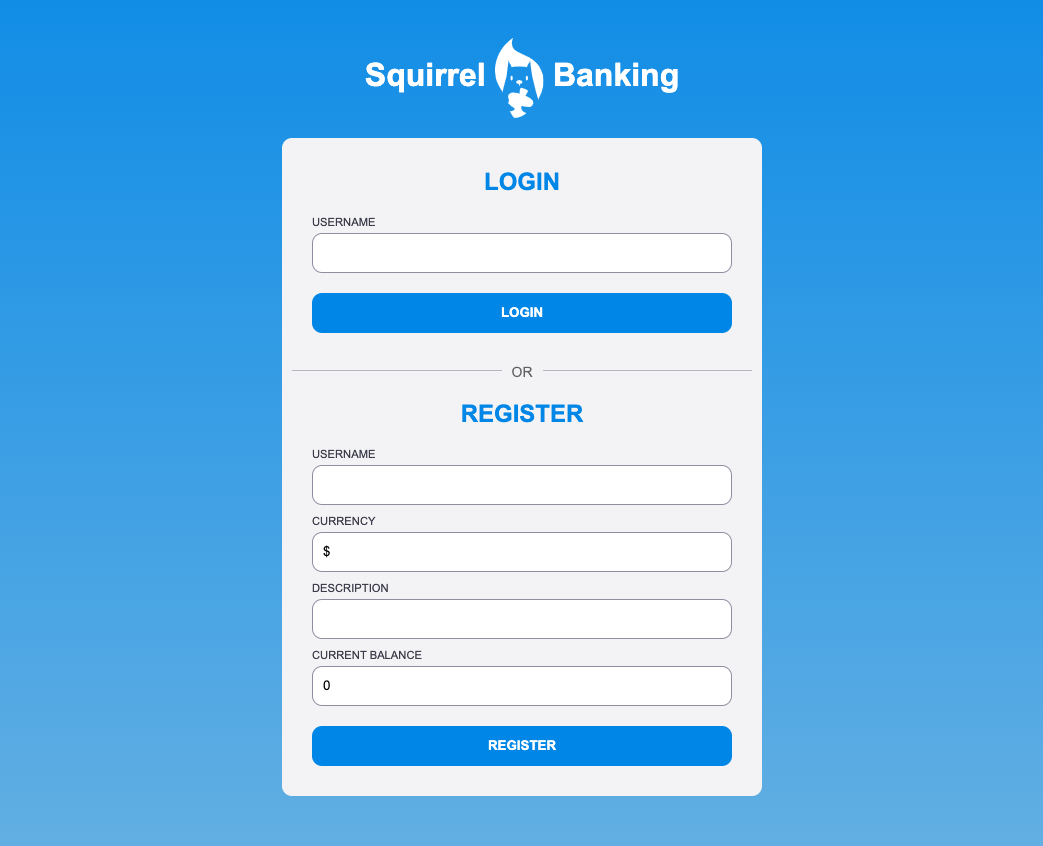
Show an error message in the HTML if the user already exists.
Here's an example of what the final login page can look like after a bit of styling:
## Post-Lecture Quiz
[Post-lecture quiz](https://ff-quizzes.netlify.app/web/quiz/44)
## Review & Self Study
Developers have gotten very creative about their form building efforts, especially regarding validation strategies. Learn about different form flows by looking through [CodePen](https://codepen.com); can you find some interesting and inspiring forms?
## Assignment
[Style your bank app](assignment.md)