# Build a Banking App Part 3: Methods of Fetching and Using Data
Think about di Enterprise computer for Star Trek - wen Captain Picard ask for ship status, di information show sharp sharp without di whole interface stop to rebuild by itself. Dat smooth flow of information na exactly wetin we dey build here wit dynamic data fetching.
Right now, your banking app dey like one printed newspaper - informative but e no dey change. We go turn am to something like NASA mission control, wey data go dey flow steady steady and dey update for real-time without interrupt di person wey dey use am.
You go sabi how to talk wit servers asynchronously, handle data wey go show at different times, and turn raw information to something wey get meaning for your users. Na di difference between demo and production-ready software dis be.
## ⚡ Wetin You Fit Do For Next 5 Minutes
**Quick Start Pathway for Busy Developers**
```mermaid
flowchart LR
A[⚡ 5 minutes] --> B[Set up API server]
B --> C[Test fetch with curl]
C --> D[Create login function]
D --> E[See data for action]
```
- **Minute 1-2**: Start your API server (`cd api && npm start`) and test di connection
- **Minute 3**: Create basic `getAccount()` function wit fetch
- **Minute 4**: Connect di login form wit `action="javascript:login()"`
- **Minute 5**: Test login and see account data show for di console
**Quick Test Commands**:
```bash
# Check say API dey run
curl http://localhost:5000/api
# Test to grab account data
curl http://localhost:5000/api/accounts/test
```
**Why Dis Matter**: For 5 minutes, you go see di magic of asynchronous data fetching wey power every modern web app. Na di foundation wey make apps feel responsive and alive.
## 🗺️ Your Learning Journey Through Data-Driven Web Applications
```mermaid
journey
title From Static Pages to Dynamic Applications
section Understanding the Evolution
Traditional page reloads: 3: You
Discover AJAX/SPA benefits: 5: You
Master Fetch API patterns: 7: You
section Building Authentication
Create login functions: 4: You
Handle async operations: 6: You
Manage user sessions: 8: You
section Dynamic UI Updates
Learn DOM manipulation: 5: You
Build transaction displays: 7: You
Create responsive dashboards: 9: You
section Professional Patterns
Template-based rendering: 6: You
Error handling strategies: 7: You
Performance optimization: 8: You
```
**Your Journey Destination**: By di end of dis lesson, you go understand how modern web apps dey fetch, process, and display data dynamically, creating di smooth user experiences wey we dey expect from pro applications.
## Pre-Lecture Quiz
[Pre-lecture quiz](https://ff-quizzes.netlify.app/web/quiz/45)
### Prerequisites
Before you jump enter data fetching, make sure say you get these components ready:
- **Previous Lesson**: Finish di [Login and Registration Form](../2-forms/README.md) - we go build on top dis
- **Local Server**: Install [Node.js](https://nodejs.org) and [run di server API](../api/README.md) to provide account data
- **API Connection**: Test your server connection wit dis command:
```bash
curl http://localhost:5000/api
# Wetin we expect for response: "Bank API v1.0.0"
```
Dis quick test dey make sure all components dey communicate well:
- Confirm say Node.js dey run correct for your system
- Show say your API server dey active and e dey respond
- Make sure say your app fit reach di server (like checking radio contact before mission)
## 🧠 Data Management Ecosystem Overview
```mermaid
mindmap
root((Data Management))
Authentication Flow
Login Process
Form Validation
Credential Verification
Session Management
User State
Global Account Object
Navigation Guards
Error Handling
API Communication
Fetch Patterns
GET Requests
POST Requests
Error Responses
Data Formats
JSON Processing
URL Encoding
Response Parsing
Dynamic UI Updates
DOM Manipulation
Safe Text Updates
Element Creation
Template Cloning
User Experience
Real-time Updates
Error Messages
Loading States
Security Considerations
XSS Prevention
textContent Usage
Input Sanitization
Safe HTML Creation
CORS Handling
Cross-Origin Requests
Header Configuration
Development Setup
```
**Core Principle**: Modern web apps na data control systems - dem dey coordinate between user interfaces, server APIs, and browser security settings to create smooth, responsive experiences.
---
## Understanding Data Fetching in Modern Web Apps
How web apps dey handle data don change wella for di past twenty years. Understanding dis change go help you appreciate why modern tools like AJAX and Fetch API powerful and why web developers no fit do without dem.
Make we look how traditional websites dey work compare to di dynamic, responsive apps wey we dey build nowadays.
### Traditional Multi-Page Applications (MPA)
For early days of web, every click be like changing TV channels - di screen go blank then slowly show di new content. Dat na how early web apps be, where every interaction mean say dem go rebuild di whole page from zero.
```mermaid
sequenceDiagram
participant User
participant Browser
participant Server
User->>Browser: Click link or submit form
Browser->>Server: Requests new HTML page
Note over Browser: Page turn blank
Server->>Browser: Returns complete HTML page
Browser->>User: Show new page (flash/reload)
```
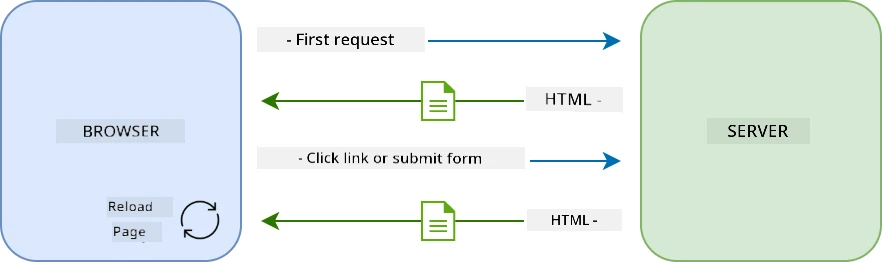
**Wetin make dis approach be clunky:**
- Every click mean rebuild di whole page from scratch
- Users go dey interrupt for middle of thing because of those annoying page flashes
- Your internet go do overtime to download di same header and footer again and again
- Apps go feel like you dey click through filing cabinet no be real software
### Modern Single-Page Applications (SPA)
AJAX (Asynchronous JavaScript and XML) change dis matter completly. Like di modular design of International Space Station wey astronauts fit change parts without building am again, AJAX let us update special parts of webpage without reloading everything. Even though e get XML for di name, we mostly dey use JSON now, but di main idea na say update only wetin need to change.
```mermaid
sequenceDiagram
participant User
participant Browser
participant JavaScript
participant Server
User->>Browser: Dey interact wit page
Browser->>JavaScript: Dey trigger event handler
JavaScript->>Server: Dey fetch only needed data
Server->>JavaScript: Dey return JSON data
JavaScript->>Browser: Dey update specific page elements
Browser->>User: Dey show updated content (no reload)
```
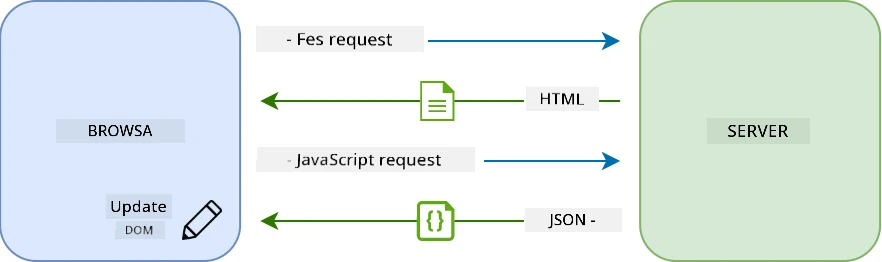
**Why SPAs feel better:**
- Only di parts wey change dey update (smart na so)
- No sudden interruption - users fit dey flow steady
- Less data dey move for network so loading fast
- Everything dey sharp and responsive, like apps for phone
### The Evolution to Modern Fetch API
Modern browsers get [`Fetch` API](https://developer.mozilla.org/docs/Web/API/Fetch_API) wey replace old [`XMLHttpRequest`](https://developer.mozilla.org/docs/Web/API/XMLHttpRequest/Using_XMLHttpRequest/). Like di difference between telegraph and email, Fetch API use promise for clean asynchronous code and e sabi handle JSON naturally.
| Feature | XMLHttpRequest | Fetch API |
|---------|----------------|----------|
| **Syntax** | Complex callback-based | Clean promise-based |
| **JSON Handling** | Must parse manually | Get built-in `.json()` method |
| **Error Handling** | Limited info | Plenty error details |
| **Modern Support** | Old browsers | ES6+ promises and async/await |
> 💡 **Browser Compatibility**: Good news - Fetch API dey work for all modern browsers! If you want know specific versions, [caniuse.com](https://caniuse.com/fetch) get full compatibility story.
>
**Bottom line:**
- E work well for Chrome, Firefox, Safari, Edge (basically everywhere your users dey)
- Only Internet Explorer need special help (and honestly, time to drop IE)
- E prepare you for better async/await style wey we go use later
### Implementing User Login and Data Retrieval
Make we implement login system wey go transform your banking app from static display to functional app. Like the authentication dem dey use for secure military places, we go check user credentials then give access to their data.
We go build am step by step, starting wit basic authentication then add data-fetching ability.
#### Step 1: Create the Login Function Foundation
Open your `app.js` file and add new `login` function wey go handle user authentication:
```javascript
async function login() {
const loginForm = document.getElementById('loginForm');
const user = loginForm.user.value;
}
```
**Make we break am down:**
- Dat `async` keyword mean say JavaScript dey expect say dis function fit need wait
- We dey grab di form from di page (no wahala, just find by ID)
- Then we dey pull wetin user type as username
- One correct trick: you fit grab any form input by its `name` attribute - no need extra getElementById palava!
> 💡 **Form Access Pattern**: Every form control fit access by its name (wey dem set for HTML using `name` attribute) as property of form. E make code clean and easy to read.
#### Step 2: Create the Account Data Fetching Function
Next, create function to get account data from server. E go similar your registration function but e focus on data fetching:
```javascript
async function getAccount(user) {
try {
const response = await fetch('//localhost:5000/api/accounts/' + encodeURIComponent(user));
return await response.json();
} catch (error) {
return { error: error.message || 'Unknown error' };
}
}
```
**Wetin dis code dey do:**
- **Use** modern `fetch` API for async data request
- **Build** GET request URL with username parameter
- **Use** `encodeURIComponent()` to handle special characters safe for URLs
- **Convert** response to JSON for easy work
- **Catch** errors well by returning error object instead of crashing
> ⚠️ **Security Note**: `encodeURIComponent()` dey handle special characters for URLs. Like naval communication encoding, e make sure your message arrive safe, so characters like "#" or "&" no go spoil am.
>
**Why dis matter:**
- Stop special characters from breaking URLs
- Protect from URL manipulation attack
- Make sure server receive correct data
- Follow secure coding style
#### Understanding HTTP GET Requests
One thing wey fit surprise you: wen you use `fetch` without extra option, e dey create a [`GET`](https://developer.mozilla.org/docs/Web/HTTP/Methods/GET) request automatically. Dis fit di kind request wey we want - to ask server "hey, abeg show me this user's account data?"
Think of GET request like polite asker wey want borrow book from library - you dey request to see something wey dey there already. POST request (wey we use for registration) na like you dey submit new book to add for library.
| GET Request | POST Request |
|-------------|--------------|
| **Purpose** | Retrieve data wey exist | Send new data to server |
| **Parameters** | For URL path or query string | For request body |
| **Caching** | Fit cache by browsers | Normally no cache |
| **Security** | Visible for URL and logs | Hidden for request body |
```mermaid
sequenceDiagram
participant B as Browser
participant S as Server
Note over B,S: GET Request (Data Retrieval)
B->>S: GET /api/accounts/test
S-->>B: 200 OK + Account Data
Note over B,S: POST Request (Data Submission)
B->>S: POST /api/accounts + New Account Data
S-->>B: 201 Created + Confirmation
Note over B,S: Error Handling
B->>S: GET /api/accounts/nonexistent
S-->>B: 404 Not Found + Error Message
```
#### Step 3: Bringing It All Together
Now di satisfying part - make we connect your account fetching function to login process. Na here everything just work:
```javascript
async function login() {
const loginForm = document.getElementById('loginForm');
const user = loginForm.user.value;
const data = await getAccount(user);
if (data.error) {
return console.log('loginError', data.error);
}
account = data;
navigate('/dashboard');
}
```
Dis function get clear sequence:
- Extract username from form input
- Ask server for user account data
- Handle any error weh fit show
- Save account data and waka go dashboard if success
> 🎯 **Async/Await Pattern**: Since `getAccount` na async function, we use `await` to make code wait till server respond. E prevent code from running wit undefined data.
#### Step 4: Creating a Home for Your Data
Your app need place to keep account info after e load. Think am like your app short-term memory - to hold current user data. Add dis line for top of your `app.js`:
```javascript
// Dis dey hold di current user account data
let account = null;
```
**Why we need am:**
- Make data dey accessible from anywhere for app
- Start wit `null` mean say "no person login yet"
- E go update wen person login or register well
- Na single source of truth - no confusion who log in
#### Step 5: Wire Up Your Form
Now make we connect your sharp new login function to HTML form. Update your form tag like dis:
```html
```
**Wetin dis small change do:**
- Stop form from reloading whole page by default
- Call your custom JavaScript function instead
- Make everything smooth like single-page app
- Make you get full control of wetin happen wen users click "Login"
#### Step 6: Enhance Your Registration Function
For balance, update your `register` function to also save account data and go dashboard:
```javascript
// Add dis lines for di end of your register function
account = result;
navigate('/dashboard');
```
**Dis upgrade give:**
- **Smooth** change from registration to dashboard
- **Consistent** user experience for login and registration
- **Quick** access to account data after registration
#### Testing Your Implementation
```mermaid
flowchart TD
A[User put credentials] --> B[Login function call]
B --> C[Fetch account data from server]
C --> D{Data reach inside well?}
D -->|Yes| E[Store account data everywhere]
D -->|No| F[Show error message]
E --> G[Go dashbɔ̀d]
F --> H[User remain for login page]
```
**Time to test am:**
1. Make new account to check if e work
2. Try to login wit dat same info
3. Check your browser console (F12) if any wahala show
4. Make sure say you land dashboard after login success
If e no work, no panic! Most wahala na small mistakes like typo or you forget start API server.
#### A Quick Word About Cross-Origin Magic
You fit dey wonder: "How my web app dey talk to dis API server wen dem dey for different ports?" Correct question! Dis na wetin every web developer go face.
> 🔒 **Cross-Origin Security**: Browsers get "same-origin policy" to stop unauthorized talk between different domains. Like checkpoint for Pentagon, dem go verify before allow communication.
>
**For our setup:**
- Your web app dey `localhost:3000` (development server)
- Your API server dey `localhost:5000` (backend server)
- API server get [CORS headers](https://developer.mozilla.org/docs/Web/HTTP/CORS) wey allow communication from your web app
Dis na real-world setup where frontend and backend dey run on different servers.
> 📚 **Learn More**: Make you dive deeper into APIs and data fetching wit dis wide [Microsoft Learn module on APIs](https://docs.microsoft.com/learn/modules/use-apis-discover-museum-art/?WT.mc_id=academic-77807-sagibbon).
## Bringing Your Data to Life in HTML
Now we go make di fetched data visible to users through DOM manipulation. Like developing photos for darkroom, we dey turn invisible data to something wey users fit see and interact with.
Manipulation for DOM na di technique wey dey turn static web pages to dynamic applications wey go dey update dia content based on how users interact and server responses.
### How to Choose Di Correct Tool for Di Work
When you wan update your HTML wit JavaScript, you get plenty options. Think am like different tools inside toolbox - each one dey perfect for certain kind work:
| Method | Wetin e good for | When to use am | Safety level |
|--------|------------------|----------------|--------------|
| `textContent` | Display user data wey safe | Anytime you dey show text | ✅ Solid well well |
| `createElement()` + `append()` | Build complex layouts | When you wan create new sections/lists | ✅ Bulletproof |
| `innerHTML` | Set HTML content | ⚠️ Try to avoid am | ❌ Risky wahala |
#### Di Safe Way to Show Text: textContent
Di [`textContent`](https://developer.mozilla.org/docs/Web/API/Node/textContent) property na your best padi when you dey show user data. E be like bouncer for your webpage - nothing wey fit harm fit pass:
```javascript
// Di safe, correct way to update text
const balanceElement = document.getElementById('balance');
balanceElement.textContent = account.balance;
```
**Benefits of textContent:**
- Treat everything as plain text (no let script run)
- Automatically clear old content
- Sharp sharp for simple text update
- Get security inside to protect against bad content
#### How to Create Dynamic HTML Elements
For more complex content, join [`document.createElement()`](https://developer.mozilla.org/docs/Web/API/Document/createElement) with [`append()`](https://developer.mozilla.org/docs/Web/API/ParentNode/append) method:
```javascript
// Beta way to make new tin dem
const transactionItem = document.createElement('div');
transactionItem.className = 'transaction-item';
transactionItem.textContent = `${transaction.date}: ${transaction.description}`;
container.append(transactionItem);
```
**How this style work:**
- **Create** new DOM elements wit code
- **Keep** full control for element attributes and content
- **Allow** make complex, nested element structure
- **Save** security by separating structure from content
> ⚠️ **Security Matter**: Although [`innerHTML`](https://developer.mozilla.org/docs/Web/API/Element/innerHTML) dey for many tutorials, e fit run script wey dey inside. Just like CERN get security wey no dey allow unauthorized code, using `textContent` and `createElement` na safer option.
>
**Risk for innerHTML:**
- E fit run any `