
 localizeflow[bot]
978e88a425
localizeflow[bot]
978e88a425
|
7 months ago | |
|---|---|---|
| .. | ||
| solution | 9 months ago | |
| README.md | 7 months ago | |
| assignment.md | 9 months ago | |
| notebook.ipynb | 9 months ago | |
README.md
Build Cuisine Recommender Web App
For dis lesson, you go build one classification model wey go use some techniques wey you don learn for di previous lessons, plus di sweet cuisine dataset wey we don dey use for dis series. You go also build one small web app wey go use di saved model, wey go take advantage of Onnx web runtime.
One of di most useful way wey machine learning dey work na to build recommendation systems, and you fit start dat journey today!

🎥 Click di image wey dey up for video: Jen Looper dey build web app wey dey use classified cuisine data
Pre-lecture quiz
For dis lesson, you go learn:
- How you go build model and save am as Onnx model
- How you go use Netron to check di model
- How you go use di model for web app to do inference
Build your model
To build applied ML systems na one important way to use di technology for your business systems. You fit use models inside your web applications (and fit use dem offline if e dey necessary) by using Onnx.
For one previous lesson, you don build Regression model about UFO sightings, "pickled" am, and use am for Flask app. Even though dis architecture dey useful, e be full-stack Python app, and your requirements fit need JavaScript application.
For dis lesson, you fit build one basic JavaScript-based system for inference. But first, you need train one model and convert am to use with Onnx.
Exercise - train classification model
First, train one classification model wey go use di cleaned cuisines dataset wey we don use before.
-
Start by importing di useful libraries:
!pip install skl2onnx
import pandas as pd
You need 'skl2onnx' to help convert your Scikit-learn model to Onnx format.
-
Work with your data di same way wey you don do before, by reading CSV file using
read_csv():data = pd.read_csv('../data/cleaned_cuisines.csv') data.head() -
Remove di first two columns wey no dey necessary and save di remaining data as 'X':
X = data.iloc[:,2:] X.head() -
Save di labels as 'y':
y = data[['cuisine']]
y.head()
Start di training routine
We go use di 'SVC' library wey get better accuracy.
-
Import di correct libraries from Scikit-learn:
from sklearn.model_selection import train_test_split from sklearn.svm import SVC from sklearn.model_selection import cross_val_score from sklearn.metrics import accuracy_score,precision_score,confusion_matrix,classification_report -
Separate training and test sets:
X_train, X_test, y_train, y_test = train_test_split(X,y,test_size=0.3) -
Build SVC Classification model like you don do for di previous lesson:
model = SVC(kernel='linear', C=10, probability=True,random_state=0) model.fit(X_train,y_train.values.ravel()) -
Now, test your model, call
predict():y_pred = model.predict(X_test) -
Print classification report to check di model quality:
print(classification_report(y_test,y_pred))As we don see before, di accuracy dey good:
                precision    recall  f1-score   support

     chinese       0.72      0.69      0.70       257
      indian       0.91      0.87      0.89       243
    japanese       0.79      0.77      0.78       239
      korean       0.83      0.79      0.81       236
        thai       0.72      0.84      0.78       224

    accuracy                           0.79      1199
   macro avg       0.79      0.79      0.79      1199
weighted avg       0.79      0.79      0.79      1199
Convert your model to Onnx
Make sure say you do di conversion with di correct Tensor number. Dis dataset get 380 ingredients listed, so you need write dat number for FloatTensorType:
-
Convert am using tensor number of 380.
from skl2onnx import convert_sklearn from skl2onnx.common.data_types import FloatTensorType initial_type = [('float_input', FloatTensorType([None, 380]))] options = {id(model): {'nocl': True, 'zipmap': False}} -
Create di onx and store am as file model.onnx:
onx = convert_sklearn(model, initial_types=initial_type, options=options)
with open("./model.onnx", "wb") as f:
    f.write(onx.SerializeToString())
Note, you fit pass options for your conversion script. For dis case, we pass 'nocl' to be True and 'zipmap' to be False. Since dis na classification model, you get option to remove ZipMap wey dey produce list of dictionaries (e no dey necessary).
noclmean say class information dey included for di model. Reduce di model size by settingnoclto 'True'.
If you run di whole notebook now, e go build Onnx model and save am for dis folder.
View your model
Onnx models no dey too visible for Visual Studio code, but one free software wey researchers dey use to see di model dey available. Download Netron and open your model.onnx file. You go see your simple model visualized, with di 380 inputs and classifier listed:
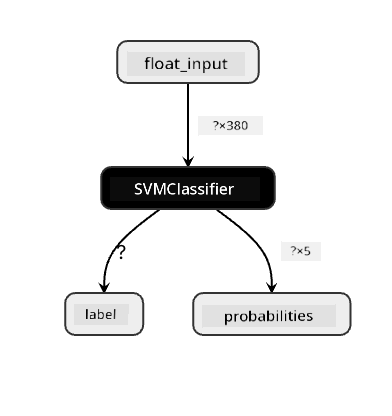
Netron na helpful tool to view your models.
Now you don ready to use dis model for web app. Make we build app wey go help you when you dey look inside your fridge and dey try figure out which combination of leftover ingredients you fit use to cook one cuisine, as di model go determine.
Build recommender web application
You fit use your model directly for web app. Dis architecture go also allow you run am locally and even offline if e dey necessary. Start by creating index.html file for di same folder wey you store your model.onnx file.
-
For dis file index.html, add di following markup:
<!DOCTYPE html> <html> <header> <title>Cuisine Matcher</title> </header> <body> ... </body> </html> -
Now, inside di
bodytags, add small markup to show list of checkboxes wey reflect some ingredients:<h1>Check your refrigerator. What can you create?</h1> <div id="wrapper"> <div class="boxCont"> <input type="checkbox" value="4" class="checkbox"> <label>apple</label> </div> <div class="boxCont"> <input type="checkbox" value="247" class="checkbox"> <label>pear</label> </div> <div class="boxCont"> <input type="checkbox" value="77" class="checkbox"> <label>cherry</label> </div> <div class="boxCont"> <input type="checkbox" value="126" class="checkbox"> <label>fenugreek</label> </div> <div class="boxCont"> <input type="checkbox" value="302" class="checkbox"> <label>sake</label> </div> <div class="boxCont"> <input type="checkbox" value="327" class="checkbox"> <label>soy sauce</label> </div> <div class="boxCont"> <input type="checkbox" value="112" class="checkbox"> <label>cumin</label> </div> </div> <div style="padding-top:10px"> <button onClick="startInference()">What kind of cuisine can you make?</button> </div>Notice say each checkbox get value. Dis value dey reflect di index wey di ingredient dey according to di dataset. Apple, for example, for dis alphabetic list, dey di fifth column, so e value na '4' since we dey start count from 0. You fit check di ingredients spreadsheet to find di index of any ingredient.
As you dey continue your work for di index.html file, add script block wey go call di model after di final closing
</div>. -
First, import di Onnx Runtime:
<script src="https://cdn.jsdelivr.net/npm/onnxruntime-web@1.9.0/dist/ort.min.js"></script>Onnx Runtime dey used to enable running your Onnx models across plenty hardware platforms, including optimizations and API to use.
-
Once Runtime dey in place, you fit call am:
<script>
    const ingredients = Array(380).fill(0);

    const checks = [...document.querySelectorAll('.checkbox')];

    checks.forEach(check => {
        check.addEventListener('change', function() {
            // toggle the state of the ingredient
            // based on the checkbox's value (1 or 0)
            ingredients[check.value] = check.checked ? 1 : 0;
        });
    });

    function testCheckboxes() {
        // validate if at least one checkbox is checked
        return checks.some(check => check.checked);
    }

    async function startInference() {

        let atLeastOneChecked = testCheckboxes()

        if (!atLeastOneChecked) {
            alert('Please select at least one ingredient.');
            return;
        }
        try {
            // create a new session and load the model.

            const session = await ort.InferenceSession.create('./model.onnx');

            const input = new ort.Tensor(new Float32Array(ingredients), [1, 380]);
            const feeds = { float_input: input };

            // feed inputs and run
            const results = await session.run(feeds);

            // read from results
            alert('You can enjoy ' + results.label.data[0] + ' cuisine today!')

        } catch (e) {
            console.log(`failed to inference ONNX model`);
            console.error(e);
        }
    }

</script>
For dis code, plenty things dey happen:
- You create array of 380 possible values (1 or 0) wey go dey set and send to di model for inference, depending on whether ingredient checkbox dey checked.
- You create array of checkboxes and way to determine whether dem dey checked for
initfunction wey dey called when di application start. When checkbox dey checked, diingredientsarray go change to reflect di chosen ingredient. - You create
testCheckboxesfunction wey dey check whether any checkbox dey checked. - You use
startInferencefunction when di button dey pressed and, if any checkbox dey checked, you go start inference. - Di inference routine include:
- Setting up asynchronous load of di model
- Creating Tensor structure to send to di model
- Creating 'feeds' wey reflect di
float_inputinput wey you create when you dey train your model (you fit use Netron to confirm dat name) - Sending di 'feeds' to di model and wait for response
Test your application
Open terminal session for Visual Studio Code for di folder wey your index.html file dey. Make sure say you don install http-server globally, and type http-server for di prompt. Localhost go open and you fit view your web app. Check wetin di app recommend based on di ingredients wey you select:
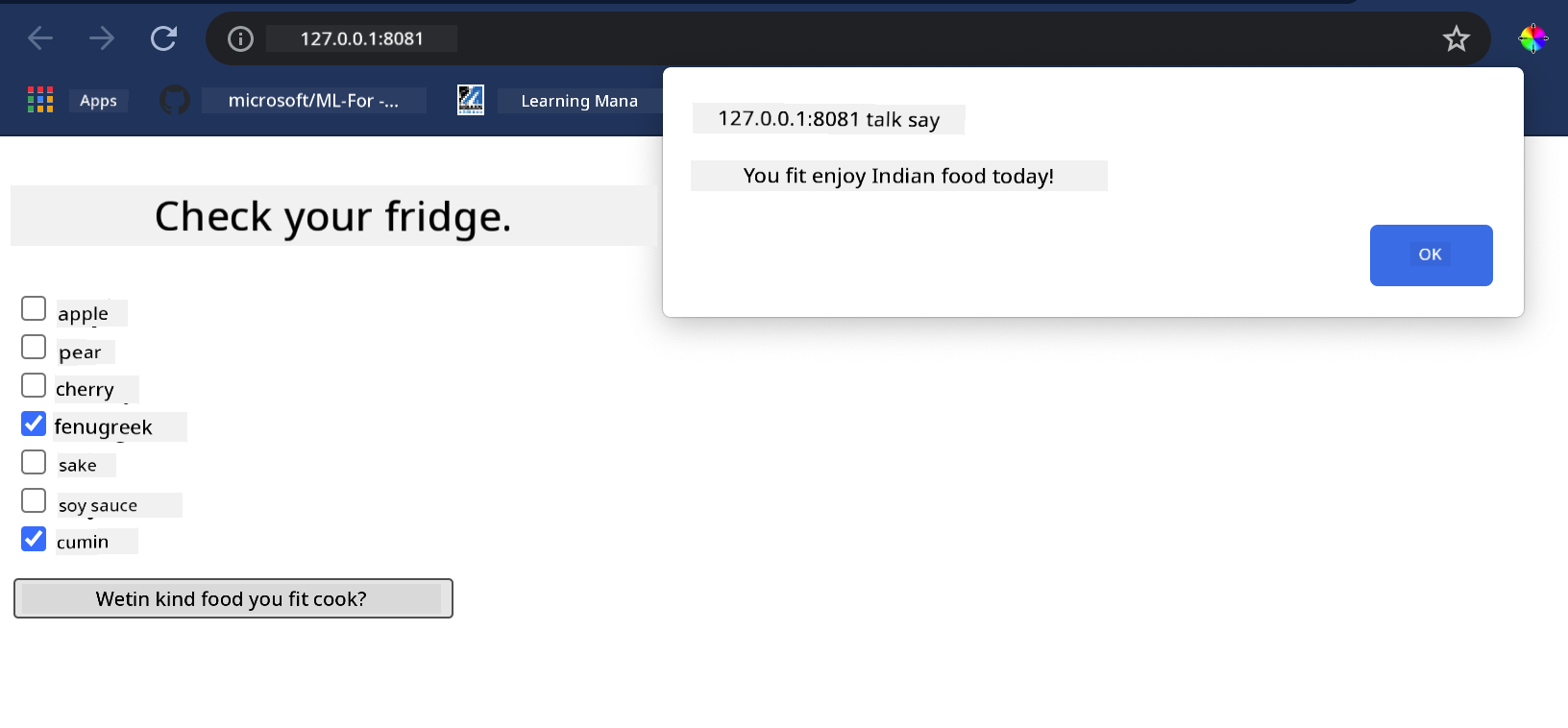
Congrats, you don create 'recommendation' web app wey get small fields. Take time to build dis system well!
🚀Challenge
Your web app dey very basic, so continue to build am well using ingredients and their indexes from di ingredient_indexes data. Which flavor combinations dey work to create one national dish?
Post-lecture quiz
Review & Self Study
Even though dis lesson just touch di surface of how to create recommendation system for food ingredients, dis area of ML applications get plenty examples. Read more about how dem dey build dis kind systems:
- https://www.sciencedirect.com/topics/computer-science/recommendation-engine
- https://www.technologyreview.com/2014/08/25/171547/the-ultimate-challenge-for-recommendation-engines/
- https://www.technologyreview.com/2015/03/23/168831/everything-is-a-recommendation/
Assignment
Disclaimer:
Dis dokyument don use AI translation service Co-op Translator do di translation. Even as we dey try make am accurate, abeg sabi say machine translation fit get mistake or no dey correct well. Di original dokyument for im native language na di main source wey you go fit trust. For important information, e good make professional human translation dey use. We no go fit take blame for any misunderstanding or wrong interpretation wey fit happen because you use dis translation.