
 Amagash
6527cae33a
Amagash
6527cae33a
|
5 years ago | |
|---|---|---|
| .. | ||
| img | 5 years ago | |
| solution | 5 years ago | |
| translations | 5 years ago | |
| README.md | 5 years ago | |
| assignment.md | 5 years ago | |
| notebook.ipynb | 5 years ago | |
README.md
Low code/No code Data Science in the Cloud
Table of contents:
- Low code/No code Data Science in the Cloud
Pre-Lecture Quiz
Pre-lecture quiz
1. Introduction
1.1 What is Azure Machine Learning?
Data scientists expend a lot of effort exploring and pre-processing data, and trying various types of model-training algorithms to produce accurate models, which is time consuming, and often makes inefficient use of expensive compute hardware.
Azure ML is a cloud-based platform for building and operating machine learning solutions in Azure. It includes a wide range of features and capabilities that help data scientists prepare data, train models, publish predictive services, and monitor their usage. Most importantly, it helps data scientists increase their efficiency by automating many of the time-consuming tasks associated with training models; and it enables them to use cloud-based compute resources that scale effectively to handle large volumes of data while incurring costs only when actually used.
Azure ML provides all the tools developers and data scientists need for their machine learning workflows, including:
- Azure Machine Learning Studio is a web portal in Azure Machine Learning for low-code and no-code options for model training, deployment, automation, tracking and asset management. The studio integrates with the Azure Machine Learning SDK for a seamless experience.
- Jupyter Notebooks to quickly prototype and test ML models
- Azure Machine Learning Designer allows to drag-n-drop modules to build experiments and then deploy pipelines in a low-code environment.
- Automated machine learning UI (AutoML) automates iterative tasks of machine learning model development allowing to build ML models with high scale, efficiency, and productivity all while sustaining model quality.
- Data labeling: an assisted ML tool to automatically label data.
- Machine learning extension for Visual Studio Code provides a full-featured development environment for building and managing ML projects.
- Machine learning CLI provides commands for managing Azure ML resources from the command line.
- Integration with open-source frameworks such as PyTorch, TensorFlow, and scikit-learn and many more for training, deploying, and managing the end-to-end machine learning process.
- MLflow is an open-source library for managing the life cycle of your machine learning experiments. MLFlow Tracking is a component of MLflow that logs and tracks your training run metrics and model artifacts, no matter your experiment's environment.
1.2 The Heart Failure Prediction Project
What better way to learn than actually doing a project! In this lesson, we are going to explore two different ways of building a data science project for the prediction of heart failure attacks in Azure ML Studio, through Low code/No code and through the Azure ML SDK as shown in the following schema.
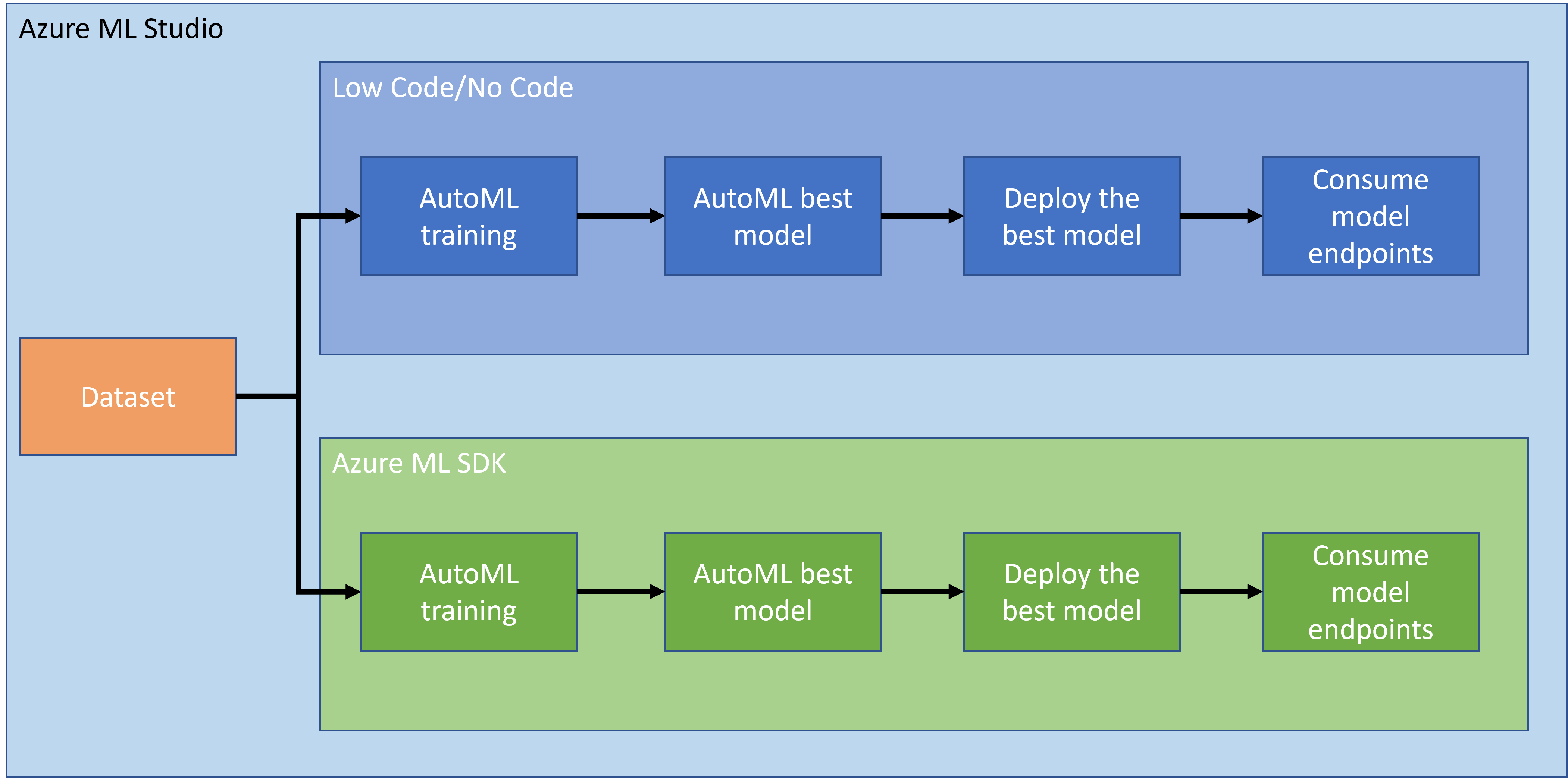
Both ways has its pro and cons. The Low code/No code way is easier to start with because it is mostly interacting with a GUI (Graphical User Interface) without knowledge of code required. This method is great at the beginning of a project to quickly test if a project is viable and to create POC (Proof Of Concept). However, once a project grows and things need to be production ready, it is not maintainable to create resources by hand through the GUI. We need to programmatically automate everything, from the creation of resources, to the deployment of a model. This is where knowing how to use the Azure ML SDK is critical.
| Low code/No code | Azure ML SDK | |
|---|---|---|
| Expertise in code | Not required | Required |
| Time to develop | Fast and easy | Depends on code expertise |
| Production ready | No | Yes |
1.3 The Heart Failure Dataset
Cardiovascular diseases (CVDs) are the number 1 cause of death globally, accounting for 31% of all deaths worlwide. Environmental and behavioural risk factors such as tobacco use, unhealthy diet and obesity, physical inactivity and harmful use of alcohol could be used as features for estimation models. Being able to estimate the probability of developping a CVD could be of great to prevent attacks for high risk people.
Kaggle has made publically available a Heart Failure dataset that we are going to use for this project. You can download the dataset now. This is a tabular dataset with 13 columns (12 features and 1 target variable) and contains 299 rows.
| Variable name | Type | Description | Example | |
|---|---|---|---|---|
| 1 | age | numerical | age of the patient | 25 |
| 2 | anaemia | boolean | Decrease of red blood cells or hemoglobin | 0 or 1 |
| 3 | creatinine_phosphokinase | numerical | Level of the CPK enzyme in the blood | 542 |
| 4 | diabetes | boolean | If the patient has diabetes | university.degree |
| 5 | ejection_fraction | numerical | Percentage of blood leaving the heart at each contraction | 45 |
| 6 | high_blood_pressure | boolean | If the patient has hypertension | 0 or 1 |
| 7 | platelets | numerical | Platelets in the blood | 149000 |
| 8 | serum_creatinine | numerical | Level of serum creatinine in the blood | 0.5 |
| 9 | serum_sodium | numerical | Level of serum sodium in the blood | jun |
| 10 | sex | boolean | Woman or man | 0 or 1 |
| 11 | smoking | boolean | If the patient smokes | 285 |
| 12 | time | numerical | follow-up period (days) | 4 |
| ---- | --------------------------- | ----------------- | ----------------------------------------------------------- | ------------------- |
| 21 | DEATH_EVENT [Target] | boolean | if the patient deceased during the follow-up period | 0 or 1 |
Once you have the dataset, we can start the project in Azure.
2. Low code/No code training of a model in Azure ML Studio
2.1 Create an Azure ML workspace
2.2 Compute Resources
2.2.1 Choosing the right options for your compute resources
2.2.2 Creating a compute cluster
2.3 Loading the Dataset
2.4 Low code/No Code training with AutoML
3. Low code/No Code model deployment and endpoint consumption
3.1 Model deployment
3.2 Endpoint consumption
🚀 Challenge
Post-Lecture Quiz
Post-lecture quiz