
 Bakhtiyar-Garashov
3f55ae7dd6
Bakhtiyar-Garashov
3f55ae7dd6
|
5 years ago | |
|---|---|---|
| .. | ||
| readMe.md | 5 years ago | |
readMe.md
30 Günlük JavaScript dərsləri
| # Gün | Mövzular |
|---|---|
| 01 | Giriş |
| 02 | Data Types |
| 03 | Booleans, Operators, Date |
| 04 | Conditionals |
| 05 | Arrays |
| 06 | Loops |
| 07 | Functions |
| 08 | Objects |
| 09 | Higher Order Functions |
| 10 | Sets and Maps |
| 11 | Destructuring and Spreading |
| 12 | Regular Expressions |
| 13 | Console Object Methods |
| 14 | Error Handling |
| 15 | Classes |
| 16 | JSON |
| 17 | Web Storages |
| 18 | Promises |
| 19 | Closure |
| 20 | Writing Clean Code |
| 21 | DOM |
| 22 | Manipulating DOM Object |
| 23 | Event Listeners |
| 24 | Mini Project: Solar System |
| 25 | Mini Project: World Countries Data Visulalization 1 |
| 26 | Mini Project: World Countries Data Visulalization 2 |
| 27 | Mini Project: Portfolio |
| 28 | Mini Project: Leaderboard |
| 29 | Mini Project:Animating characters |
| 30 | Final Projects |
🧡🧡🧡 Xoş kodlamalar 🧡🧡🧡

30 Günlük JavaScript: Giriş


Author:
Asabeneh Yetayeh
Yanvar, 2020
🇬🇧 English 🇪🇸 Spanish 🇷🇺 Russian Az Azerbaijan
- 30 Günlük JavaScript dərsləri
- 📔 Gün 1
- 💻 Gün 1: Tapşırıqlar
📔 Gün 1
Giriş
30 günlük JavaScript proqramlaşdırma müsabiqəsində iştirak etmək qərarına gəldiyiniz üçün sizi təbrik edirik. Bu çağırışda siz JavaScript proqramçısı olmaq üçün lazım olan hər şeyi və ümumiyyətlə, proqramlaşdırmanın bütün konsepsiyasını öyrənəcəksiniz. Müsabiqənin sonunda siz 30DaysOfJavaScript proqramlaşdırma testini tamamlama sertifikatı alacaqsınız. Yardıma ehtiyacınız olarsa və ya başqalarına kömək etmək istəyirsinizsə, rəsmi telegram qrupuna qoşula bilərsiniz
30GünlükJavaScript çağırışı həm yeni başlayanlar, həm də təcrübəli JavaScript proqramçıları üçün bələdçidir. JavaScript-ə xoş gəlmisiniz. JavaScript internetin dilidir. Mən JavaScript istifadə etməkdən və öyrətməkdən həzz alıram və ümid edirəm ki, siz də bunu edəcəksiniz.
Bu addım-addım JavaScript dərslərində siz bəşəriyyət tarixində ən populyar proqramlaşdırma dili olan JavaScript-i öyrənəcəksiniz.JavaScript veb-saytlara interaktivlik əlavə etmək, mobil proqramlar, masaüstü proqramlar, oyunlar hazırlamaq üçün istifadə olunur və bu gün JavaScript hətta maşın öyrənməsi və AI (süni intellekt) üçün istifadə edilə bilər. JavaScript (JS) son illərdə populyarlığı artıb və son altı ildir ki, ardıcıl olaraq ən məhşur və ən çox istifadə olunan proqramlaşdırma dilidir Mənbə: Github.
Tələblər
İlkin olaraq heç bir proqramlaşdırma biliyi tələb olunmur. Yalnız ehtiyacınız var:
- Motivasiya
- Kompüter
- Internet
- Brauzer
- Kod yazmaq üçün editor
Hazırlıq
İnanıram ki, sizdə proqramçı olmaq üçün kompüter, internet, motivasiya və güclü istək var. Bunlara sahibsinizsə, başlamaq üçün hər şeyiniz var.
Node.js-in yüklənilməsi
İndi olmasa belə daha sonrakı addımlar üçün Node-a ehtiyaciniz var. Yükləmək üçün buraya istinad edin.
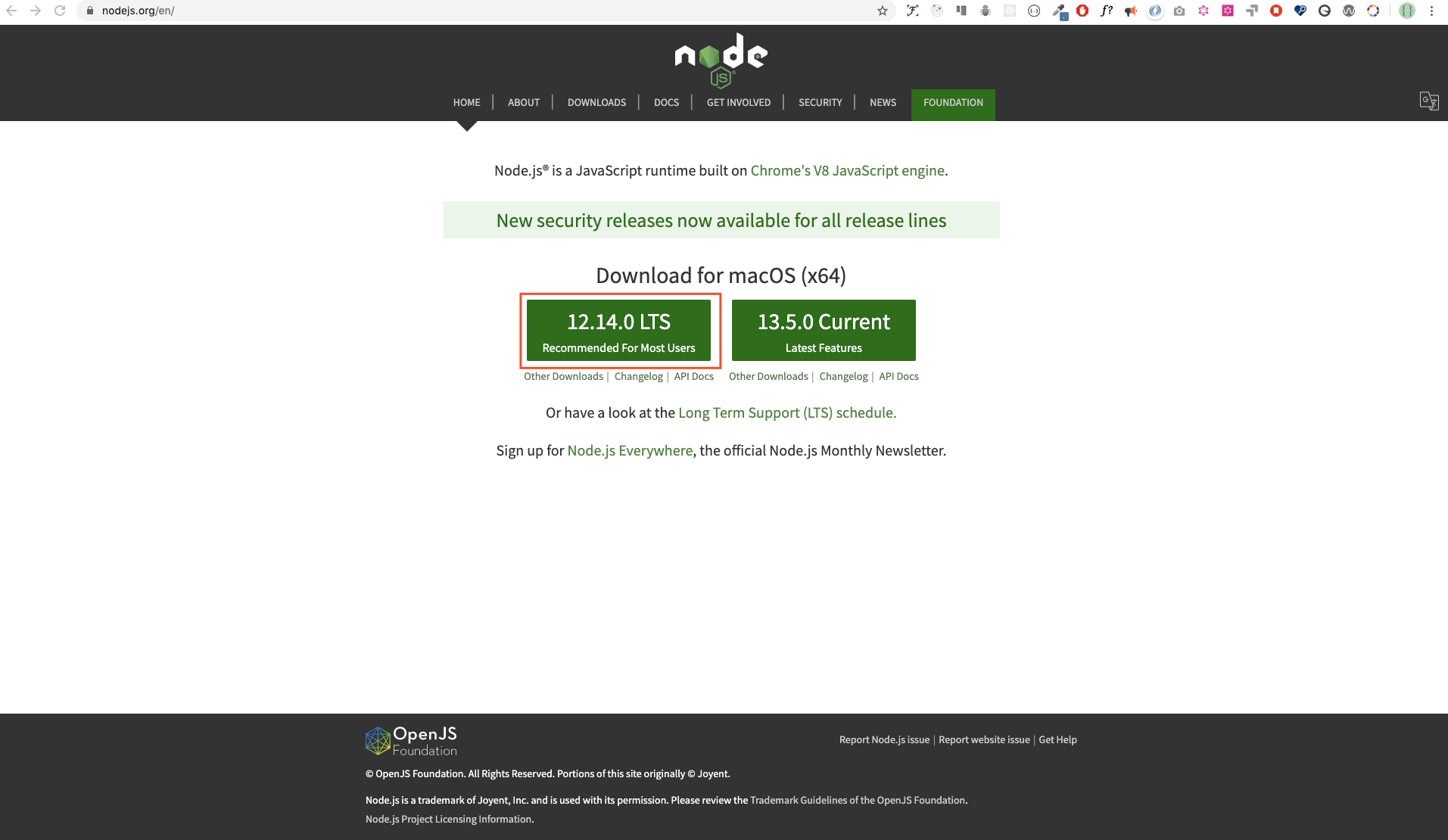
Yükləndikdən sonra quraşdırılma üçün
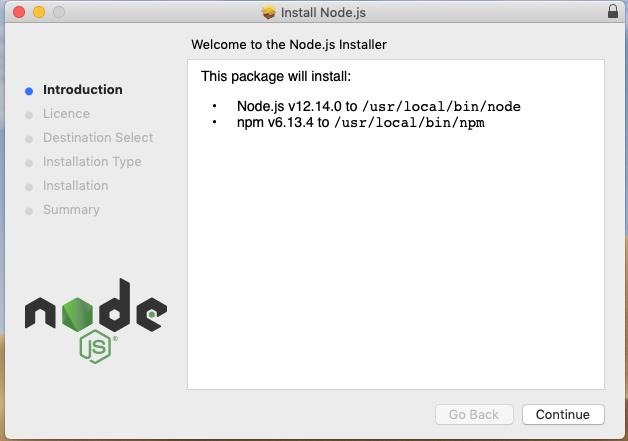
Əməliyyat sistemi terminalımızı açaraq maşınımızda node quraşdırılıb-quraşdırılmadığını yoxlaya bilərik.
asabeneh $ node -v
v12.14.0
Bu dərsliyi hazırlayarkən mən Node versiyası 12.14.0-dan istifadə edirdim, lakin indi yükləmək üçün Node.js-in tövsiyə olunan versiyası v14.17.6-dır.
Brauzer
Hazırda bir çox brauzer mövcud olsa da müəllif Google Chrome istifadəsini tövsiyə edir.
Google Chrome yükləmək
Google Chrome sizdə mövcud deyilsə bu linkə istinad edin. Biz brauzer konsolunda kiçik JavaScript kodu yaza bilərik, lakin ciddi proqramların hazırlanması üçün brauzer konsolundan istifadə etmirik.
Google Chrome konsola giriş
Siz Google Chrome konsolunu brauzerin yuxarı sağ küncündə üç nöqtəyə klikləməklə, Əlavə alətlər -> Tərtibatçı alətləri seçməklə və ya klaviatura qısa yolundan istifadə etməklə aça bilərsiniz. Mən qısayollardan istifadə etməyi üstün tuturam.
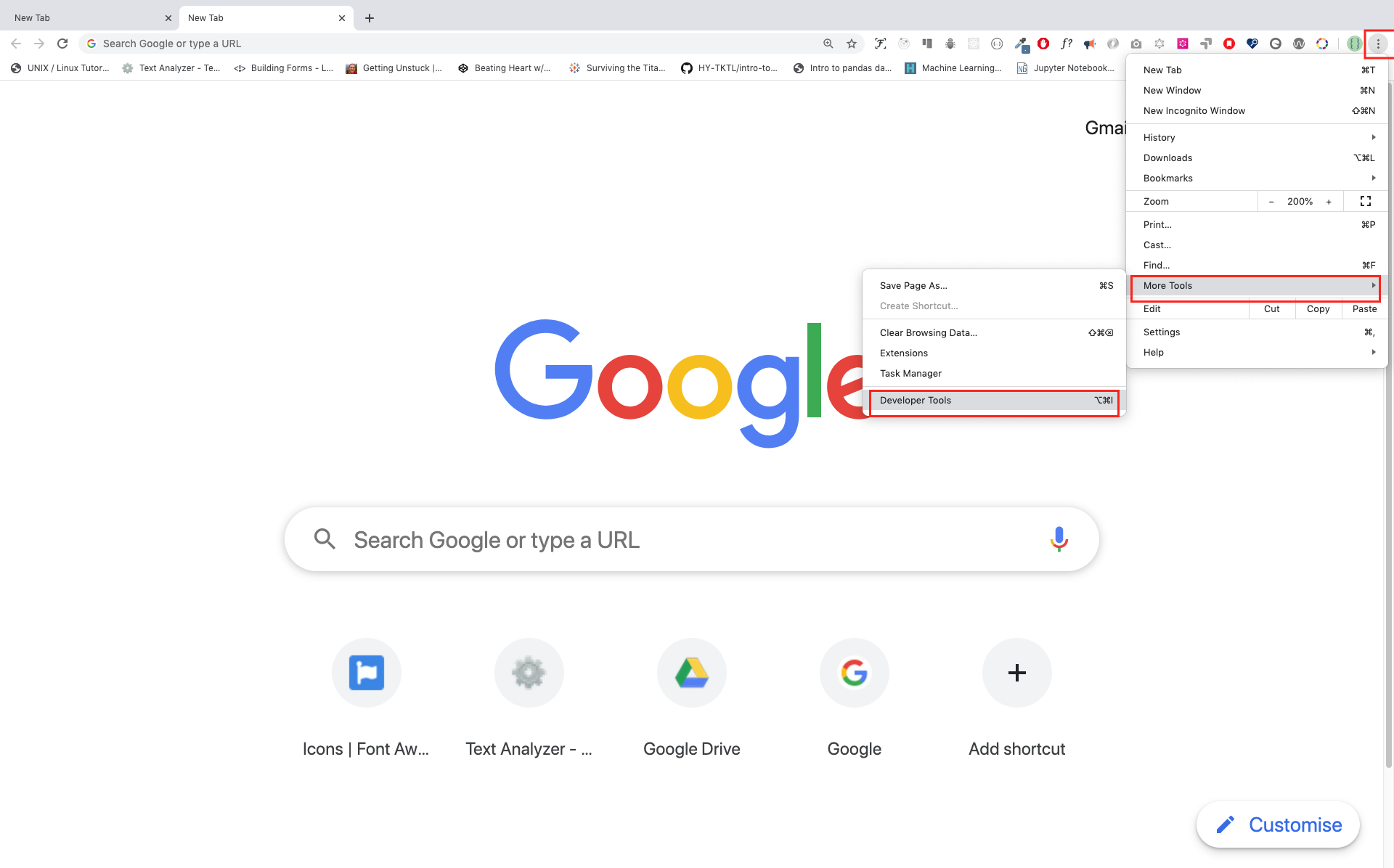
Klaviatura qısayolu ilə brauzer açmaq üçün
Mac
Command+Option+J

Windows/Linux:
Ctl+Shift+J
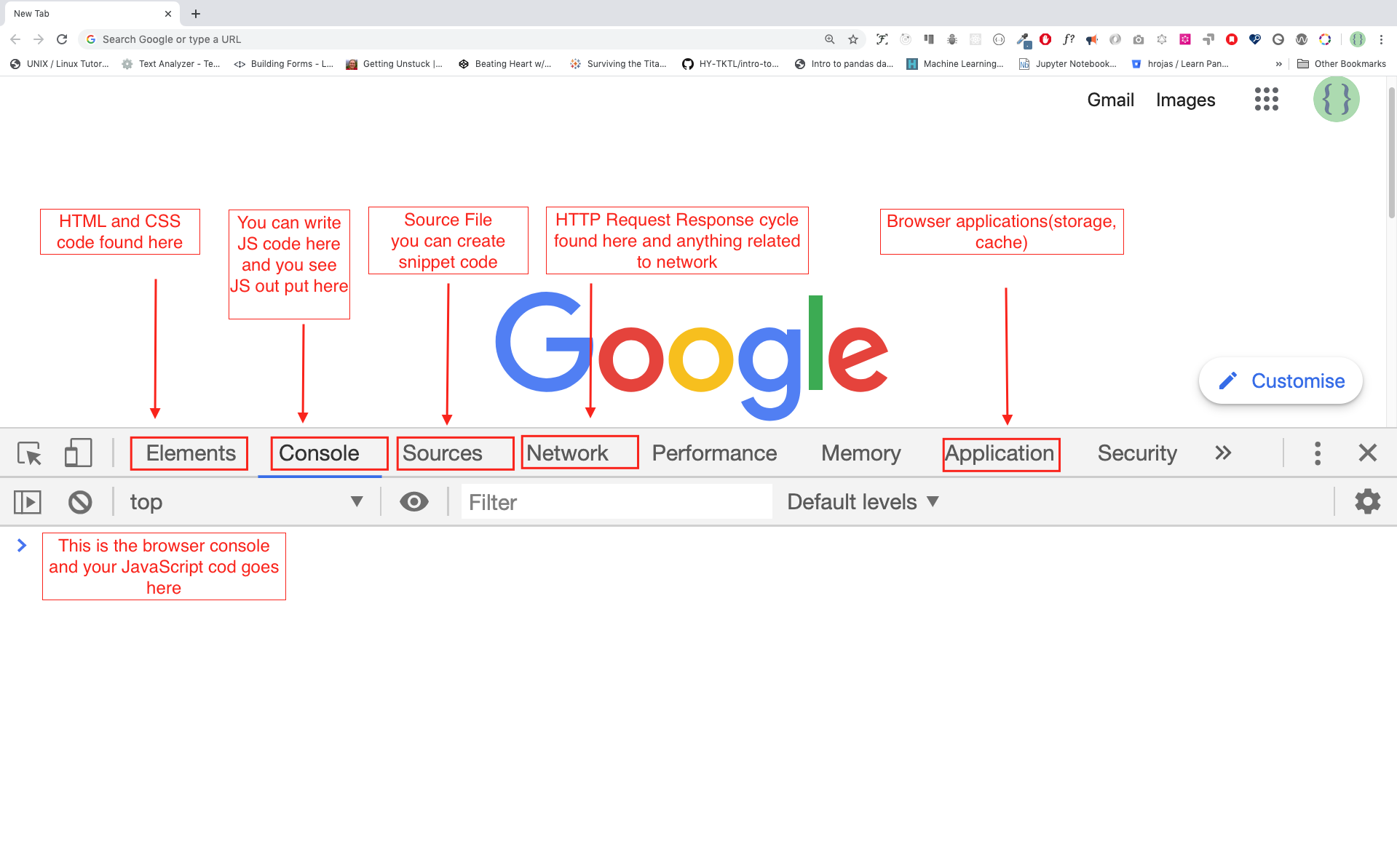
Google Chrome konsolunu açdıqdan sonra işarələnmiş düymələri araşdırmağa çalışın. Biz vaxtımızın çox hissəsini Konsolda keçirəcəyik. Konsol JavaScript kodunuzun mövcud olduğu yerdir. Google Console V8 mühərriki JavaScript kodunuzu maşın koduna tərcümə edir. Gəlin Google Chrome konsolunda JavaScript kodu yazaq:
Brauzer konsolunda kodun yazılması
Biz istənilən JavaScript kodunu Google konsolunda və ya istənilən brauzer konsolunda yaza bilərik. Bununla belə, bu problem üçün biz yalnız Google Chrome konsoluna diqqət yetiririk. Konsolu aşağıdakılardan istifadə edərək açın:
Mac
Command+Option+I

Windows:
Ctl+Shift+I
Console.log
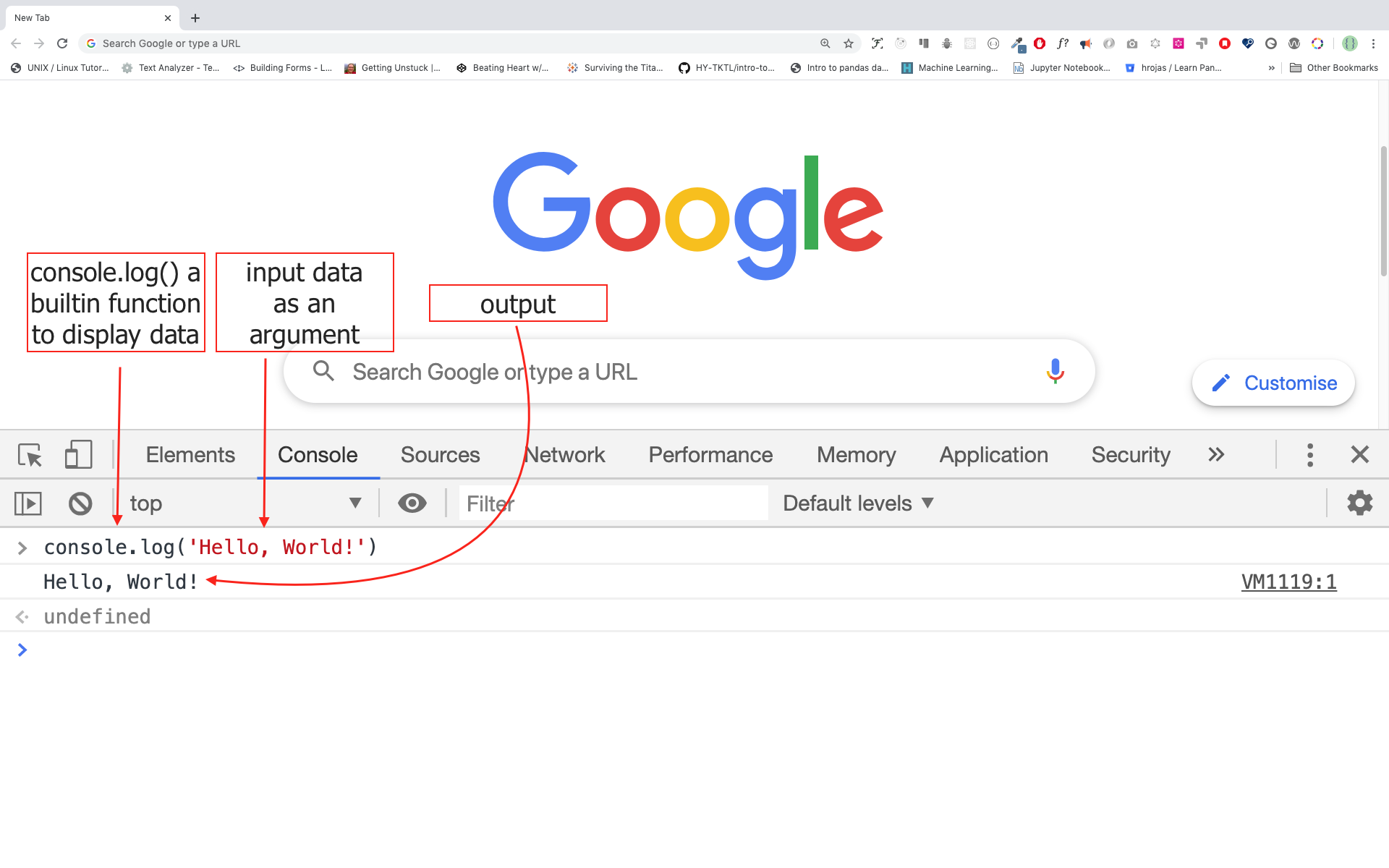
İlk JavaScript kodumuzu yazmaq üçün biz daxili funksiyadan istifadə etdik console.log(). Biz arqumenti giriş məlumatları kimi ötürdük və funksiya çıxışı göstərir. Biz console.log() funksiyasında giriş məlumatı və ya arqument kimi "Salam, Dünya"nı ötürdük.
console.log('Salam, Dünya!')
Console.log - birneçə arqument ilə
console.log() funksiyasi vergüllə ayrılmış istənilən sayda parametri qəbul edə bilər. Sintaksis: console.log(param1, param2, param3)
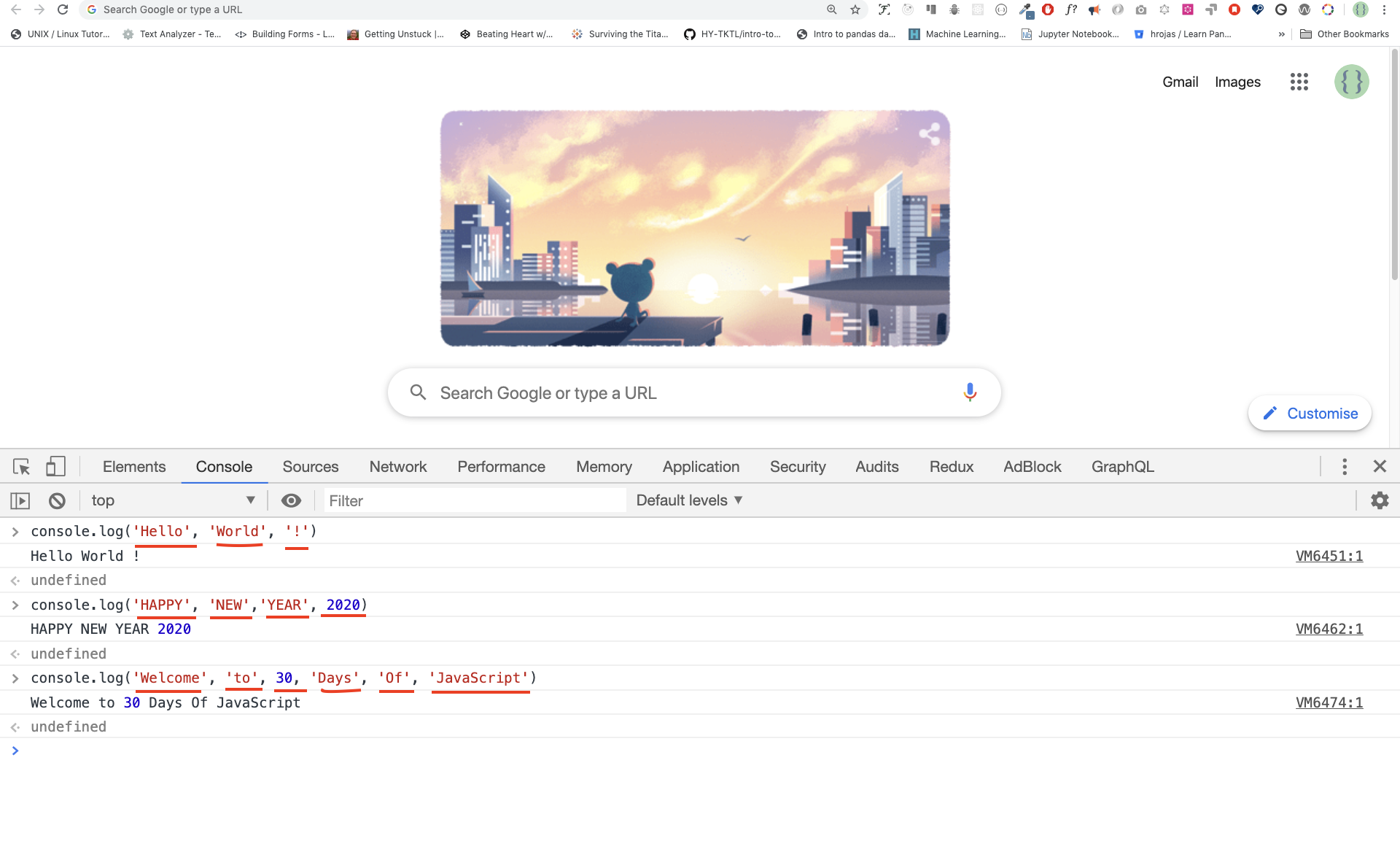
console.log('Hello', 'World', '!')
console.log('HAPPY', 'NEW', 'YEAR', 2020)
console.log('Welcome', 'to', 30, 'Days', 'Of', 'JavaScript')
Yuxarıdakı kod parçasından göründüyü kimi, console.log() çoxlu arqument qəbul edə bilər.
Təbrik edirik! Siz ilk JavaScript kodunuzu console.log() istifadə edərək yazdınız.
Şərhlər
Kodumuza şərhlər əlavə edirik. Kodu daha oxunaqlı etmək və kodumuzda qeydlər daxil etmək üçün şərhlər çox vacibdir. JavaScript kodumuzun şərh hissəsini qeydə almır və maşın dilinə tərcümə etmir. JavaScript-də // ilə başlayan hər hansı mətn sətiri şərhdir və həmçinin buna /* */ kimi əlavə edilən hər şey də şərhdir.
Nümunə: Tək sətirli şərhlər
// Bu bir şərhdir
// Bu da bir şərhdir
// Bu da həmçinin
Nümunə: Çoxsətirli şərhlər
/*
Çoxsətirli şərhlər
Çoxsətirli şərhlər bir neçə sətiri ehtiva edə bilir
JavaScript web-in dilidir
*/
Sintaksis
Proqramlaşdırma dilləri insan dillərinə bənzəyir. İngilis və ya bir çox başqa dil mənalı mesajı çatdırmaq üçün sözlər, ifadələr, cümlələr, mürəkkəb cümlələr və sair istifadə edir. Sintaksisin ingiliscə mənası dildə yaxşı formalaşmış cümlələr yaratmaq üçün söz və ifadələrin düzülüşüdür. Sintaksisin texniki tərifi kompüter dilində ifadələrin strukturudur. Proqramlaşdırma dillərində sintaksis var. JavaScript proqramlaşdırma dilidir və digər proqramlaşdırma dilləri kimi onun da öz sintaksisi var. JavaScript-in başa düşdüyü sintaksisi yazmasaq, o, müxtəlif növ xətaları bizə qaytaracaq. Müxtəlif növ JavaScript xətalarını daha sonra araşdıracağıq. Hələlik gəlin sintaksis səhvlərinə baxaq.
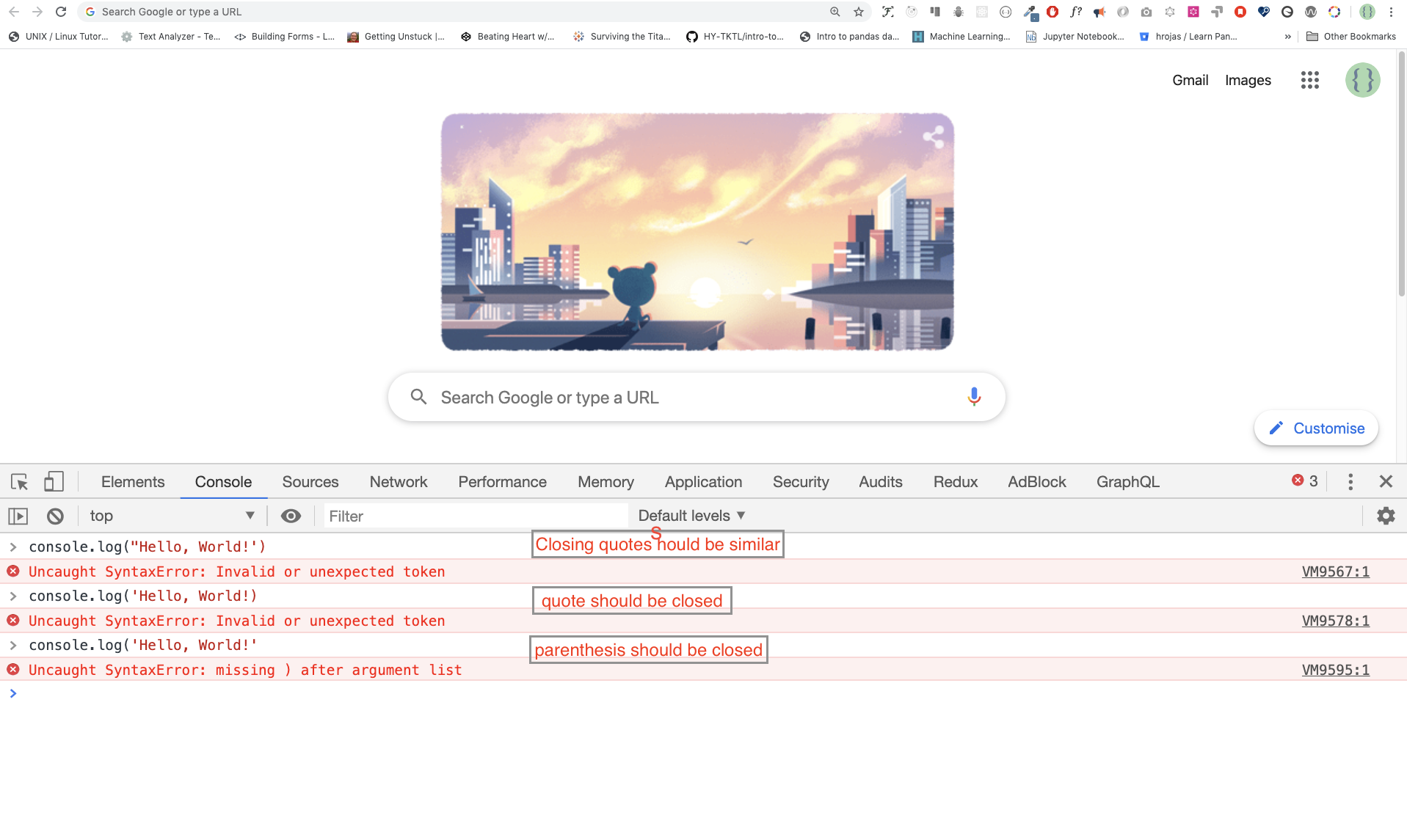
Mən qəsdən səhv etdim. Nəticədə, konsol sintaksis səhvlərini qaytarır. Əslində, sintaksis çox informativdir. Hansı növ səhvə yol verildiyini bildirir. Səhv rəyi təlimatını oxumaqla biz sintaksisi düzəldə və problemi həll edə bilərik. Proqramdakı xətaların müəyyən edilməsi və aradan qaldırılması prosesi "debugging" adlanır. Gəlin səhvləri düzəldək:
console.log('Hello, World!')
console.log('Hello, World!')
So far, we saw how to display text using the console.log(). If we are printing text or string using console.log(), the text has to be inside the single quotes, double quotes, or a backtick quotes. Example:
console.log('Hello, World!')
console.log("Hello, World!")
console.log(`Hello, World!`)
Arithmetics
Now, let us practice more writing JavaScript codes using console.log() on google chrome console for number data types. In addition to the text, we can also do mathematical calculations using JavaScript. Let us do the following simple calculations. The console can directly take arguments without the console.log() function. However, it is included in this introduction because most of this challenge would be taking place in a text editor where the usage of the function would be mandatory. You can play around directly with instructions on the console.
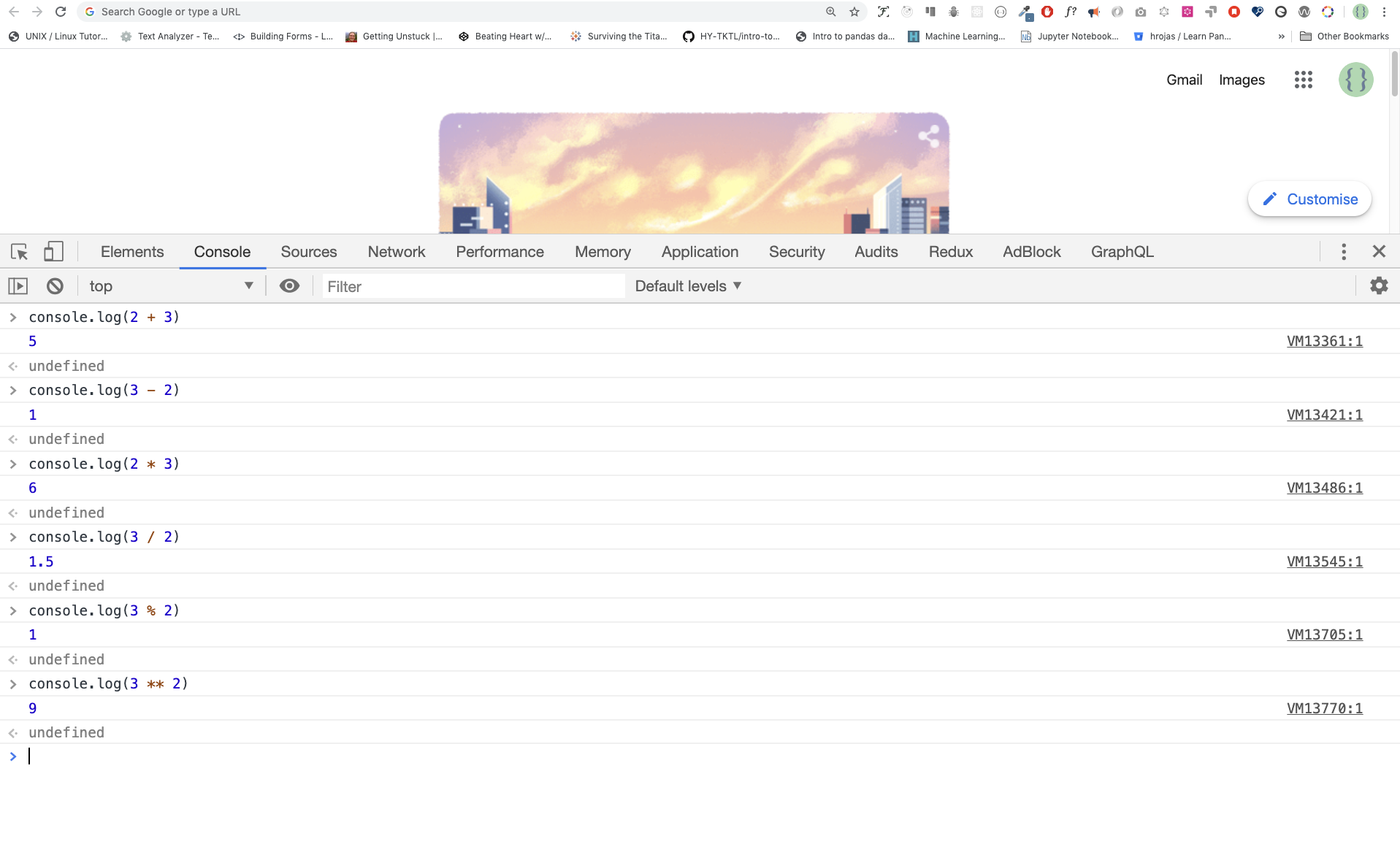
console.log(2 + 3) // Addition
console.log(3 - 2) // Subtraction
console.log(2 * 3) // Multiplication
console.log(3 / 2) // Division
console.log(3 % 2) // Modulus - finding remainder
console.log(3 ** 2) // Exponentiation 3 ** 2 == 3 * 3
Code Editor
We can write our codes on the browser console, but it won't do for bigger projects. In a real working environment, developers use different code editors to write their codes. In this 30 days JavaScript challenge, we will be using Visual Studio Code.
Installing Visual Studio Code
Visual studio code is a very popular open-source text editor. I would recommend to download Visual Studio Code, but if you are in favor of other editors, feel free to follow with what you have.

If you installed Visual Studio Code, let us start using it.
How to Use Visual Studio Code
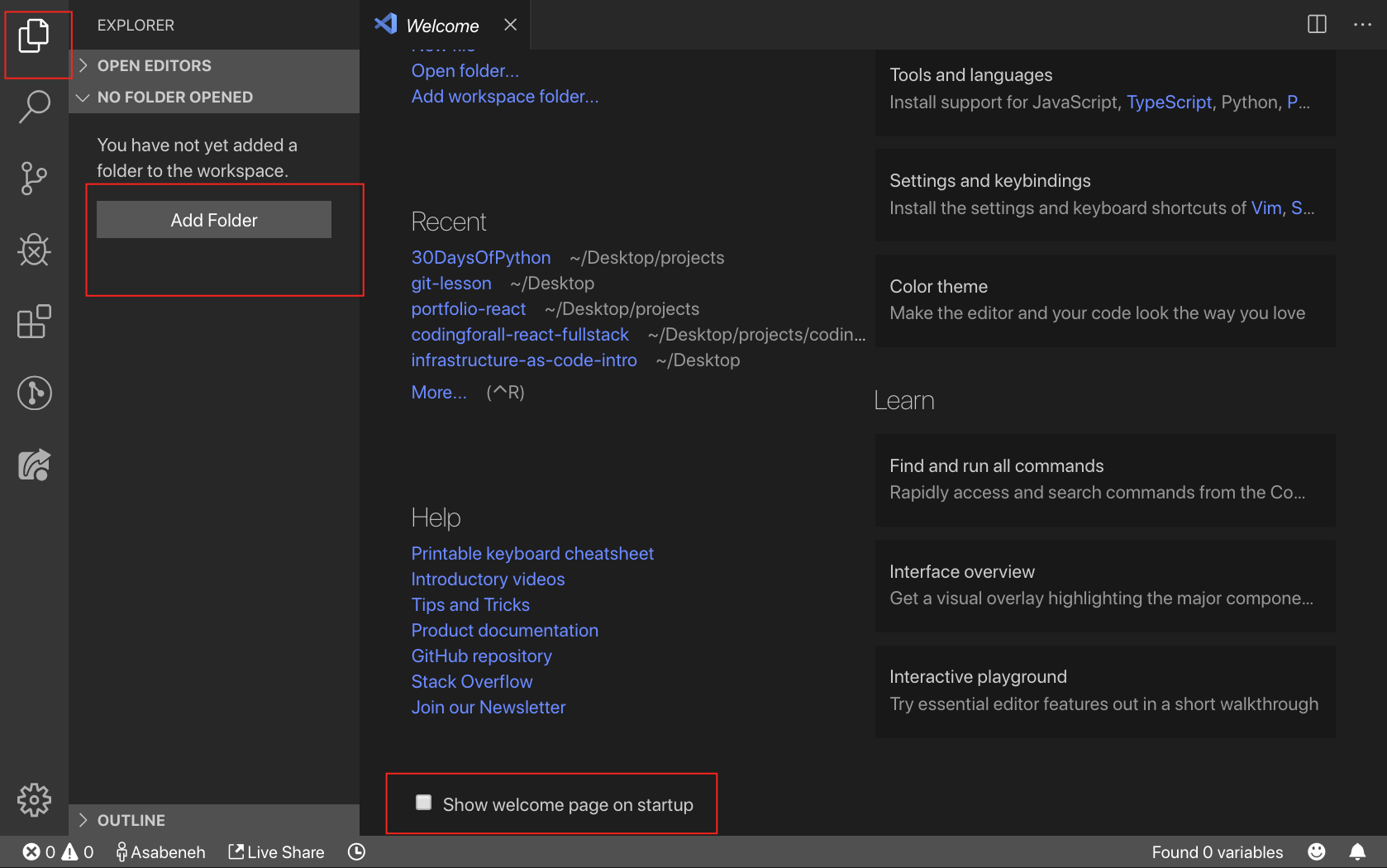
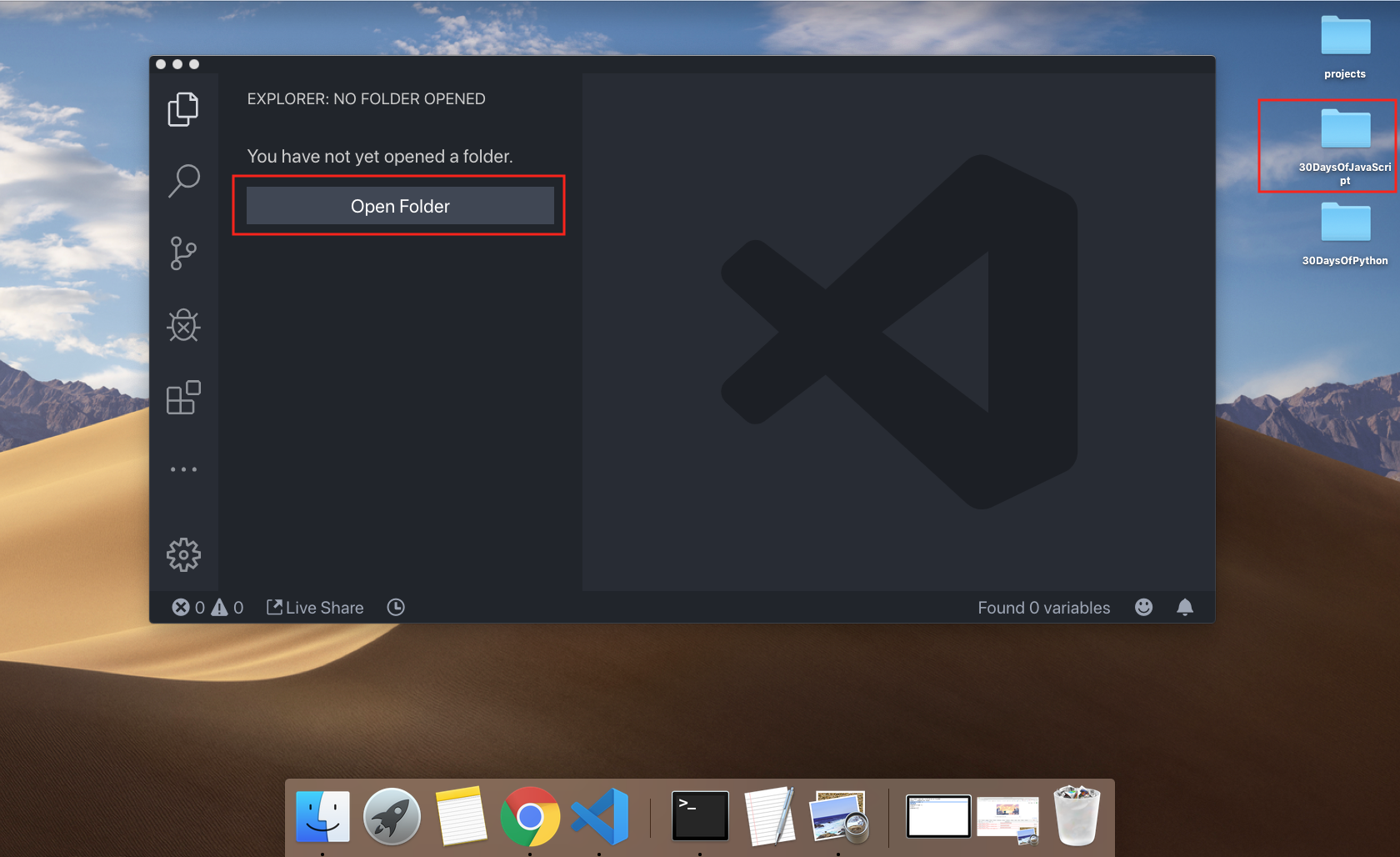
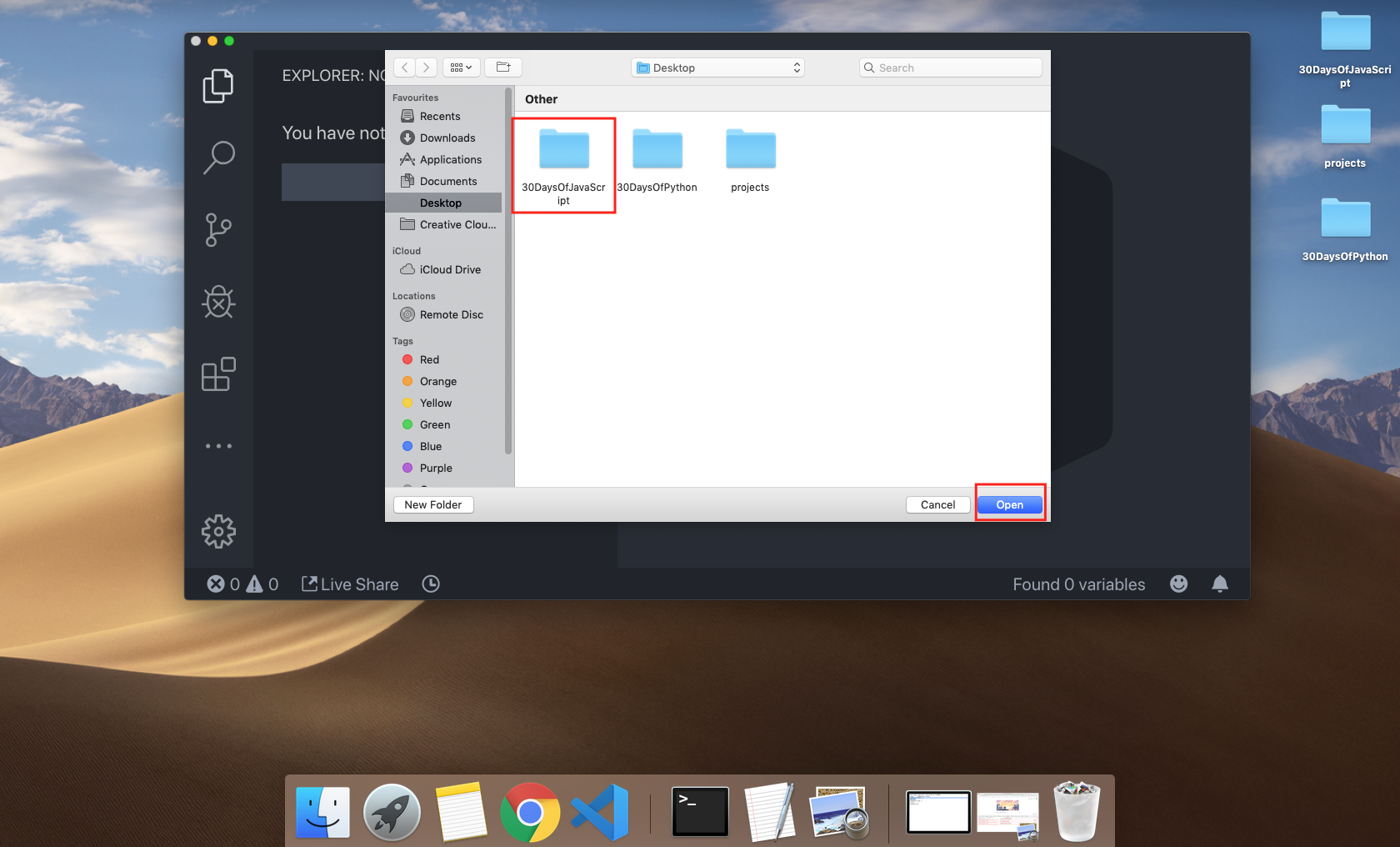
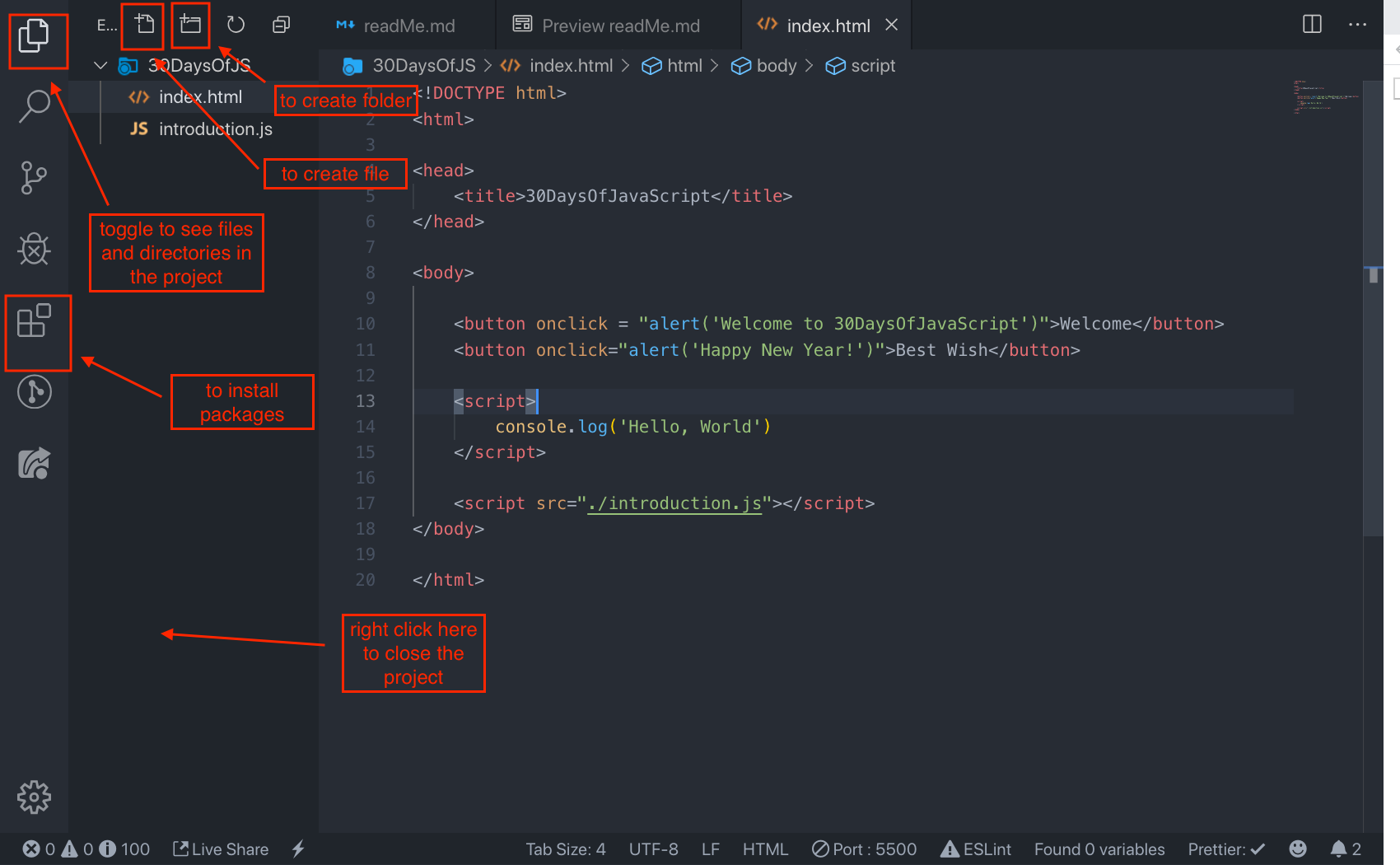
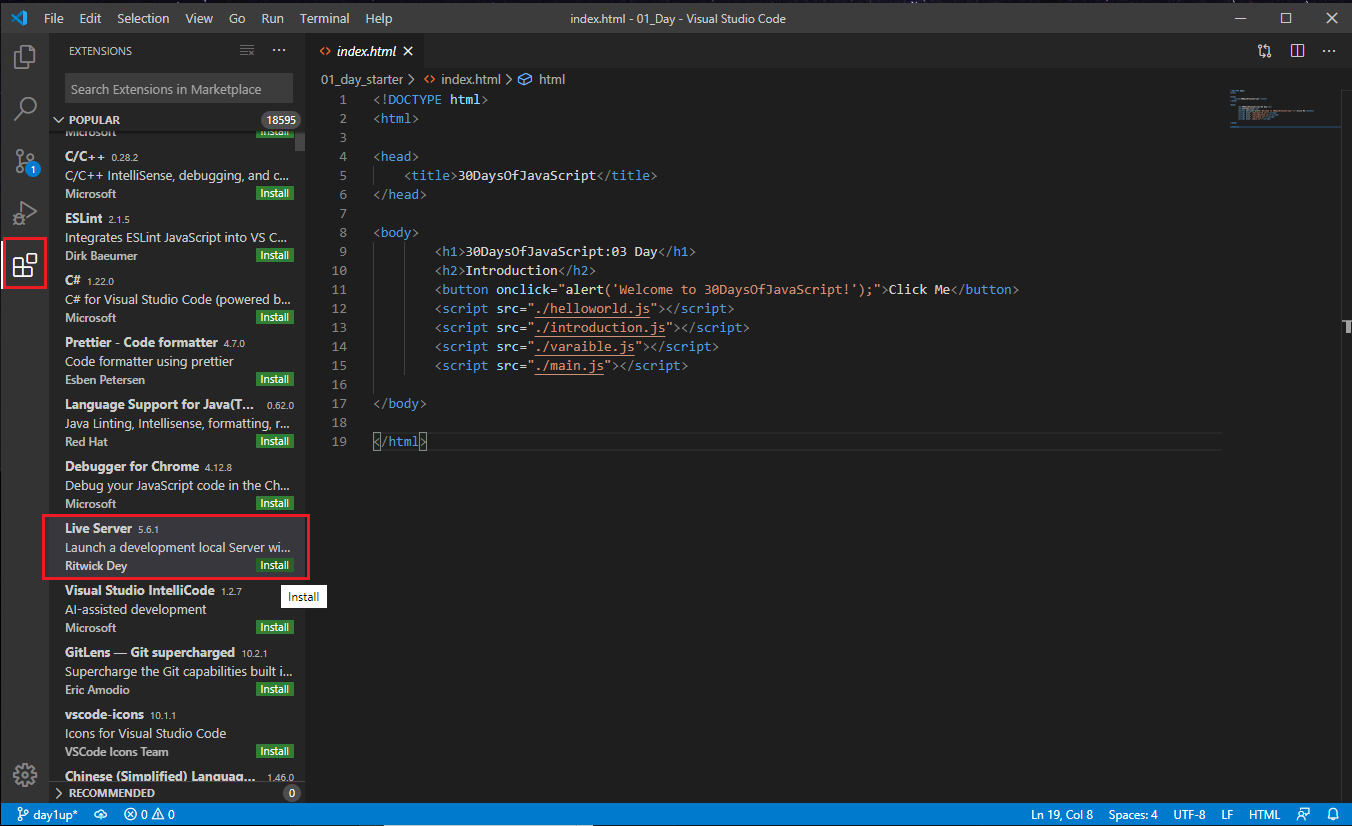
Open the Visual Studio Code by double-clicking its icon. When you open it, you will get this kind of interface. Try to interact with the labeled icons.

Adding JavaScript to a Web Page
JavaScript can be added to a web page in three different ways:
- Inline script
- Internal script
- External script
- Multiple External scripts
The following sections show different ways of adding JavaScript code to your web page.
Inline Script
Create a project folder on your desktop or in any location, name it 30DaysOfJS and create an index.html file in the project folder. Then paste the following code and open it in a browser, for example Chrome.
<!DOCTYPE html>
<html>
  <head>
    <title>30DaysOfScript:Inline Script</title>
  </head>
  <body>
    <button onclick="alert('Welcome to 30DaysOfJavaScript!')">Click Me</button>
  </body>
</html>
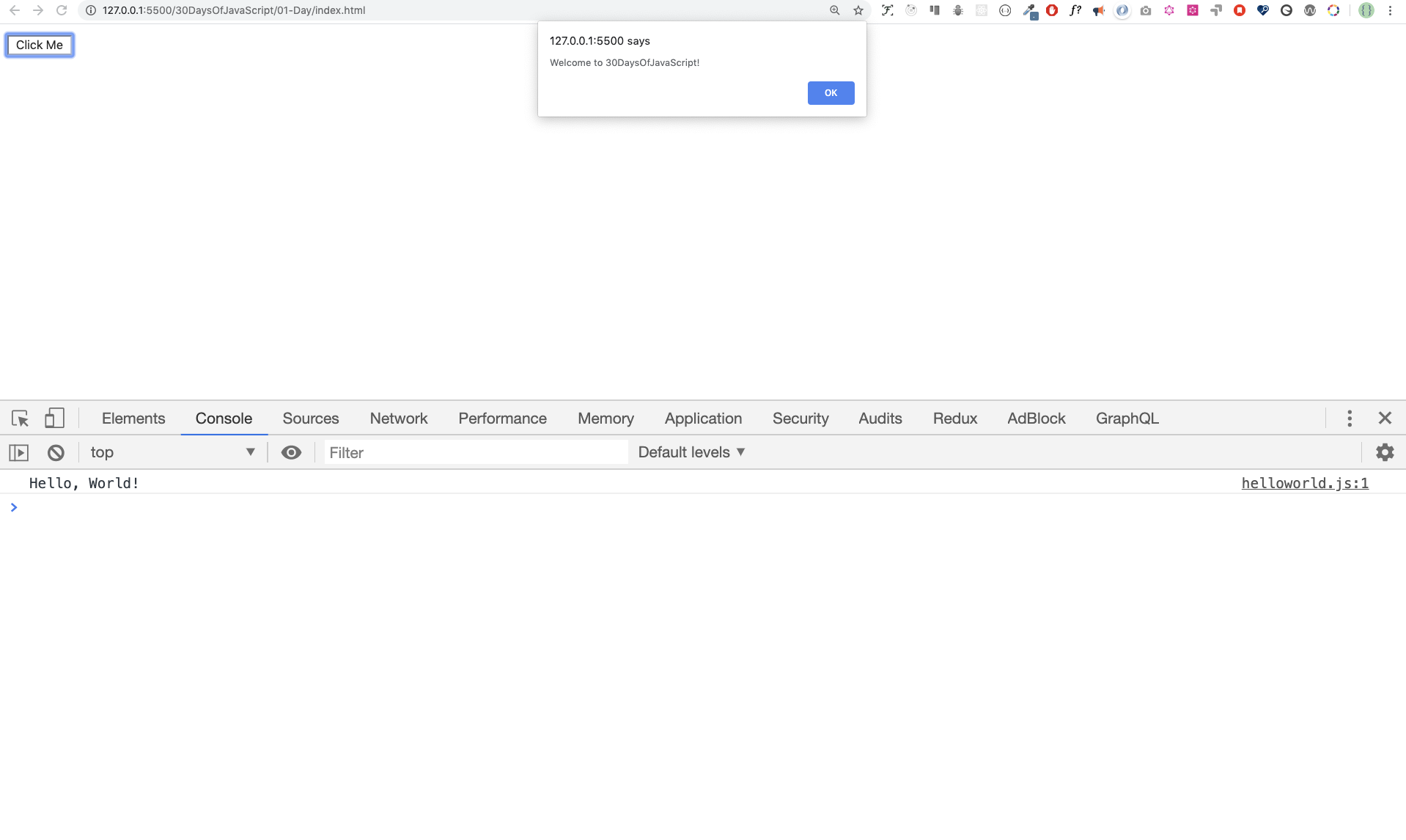
Now, you just wrote your first inline script. We can create a pop up alert message using the alert() built-in function.
Internal Script
The internal script can be written in the head or the body, but it is preferred to put it on the body of the HTML document. First, let us write on the head part of the page.
<!DOCTYPE html>
<html>
  <head>
    <title>30DaysOfScript:Internal Script</title>
    <script>
      console.log('Welcome to 30DaysOfJavaScript')
    </script>
  </head>
  <body></body>
</html>
This is how we write an internal script most of the time. Writing the JavaScript code in the body section is the most preferred option. Open the browser console to see the output from the console.log()
<!DOCTYPE html>
<html>
  <head>
    <title>30DaysOfScript:Internal Script</title>
  </head>
  <body>
    <button onclick="alert('Welcome to 30DaysOfJavaScript!');">Click Me</button>
    <script>
      console.log('Welcome to 30DaysOfJavaScript')
    </script>
  </body>
</html>
Open the browser console to see the output from the console.log()
External Script
Similar to the internal script, the external script link can be on the header or body, but it is preferred to put it in the body. First, we should create an external JavaScript file with .js extension. All files ending with .js extension are JavaScript files. Create a file named introduction.js inside your project directory and write the following code and link this .js file at the bottom of the body.
console.log('Welcome to 30DaysOfJavaScript')
External scripts in the head:
<!DOCTYPE html>
<html>
  <head>
    <title>30DaysOfJavaScript:External script</title>
    <script src="introduction.js"></script>
  </head>
  <body></body>
</html>
External scripts in the body:
<!DOCTYPE html>
<html>
  <head>
    <title>30DaysOfJavaScript:External script</title>
  </head>
  <body>
    <!-- it could be in the header or in the body -->
    <!-- Here is the recommended place to put the external script -->
    <script src="introduction.js"></script>
  </body>
</html>
Open the browser console to see the output of the console.log()
Multiple External Scripts
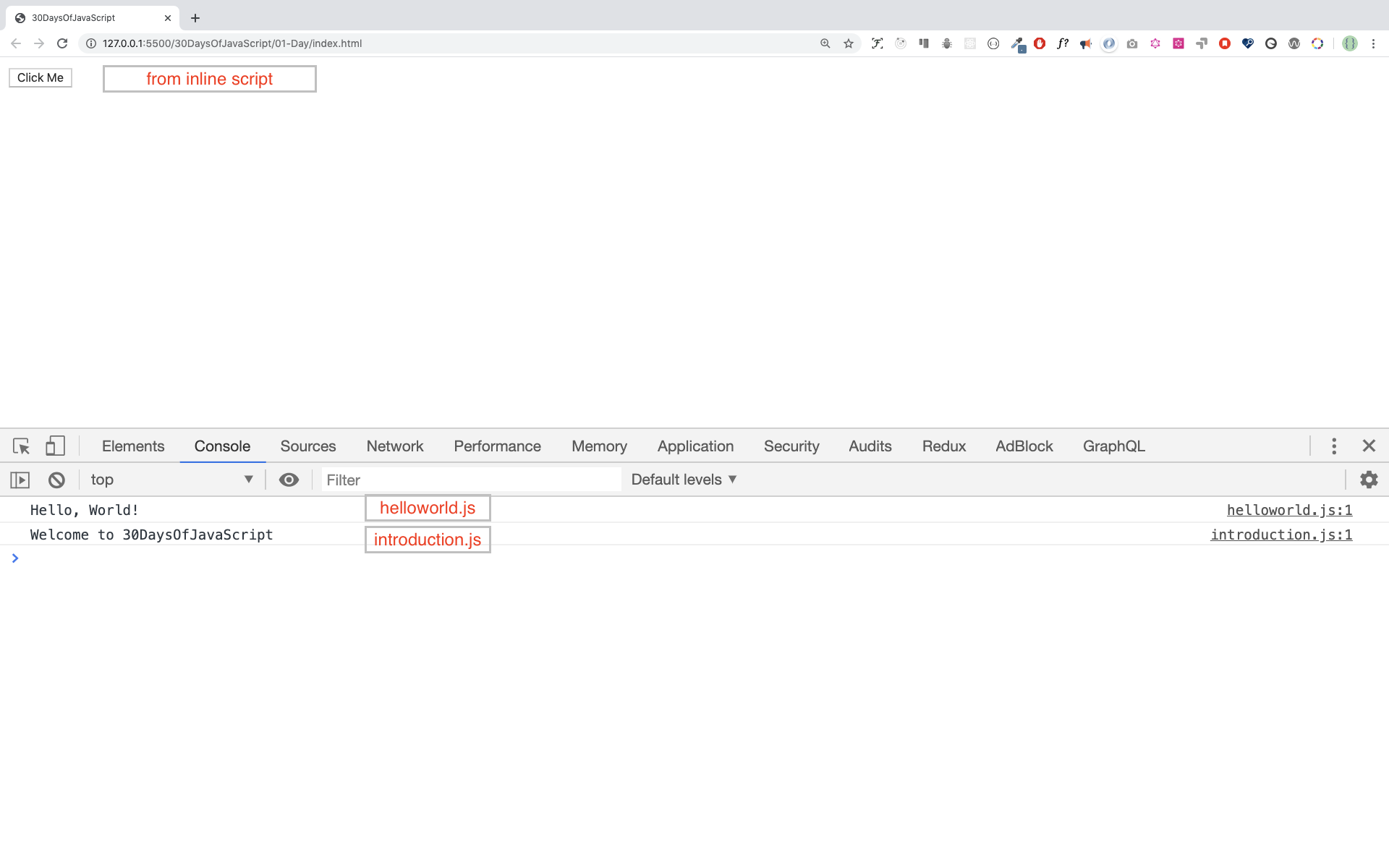
We can also link multiple external JavaScript files to a web page. Create a helloworld.js file inside the 30DaysOfJS folder and write the following code.
console.log('Hello, World!')
<!DOCTYPE html>
<html>
  <head>
    <title>Multiple External Scripts</title>
  </head>
  <body>
    <script src="./helloworld.js"></script>
    <script src="./introduction.js"></script>
  </body>
</html>
Your main.js file should be below all other scripts. It is very important to remember this.
Introduction to Data types
In JavaScript and also other programming languages, there are different kinds of data types. The following are JavaScript primitive data types:String, Number, Boolean, undefined, Null, and Symbol.
Numbers
- Integers: Integer (negative, zero and positive) numbers Example: ... -3, -2, -1, 0, 1, 2, 3 ...
- Float-point numbers: Decimal number Example ... -3.5, -2.25, -1.0, 0.0, 1.1, 2.2, 3.5 ...
Strings
A collection of one or more characters between two single quotes, double quotes, or backticks. Example:
'Asabeneh'
'Finland'
'JavaScript is a beautiful programming language'
'I love teaching'
'I hope you are enjoying the first day'
`We can also create a string using a backtick`
'A string could be just as small as one character as big as many pages'
Booleans
A boolean value is either True or False. Any comparisons returns a boolean value, which is either true or false.
A boolean data type is either a true or false value.
Example:
true // if the light is on, the value is true
false // if the light is off, the value is false
Undefined
In JavaScript, if we don't assign a value to a variable, the value is undefined. In addition to that, if a function is not returning anything, it returns undefined.
let firstName
console.log(firstName) // undefined, because it is not assigned to a value yet
Null
Null in JavaScript means an empty value.
let emptyValue = null
Checking Data Types
To check the data type of a certain variable, we use the typeof operator. See the following example.
console.log(typeof 'Asabeneh') // string
console.log(typeof 5) // number
console.log(typeof true) // boolean
console.log(typeof null) // object type
console.log(typeof undefined) // undefined
Comments Again
Remember that commenting in JavaScript is similar to other programming languages. Comments are important in making your code more readable. There are two ways of commenting:
- Single line commenting
- Multiline commenting
// commenting the code itself with a single comment
// let firstName = 'Asabeneh'; single line comment
// let lastName = 'Yetayeh'; single line comment
Multiline commenting:
/*
  let location = 'Helsinki';
  let age = 100;
  let isMarried = true;
  This is a Multiple line comment

*/
Variables
Variables are containers of data. Variables are used to store data in a memory location. When a variable is declared, a memory location is reserved. When a variable is assigned to a value (data), the memory space will be filled with that data. To declare a variable, we use var, let, or const keywords.
For a variable that changes at a different time, we use let. If the data does not change at all, we use const. For example, PI, country name, gravity do not change, and we can use const. We will not use var in this challenge and I don't recommend you to use it. It is error prone way of declaring variable it has lots of leak. We will talk more about var, let, and const in detail in other sections (scope). For now, the above explanation is enough.
A valid JavaScript variable name must follow the following rules:
- A JavaScript variable name should not begin with a number.
- A JavaScript variable name does not allow special characters except dollar sign and underscore.
- A JavaScript variable name follows a camelCase convention.
- A JavaScript variable name should not have space between words.
The following are examples of valid JavaScript variables.
firstName
lastName
country
city
capitalCity
age
isMarried

first_name
last_name
is_married
capital_city

num1
num_1
_num_1
$num1
year2020
year_2020
The first and second variables on the list follows the camelCase convention of declaring in JavaScript. In this material, we will use camelCase variables.
Example of invalid variables:
  first-name
  1_num
  num_#_1
Let us declare variables with different data types. To declare a variable, we need to use let or const keyword before the variable name. Following the variable name, we write an equal sign (assignment operator), and a value(assigned data).
// Syntax
let nameOfVariable = value
Examples of declared variables
// Declaring different variables of different data types
let firstName = 'Asabeneh' // first name of a person
let lastName = 'Yetayeh' // last name of a person
let country = 'Finland' // country
let city = 'Helsinki' // capital city
let age = 100 // age in years
let isMarried = true

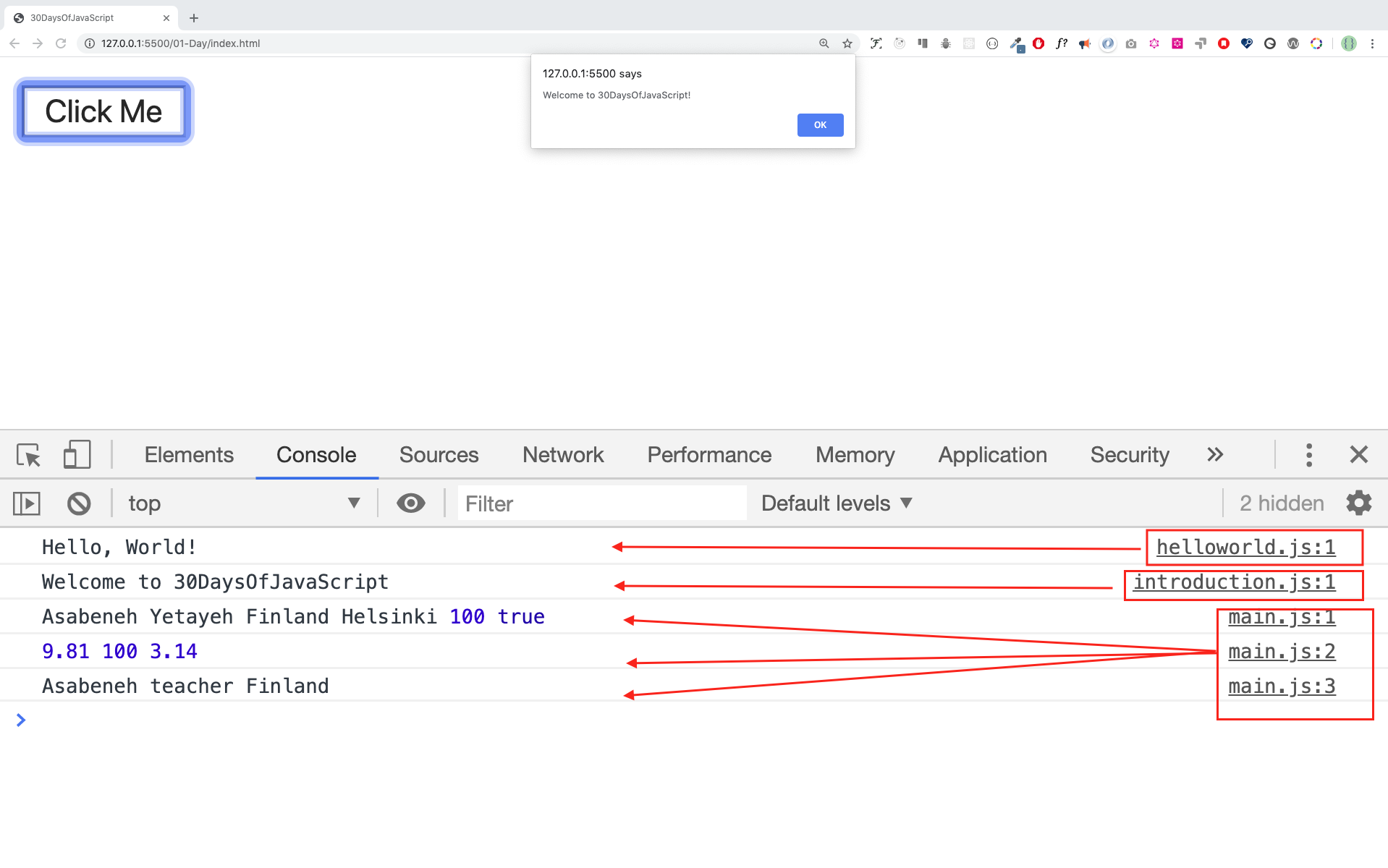
console.log(firstName, lastName, country, city, age, isMarried)
Asabeneh Yetayeh Finland Helsinki 100 true
// Declaring variables with number values
let age = 100 // age in years
const gravity = 9.81 // earth gravity  in m/s2
const boilingPoint = 100 // water boiling point, temperature in °C
const PI = 3.14 // geometrical constant
console.log(gravity, boilingPoint, PI)
9.81 100 3.14
// Variables can also be declaring in one line separated by comma
let name = 'Asabeneh', // name of a person
job = 'teacher',
live = 'Finland'
console.log(name, job, live)
Asabeneh teacher Finland
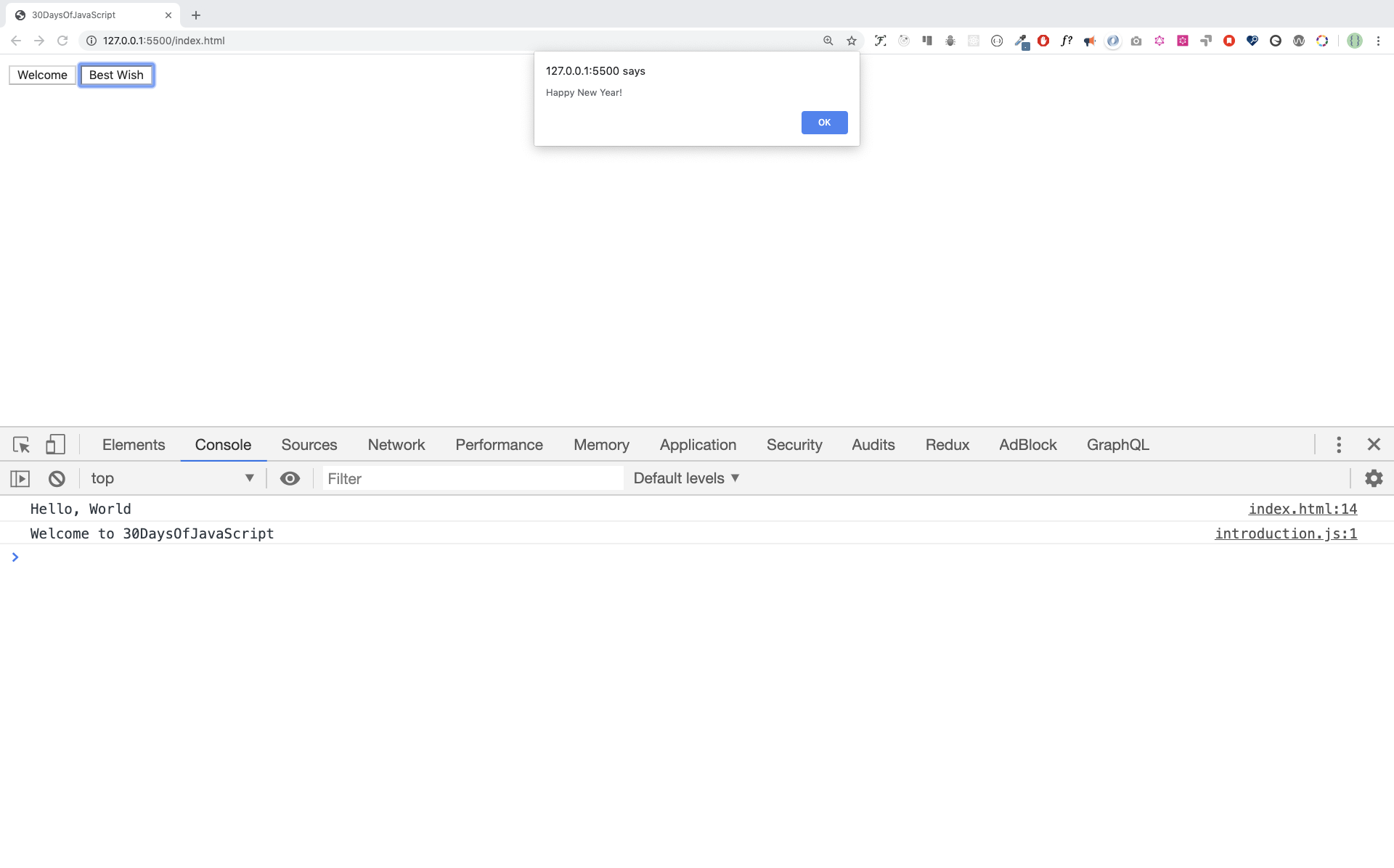
When you run index.html file in the 01-Day folder you should get this:
🌕 You are amazing! You have just completed day 1 challenge and you are on your way to greatness. Now do some exercises for your brain and muscle.
💻 Day 1: Exercises
-
Write a single line comment which says, comments can make code readable
-
Write another single comment which says, Welcome to 30DaysOfJavaScript
-
Write a multiline comment which says, comments can make code readable, easy to reuse and informative
-
Create a variable.js file and declare variables and assign string, boolean, undefined and null data types
-
Create datatypes.js file and use the JavaScript typeof operator to check different data types. Check the data type of each variable
-
Declare four variables without assigning values
-
Declare four variables with assigned values
-
Declare variables to store your first name, last name, marital status, country and age in multiple lines
-
Declare variables to store your first name, last name, marital status, country and age in a single line
-
Declare two variables myAge and yourAge and assign them initial values and log to the browser console.
I am 25 years old.
You are 30 years old.
🎉 CONGRATULATIONS ! 🎉